Repository navigation
Releases: musithang/sdrtop
Release list
v0.6.6 - The meeting before the music


Before a pair of headphones plays a single note, it and the phone hold a short meeting. What can you do? Which Bluetooth were you built to? What is your name? Shall we pair? Shall we encrypt?
sdrtop can now sit in on that meeting and take the minutes.
The link manager's messages, by name
Each item on that agenda is a link manager message, and Classic 2 now reads them off the air into a new LMP column: the message's name from the Bluetooth Core (features_res, version_res, encryption_key_size_req), with its parameters in plain words where the Core gives them a meaning.
- The other end's maker and Bluetooth version, named from the Bluetooth SIG's own lists:
version_res Core 5.2 · Qualcomm (0x001d). M:orS:says who started the exchange. The first messages read on the air showed why that is worth a column of its own: the headphones' answer to the phone's question was markedM:, because Bluetooth files a reply under whoever asked.- Keys are named, never shown. The bench measures a link; it does not collect what a key search needs.
lkeeps them. Music pushes these messages out of the packet list in seconds, so each piconet keeps its last 256 apart, andlshows only those.- Classic 1 counts them:
8 messages · last encryption_key_size_req, 12 s ago.
One catch, and it is Bluetooth's, not ours: once the two devices agree to encrypt, everything after is encrypted too. The meeting is readable only while it happens. Switch your headphones off and on while sdrtop listens, and you will see it.
The NET guide, one page per view
The NET guide had grown into one very long page. It is now a short hub and ten pages beside it, one per view, each rewritten with tables and small diagrams, and every claim in them checked against the code. A few of the old claims did not survive the check, and are now right.
And the rest
- Classic 1's roster stays still. It used to sort by who was heard last, so the piconet you were reaching for moved every time it spoke. It is ordered by LAP now, and
S/Rsort it by any column, like the Census. - The masked mode covers the new column too. A device's name and address inside these messages follow
i, like everything else. Caught while writing the docs, before it shipped.
Upgrading
No config changes; everything loads as before. The full list is in the
changelog.
cargo install sdrtop --lockedOr the installer, same as before.
Full Changelog: v0.6.5...v0.6.6
v0.6.5 - The range the DC took
LE Coded is BLE's long-range mode. It exists to be heard from the next room. Put a phone in the kitchen and sdrtop 0.6.4 heard none of its advertisements. 0.6.5 hears 76 of 77.
The culprit sat under every packet
Every radio adds a DC offset at exactly the frequency it is tuned to. In NET that is exactly where every advertising packet sits. When the offset is stronger than a faint packet, the frequency the receiver reads falls apart, and no correction downstream can put it back together.
sdrtop now measures the radio's offset from the quiet stretches of the stream and takes it off before any receiver sees a sample.
| same recordings | 0.6.4 | 0.6.5 |
|---|---|---|
| LE Coded, phone in the kitchen | 0 | 76, down to -1.6 dB SNR |
| LE 1M packets through their CRC | 216 / 147 / 818 | 400 / 279 / 1220 |
Long range is long range again, and ordinary BLE hears up to twice as much. Accuracy was checked against the SIG-definition reference harness before anything shipped: unchanged.
SNR you can believe
The same phone, about 35 dB over the noise, used to read 13 to 21 dB at the tuned centre and 27 to 31 a few megahertz away. LE 1M stopped near 19. SNR is now the packet's power over the noise just before it, one way for LE 1M and LE Coded, and the phone reads 35 wherever it sits. A packet that arrives straight after another shows no SNR rather than a wrong one.
Also fixed
- A packet starting from silence could be measured a whole bit off.
- The decode-health tally now always adds up.
- Leaving the LE Coded view no longer leaves a "running" channel behind.
Under the hood: the NET worker's 1170-line loop is now 137, and CI checks every doc link.
cargo install sdrtop --lockedConfig and export columns unchanged. Full list in the
changelog.
Full Changelog: v0.6.4...v0.6.5
v0.6.4 - The long way round
BLE's long-range mode, LE Coded, and the extended advertising that carries it. sdrtop now receives LE Coded with a receiver of its own, and follows an extended advertisement from the packet that announces it to the packet that says who sent it, on LE Coded and LE 1M alike. Every pointer it follows ends with an account of what happened to it.
LE Coded: a section of its own
LE Coded sends every bit as eight symbols (S=8) or two (S=2), behind aconvolutional code, which buys range at the cost of time. The LE 1M receiver cannot hear it at all, and a first attempt built on top of it needed about 17 dB to decode, which gave the range away. So it has its own receive chain (a whole-preamble detector, symbol means and a soft-decision Viterbi) and its own menu section:
- a list and a detail, with the coding scheme and how many symbols the FEC had to repair for each packet;
- on S=8, the transmitter measured as the LE Coded RF tests define it: the preamble's f0, the deviation (225 to 275 kHz) and the drift through the payload. S=2 has no such tests, and the detail says so;
- its own export file,
net-coded, in the BLE file's columns.
Following the AuxPtr
Extended advertising is a two-step affair. The ADV_EXT_IND on the advertising channel carries no address and no data, only a pointer (the AuxPtr) to an AUX_ADV_IND on a data channel a few milliseconds later, which has the address and the name. sdrtop listens on that channel at the promised time and reports what became of each pointer: heard, missed, out of the radio's view, or not followed, with the reason.
This works on the LE views too, for ordinary LE 1M extended advertising. A phone set up in nRF Connect with both PHYs, each advertising its name at
250 ms:
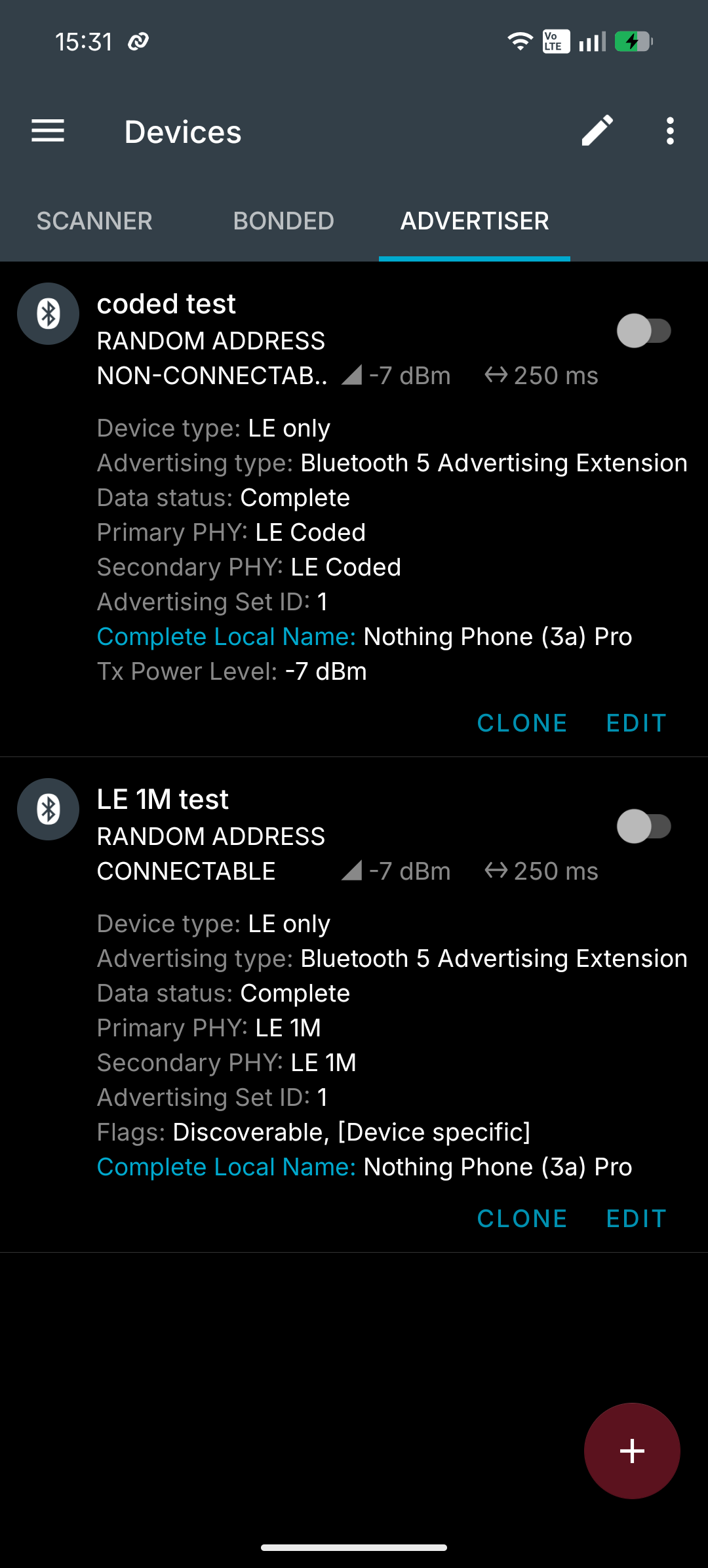
and on LE 2, its auxiliary packets on data channels 7 to 13, named, each bound to the ADV_EXT_IND that pointed at it and measured like any other packet:
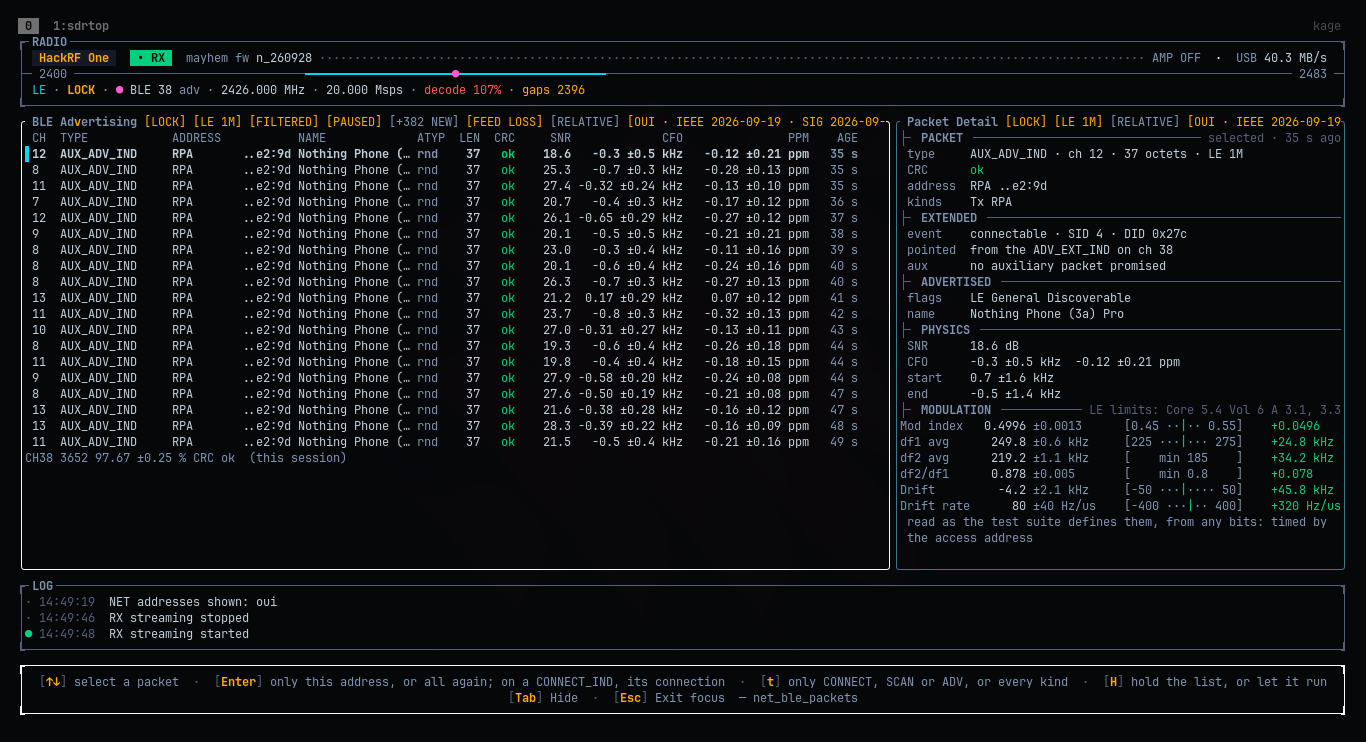
An extended advertiser is now counted in the Census from its auxiliary packet, and the Advertising list shows ADV_EXT_IND as read instead of "(not decoded)". The auxiliary link reads the full 255-octet extended payload; on the air that turned up a second device in the room sending 100-octet auxiliary packets.
🔧 Fixed
- A retune left the held samples in place, so a connection event or a measurement right after it could be read from samples mixed for the old centre frequency. They are dropped at the retune now.
- A followed connection that moved to LE 2M at 20 Msps reported its events as feed lost. There is no LE 2M receiver at that rate (it needs a multiple of 8 Msps); the events now say "no receiver".
- SoapyRemote's AMP is a switch again, and the whole-chain gain no longer turns it on. Thanks, @kajoty. ❤️
Known limits
- At 20 Msps the LE Coded receiver costs more than real time on a small machine. The header's
decodefigure shows it, and pointers it could not follow say "its samples were not held". - LE Coded's SNR reads low on the air (13 to 31 dB for packets measured directly at about 40 dB over the noise). The HackRF's DC offset is ruled out; the investigation continues.
Upgrading
The config is unchanged. The NET export writes one more file (net-coded), and the BLE CSV gains three columns at the end (fec_repairs, sid, aux); anything that reads it by column name keeps working. The full list is in the
changelog.
cargo install sdrtop --lockedOr the installer, same as before.
What's Changed
Full Changelog: v0.6.3...v0.6.4
Contributors

Assets 5
v0.6.3 - Following the remote
I spent two evenings taking the batteries out of a TV remote and putting them back in. Around fifty times. A connection only introduces itself when it is set up, so the remote had to reconnect, and the box had to answer on the one channel the HackRF was listening to. It mostly didn't.
The remote is fine. The box is fine. I am mostly fine. My wife and my daughter, having watched me spend my evenings in front of a laptop doing unspeakable things to a TV remote, have started to worry about me.
What came out of it: sdrtop can now follow a Bluetooth LE connection, not just watch devices introduce themselves.
LE 3: one connection, event by event
A BLE connection is set up by one packet, the CONNECT_IND, which says everything a listener needs: the connection's address, its timing and how it hops. The new Connection view takes that packet and follows the connection on the channels the radio already sees, without retuning. Every event is accounted for (followed, missed, out of view or lost to the feed), the control packets are read until encryption starts, and the two devices' turnaround time and clock are measured.
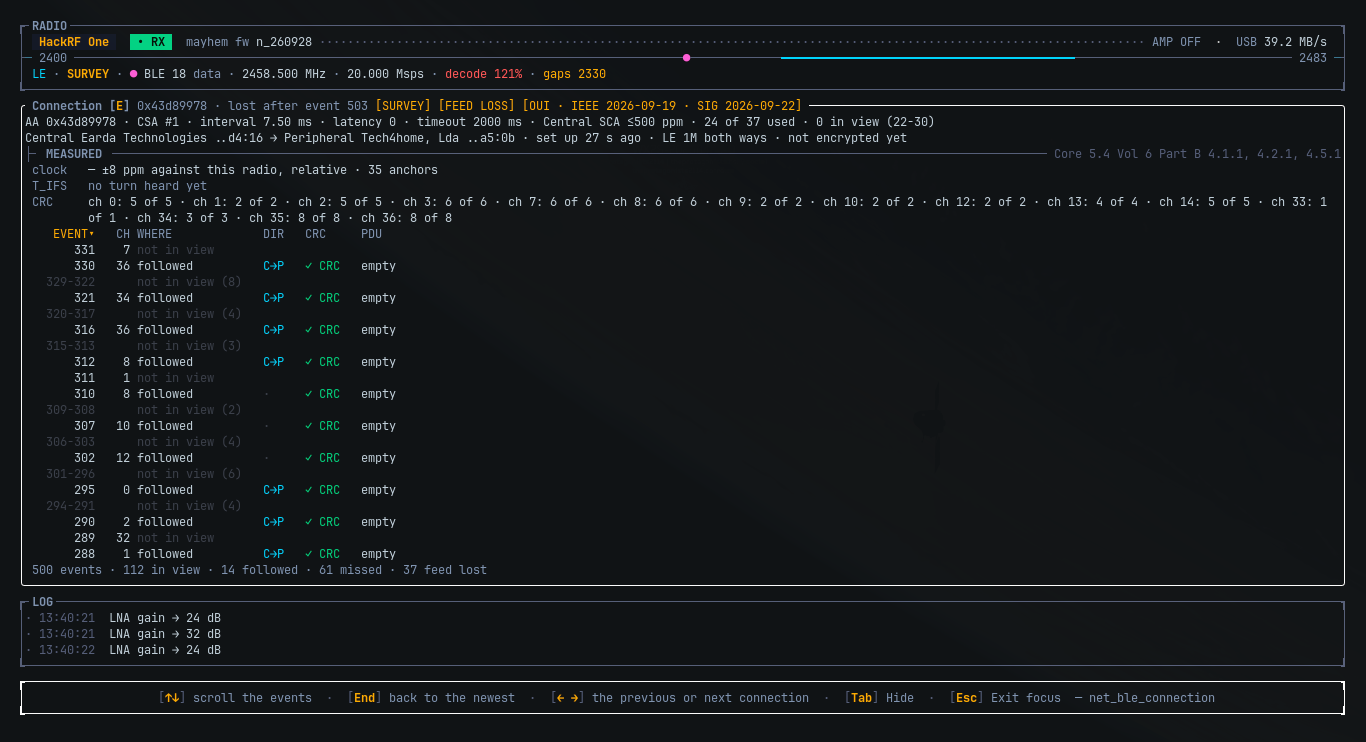
The first real connection it met, it followed perfectly through 268 events without hearing one. The box had set a bit that said "hop the new way", and sdrtop believed it. A page further on, the specification gives the remote a vote too, and the remote had voted no. With both bits read, every event in view was there.
Live on the old i3 it keeps up with part of it, and says exactly how much it lost to the feed rather than guessing.
Ctrl+R records the radio
The raw IQ stream, as SigMF, from any layout, with every gap, retune and gain change written into the file. Recording is also how I found the worst bug of the release: a HackRF at 20 Msps had been losing up to a third of its samples inside the radio, because sdrtop did its sums on the driver's own thread. It doesn't any more, and the radio's own drop count is now read and shown.
Classic and the rest
- Classic Bluetooth: one piconet packet by packet, and a bench with both ends side by side.
- The menu grew to three sections: NET, LE and Classic.
tfilters the Advertising list to CONNECT, SCAN or ADV, so the one packet you want is not buried in the flood.- A clipping ADC shows on the NET band line.
- SoapyRemote radios open now, thanks to @kajoty. ❤️
Upgrading
One new, optional [record] section in the config; everything else loads as before. The full list is in the
changelog.
cargo install sdrtop --lockedOr the installer, same as before. And if you own a BLE remote, I am sorry in advance.
What's Changed
- fix(soapy): keep the remote address in the open markup (SoapyRemote devices could not be opened) by @kajoty in #21
New Contributors
Full Changelog: v0.6.2...v0.6.3
Contributors
Assets 5
v0.6.2 - Measured like a tester
Somewhere on the second day I noticed I was no longer measuring Bluetooth.
I was measuring the thing that measures Bluetooth, against a fake transmitter and a fake tester I had built to check how well it measures. Then I measured how long all that measuring took. Then I measured whether measuring faster changed the measurements. It did, so I put it back and measured again. Then again, to be sure. Then once more, because by then I no longer trusted the one that told me to be sure.
The old i3 this is developed on has stopped making eye contact with me.
What came out of it: some numbers moved. Most by a few percent, and one by a factor of two, which is exactly the kind of thing you want to find before anyone else does. 😌
The figures a tester would give you
0.6.1 made NET honest about what it measured. This one makes it measure what a Bluetooth tester measures. The SIG's test suites (RF-PHY.TS for LE, RF.TS for classic) define df1, df2, the initial carrier and the drift on special test patterns. sdrtop now reads the same quantities, by the same definitions, from the ordinary traffic in your room, and a reference built from those suites holds it to them in every test run.
Building the reference was humbling:
- a classic transmitter sending a modulation index of 0.88 read 0.28 to 0.54. It now reads 0.93, as a compliant tester does;
- BLE df2 sat 8.7 % low, because at four samples a symbol the straight line between two readings runs under the curve;
- classic Bluetooth counted, live, about one packet in five, and fitted its slot timing to the survivors.
All fixed. A classic piconet also gets a CARRIER section of its own: f0, drift and drift rate against the limits in the Core Specification. A reading taken while the next channel was shouting is refused, not bent.
Faster, at parity
The rule was simple: a speed-up stays only if the reference prints the same figures to the last digit. Two did not, and are gone. The rest, on the i3:
| View | 0.6.1 | 0.6.2 |
|---|---|---|
| Classic, 4 Msps | 1.91x real time | 0.73x |
| Classic, 20 Msps | 11.22x | 3.28x |
| Survey, 20 Msps | 1.52x | 0.99x |
The Classic view at 4 Msps now keeps up with the radio on a machine that was chosen for being slow. The Survey spends some of the room on marking classic hits in the coexistence history, on as many channels as its measured load allows, and says so when it has none.
What is honest to say
These figures are held to a reference built from the specification. That is not the same as a real tester next to a real transmitter, and I am not going to pretend it is. That comparison is the next job.
Upgrading
No config change, and the export columns are the same; the numbers in them are just read better now.
cargo install sdrtop --lockedOr the installer, same as before.
As ever: if a number looks wrong, it might be. Open an issue, ideally with the CSV. ❤️
Full Changelog: v0.6.1...v0.6.2
v0.6.1 - A second look
The day after 0.6.0 I did the least glamorous thing you can do with a new instrument: I sat in front of it, live, with a HackRF and a notepad, and wrote down everything that looked wrong. Most of the list was taste. Two items were not.
The two numbers that were simply false
Every BLE device in the room had a crystal about 205 ppm off. That would make them the worst oscillators ever put in a product, and they were not. The survey tunes half a megahertz beside an advertising channel, and the receiver was quietly reading that half megahertz as each transmitter's own error, then averaging it into the census, where it looked very precise and very wrong. The receiver now brings the channel to its own centre first. The same devices now read a couple of ppm, which is what a crystal does.
The survey heard advertising about a tenth of the time, and channel 37 never. It only decoded the channel sitting dead centre of each survey stop, and the stops are laid out for the band, not for Bluetooth. It now takes the advertising channel wherever it is in view, and the Census rotates the three advertising channels on its own, so it fills up without the BLE list open beside it.
Also in the "measured the wrong thing" drawer: the df2 max row compared a maximum of noisy readings against a minimum allowed by the specification. Noise only ever pushed it further from the line, so it could not fail, and a check that cannot fail is decoration. It is df2 avg now, with its uncertainty.
Classic Bluetooth, more honest about what it hears
- The LAP everyone sends is the general inquiry code, a device looking for others, and it is now called that instead of the busiest piconet in the room.
- A device being paged is recognised by the rhythm of its packets (no header ever follows, and they land on odd half slots, which a piconet never does) and only named when both signs are there. The first method I tried failed its own calibration, so I threw it away and found a better one. That is how it is supposed to go.
- A piconet's clock error falls out of its slot timing, relative to our own oscillator until a reference corrects it.
Masked means masked
The masked address mode used to hide the address and nothing else, so a perfectly anonymous #17 could sit next to "Viktor's AirPods". It now hides names, payload bytes, and the classic address parts too, on screen and in every export.
And the rest
A footer per section that shows the keys you can actually press there, gain stages from any layout, ← → to step a locked radio across channels, a header that shows what the radio can see, every BLE limit read from the Core Specification instead of remembered, and several panels that finally use the space they are given. Ctrl+C now quits without saving, as the manual had been claiming all along. The full list is in the changelog.
One key is gone on purpose: P, for LE 2M. It could only listen for something that, on the channels it listens to, is never sent. LE 2M comes back when sdrtop can follow a connection, and it will switch by itself.
Upgrading
No config change. The , . gain-stage keys work from every layout now, not only the Command Rail's focus mode, and two export columns changed (df2_max_khz became df2_avg_khz with its sigma; the classic export gained lap_kind and clock_ppm).
cargo install sdrtop --lockedOr the installer, same as before.
As ever: if something looks broken, it is either a bug or an undocumented feature. Flip a coin, then open an issue. ❤️
Full Changelog: v0.6.0...v0.6.1
v0.6.0: Bluetooth, measured and a tinySA
Two things arrived in this release, and they could hardly be more different. One is a whole new section of the app that listens to the 2.4 GHz band. The other is a small handheld spectrum analyser that a contributor taught sdrtop to speak to, properly, in calibrated dBm.
NET: the 2.4 GHz band, as a bench measurement
The obvious joke writes itself: a terminal app that lists the Bluetooth devices in the room. There are phone apps for that, and they are prettier.
That is not what this is. NET is the Lab benches pointed at other people's transmitters. It decodes BLE advertising and finds classic Bluetooth piconets, and then it measures them, the way an RF test set would, except that it never transmits and nobody had to put the device into a test mode first:
- every device's modulation index, deviation and frequency drift against the specification's limits, read from its own ordinary packets;
- its crystal error in ppm, with an uncertainty, relative to our own oscillator until you give it a reference, and then corrected (and the panels say which of those two it is, every time);
- its advertising interval, the random delay on top, and whether it sits on the 0.625 ms grid the specification asks for;
- the frame error rate against SNR of the whole room, or of one device;
- for classic Bluetooth: the piconet's UAP, which it never sends, worked out from its headers; the BR modulation index; and its slot timing jitter against its own fitted 625 µs grid and the 1 µs limit.
Every figure carries its uncertainty or a dash. Limits read from the Bluetooth Core Specification say which section, and the BLE ones that are still recalled rather than read are documented as exactly that. A panel with nothing to say tells you which of three kinds of silence it is (refused, nothing heard, not listening), and a measurement that could be chance is refused as one. Five CSV exports take it all away, each opening with where, when and against what it was measured.
It is a toy in the same sense that a spectrum analyser is a toy: you can play with it, but it was built to be believed.
What is honest to say about it: BLE decoding, the census and the classic access-code search have run in a real room on a HackRF. The classic header decode, BR modulation and slot jitter pass every synthetic test and have not yet met a piconet whose UAP resolved, so they are marked "unchecked on air" where they appear. And decoding two protocols at once is real work: on the deliberately old i3 this is developed on, 4 Msps of BLE plus classic runs at about one and a half times real time, and the panels say [FEED LOSS] when blocks are dropped rather than pretending the room was quieter.
tinySA
@AlCalzone added the tinySA and tinySA Ultra family as a backend: calibrated power traces on the spectrum and waterfall, native band sweeps, and the device-options framework that gives the menu's Options pane something to hold, typed numbers included. Verified on a tinySA Ultra ZS405. It arrived as a sequence of small, reviewable pull requests, which is rarer and nicer than it should be.
The same contributor made libhackrf and librtlsdr runtime loads instead of link-time dependencies: the release tarball links no SDR library at all, a missing library disables only its own backend, and install.sh --hackrf / --rtlsdr / --soapy installs just what your radio needs.
Also
- The menu grew up: a colour per section, one selection mark shared with every list in the app, a live line under each NET view that is only as live as its receiver, and a Keys pane that opens with the focus keys of the section you came from, read from the panels themselves.
- The config file gains
[net]and[tinysa]blocks. Old files still load; the minor bump is for the new shape, as the changelog promises.
The full list is in CHANGELOG.md, the story in user_docs/whats-new.md, and the NET section has its own page, user_docs/net.md.
v0.5.1 - A wall, and the one number that was on the wrong side of it
Most of this release is invisible, which is the nicest thing I can say about it.
🎚 The part you could actually have noticed
Ask a HackRF reached through SoapySDR for 100 dB of gain and it stored 100 dB,
drew it on the bar, and reported it as a legal setting. The radio disagreed
quietly, which is the worst way to disagree.
The driver reports 0 to 116 dB for the whole chain, because it counts an
amplifier that has its own key and is not part of the knob. The stage that
number actually goes into stops at 40. sdrtop was clamping against the first
figure and writing into the second.
The two native backends never had this bug. They always answered from their own
stage list, and the front stage says 40, so 40 is what came back. Only the
SoapySDR path clamped a different way, because in 0.5.0 it was a different
way: a variant of its own in a type the other two shared.
I did not go hunting for this. It fell out of making every device answer the
same question through the same code, which is the argument for the rest of this
release in one sentence.
🧱 The wall
0.5.0 taught sdrtop to speak SoapySDR, and it did that by adding a case to the
type the two native radios already used. That works, and it means a fact about
one radio's gain chain lives in the file the other two read. Fix something for
an Airspy, touch the code path a HackRF runs.
So the backends are separated now. native/ holds the two radios sdrtop drives
itself and has tested on real hardware; soapy/ holds everything reached
through libSoapySDR. Exactly one module is allowed to know both exist, because
deciding what to show when two of them find the same radio is a question neither
can answer alone.
The survey that sized the job was the pleasant surprise: the UI layer, over half
the codebase, already contained no reference to any backend at all. The
mixing was about 150 lines in two files. A day's work rather than the fortnight
I had braced for.
Nothing on screen moved. That is checked rather than hoped. The panel tests
render through the real registry and compare the actual buffer, and not one of
them needed its expected text edited.
📻 A note about RTL-SDR
sdrtop's rule for the two native backends is that support lands only after
physical testing. I had a HackRF for this one and no RTL-SDR, so I am saying so
here rather than letting anyone find out.
The exposure is narrower than the diff looks. Not one line of the RTL-SDR
device implementation changed: same tuning, same gain calls, same read thread.
What changed is how it describes its gain chain to the rest of the app, and
which trait call the [A] key picks, both covered by tests. If you have one and
the boost key misbehaves, that is the thing to tell me about.
📋 Upgrading
Nothing to do. No config change, no key change, no new dependency.
cargo install sdrtop --lockedOr the installer, same as before.
As ever: if something looks broken, it is either a bug or an undocumented
feature. Flip a coin, then open an issue. ❤️
Full Changelog: v0.5.0...v0.5.1
v0.5.0 - It talks to your radio, and then it listens to it
Two radios went in. A lot more came out.
This is the release where sdrtop stopped being a tool for the two devices I
happen to own, and it took three goes to get there: a way to reach the layouts,
a way to reach the hardware, and then a fairly long argument with a gain knob.
🧭 There is a menu
sdrtop had fifteen layouts and ten number keys to reach them with. You can see
the arithmetic. One layout never got a key at all, and ? opened a help overlay
that had been quietly wrong for several releases, because nothing tied it to the
keys the app actually handled.
Esc now opens a menu. Layouts are grouped into Command Rail, Lab,
Sweep and Micro, and each section has its own 1 to 9. The same nine
digits, four times over, instead of one row that had run out.
The key reference is a pane in that menu, and the test suite checks it against
the app's own dispatch in both directions. A key with no entry fails the build.
An entry for a key that no longer exists fails it too. The overlay it replaces
had no such check, which is exactly why it was wrong.
📡 It speaks SoapySDR
Airspy, SDRplay, PlutoSDR, LimeSDR, bladeRF, USRP, and SoapyRemote for a radio
on another machine. If libSoapySDR is installed, your devices appear in the
picker. If it is not, nothing changes and the same binary keeps working: it is
opened at runtime, not linked, so there is no new build dependency and no new
runtime requirement.
Which means I broke my own rule, the one that said hardware support lands
only after physical testing. It was a good rule. It was also why the answer was
always no.
What I did instead of pretending I had tested an Airspy:
- Nothing about your radio is hardcoded. Frequency range, sample rates, gain
elements, whether there is an AGC, the sample format and how many of its bits
mean anything: all asked at open. There is no device table in the source,
because a table would be me guessing about hardware I have never held. - What cannot be asked is refused, not invented. An undeterminable reading
says unavailable. It never falls back to a plausible number, a plausible
number being the single worst thing a measurement tool can produce. - Failures name the driver, the call and the driver's own error text.
Verified end to end on a HackRF through SoapyHackRF. Everything else is
unverified and the docs say so at some length. If you own one of these, an issue
either way is worth a great deal to me.
🎚 The gain is yours now
Then I sat down with one of those devices, and this is the part where the
release slipped.
Handing a driver a total and letting it decide the split is the standard thing
to do. On a HackRF through SoapyHackRF what it decides is to put most of it in
the VGA and leave the LNA low, which is the arrangement with the worst noise
figure of the ones available. It was also not monotonic. Turning the knob up
could make the LNA go down.
sdrtop no longer asks a driver to split anything.
↑/↓move the whole chain, filling the front stage first. Front first is
the arrangement with the best noise figure.,and.in the Command Rail pick one gain element by name, and then
↑/↓move that one alone. This is the only way to reach a third gain
element, and some radios have one.- The config says it in the same words:
gain = "LNA=32,VGA=20".
The names are the driver's, not mine. A radio that calls its stages IF1 and
IF2 gets rows labelled IF1 and IF2, because guessing which one is "really"
the LNA is the kind of bug that costs somebody an afternoon.
⏱ The timing bench was measuring the wrong thing
A HackRF pushes blocks at you and can be late. A SoapySDR device is read in a
loop and cannot be, because a slow reader simply waits less. There is no
deadline to miss.
The bench had been grading pull traffic against a deadline that does not exist,
which is how a perfectly healthy link came to report a permanent USB overload.
It now measures the opposite quantity: how much of each read cycle went on
working rather than waiting. Low is healthy.
The verdict names its own reason too, so a clock that is a few hundred ppm off
no longer shares a grade and a sentence with a link that is genuinely losing
samples. Those two are not remotely the same problem and they used to look
identical.
📐 And the RF bench learned to measure
The bench had gone nearly blank on anything that was not a HackRF, because the
whole panel was gated on knowing the chain's noise figures stage by stage. Only
two of its blocks need that. The level line-up, the staging advice and the
verdict are measured, not modelled, and they work on any radio that names its
stages. Those two blocks now say which fact is missing and why, and everything
else stays.
Then a new one. Press K and sdrtop runs a measurement rather than
reporting one: it walks the front gain stage across its settings and watches
what the noise floor does. What comes back is the knee, the lowest gain at
which your radio's front end rather than its converter decides how faint a
signal you can hear. Under it you are throwing sensitivity away. Over it you are
only spending headroom. About five seconds.
It moves the way physics says it should, which was a relief. On my HackRF the
knee sat at LNA 24 dB on a busy FM channel and 32 dB on a quiet stretch of UHF,
same afternoon, same antenna: a quieter band needs more gain before the front
end clears the converter. That is why the panel always names the frequency it
measured at.
It is not a noise figure and it says so on screen. A noise figure needs a
known source at the input, which sdrtop has no way to provide and no way to ask
you for.
📋 Upgrading
[radio].gain replaces lna_gain and vga_gain. The old fields still load and
still work, so your config opens exactly where you left it; they are simply no
longer written, and the first time you quit they become one gain line.
Nothing to do. This is the whole of the migration, and it is the reason this is
0.5.0 rather than 0.4.5.
The number keys changed meaning, though, so there is some muscle memory to
re-learn. Esc shows you what they mean now.
cargo install sdrtop --lockedOr the installer, which resolves libhackrf and librtlsdr through whatever
package manager your machine has and builds from source when the prebuilt binary
cannot run there.
As ever: if something looks broken, it is either a bug or an undocumented
feature. Flip a coin, then open an issue. ❤️
Full Changelog: v0.4.2...v0.5.0
v0.4.2
Two days. No sleep. GitHub Actions. In that order, causally.
🎧 Recommended listening while reading this:
What's Happening 2 BATTLE (full tape)It is a battle tape. This was a battle. The tape won. So did we, eventually,
at roughly 04:00, with the enemy being a YAML file.
There is no new radio code in this release. Not one line. The spectrum is
the spectrum, the waterfall is the waterfall, RDS still decodes, the FM
discriminator is still hand written and still correct.
What changed is everything about how sdrtop gets to you, and I would like to
tell you about it, because I have not slept in 48 hours and the alternative is
lying down and thinking about librtlsdr sonames. ❤️
📦 cargo install sdrtop
That is it. That is the headline.
cargo install sdrtop --lockedAny architecture. Any distribution. It compiles on your machine and links what
your machine actually has, which sidesteps roughly ninety percent of the
problems described below by simply refusing to participate in them.
You still need libhackrf and librtlsdr first. You always will. Both, even if
you own one radio. I am sorry. It is a linker thing.
🔥 What we deleted, and why you should be glad
Previously, shipping sdrtop involved a .deb matrix. Three architectures.
Including armhf. Which was built under QEMU emulation, slowly, so that a
package could be produced for a machine that does not exist in this flat, and
then tested on that same emulated non-existent machine, even more slowly, to
confirm that the package nobody needed worked on the hardware nobody had.
At one point there was a conversation about producing a .dmg.
For a terminal application.
On Linux.
All of that is gone. In its place: one crate on crates.io, one tarball, one
installer, and a fourth thing called "reading the documentation", which remains
optional as always.
🕵️ The bug that had been lying to everyone for months
install.sh verified the checksum of every download. It printed nothing when it
did, which was fine, because it worked.
Except the check lived inside an if whose every single branch continued.
If the SHA256SUMS download hiccuped, or your machine simply had no
sha256sum, the installer skipped verification entirely, said absolutely
nothing about it, and installed the binary anyway.
It looked like a check. It read like a check in review. It was a decoration.
It now stops. Loudly. --no-verify exists for people who have a reason and know
that they have one.
🐳 The container that refused to be rebuilt
The release image was rebuilt only if it did not already exist.
So: edit the Containerfile, run the build on a machine that already had an
image, and receive a tarball built by the previous recipe, with nothing on
screen indicating that anything had been ignored. CI never noticed, because a
fresh runner has no image to skip.
This is the kind of bug that does not bite you. It bites the person who trusts
you six months later.
🔬 The genuinely nerdy part
For anyone who cares about supply chains, and you should:
The tarball is reproducible. Build the same commit twice, get the same
bytes. Archive and binary. Verified by actually doing it, with the build cache
deleted in between so the second run really recompiled:
archive  c73147...64a0   c73147...64a0   identical
binary   ab969b...9fad   ab969b...9fad   identical
That required pinning the base image by digest rather than by tag, pinning
the compiler to an exact version, taking SOURCE_DATE_EPOCH from the commit
date, and beating five separate sources of entropy out of tar and gzip. The
one that gets everybody is the gzip header, which quietly stamps itself with the
current time. gzip -n. You are welcome.
Every artefact is signed. Sigstore provenance, bound to this repository and
this workflow, with no key for me to lose:
gh attestation verify sdrtop-0.4.2-x86_64-unknown-linux-gnu.tar.gz --repo mustang6139/sdrtopA checksum tells you the download arrived intact. It tells you nothing about
where it came from, because it is served from the same place by the same person
who could have replaced both. This is the other half.
The binary knows which build it is. sdrtop --version now prints
0.4.2 (a1b2c3d), resolved from three sources in order of authority: an
environment variable set by the release build, then git, then the
.cargo_vcs_info.json that cargo buries inside every published crate. A
-dirty suffix means somebody built it from an edited tree and you should ask
them about that.
The release workflow now also asserts the exact set of shared libraries the
binary asks for, rather than printing them into a log that nobody reads. If a
dependency ever quietly drags in a new .so, the release fails instead of
succeeding and then failing on somebody's laptop.
🗡️ The Debian versus Ubuntu thing, for the record
Debian ships the rtl-sdr runtime as librtlsdr0.
Ubuntu packages the identical upstream source as librtlsdr2, soname
.so.2.
Kali and Raspberry Pi OS follow Debian. Mint follows Ubuntu. Nobody is wrong.
Everybody is incompatible. One prebuilt binary cannot serve both, and no amount
of clever detection changes that.
So install.sh does not detect. It runs the binary. If it starts, use it.
If it does not, compile. That single decision is why one script covers every
architecture including a Raspberry Pi, and it is the only part of this project I
am smug about.
📋 Also in this release
install.sh --gitbuildsmain, for the reckless- The prebuilt tarball is named after the full Rust target triple now, because
x86_64-linuxdoes not say which libc and that is precisely the axis that
keeps hurting us - The installer no longer writes udev rules or edits your groups. Your
distribution's packages already ship those, and two sets of rules that agree
only by coincidence is worse than one - Release notes are written by a human and read out of
CHANGELOG.mdby the
pipeline, instead of being a list of commit subjects pretending to be prose - There is now a
RELEASING.md. It has a Bestiary of Disasters in it. I regret
nothing
🙃 One last thing
docs.rs, asked to document this crate, replied:
sdrtop-0.4.1 is not a library.
Correct. Devastating. No further questions.
Still early development, the known issues list has not got any shorter, and if
something looks broken it is either a bug or an undocumented feature. Flip a
coin, then open an issue. I will read it after I have slept.
73 de sdrtop. 📻
Full Changelog: v0.4.1...v0.4.2