Repository navigation
Releases: mzac/Makery
Release list
v2026.9.17

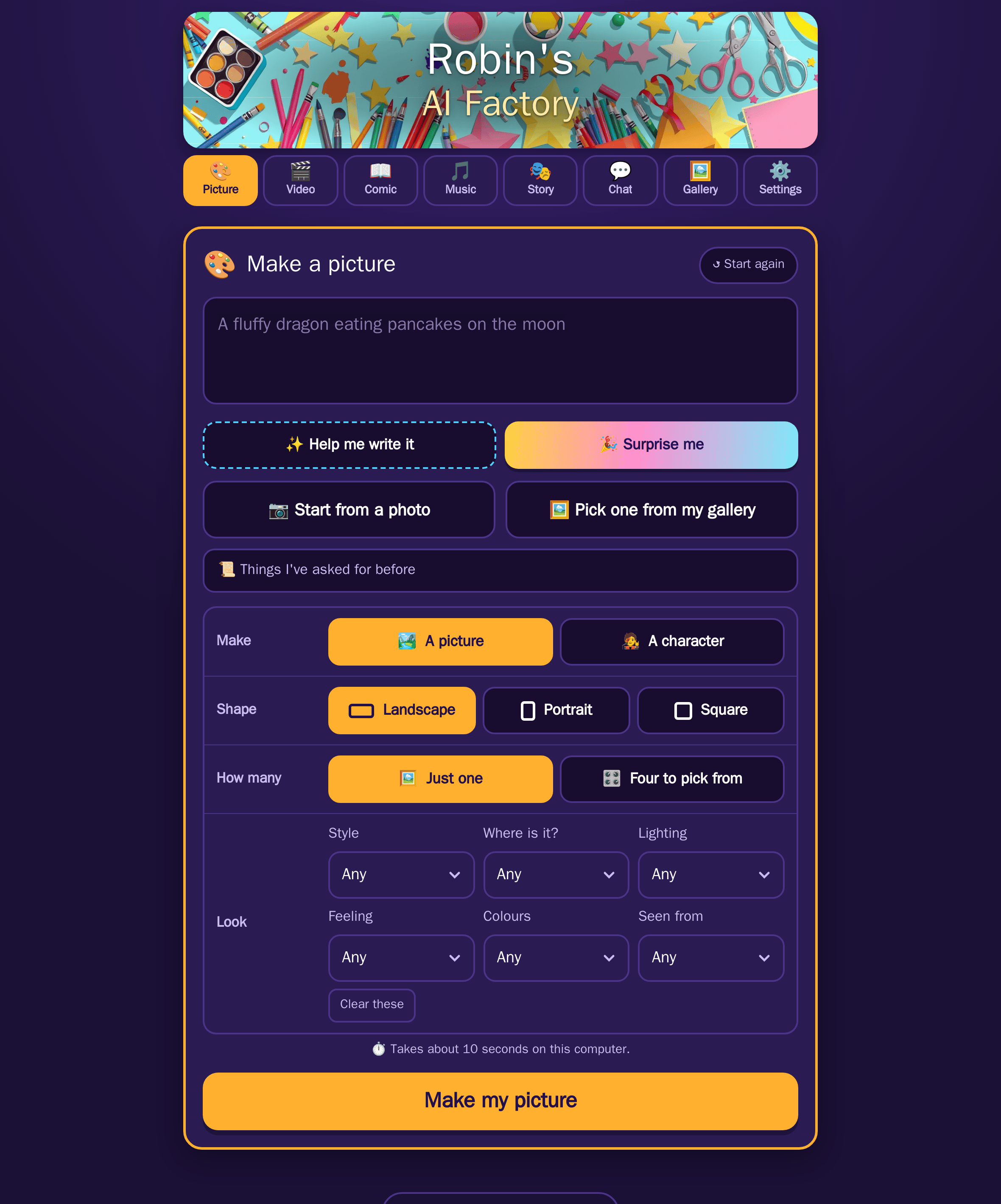
The first release of Makery, a front-end for ComfyUI built for a child rather
than for an operator. No model pickers, no samplers, no seeds. A box to type
in, a big button, and a gallery of everything they have made.
It runs beside a ComfyUI and an Ollama you already have and talks to them over
the network. It renders nothing itself.
What it can make
Each maker is a tab, and a parent can switch any of them off per child.
- Pictures from a sentence, one at a time or four to choose between, in
landscape, portrait or square. - Videos with sound, 5 to 15 seconds, made from words, from a picture,
between two pictures, or as a short film of several clips where each one
starts from the last frame of the one before. - Songs, with singing or without, plus short instrumental tunes and long
background hums. One button writes the description and the words together. - Comics, where a story becomes a 3, 4 or 6 panel strip with speech
bubbles. - Chat with a local model, filtered in full before any of it is shown.
- A Story, which is the others put in order: one idea walked through a
picture, a film and a song, with each result on screen before the next step
begins.
Then there is a great deal to do with what comes out. Turn a picture into a
cartoon, a painting, a clay model or stained glass. Change one thing in it.
Extend it beyond its frame. Paint over a part and say what should be there
instead. Cut a sticker out of it, make it four times bigger, smooth a video or
slow it down, grab a frame, record a voice-over, drop in one of twelve
synthesised sound effects, or join clips into a movie with a title card.
Writing a good prompt is the part a child should not have to learn, so there
are dropdowns for style, place, lighting, colour, mood and camera, and buttons
that expand a few words into a full prompt, invent an idea from nothing, or
look at a picture and describe it.
Seven languages
English, French, German, Spanish, Italian, Dutch and Portuguese, switched by
the child in their own Settings tab. The whole interface follows, and so do the
helpers. What reaches the image model is translated to English, because that is
measurably what it understands. Song lyrics are never translated.
For the grown-ups
A separate page at /parent, behind a PIN, with today at a glance and the live
GPU figures, profiles for several children, daily limits with a one-tap top-up
that expires at midnight, a weekly timetable, optional warm-up sums before the
first make of the day, a nightly email, alerts to a phone through Apprise, an
optional Telegram bot that answers questions, backup and restore, and an
append-only activity log where each entry is sealed against the one before it.
All twenty-one instructions this app gives a model are listed on that page and
can be read without opening the source.
Before a child uses it
Please read this part. Some of it is deliberate and none of it is reassuring.
- There is no authentication on the child's side. Anything that can reach
the port can make a picture, browse the gallery and delete from it. This is
meant to sit on a home network behind a router. It is not safe to put on the
internet. - The parent PIN has a published default of
1234, so that a fresh install
has a gate at all. The app warns on every start until it is changed. Change
it. - The content filter is an input-side blocklist and nothing else. It reads
the words that were typed, in all seven languages, and refuses a match before
anything reaches ComfyUI. It does not look at what the model produces. A
model can still draw something nobody asked for. - Profiles are a curtain, not a lock. Two children get separate galleries,
limits and rules. They do not get separate accounts, and switching profile is
one tap with no PIN.
SECURITY.md
separates the decisions above from what would genuinely be a bug, and explains
how to report one privately.
What you need
- ComfyUI 0.36 or newer. Verified against 0.36.0. Older versions may not
have the Flux 2 and LTX 2.5 nodes. - Ollama, with one vision model pulled.
- An NVIDIA GPU with 16 GB of VRAM or more. That is what this was built and
measured on, and it is close to the floor: a 15 second video peaks near
15.5 GB. - About 100 GB of disk for models. Sixteen model files across eleven
ComfyUI graphs, and the README lists every filename and directory.
Getting started
The README has the
whole install in six steps, including a complete docker-compose.yml for the
published image, so running this needs a compose file and a .env rather than
a clone.
docker pull ghcr.io/mzac/makery:2026.9.17Available as 2026.9.17, 2026.9, 2026 and latest. Pinning the full
version is the better choice for something a child uses daily, because it means
an update happens when you choose it.
A note on the version number
Calendar versioning, as year.month.day. The month and day are deliberately not
zero-padded, because 2026.09.17 is not valid semver and the image workflow
tags on semver.
Known limitations
- The negative prompts written into every workflow have no effect today. Every
graph runs at CFG 1.0, where the term that would subtract them is multiplied
by zero. They are kept in full so they start working if CFG is ever raised.
The blocklist is the real filter. - Saved characters give a family resemblance, not the same character twice.
Flux cannot promise identity without extra models. - Photo screening fails open when Ollama is unreachable, on the argument that
it is the child's own camera roll. - Recording a voice-over and taking a photo need HTTPS, because Safari requires
a secure context for the microphone and camera.
Licence
Apache 2.0. The models these workflows load have licences of their own, so
check Flux schnell's, Flux 2 Klein's, LTX 2.5's and ACE-Step's terms before
using anything this produces commercially.