Make this:
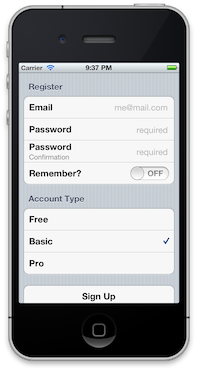
using this:
@form = Formotion::Form.new({
  sections: [{
    title: "Register",
    rows: [{
      title: "Email",
      key: :email,
      placeholder: "me@mail.com",
      type: :email,
      auto_correction: :no,
      auto_capitalization: :none
    }, {
      title: "Password",
      key: :password,
      placeholder: "required",
      type: :string,
      secure: true
    }, {
      title: "Password",
      subtitle: "Confirmation",
      key: :confirm,
      placeholder: "required",
      type: :string,
      secure: true
    }, {
      title: "Remember?",
      key: :remember,
      type: :switch,
    }]
  }, {
    title: "Account Type",
    key: :account_type,
    select_one: true,
    rows: [{
      title: "Free",
      key: :free,
      type: :check,
    }, {
      title: "Basic",
      value: true,
      key: :basic,
      type: :check,
    }, {
      title: "Pro",
      key: :pro,
      type: :check,
    }]
  }, {
    rows: [{
      title: "Sign Up",
      type: :submit,
    }]
  }]
})

@form_controller = Formotion::FormController.alloc.initWithForm(@form)
@window.rootViewController = @form_controller
And after the user enters some data, do this:
@form.render
=> {:email=>"me@email.com", :password=>"password",
:confirm=>"password", :remember=>true, :account_type=>:pro}gem install formotion
In your Rakefile:
require 'formotion'
You can initialize a Formotion::Form using either a hash (as above) or the DSL:
form = Formotion::Form.new

form.build_section do |section|
  section.title = "Title"

  section.build_row do |row|
    row.title = "Label"
    row.subtitle = "Placeholder"
  end
end
Then attach it to a Formotion::FormController and you're ready to rock and roll:
@controller = Formotion::FormController.alloc.initWithForm(form)
self.navigationController.pushViewController(@controller, animated: true)You have form#submit, form#on_submit, and form#render at your disposal. Here's an example:
class PeopleController < Formotion::FormController
  def viewDidLoad
    self.navigationItem.rightBarButtonItem = UIBarButtonItem.alloc.initWithBarButtonSystemItem(UIBarButtonSystemItemSave, target:self, action:'submit')
  end

  def submit
    data = self.form.render

    person.name = data[:name]
    person.address = data[:address]
  end
end
Why would you use form#on_submit? In case you want to use type: :submit. Ex:
@form = Formotion::Form.new({
  sections: [{
  ...
  }, {
    rows: [{
      title: "Save",
      type: :submit
    }]
  }]
})

@form.on_submit do |form|
  # do something with form.render
end
form#submit just triggers form#on_submit.
Formotion current supports static and editable text, switches, and checkboxes.
Formotion::Form, Formotion::Section, and Formotion::Row all respond to a ::PROPERTIES attribute. These are settable as an attribute (ie section.title = 'title') or in the initialization hash (ie {sections: [{title: 'title', ...}]}). Check the comments in the 3 main files (form.rb, section.rb, and row.rb for details on what these do).
See the KitchenSink example for a bunch of options in action.
Feel free to fork and submit pull requests! And if you end up using Formotion in your app, I'd love to hear about your experience.
- Not very efficient right now (creates a unique reuse idenitifer for each cell)
- More data entry types (dates, etc)
- More tests
- Styling/overriding the form for custom UITableViewDelegate/Data Source behaviors.
- Custom cell text field alignments