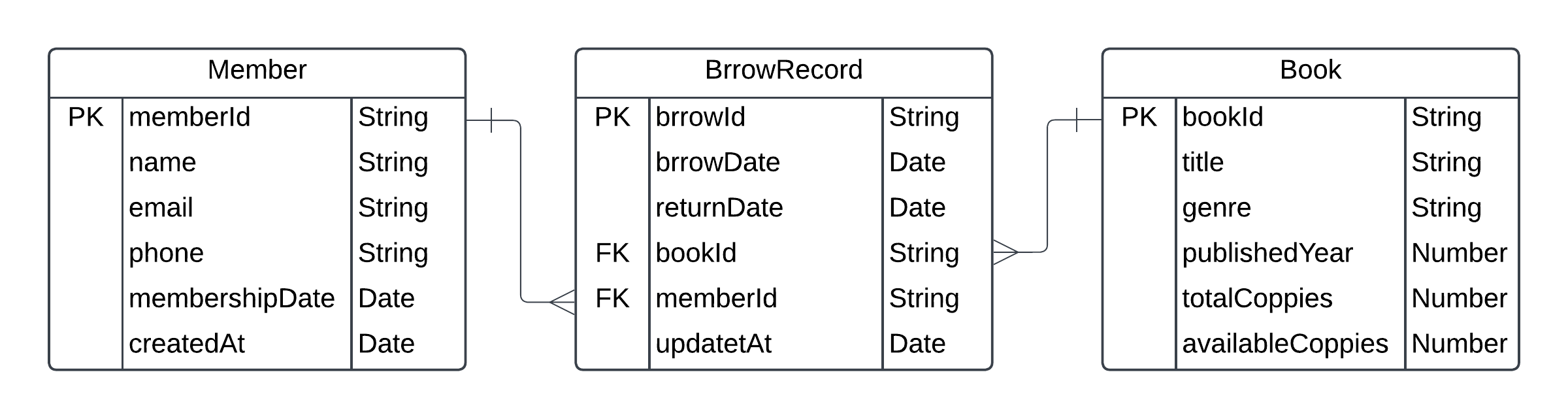
The Library Management System Backend API is designed to help library staff and members manage books, memberships, and borrowing activities. It supports essential operations like adding and removing books, registering members, and tracking borrow and return activities. This backend API forms the foundation for a full-featured library management system, automating key processes to improve operational efficiency and inventory accuracy.
- Express.js
- Prisma ORM
- PostgreSQL
- TypeScript
- Books Management: Add, update, view, and delete books in the library.
- Member Management: Register, update, and delete library members.
- Borrowing and Returning: Track book borrowing and returning, updating inventory accordingly.
- Detailed Records: Maintain records of borrowing activities, including the borrowed date and return status.
- Error Handling: Comprehensive error handling for all CRUD operations.
Library Management System
├── src
│   ├── app
│   │   ├── modules
│   │   │   ├── controllers
│   │   │   ├── models
│   │   │   ├── services
│   │   │   ├── routes
│   │   └── app.ts
├── .env.example
├── package.json
└── tsconfig.json
Handles incoming requests and interacts with the service layer.
Defines the data schema and structure using Mongoose.
Defines the application endpoints and associates them with controllers.
Contains the business logic and interacts with the data layer.
- Node.js
- yarn
- Postgres
-
Clone the repository
git clone https://github.com/naimuddin94/library_backend.git
-
Navigate to the project directory
cd library_backend -
Install dependencies
yarn install
-
Set environment variables
Create a
.envfile in the root directory following the.env.examplefile and fill in the required variables. -
Start the server
yarn dev
-
Build the project
yarn build
The API documentation is available through Postman. It provides detailed information on the available endpoints, request formats, and response structures.