BitTorrent is a communication protocol for peer-to-peer file sharing (P2P) which is used to distribute data and electronic files over the Internet in a decentralized manner.
In this project we implement one peer-to-peer communication protocol like bitTorrent, but it's not exactly the same.
We use the Ping concept to implement this project. Ping operates by sending Internet Control Message Protocol (ICMP) echo request packets to the target host and waiting for an ICMP echo reply. Here is the IP datagram of a ping packet:
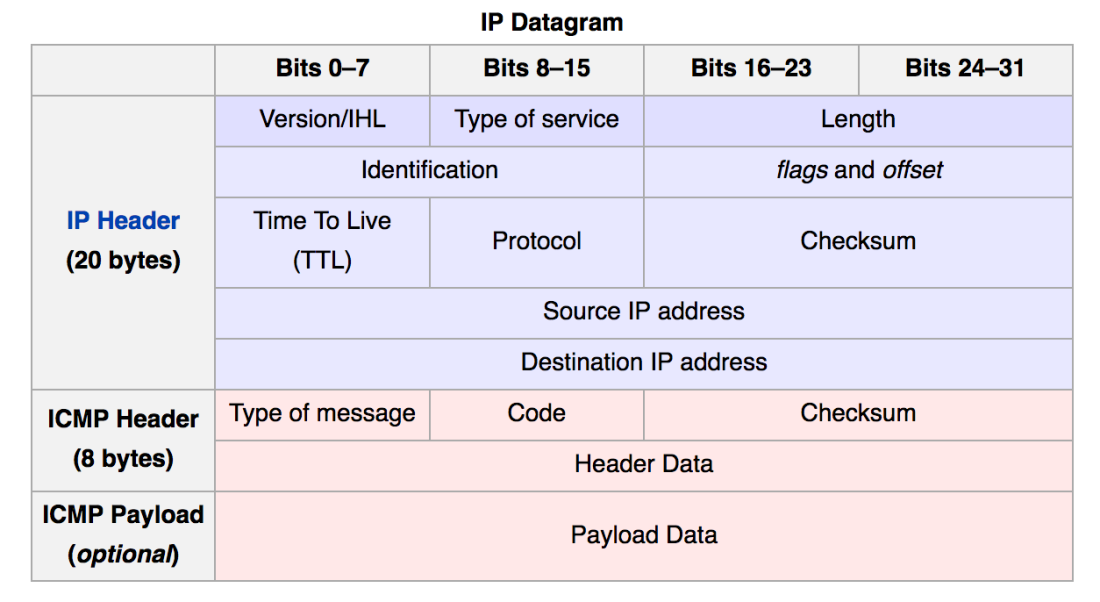
Now we change the Ping in a way that the source host sends an ICMP echo request packet to the destination host, but instead of locating its own IP address in the Source IP address section, locate one of the other host IP address randomly. For example, imagine that the source host IP address is 10.0.0.5, but the source locates 10.0.0.7 for the Source IP address of the sending packet. Now when our packet received to the destination, it will change the source and destination IP addresses and send an ICMP echo reply to the destination, which is one of the nodes in the topology. Then, the receiver of the new packet will do the same again with IP spoofing. The result here is that our packet, which contains data in the ICMP Payload will transfer between different hosts, and at the moment, no one knows where the packet is. In the end, when we want to get the packet, the receiver will send an ICMP echo request packet with the "return" and its IP in the ICMP Payload. This packet name is RETURN_HOME. Then each host, when getting the RETURN_HOME packet, will send the packet to the destination.
But the here sending one packet is not the target, we want to share a big file here. For this purpose, we should chunk file to the ICMP Payload size and somehow remember the sequence of the packet. So we design one protocol like this and hosts speak together with this protocol:
Protocol : returnOrNot? ~ if return -> ip else -> data ~ numberOfData ~ size ~ toDelete ~ fileName
- upload
- Upload a file with in the directory between hosts.
- download
- Download an uploaded file with the name of downloaded_{filename}.
- vim
- Show files with in the directory.
For running this program, you need to have Mininet virtual machine. After running Mininet in your virtual machine, you need to run the network topology you want to have. Here we design a simple topology, but you can make it as big as you want. For running the topology, you need to run this command:
sudo mn --custom Q5-hosts.py --topo mytopo
Now you need to run a terminal in each host, for this purpose you need to run xterm command in the mininet terminal. For example:
xterm h1
or you can run this command for openning one terminal for each host at the beginning:
sudo mn -x --custom Q5-hosts.py --topo mytopo
Here maybe you have some problem with xterm. Here are some tips to get rid of this problem.
- Using ssh command from your computer to connect to the mininet virtual machine. You can get the IP of the mininet by the
ifconfigcommand in the mininet virtual machine.ssh -X mininet@{IP of the Mininet} - Installing
xquartzapplication.
Then when you run a terminal in each of the hosts, you need to run the below command in each host:
python bitTorrent.py
Finally, everything had been set up. You can now use the commands for sharing your file between hosts. Enjoy :)
- Navid Akbari
- Farzad Habibi