NCICT User Manual
NCI Dosimetry System for Computed Tomography
Current documented release: 4.20260502
The National Cancer Institute Dosimetry System for Computed Tomography (NCICT) is a reference-grade radiation dose estimation system developed by the National Cancer Institute (NCI) for estimating organ absorbed doses and effective dose from computed tomography (CT) examinations.
NCICT is based on precalculated organ dose conversion coefficients derived from Monte Carlo radiation transport simulations, multiple computational human phantom models, and a reference CT scanner framework. The system supports patient-specific dose calculations, population-based dose evaluation, and benchmarking. It is not intended for clinical decision support.
| Step | Description |
|---|---|
| 1 | Define patient characteristics |
| 2 | Enter scanner parameters |
| 3 | Define scan coverage |
| 4 | Review organ and effective dose output |
| 5 | Optionally run multiple cases through Batch Calculation Mode |
NCICT includes three phantom libraries to support matching of patient anatomy and body dimensions:
- ICRP reference pediatric and adult phantoms (n=12)
- Body size-dependent pediatric and adult phantoms (n=362)
- Pregnant women and fetal phantoms at 8, 10, 15, 20, 25, 30, 35, and 38 weeks of gestation
When detailed body size information is unavailable, users may select one of the ICRP-defined reference age and sex groups:
- Newborn male or female
- 1, 5, 10, or 15 years (male or female)
- Adult male or female (assumed ≥20 years)
When ICRP phantoms are selected, reference height and weight are automatically assigned.
The ICRP reference height and weight pairs used by NCICT are:
| Reference phantom | Height (cm) | Weight (kg) |
|---|---|---|
| Newborn female or male | 47 | 4 |
| 1-year female or male | 76 | 10 |
| 5-year female or male | 110 | 19 |
| 10-year female or male | 140 | 32 |
| 15-year female | 161 | 53 |
| 15-year male | 166 | 56 |
| Adult female | 168 | 60 |
| Adult male | 178 | 73 |
If a patient's age falls between reference groups, users may perform external dose interpolation or select the nearest reference age group.

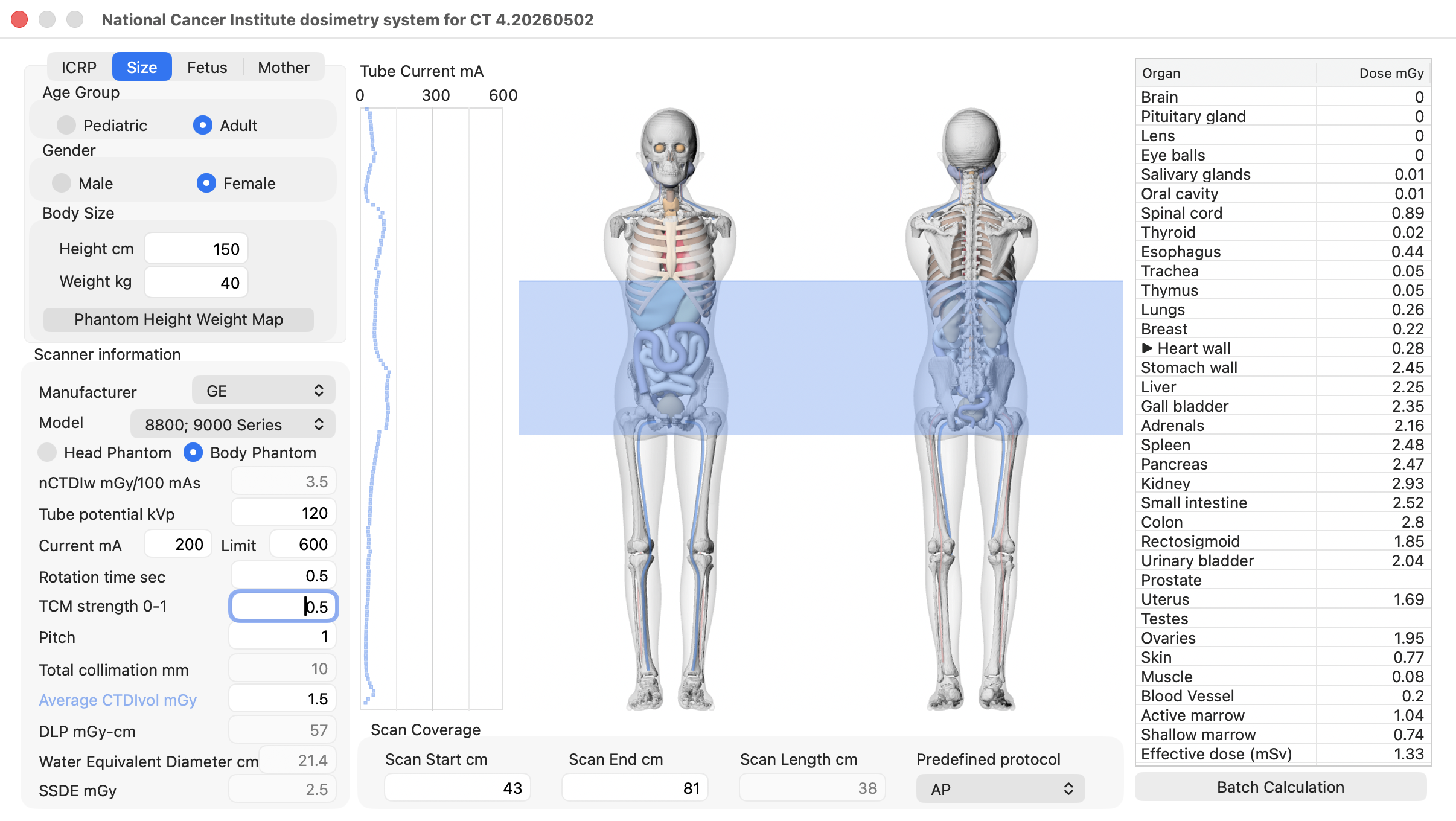
When patient height and weight are available, users may specify body size directly within the pediatric or adult phantom libraries. This approach maps the patient's body size to the closest matching size-dependent phantom. Phantom height and weight can be adjusted using the up/down arrow keys.
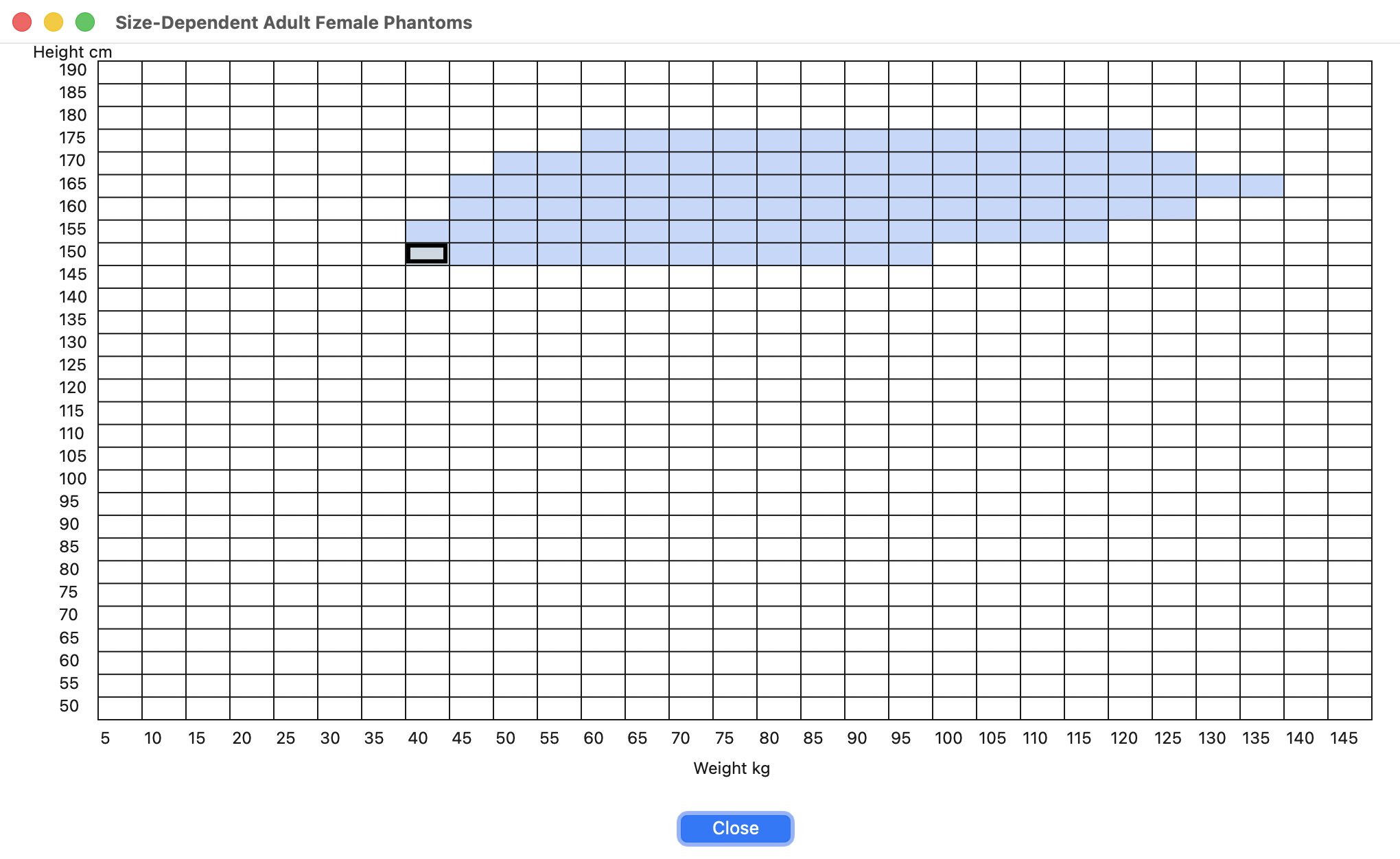
Alternatively, users can click the "Phantom Height Weight Map" button to access an interactive size map. Red cells represent available height/weight combinations, and the selected cell is highlighted; clicking a cell updates the selection in the main panel.
When fetal organ doses are of interest, users can select the "Fetus" tab and specify fetal age (8–38 weeks). Fetal anatomy is shown in color, while maternal anatomy is grayed out in the phantom display. Because fetal age may not directly correspond to maternal abdominal diameter, the maximum maternal abdominal diameter (cm), which is commonly measured during prenatal visits, is also displayed to help select the most appropriate pregnancy phantom.

When maternal organ doses are of interest, fetal age (or maternal abdominal diameter) can be selected under the "Mother" tab. Maternal anatomy is shown in color, while fetal anatomy is grayed out in the phantom display.

Two scanner parameter scenarios are supported.
When CTDIvol is not available, it can be reconstructed from the scanner model, tube potential (kVp), tube current (mA), rotation time (sec), pitch, and total collimation (mm). CTDIvol (mGy) is automatically calculated using a built-in normalized CTDIw (mGy/mAs) library for over 160 scanner models. Additional scanner models are being added to the library through CTDI surveys.
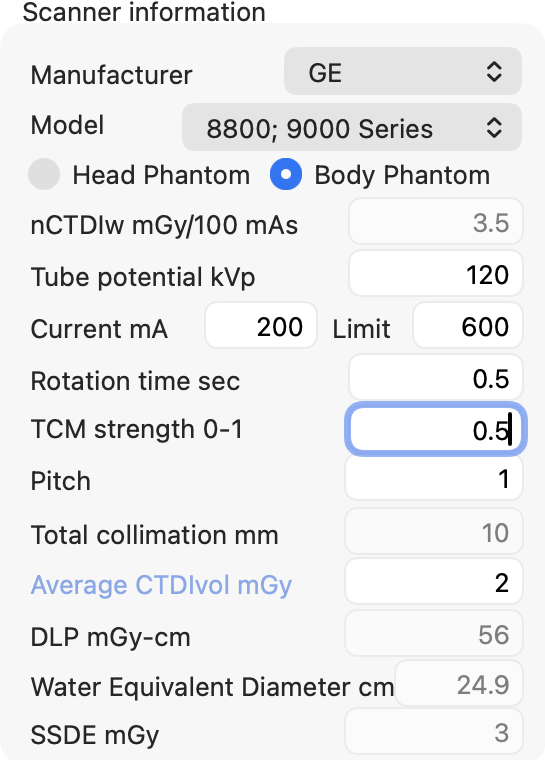
A generic longitudinal tube current modulation (TCM) model is implemented for illustrative purposes. It is not vendor-specific. TCM strength ranges from 0 (no modulation) to 1 (maximum modulation). The modulated current profile is displayed next to the phantom panel.
Users may directly enter CTDIvol and select the CTDI phantom type (head CTDI phantom with 16 cm diameter or body CTDI phantom with 32 cm diameter). This value overrides all other scanner parameters. NCICT uses a scanner-independent organ dose calculation algorithm, so CTDIvol drives organ dose estimation even when a specific scanner model is not listed.
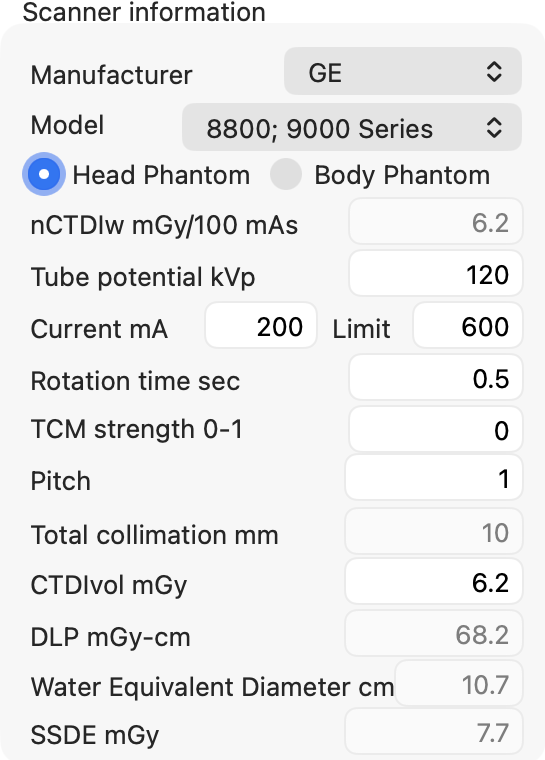
- DLP is calculated from CTDIvol and scan length
- SSDE is calculated using regression equations based on WED
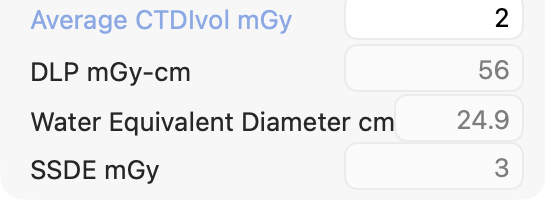
Scan coverage can be defined:
- interactively (mouse drag)
- numerically (Scan Start cm / Scan End cm)
- using the up/down arrow keys in the text fields
- using predefined protocols

NCICT reports organ absorbed dose (mGy) and effective dose (mSv). Results are intended for comparative and population-level analyses, not individual risk estimation.
Detailed cardiac substructure doses are available when size-dependent phantoms are selected.
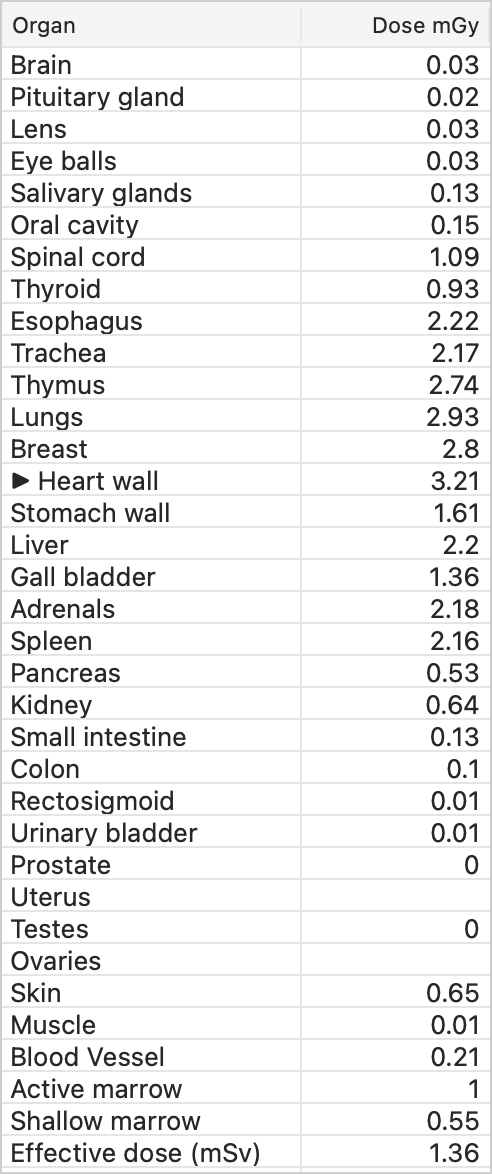
| Acronym | Cardiac Substructure |
|---|---|
| Heart wall | Heart wall |
| H LA | Left Atrium |
| H RA | Right Atrium |
| H LV | Left Ventricle |
| H RV | Right Ventricle |
| H LVM | Left Ventricular Myocardium |
| H LMCA | Left Main Coronary Artery |
| H LADA | Left Anterior Descending Artery |
| H LCA | Left Circumflex Artery |
| H RCA | Right Coronary Artery |
| H AV | Aortic Valve |
| H MV | Mitral Valve |
| H PV | Pulmonary Valve |
| H TV | Tricuspid Valve |
Input parameters can be provided in CSV format. A template file (ncictBatchInput.csv) is available in the repository and can be edited in Excel.
The Batch CSV uses the same calculation parameters as the NCICT API. The API uses JSON format, while GUI Batch uses CSV format, but the parameter names and definitions are the same.
Recommended Batch CSV column order:
age, sex, height, weight, wed, start, end, kvp, tcm_strength, head_body, ctdivol, custom_ma
The Batch parser reads column headers, so columns may be reordered as long as the required headers are present. Required headers are age, start, end, kvp, tcm_strength, head_body, and ctdivol. Additional empty columns may be placed after custom_ma to enter slice-specific custom mA values across Excel cells.
| Parameters | Note |
|---|---|
age |
Patient age in years for patient dose; gestational age such as 8wk, 30wk, or 38wk for fetus or mother dose |
sex |
f or m for patient dose; leave blank for fetus or mother dose |
height |
Patient height in cm; optional |
weight |
Patient weight in kg; optional |
wed |
Water equivalent diameter in cm; optional |
start |
Scan start location from the top of the head in cm, or an anatomical landmark ID |
end |
Scan end location from the top of the head in cm, or an anatomical landmark ID |
kvp |
Tube potential in kVp; must be greater than 0
|
tcm_strength |
TCM strength from 0 to 1; use -1 for custom mA values |
head_body |
1=16 cm CTDI phantom, 2=32 cm CTDI phantom |
ctdivol |
CTDIvol in mGy; must be greater than or equal to 0
|
custom_ma |
Required when tcm_strength = -1; enter the first custom mA value here; all custom mA values must be greater than 0
|
If a patientID column is included, NCICT uses it in the output. If patientID is omitted, rows are numbered automatically.
NCICT selects the closest phantom based on age, sex, height, weight, and WED when those values are provided. Missing height or weight values are estimated internally before matching.
For Batch height/weight matching, the candidate library includes both the 12 ICRP reference phantoms and the 362 size-dependent phantoms. The ICRP reference phantom height/weight pairs are slightly offset from the regular size-dependent height/weight bins. Users who want to select an ICRP reference phantom in Batch can enter the corresponding ICRP reference height and weight from Section 1.1 exactly; NCICT will then match that ICRP reference phantom.
NCICT automatically determines the dose target and phantom group from the input:
-
agein years withsex: patient dose using age/sex reference matching -
agein years withsexandwed: patient dose using WED-based body size matching -
agein years withsex,height, andweight: patient dose using height/weight body size matching -
agein weeks, e.g.,38wk, with blankheight: fetus dose -
agein weeks with any nonblankheightvalue: mother dose
Age < 20 is treated as pediatric for patient dose. Supported pregnant phantom ages are 8wk, 10wk, 15wk, 20wk, 25wk, 30wk, 35wk, and 38wk.
When age, sex, and wed are provided for patient dose, NCICT first determines the patient phantom group from age and sex:
- age < 20 and
sex = f: pediatric female - age < 20 and
sex = m: pediatric male - age >= 20 and
sex = f: adult female - age >= 20 and
sex = m: adult male
For WED-based matching, NCICT uses the scan range to determine the anatomical region. WED-based matching is applied when start and end match one of the supported landmark pairs for chest, abdomen, pelvis, abdomen-pelvis (AP), or chest-abdomen-pelvis (CAP).
For patients 5 years of age or older, NCICT estimates a target body weight from WED using region-, age-, and sex-specific regression equations. A fixed target height is assigned from the age/sex group. For patients younger than 5 years, NCICT uses fixed reference size targets for the newborn and 1-year phantom groups:
| Group | Target height |
|---|---|
| age < 1 year | 47 cm |
| 1 <= age < 5 years | 76 cm |
| 5 <= age < 10 years | 115 cm |
| 10 <= age < 15 years | 145 cm |
| 15 <= pediatric age < 20 years | 165 cm |
| adult female | 165 cm |
| adult male | 175 cm |
For the fixed pediatric groups, the target weights are 4 kg for age < 1 year and 10 kg for 1 <= age < 5 years. The estimated or fixed target weight is limited to the available body size range, and NCICT selects the closest available size-dependent phantom within the same phantom group. The closest phantom is determined by minimizing:
|target height - phantom height| + |target weight - phantom weight|
If the scan range does not match one of the supported WED landmark ranges, NCICT falls back to age/sex-based matching using internally estimated reference height and weight.
Scan start and end locations can be specified either as distances from the top of the head in cm or as anatomical landmark IDs. If a landmark ID is used for one boundary, a landmark ID should also be used for the other boundary.
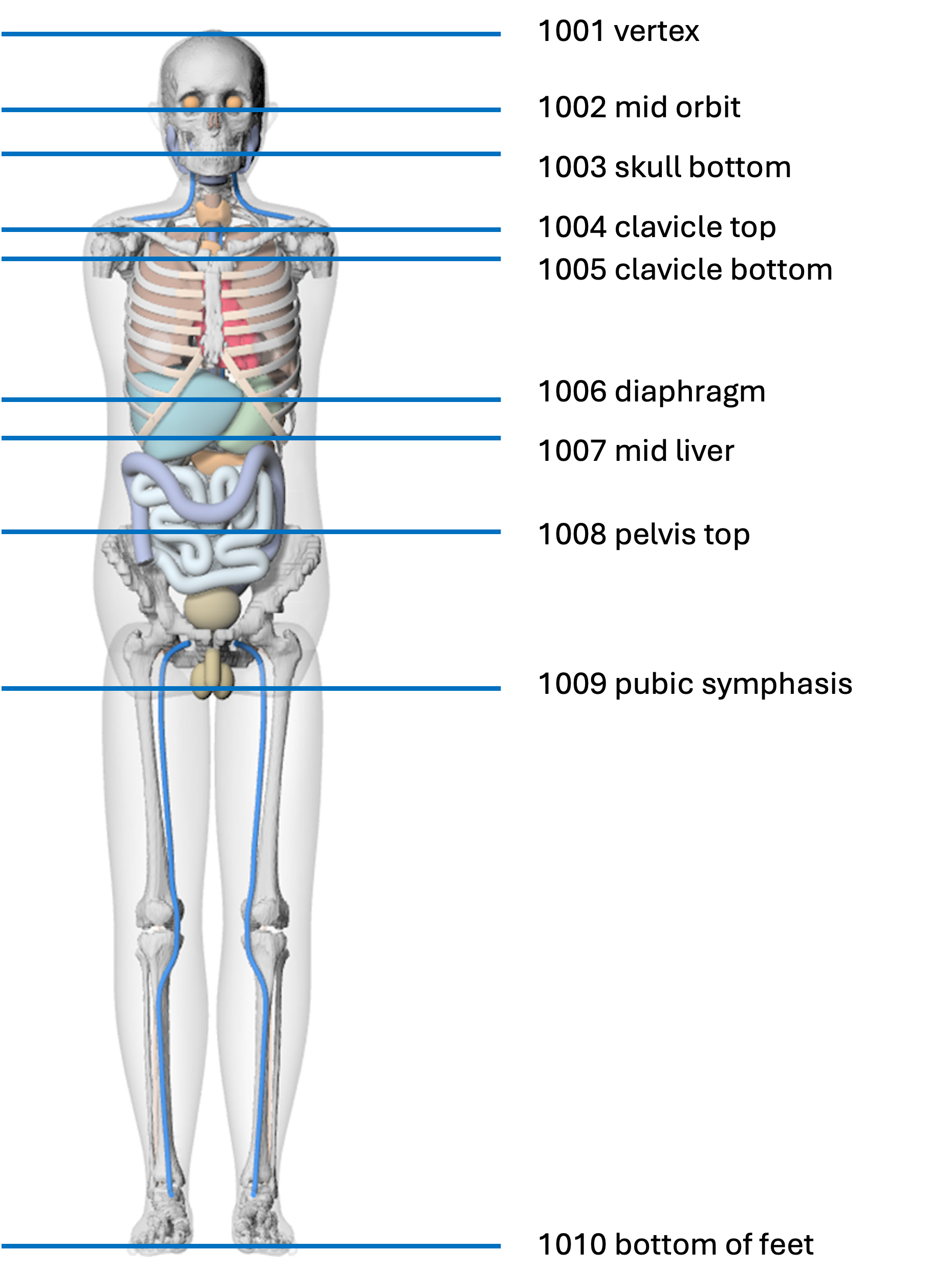
Common protocol ranges can be entered using the following landmark ID pairs:
| Protocol | Start landmark ID | End landmark ID |
|---|---|---|
| Head | 1001 | 1003 |
| Neck | 1002 | 1005 |
| Chest | 1004 | 1007 |
| Abdomen | 1006 | 1008 |
| Pelvis | 1008 | 1009 |
| Abdomen-pelvis | 1006 | 1009 |
| Chest-abdomen-pelvis | 1004 | 1009 |
| Whole body | 1001 | 1010 |
After landmark conversion, the scan range must satisfy 0 <= start < end <= 190.
When editing the Batch CSV in Excel, custom mA values can be entered across multiple cells starting at the custom_ma column:
| age | sex | height | weight | wed | start | end | kvp | tcm_strength | head_body | ctdivol | custom_ma | ||||||
|---|---|---|---|---|---|---|---|---|---|---|---|---|---|---|---|---|---|
| 10 | f | 25 | 0 | 20 | 120 | -1 | 1 | 20 | 100 | 200 | 300 | 400 | 500 | 600 | 700 |
Do not add commas, brackets, or quotation marks when entering custom mA values across Excel cells. NCICT reads the custom_ma cell and all numeric cells to its right as a single custom mA profile. Leave these cells blank when tcm_strength is not -1.
Example Batch CSV rows:
age,sex,height,weight,wed,start,end,kvp,tcm_strength,head_body,ctdivol,custom_ma,,,,,,
10,f,,,,0,20,120,0,1,20,,,,,,,
10,f,,,25,0,20,120,-1,1,20,100,200,300,400,500,600,700
38wk,,,,,1004,1009,120,0,2,20,,,,,,,
30wk,,164,,,1004,1009,120,0,2,20,,,,,,,
Output CSV includes:
- Patient ID
- Dose Target
- Age, sex, height, weight, WED, and scan start/end
- Scanner parameters
- Matched phantom group and matched phantom size or fetal age
- Organ doses and effective dose