Extremely fast and simple git prompt for bash
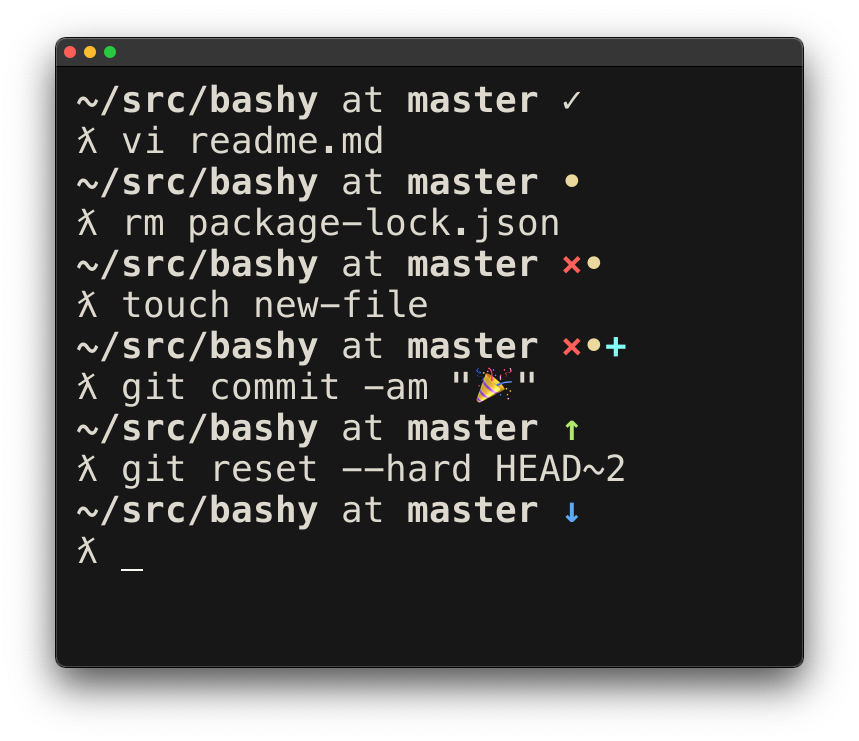
You need bashy to run as any other command, so install it in any directory in your $PATH. I like to use ~/bin:
$ cp bashy ~/binIn your bashrc (linux) or bash_profile (MacOS) you need to add bashy to your $PS1:
export PS1='\[$(bashy)\] $ 'This example will give you the next prompt:
repo at branch✓ $ # if you are in a git repo
folder $ # otherwise
You can also choose a path relative to your home folder with the option -r:
export PS1='\[$(bashy -r)\] $ '
# results in
~/repos/bashy at master $I've been a zsh user for a long time just for the prompts of oh-my-zsh. But because oh-my-zsh started to slow my prompt so much I decided to go back to bash and make my own customizations.
The first tool I used to do so was vcprompt, but the speed was not improving a lot.
If we compare bashy to other tools like vcprompt we can see is much faster:
$ time vcprompt
real    0m0.094s
user    0m0.037s
sys     0m0.024s

$ time bashy
real    0m0.010s
user    0m0.004s
sys     0m0.003s
Okay,
bashyis faster but, come on,0.094sis still very fast.
Yes and no. While times like those can be indistinguishable for humans, you can totally notice the difference in slower systems and also in fast terminal actions like:

Okay okay, you don't care so much about the performance because you love customization, and tools like vcprompt are very good at that. While bashy does not have a built in customization option, it's extremely easy to customize. Just edit the script, purely bash, and write your own icons there, add more colors, or even rearrange the branch name and directory. Your imagination is the limit here.
© 2017 Pablo Varela