Testing: CI (GitHub Actions)
SCT currently uses continuous integration (CI) to automatically run tests, and to perform code analysis (linting, coverage, etc.) on new contributions.
For pull requests, only key platforms (macOS, Ubuntu, Windows) are tested in most cases. However, daily tests for additional platforms (Arch, Debian, WSL) are run automatically on the master branch as well.
SCT uses GitHub Actions. GH Actions uses 'workflows' to define what should be run. Our workflow files are stored in the .github/workflows directory.
Note: SCT previously used Travis.org for CI testing. After Travis changed its pricing model, we made the switch to GitHub Actions.
The majority of our GitHub actions are triggered automatically, either periodically (schedule) or on a new commit push (push). Naturally, these will be run without your input, with most sending you an email if they fail to run.
Note: A GitHub CI action failing is not always the result of changes you made! For example, the task which checks for broken links (
Check for broken links) can fail if the server a URL references is down. If in doubt, you can select the failed GitHub action to view a log of its output; review it and see what went wrong, and go from there.
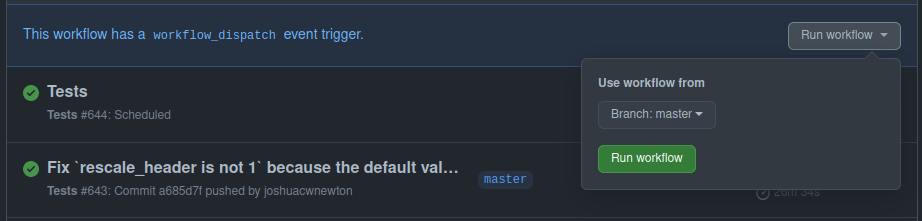
Many GitHub Actions can also be triggered upon request via "workflow_dispatch". One of these is the Tests workflow; this allows to to request GitHub to re-run all tests on a given branch without needing to make a new commit to the repo.
To run a task with this capability, navigate to the Actions page of this repository. You can then select the workflow you want from the sidebar to the left, and (assuming it has a workflow_dispatch trigger) an option to manually trigger it should appear:
SCT uses a CI label to keep track of issues and quirks with GitHub Actions.

- Contributing
-
Programming
- API code vs CLI code
- Argparse usage in CLI scripts
- CLI script structure
- Commenting
- Exceptions
- General guidelines
- Logging
- Moving away from pyplot
- Moving away from sct.run and run_proc
- Naming conventions (variables, files)
- QC Reports
- Shell scripts
- Single or double quotes
- Time Profiling and Memory Tracing
- Useful file tools in Python
- Documentation
- Testing
- Packaging
- Websites
- DL models