Skip to content

Make ON/OFF labels clickable - #101

Merged
nielsonm236 merged 3 commits into
nielsonm236:masterfrom
Niko-O:master
Aug 31, 2022
Merged

Make ON/OFF labels clickable#101
nielsonm236 merged 3 commits into
nielsonm236:masterfrom
Niko-O:master

Conversation

@Niko-O

@Niko-O Niko-O commented Jul 14, 2022

Copy link
Copy Markdown
Contributor

If you have an <input type="radio">, then you can make the associated <label> clickable by giving the input an ID and specifying that ID in the for attribute of the label:
<input type="radio" id="Foo"><label for="Foo">

I refuse to put up with the BS hurdle race of compiling with the STM8 toolchain, but I would greatly appreciate if you could release a new version with this change.

@yozik04

yozik04 commented Jul 14, 2022

Copy link
Copy Markdown
Collaborator

There is a fight for every byte :) so it was luxury to add id’s there.

@mkukik

mkukik commented Jul 15, 2022

Copy link
Copy Markdown

well... to avoid using "id" and saving some bytes you can enclose <input> in <label>
<label><input type="radio" name="Foo"> On/Off</label>

@mkukik mkukik left a comment

Copy link
Copy Markdown

Choose a reason for hiding this comment

The reason will be displayed to describe this comment to others. Learn more.

there is no need to do this... just put input inside label

@Niko-O

Niko-O commented Jul 15, 2022

Copy link
Copy Markdown
Contributor Author

@mkukik Not bad, that works too.

@nielsonm236

Copy link
Copy Markdown
Owner

Sorry for the delay ... tied up with some medical issues. Could you explain a little more what this does? If you click on the "name" of an I/O it will toggle it on/off? Then click "Save" to signal the firmware to save the new state?
I just want to be sure I understand so I can document correctly. Also be aware this is my first GitHub project so I am not always clear on how everything works in the system. You'll just have to tolerate my ... slowness.
Thanks
Mike

@mkukik

mkukik commented Jul 23, 2022

Copy link
Copy Markdown

this is just user experience enhancement... so the label is also clickable making it easier to interact with... and there is no cost of extra bytes needed with my solution

@Niko-O

Niko-O commented Jul 23, 2022

Copy link
Copy Markdown
Contributor Author

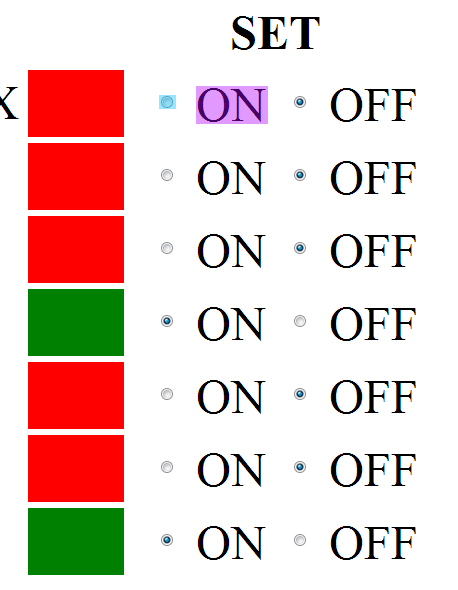
It simply allows clicking on the "ON" and "OFF" text to set the respective radio button:
Example
Without this change, you have to click the blue area to turn the radio button for the first output on, which requires relatively precise mouse movement.
With this change, you can (in addition to the blue area) simply click the purple area, which is much easier and faster to do.

BTW: The screenshot is from a page that's zoomed 300%. Most browsers should also make radio buttons bigger, but this one does not.

@nielsonm236

Copy link
Copy Markdown
Owner

Thank you for the explanation. I like this idea. I'll get to the merge and release as soon as I can.

Mike

@nielsonm236

Copy link
Copy Markdown
Owner

Hi Niko-O - I finally had some time to review the code and consider the change. Despite the complexity of the overall code I will admit right up front that I consider myself to be a less than stellar coder or github user. But I get along. Keeping that in mind and that I might say some amateur things, here are my comments and discussion:

  1. The specific code change provided will only affect the MQTT version of the code. There is an almost identical copy of this javascript further down in the httpd.c file that is used when the Browser version of the code is compiled. Not a problem, but rather than merge what you provided I will probably copy your code into the master (or a branch) so I can cover both cases.
  2. The way the javascript is handled in this specific application is that a more "readable" version of the javascript is kept in comments, changes are made in that readable code, then it is run through a compression process to minimize the bytes used. Might be a roundabout way to do it, but it does help when trying to add new capability yet still get a minimized code. FYI, the code retained in comments follows the compressed code that you modified. Again, not a problem, but I want to follow prior process so I don't get more confused than I normally am. :-)
  3. Fortunately the change you want to make would be identical in both the MQTT and Browser code. The change you provided:
    old "=>{return<input type=radio name=o${e} value=${t} ${n==t?'checked':''}/><label>${(t?'on'" new "=>{return<input type=radio id=o${e} name=o${e} value=${t} ${n==t?'checked':''}/>${(t?'on'"
    Following is the uncompressed code. I was trying to implement your change in this code and pretty quickly got lost. Can you show how the above would appear in the following?
    make_radio_input = (type, id, checked_type) => {
    var type_str = type ? 'on' : 'off';
    return <input type=radio name=o${id} value=${type} ${checked_type == type ? 'checked' : ''}/><label>${type_str.toUpperCase()}</label>;
    },
  4. Final question: From your notes it looks like you built the code and tested it. Is that correct? Assuming "Yes", I'll take your uncompressed code feedback, run it through compression, verify that we haven't overrun available FLASH space, and issue a test build.
    Thanks
    Mike

@Niko-O

Niko-O commented Aug 29, 2022

Copy link
Copy Markdown
Contributor Author
  1. Yep, that makes sense.
  2. That also makes sense. I am pretty unfamiliar with your repository, so I wanted to keep the proposed changes to a minimum to get the point across.
  3. The backticks in your example code got eaten up by GitHub's formatting. Usually, backticks are used to denote code here. So if you type a backtick, followed by "hello" literally, followed by another backtick, you end up with hello. But if you type three backticks on a separate line, then any code on the next line, then three backticks again on a separate line, then the single backticks in the code won't be swallowed:
    This is the old code:
        make_radio_input = (type, id, checked_type) => {
            var type_str = type ? 'on' : 'off';
            return `<input type=radio name=o${id} value=${type} ${checked_type == type ? 'checked' : ''}/><label>${type_str.toUpperCase()}</label>`;
        },

This is the newcode:

        make_radio_input = (type, id, checked_type) => {
            var type_str = type ? 'on' : 'off';
            return `<input type=radio id=o${e} name=o${id} value=${type} ${checked_type == type ? 'checked' : ''}/><label for=o${e}>${type_str.toUpperCase()}</label>`;
        },
  1. Unfortunately I was not able to test the code. Compiling C code is, as always, extremely frustrating, so I gave up when the IDE kept asking me to specify the key file. So I suggest testing those changes on a spare board before pushing them.

@nielsonm236

Copy link
Copy Markdown
Owner

OK - This is great. Yes I forgot about the backtick problem ... and will probably continue to forget. My apologies for the delays. Many life complications lately.
I will use all spare time to get this built and at least a preliminary test. I'll go ahead and do another branch of my own to create test code. I'll share it for further testing once I get it through my own preliminary test. I'm hoping within a week (now I jinxed it ...).
Just as an FYI, the "key file" can be obtained for free from STM and will be unique to the computer you install it on. I can help you with that if you want. Unfortunately you have to renew it annually. Not a difficult process, but I have to go back to my notes every year to remember how I did the renew. I should probably add those notes to my manual. Of course, its only of value if you are going to build frequently (or I'm just being too slow with a change request ............)

@Niko-O

Niko-O commented Aug 29, 2022

Copy link
Copy Markdown
Contributor Author

Awesome! And don't overwork yourself because of this project. It's not critical.

Regarding the key file: I did that and it seems I got a working one, but it seems that the compiler prompts me to specify the key file every single time it is started, which is multiple times per compilation cycle. And even then, things just didn't work for no apparent reason. I just don't have the patience for that, so I gave up, and I'm fine with that.

@nielsonm236

Copy link
Copy Markdown
Owner

It's probably something simple like the license file copied to the wrong directory. Doesn't matter. I've got this change covered and you can decide to try again later if you take over your own version of the code.

@yozik04 yozik04 left a comment

Copy link
Copy Markdown
Collaborator

Choose a reason for hiding this comment

The reason will be displayed to describe this comment to others. Learn more.

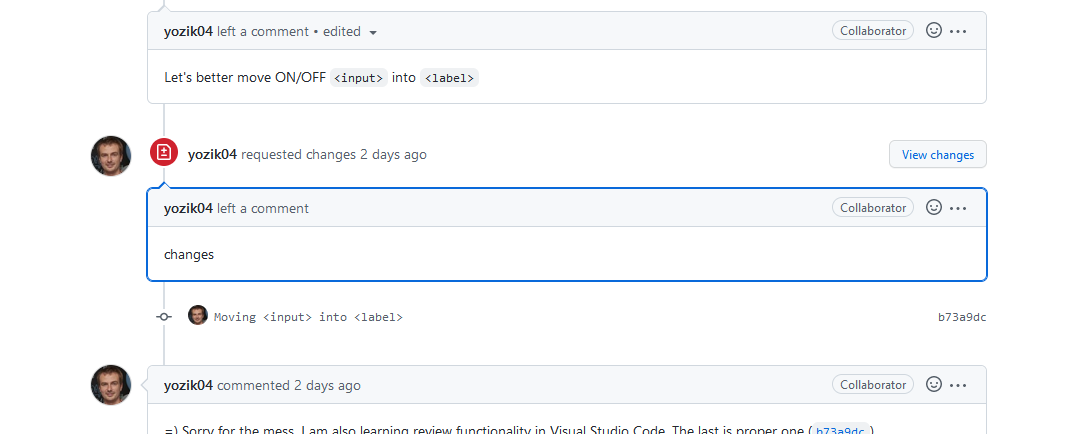
Let's better move ON/OFF <input> into <label>

@yozik04 yozik04 left a comment

Copy link
Copy Markdown
Collaborator

Choose a reason for hiding this comment

The reason will be displayed to describe this comment to others. Learn more.

changes

@yozik04

yozik04 commented Aug 29, 2022

Copy link
Copy Markdown
Collaborator

=) Sorry for the mess. I am also learning review functionality in Visual Studio Code. The last is proper one (b73a9dc).

@yozik04

yozik04 commented Aug 29, 2022

Copy link
Copy Markdown
Collaborator

@nielsonm236 Where is our current JS/HTML playground url. Can you post me the link?

@nielsonm236

Copy link
Copy Markdown
Owner

The last links I had were yours. I'll send by email.

@nielsonm236

Copy link
Copy Markdown
Owner

Via email I discussed the proposed changes recommended by yozik04 and his looks likes a better implementation (consumes no additional bytes of Flash). So now I'm a little confused about what to merge. yozik04: If I click review on the code in this issue list I see the change only in the MQTT Javascript (but not in the Browser Javascript). So simply merging what is here gives an incomplete result.
I now understand what is being done. I can create my own branch and implement the changes. Is that the better path?
OR I suppose I can merge what is here, then make additional changes to complete the code and comments. I just don't want to leave "branch debris" behind.
Mike

@yozik04

yozik04 commented Aug 31, 2022

Copy link
Copy Markdown
Collaborator

Now I moved it in all places.
You need to accept my requested changes first. Then verify what became in pull request. If it is right then you can accept it.

@Niko-O

Niko-O commented Aug 31, 2022

Copy link
Copy Markdown
Contributor Author

Unfortunately, I don't know Git well enough either.
I don't really care whether or not you merge this particular request. It is nice to have proof of "I contributed something useful to a repository", but in the end, it doesn't even matter.
I also don't particularly care, which solution you use. Moving the <input>s inside the <label>s seems like a simpler solution to me, so I would recommend doing that.
I suppose simply closing this merge request and creating your own commit that makes the changes would work too. Feel free to experiment, though!

@yozik04

yozik04 commented Aug 31, 2022

Copy link
Copy Markdown
Collaborator

😄 let's learn something new and fix this pull request.

@yozik04

yozik04 commented Aug 31, 2022

Copy link
Copy Markdown
Collaborator

I am not actually sure who should accept the requested changes. @Niko-O or @nielsonm236. I think @Niko-O because he is owner of this pull request.

@nielsonm236

Copy link
Copy Markdown
Owner

Niko-O: When you open the issue do you see anything that looks like an "accept changes" button? I don't see one on my screen. Right now the "Merge pull request" button is grayed out. It looks like I might be able to force a merge, but I agree with yozik04 ... if we can follow github process and learn something that would be useful.
But, if we get stuck I can try the "force it" route.
Mike

@nielsonm236

Copy link
Copy Markdown
Owner

Niko-O: Additional question. It looks like you might have cloned the code to your own repository, then worked on changes. Is this correct? If yes, I don't think I can directly merge the changes, but might have to copy them over to my repository. I sent a separate email to yozik04 on this subject. We're all in greatly different time zones so replies might be delayed.
Mike

@Niko-O

Niko-O commented Aug 31, 2022

Copy link
Copy Markdown
Contributor Author

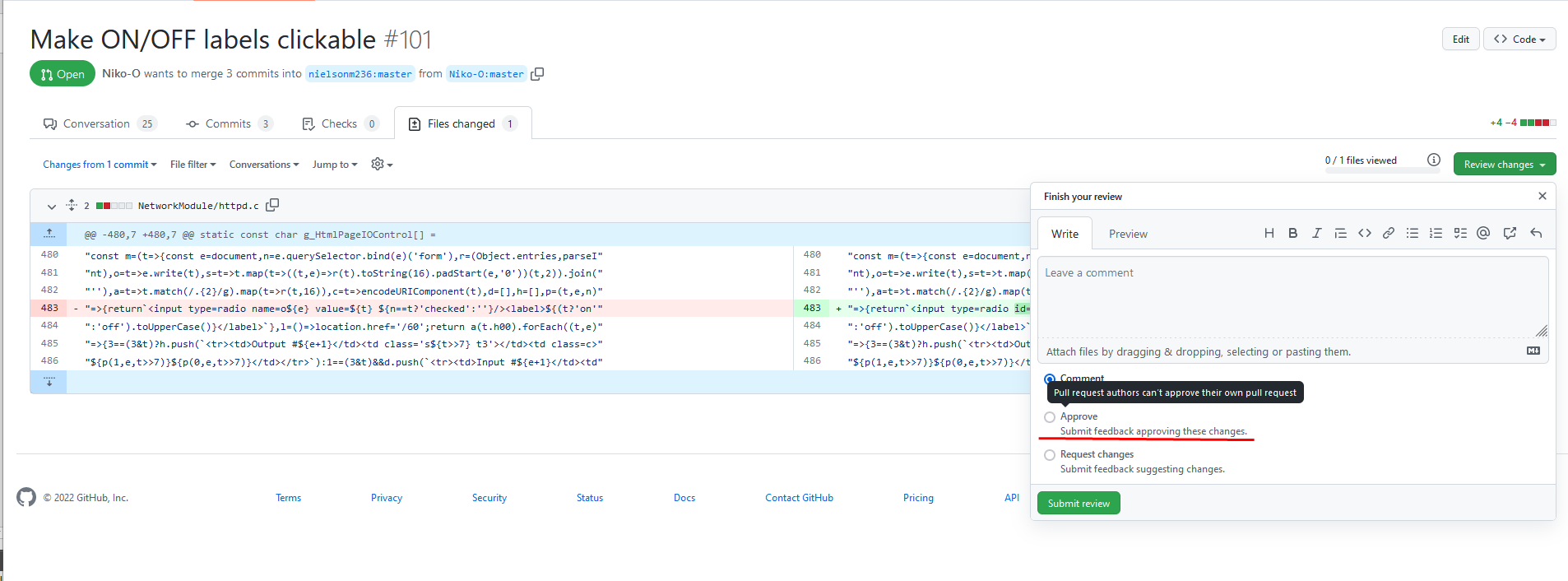
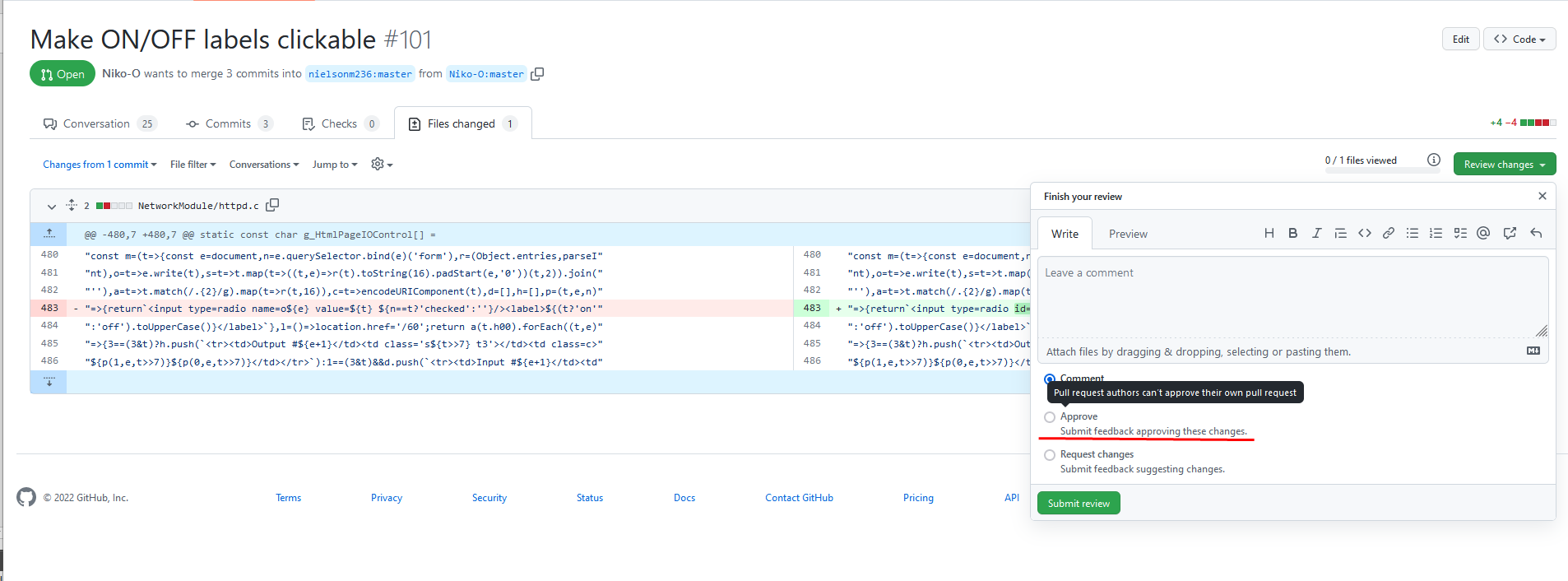
Hmmmm. I see this:
grafik
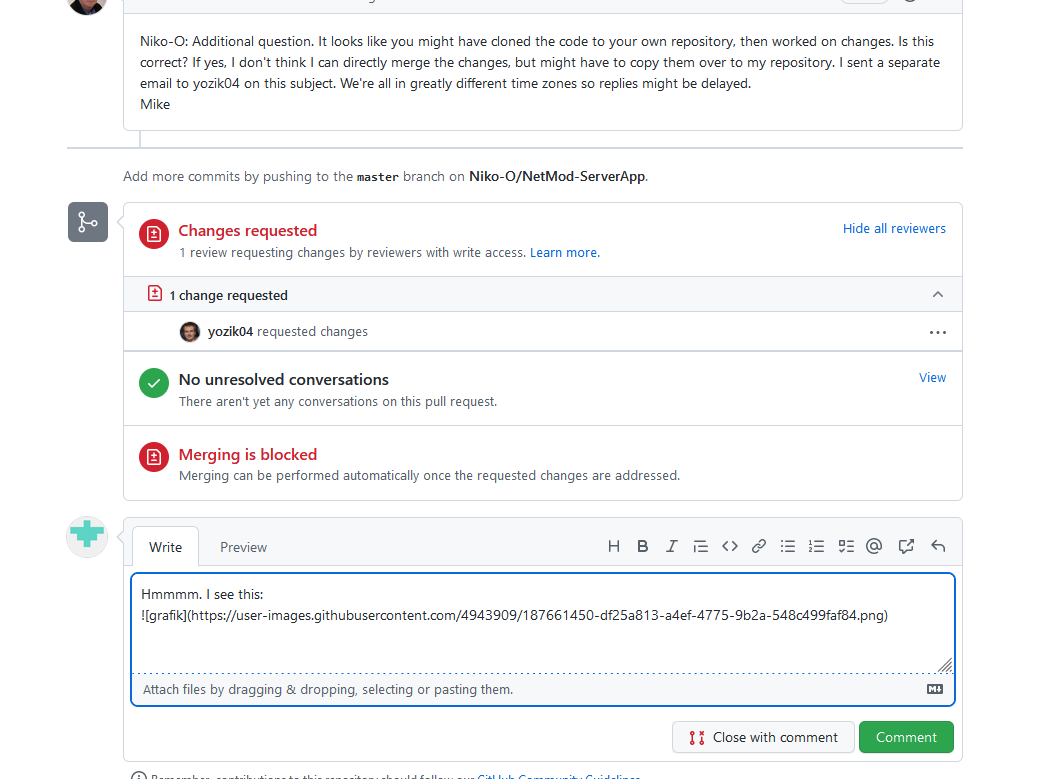
grafik
But I can't accept the changes.

@yozik04

yozik04 commented Aug 31, 2022

Copy link
Copy Markdown
Collaborator

@Niko-O Approve is right thing. Please approve all my suggestions.

@Niko-O

Niko-O commented Aug 31, 2022

Copy link
Copy Markdown
Contributor Author

Ah, didn't see the additional question. Yes, that is correct. I forked the repository, created the commit there, then created a pull request to get that commmit into your repository. IIRC this is because I cannot directly make commits on your repository.

This "Approve Changes" button is not present for me:
grafik
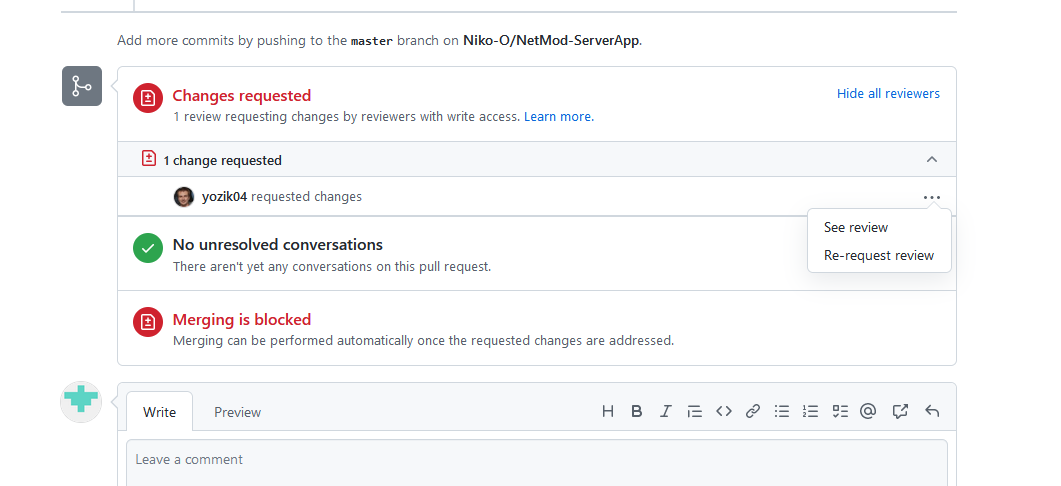
When I click on "See review", this comment gets highlighted:
grafik
If I click on "View changes" there, I get to that first screenshot of mine, where I cannot approve my own changes.
grafik

@yozik04

yozik04 commented Aug 31, 2022

Copy link
Copy Markdown
Collaborator

In the end I approved them myself 🤣

@nielsonm236

Copy link
Copy Markdown
Owner

yozik04: "Approve changes" still didn't appear for me when I followed your suggestion. But it appears you were able to approve yourself. Yes, and odd usability situation. Now "Merge pull request" is no longer grayed out. I will click on that and see what happens. :-)

@yozik04

yozik04 commented Aug 31, 2022

Copy link
Copy Markdown
Collaborator

I think I still have write access to this repo. @nielsonm236 you know how to merge it. Feel free. I have rechecked it once again.

@nielsonm236
nielsonm236 merged commit 9ca50f3 into nielsonm236:master Aug 31, 2022
@yozik04

yozik04 commented Aug 31, 2022

Copy link
Copy Markdown
Collaborator

Yeeey!!! Champagne!
💥
.....🍾

@nielsonm236

Copy link
Copy Markdown
Owner

Perhaps champagne soon. Merge looks successful - after refresh I see the changes in my local working directory. I will create a test build, test it myself, and send test builds by email. Yeah, I know I can do that with github but this old dog is having trouble enough with that.
Niko-O: Please send me an email at nielsonm.projects@gmail.com and I will send a test build to you. Of course only after I've tried it myself.
If anyone else out there is watching this thread and wants to help test let me know.
Mike

@jmcvieira1

Copy link
Copy Markdown

I can also help test
J Vieira

@Niko-O

Niko-O commented Aug 31, 2022

Copy link
Copy Markdown
Contributor Author

It would be nice, though, if you could upload a/the release to GitHub, too.

@nielsonm236

Copy link
Copy Markdown
Owner

yozik04: I tried the build with Chrome, Edge, and Firefox. Despite seeing it work in the JS Playground, it doesn't appear to work in actual use. Very puzzling. I'm attaching the runtime code and httpd.c file in case you see something I don't.
temp.zip

@Niko-O

Niko-O commented Sep 1, 2022

Copy link
Copy Markdown
Contributor Author

I can't see the problem from the code.
But I'll likely get to test it tomorrow afternoon, then I might be able to say more.

@yozik04

yozik04 commented Sep 1, 2022

Copy link
Copy Markdown
Collaborator

@nielsonm236 Please send me IO Control HTML source code from the browser DevTools. I do not have time to flash and configure my spare unit today.

@yozik04

yozik04 commented Sep 1, 2022

Copy link
Copy Markdown
Collaborator

httpd.c is good.

@nielsonm236

Copy link
Copy Markdown
Owner

@yozik04 I think I captured what you requested. See file.
IOControl DevTools capture.txt

@yozik04

yozik04 commented Sep 1, 2022

Copy link
Copy Markdown
Collaborator

@nielsonm236 this is old version. Are you sure you have flashed it with freshly compiled?

@nielsonm236

Copy link
Copy Markdown
Owner

I've tried several things - none have worked.

  • The Configuration page is showing the new build revision, so I know it is being flashed.
  • Thought that since the httpd.c file was not changed using my local tool set that the compiler didn't know it changed. Did a "rebuild all". No effect.
  • Made a deliberate change to httpd.c and could see that the tool set knew the file had changed. Did a rebuild. No effect.
  • Verified that the object file was updated by time stamp. The .o file IS being updated so we know it is recompiled.
  • Cleared cache in the Chrome browser. No effect.
    Must be missing something obvious here. Any ideas what to try next?

@nielsonm236

Copy link
Copy Markdown
Owner

Wait ... I think I found it. I see that the changes we made directly affect the non-upgradeable versions. I'm using an upgradeable version. I must be forgetting a step to create the upgradeable webpages. Give me a bit to think this through.
Mike

@nielsonm236

Copy link
Copy Markdown
Owner

OK - figured it out. The directly programmed versions should work just fine as is (using the SWIM interface to program the device). But I forgot to generate the "strings.sx" file and install it when doing my testing with the upgradeable code that is installed over ethernet. I've now completed that process and it looks like it is working fine.

Even though users may never have to generate a strings.sx file I need to document that process for my own sanity. And I should make the strings generator program available just in case I get hit by a bus and someone else needs to pick this up.

I did some how-to reading and will put this code "pre-release" on GitHub as you guys suggested. After you think it looks like it is working I'll make it a production release. Should be available within the hour.
Mike

nielsonm236 added a commit that referenced this pull request Sep 1, 2022
Usability Enhancement: Make ON/OFF labels clickable
@nielsonm236

Copy link
Copy Markdown
Owner

Put the pre-release on GitHub. Let me know if it works. Appears to work for me. I'll update it to "General Release" if we don't find anything wrong.

@nielsonm236

Copy link
Copy Markdown
Owner

I've now tested on 7 boards, MQTT and Browser versions, with Chrome and Firefox. @jmcvieira1 one of those test boards is your expansion design. All my tests are using the ethernet upgradeable version of the code (rather than the SWIM programmed version). Looks good to me.

@jmcvieira1

Copy link
Copy Markdown

I´m testing on two board´s the upgradeable browser and the MQTT versions, i let it running over night and so far is running fine.

@nielsonm236

Copy link
Copy Markdown
Owner

@jmcvieira1 Clicking on the ON/OFF labels works for you? What OS and Browser? Just checking to see if OS/Browser combos other than what I'm using are working. Later when I get home I will check Safari on my iPhone.

@jmcvieira1

Copy link
Copy Markdown

Yes work´s fine tested with Windows 10 Home 20H2 19042.1466
Chrome Versão 105.0.5195.102 (64 bits) and Firefox 103.0.2 (64-bit)

@nielsonm236

Copy link
Copy Markdown
Owner

@jmcvieira1 Thank you!
I also just tested with the latest revision of Safari 15.x on my iPhone. Can't tell precise version on iPhone. Works fine so I think we nailed it (thank you @yozik04 !!).
Waiting to hear from @Niko-O when he is able to test.

@jmcvieira1

Copy link
Copy Markdown

Also tested on an old system with Windows 10 Pro 1909 18363.836
Chrome Versão 105.0.5195.102 (64 bits) and Firefox 104.0.1 (32-bit)
Worked fine on an more old system with Windows 7 Home Premium 64bits
Chrome Versão 105.0.5195.102 (64 bits) and Firefox 104.0.1 (64-bit)

@Niko-O

Niko-O commented Sep 3, 2022

Copy link
Copy Markdown
Contributor Author

Tested it just now on three devices (browser-only version) and it works fine.
Thank you very much!

@nielsonm236

Copy link
Copy Markdown
Owner

Great! I'll get this converted to a Production release. Good working with you.
Mike

@nielsonm236

Copy link
Copy Markdown
Owner

Addressed in Release 20220921 0500

Sign up for free to join this conversation on GitHub. Already have an account? Sign in to comment

Labels

None yet

Projects

None yet

Development

Successfully merging this pull request may close these issues.

5 participants