ME-mod v0.8.0

me-mod v0.8.0 — Prefab Manager folder browser + right-click context menus

Added
- Prefab Manager folder browser. Real filesystem subfolders under
\DCS\dcs-sms\prefabs. Two-pane layout — folder tree on
the left (with its own search), prefab list on the right. New Folder
button below the tree; right-click on a tree node → New subfolder /
Rename / Delete / Open in Explorer. Saves write to the currently
selected folder. Filter on the right is scoped to the selected folder- descendants (or all folders when "Show all" is clicked / nothing is
selected).
- descendants (or all folders when "Show all" is clicked / nothing is
- Right-click context menu on prefab rows (closes #50). Move to… ·
Copy file contents · Copy place snippet · Show in Explorer. Error
rows expose only Show in Explorer. - Move-Prefab modal dialog: parent-window disabled while open, opens
centred over the Prefab Manager, non-resizable, plain title.
Changed
- prefab_ops.scan_dir now recurses; rows carry a new folder field.
- prefab_ops.save_selection gains an optional folder argument (default "").
- paths.lua gains folder_to_abs and ensure_prefab_folder helpers — the
single seam between in-memory '/' and on-disk ''. - Prefab Manager minimum window size bumps from 540×460 → 760×460 to
accommodate the tree pane. - "Search:" label renamed to "Search files:".
- Reload / Undo last placement buttons moved to the right side, sharing
a row with Rename / Delete. + New folder / Show all live in their own
row below the tree.
Internal
- New context_menu.lua module with lazy clipboard probe (Gui.setClipboard
→ dxgui.setClipboard → Input.setClipboard → cmd /c clip last resort). - New prefab_ops.move_prefab, rename_folder, delete_folder,
count_folder_contents. - Path-traversal validator prefab_ops._validate_folder_path rejects ".",
"..", backslash, reserved characters. - SMSWindow gains resizable / modal_parent / branded_title opts; default
Window close X now routes through :hide() so modal_parent re-enable
runs on every dismissal path.
Install
-
Download dcs-sms.exe from this release.
-
Double-click
dcs-sms.exe. A small menu opens — pick 1 to install. (Prefer the command line? Rundcs-sms.exe install-me-modfrom a terminal in the same folder — same result.)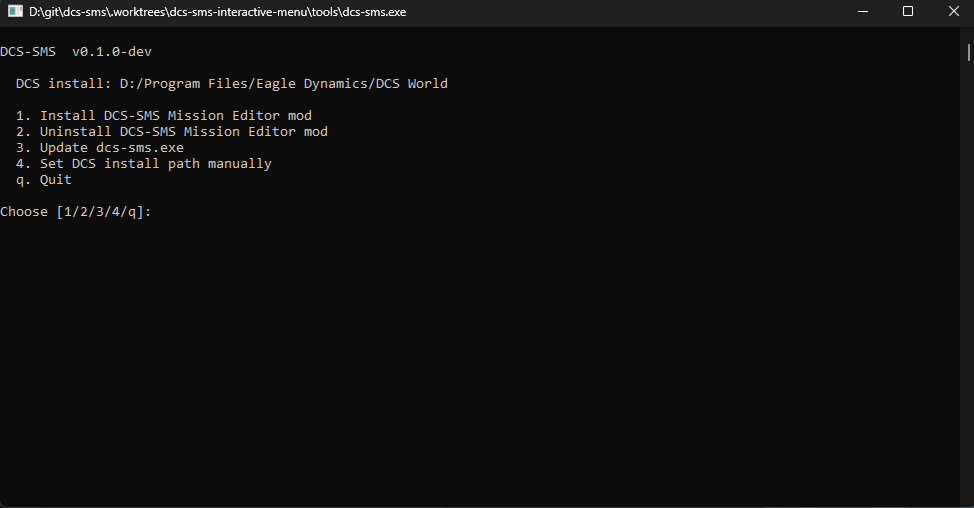
Either way, the .exe auto-detects your DCS install (or you can paste the path via menu option 4), copies the embedded ME-mod Lua files into
<DCS install>/MissionEditor/modules/dcs_sms_me/, and patchesMissionEditor.luawith a single bootstrap line bracketed by sentinel comments for clean removal. -
Restart DCS (a full restart, not just closing the Mission Editor — the lua files load once at DCS start). When you open the Mission Editor you should see DCS-SMS in the top menu bar.
Update
From an existing install, run:
dcs-sms.exe update
dcs-sms.exe install-me-mod
The first command pulls the new dcs-sms.exe from this release in place; the second re-applies the bundled ME-mod files. Idempotent — the patch line in MissionEditor.lua stays put, the Lua files get overwritten. After updating, fully quit DCS and start it again.
(dcs-sms.exe update requires you already have a dcs-sms.exe from a previous install. First-time users follow the Install steps above instead.)
Uninstall
dcs-sms.exe uninstall-me-mod
Removes the patch block from MissionEditor.lua and deletes the modules directory.
Alternative install (OVGME / no .exe)
If your browser blocks dcs-sms.exe as "unsigned" and you can't unblock it, an OVGME-friendly zip is also attached to this release: dcs-sms-me-mod-vX.Y.Z.zip.
- Download the zip and extract it.
- Drop the
dcs-sms-me-modfolder into your OVGME mods directory; enable it in OVGME. - Open
<DCS install>/MissionEditor/MissionEditor.luain a text editor and append this single line at the end of the file:require('dcs_sms_me.init')— then save. - Restart DCS.
Full instructions are in the README.md inside the zip. The .exe path is still recommended where possible — it patches MissionEditor.lua for you and supports dcs-sms.exe update / dcs-sms.exe uninstall-me-mod.