spank is a motion-triggered sound app. Tap, slap, or jolt a device, and it detects the impact from accelerometer data and plays a random sound from the selected pack.
The primary experience is the mobile app for Android phones and supported iPhones. The repository also includes the original Linux CLI for laptops that expose accelerometers through Linux IIO.
- Mobile app in
mobile/:- Android-first Flutter app
- Supported iPhone build target: iOS 12+
- Native accelerometer and audio bridges on both platforms
- Bundled
pain,halo, andsexysound packs - Foreground monitoring while the app is open
- Android: optional Call Mode keeps monitoring active while backgrounded during calls, with Private (earpiece-only) and Shared (loudspeaker) audio routing
- Linux CLI:
- Raw accelerometers exposed through
/sys/bus/iio/devices/iio:device* - CLI commands for monitoring, diagnostics, and sensor listing
- Sample
systemd --userunit for login-time autostart
- Raw accelerometers exposed through
This repository is no longer just a Lenovo/Linux experiment. The mobile app is now the main path for turning older phones into slap or tap triggered sound devices, while the Linux CLI remains available for laptop hardware that exposes compatible sensors.
- Mobile build and run guide:
docs/mobile-build-run.md - Mobile app notes:
mobile/README.md - Linux CLI entrypoint:
cmd/spank/main.go
Linux desktop orientation helpers such as iio-sensor-proxy are useful for screen rotation, but they do not provide the continuous raw XYZ acceleration stream needed for impact detection. spank reads the kernel IIO/sysfs interface directly.
spank run
spank list-sensors
spank doctorcd /path/to/spank
go build ./cmd/spank
./spank doctor
./spank list-sensors
./spank run --dry-runIf auto-detection picks the wrong device:
./spank run --sensor /sys/bus/iio/devices/iio:device0cd /path/to/spank/mobile
flutter test
flutter run -d androidThe mobile app keeps the detector logic in Dart and uses platform-native code only for:
- accelerometer sampling
- local settings persistence
- low-latency playback of bundled MP3 assets
Current mobile assumptions:
- Android is the primary target
- iPhone support is configured for iOS 12+
- Android supports background monitoring via Call Mode; iPhone monitoring is foreground-only
- Older devices may need threshold tuning in the in-app Tap Test screen
For full Android and iPhone setup, build, install, and run instructions, see docs/mobile-build-run.md.
Configuration is loaded in this order:
- Built-in defaults
- Config file at
$XDG_CONFIG_HOME/spank/config.jsonor~/.config/spank/config.json - Environment variables
- CLI flags
Supported settings:
sensorthresholdsample_intervalcooldownsoundvolumeplayer_cmdlog_leveldry_run
Available sound values:
defaultorpainhalosexy
Environment variable forms:
SPANK_SENSOR=/sys/bus/iio/devices/iio:device0
SPANK_THRESHOLD=1.8
SPANK_SAMPLE_INTERVAL=40ms
SPANK_COOLDOWN=1200ms
SPANK_SOUND=default
SPANK_VOLUME=1.0
SPANK_PLAYER_CMD="ffplay -nodisp -autoexit -loglevel quiet %s"
SPANK_LOG_LEVEL=debug
SPANK_DRY_RUN=true
Because the bundled packs are MP3 files, spank expects an MP3-capable player such as ffplay, mpv, mpg123, mpg321, play, or vlc.
Copy the sample unit:
mkdir -p ~/.config/systemd/user
cp packaging/spank.service ~/.config/systemd/user/spank.service
systemctl --user daemon-reload
systemctl --user enable --now spank.service
Adjust the ExecStart path and flags in the unit file as needed.
- Most laptops that work will expose a 3-axis accelerometer under
/sys/bus/iio/devices. - Access to the sysfs files is usually readable as an unprivileged user; if not,
spank doctorwill show the failure. - Some laptops expose multiple motion sensors.
spank list-sensorsshows ranking reasons and helps choose the correct one. - If no suitable accelerometer exists,
spankexits cleanly with a diagnostic instead of pretending support.
If spank doctor reports that /sys/bus/iio/devices does not exist, the issue is usually below the application layer:
journalctl -k -b | rg 'iio|sensor|accel|gyro|hid'
sudo modprobe industrialio hid_sensor_hub hid_sensor_accel_3d hid_sensor_gyro_3d
find /sys/bus/iio/devices -maxdepth 1 -type d
If those commands still do not produce any iio:device* entries, your laptop probably does not expose a Linux-readable accelerometer. Repository investigation on a ThinkPad T14 Gen 1 AMD (20UD) running Ubuntu 24.04 and kernel 6.17.0 found no usable accelerometer on IIO, HID sensor, I2C, or SPI buses. Lenovo's T14 Gen 1 AMD spec sheet also does not advertise an accelerometer, so that platform should currently be treated as unsupported unless a future BIOS or kernel path surfaces one.
go test ./...
go build ./cmd/spank
cd mobile && flutter test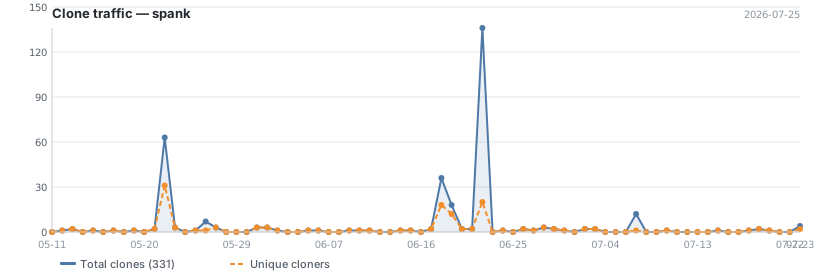
Updated daily. Total and unique cloners over the last 14 days.