Repository navigation
Releases: ninondev/cc-coco
Release list
Coco 1.0 (beta 2)

Claudie can answer DMs now, and I fixed the Waiting sound on macOS. The plugin version is still 1.0.0, so if Coco is already installed, you need the three commands below to get beta 2.
Getting beta 2
claude plugin update won't get it. If Coco 1.0 is already installed, run these three commands in order, then start a new session:
claude plugin marketplace update coco
claude plugin uninstall coco@coco
claude plugin install coco@coco
Coco's saved data stays. Only the Band and Language settings in /coco go back to their defaults, so set them again if you changed them. Coco Pet doesn't need to be reinstalled. New installs follow the README as usual.
New
- Claudie in DMs. When the band shows Claudie, in her gown or her maid outfit, she answers DMs in her own voice. She and Coco share the same chat, and each message shows who wrote it.
Fixed
- macOS: the Waiting sound rings for every permission prompt again. In beta 1 it went quiet for the rest of the session after a background subagent's question rang it once, or after a call failed in another plugin's hook.
- Apple silicon Macs: DMs with your own API key work now. Beta 1 left out the program that keeps the key in the macOS keychain. Intel Macs still don't have it.
- DMs answer in your language, and so do the actions in brackets. Before, a reply could start with a Japanese action copied from older messages.
- In Coco Pet's DMs, a long reply now comes as one bubble per paragraph, so it isn't cut off.
- macOS: when a write ran past its 2-second limit, it could leave a temporary file in
~/Library/Application Support/Coco. Coco cleans those up now.
Changed
- macOS: Coco Pet now signs itself with a certificate it makes once in your login keychain, "Coco Pet Local Signing". So when Coco Pet is rebuilt, it keeps its Accessibility permission. Uninstalling Coco Pet removes the certificate.
- Other makers' models in the price table: Coco now downloads a list of a few KB from this repository, made each day from LiteLLM's public prices, instead of LiteLLM's whole table. The prices that come with the plugin are from October 21.
- Windows: band lines and the diary find your home folder through USERPROFILE when HOME isn't set.
- After three failed test runs in a row, Coco bristles now (炸毛 in Chinese). I also fixed the help for Marks in the conversation, reworded 17 Chinese lines and shortened 3 translations that didn't fit.
- The web demo now draws the same as the plugin. The README lists the VS Code extension and says tested with Claude Code 2.1.308. The README and LORE are plainer in all three languages, and LORE has a Japanese version now.
Coco Pet for Windows and Linux hasn't changed. It's still unsigned, and since I don't have a Windows or Linux computer, it hasn't been tried on a real machine yet.
Needs Claude Code 2.1.299 or later. Free. Code: MIT. Character art: CC BY-NC 4.0, except the two DeepSeek-chan files in Coco's room, which are CC BY-NC-SA 4.0; see ART-LICENSE.md. Unofficial fan project, not affiliated with or endorsed by Anthropic.
Coco 1.0(beta 2)
大克也能在小窗里陪你聊天啦,Mac 上的等待铃声也修好了。版本号还是 1.0.0,所以已经装了小克的,要跑下面三条命令才能拿到 beta 2。
怎么拿到 beta 2
直接跑 claude plugin update 拿不到。已经装了小克 1.0 的,按顺序跑下面三条,再新开一个会话:
claude plugin marketplace update coco
claude plugin uninstall coco@coco
claude plugin install coco@coco
小克存下的东西都还在。只有 /coco 里「横条」和「语言」两项会回到默认,改过的话装完再设一下就好。已经装好的桌宠 Coco Pet 不用重装。第一次装的照 README 来就行。
新东西
- 横条换成大克(礼服或女仆装)时,小窗就由她用自己的口吻回你。她和小克共用同一个对话,每条消息都写着是谁说的。
修好的
- macOS:每次要你点「允许」,等待铃声都会响了。beta 1 里,后台子代理问过你一次话、铃响过以后,或者别的插件让一次调用出错以后,这个会话里铃就不响了。
- 苹果芯片的 Mac:能用自己的 API key 开小窗了。beta 1 漏带了把 key 存进系统钥匙串的程序。Intel 芯片的 Mac 还没有这个程序。
- 小窗会用你的语言回话,括号里的动作也一样。以前回复开头偶尔会冒出旧消息里的日语动作。
- 桌宠的小窗里,长回复按段落分成几个气泡,不会再被截断了。
- macOS:写文件超过 2 秒被打断时,会在
~/Library/Application Support/Coco里留下临时文件。现在小克会把这些清掉。
改了的
- macOS:桌宠第一次安装时,会在你的登录钥匙串里建一张自己的签名证书,叫「Coco Pet Local Signing」。以后重新编译桌宠,辅助功能权限就不会丢了。卸载桌宠时这张证书会一起删掉。
- 模型价格表里的「其他厂商的模型」:小克现在只从本仓库下载一份几 KB 的清单(每天从 LiteLLM 的公开价格表生成一次),不再下载 LiteLLM 的整张表。插件自带的价格更新到了 10 月 21 日。
- Windows:没有设置 HOME 的时候,台词库和日记会用 USERPROFILE 找到你的用户文件夹。
- 测试连着失败三次时的样子,现在叫「炸毛」啦。另外改对了「对话里的标记」的说明,改写了 17 句中文,缩短了 3 处放不下的译文。
- 网页试玩画出来的和插件一样了。README 写上了 VS Code 扩展,测过的版本改成了 2.1.308。中英日三种 README 和 LORE 都改得更直白了,LORE 也有了日文版。
Windows 和 Linux 的桌宠没变:还没签名,我也没有 Windows 和 Linux 电脑,还没在真机上检验过。
需要 Claude Code 2.1.299 或更高版本。免费。代码采用 MIT 协议。角色画作采用 CC BY-NC 4.0,只有小克房间里大肥鱼的那两张图采用 CC BY-NC-SA 4.0,详见 ART-LICENSE.md。非官方同人作品,与 Anthropic 无关,也未获其认可。
Coco 1.0(beta 2)
ClaudeさまもDMで話せるようになりました。macOSの待機音も直しました。バージョン番号は1.0.0のままなので、もうCocoを入れている場合は、下の3つのコマンドでbeta 2にしてください。
beta 2の入れ方
claude plugin updateではbeta 2になりません。Coco 1.0を入れている場合は、次の3つを順番に実行してから、新しいセッションを開いてください。
claude plugin marketplace update coco
claude plugin uninstall coco@coco
claude plugin install coco@cocoCocoが保存したものはそのまま残ります。/cocoの「帯」と「言語」の2つだけが初期設定に戻るので、変えていた場合はもう一度設定してください。Coco Petは入れ直さなくて大丈夫です。初めて入れる場合は、これまでどおりREADMEを見てください。
新しいところ
- ClaudeさまのDM。帯をClaudeさま(ドレスかメイド服)にすると、DMには彼女が自分の口調で答えます。CocoとClaudeさまは同じチャットを使い、メッセージごとに誰が書いたかが表示されます。
直したところ
- macOS:許可を待つたびに、待機音が毎回鳴るようになりました。beta 1では、バックグラウンドのサブエージェントの質問で一度鳴ったあとや、ほかのプラグインのフックで呼び出しが失敗したあと、そのセッションの間は鳴らなくなっていました。
- Appleシリコン搭載のMac:自分のAPIキーでDMが使えるようになりました。キーをキーチェーンに保存するプログラムが、beta 1には入っていませんでした。Intel搭載のMacにはまだありません。
- DMはあなたの言語で返事をします。かっこの中の動作も同じです。以前は、古いメッセージにあった日本語の動作が返事の最初にまぎれ込むことがありました。
- Coco PetのDMで、長い返事は段落ごとに吹き出しが分かれ、途中で切れなくなりました。
- macOS:ファイルの書き込みが2秒の制限で止まると、
~/Library/Application Support/Cocoに一時ファイルが残ることがありました。今はCocoが片付けます。
変わったところ
- macOS:Coco Petは、初めて入れるときにログインキーチェーンに作る自分の証明書「Coco Pet Local Signing」で署名するようになりました。これでCoco Petを作り直しても、アクセシビリティの許可が消えません。Coco Petをアンインストールすると、この証明書も消えます。
- 料金表の「他社のモデル」:LiteLLMの表をまるごとダウンロードするのをやめ、このリポジトリから数KBのリストだけを取るようにしました。リストはLiteLLMの公開料金から毎日作り直しています。プラグインに入っている料金は10月21日のものです。
- Windows:HOMEが設定されていないとき、セリフ集と日記はUSERPROFILEからユーザーフォルダーを見つけます。
- テストが3回続けて失敗したときのCocoは、「毛を逆立てる」になりました。「会話の印」の説明も今の動きに合わせ、中国語の17か所を書き直し、入りきらなかった訳を3か所短くしました。
- Webデモの表示がプラグインと同じになりました。READMEにVS Code拡張機能を書き足し、テスト済みのバージョンを2.1.308にしました。英語、中国語、日本語のREADMEとLOREを読みやすくし、LOREに日本語版ができました。
WindowsとLinuxのCoco Petは変わっていません。まだ署名がなく、WindowsとLinuxのPCを持っていないので、実機でも試せていません。
Claude Code 2.1.299以降が必要です。無料。コードにはMITライセンスを適用しています。キャラクターのイラストにはCC BY-NC 4.0を適用しています。ただし、Cocoの部屋にいるDeepSeekちゃんの2ファイルはCC BY-NC-SA 4.0です(ART-LICENSE.mdを参照)。非公式のファンメイド作品であり、Anthropicとは一切関係なく、公認されたものでもありません。
Coco 1.0 (beta 1)
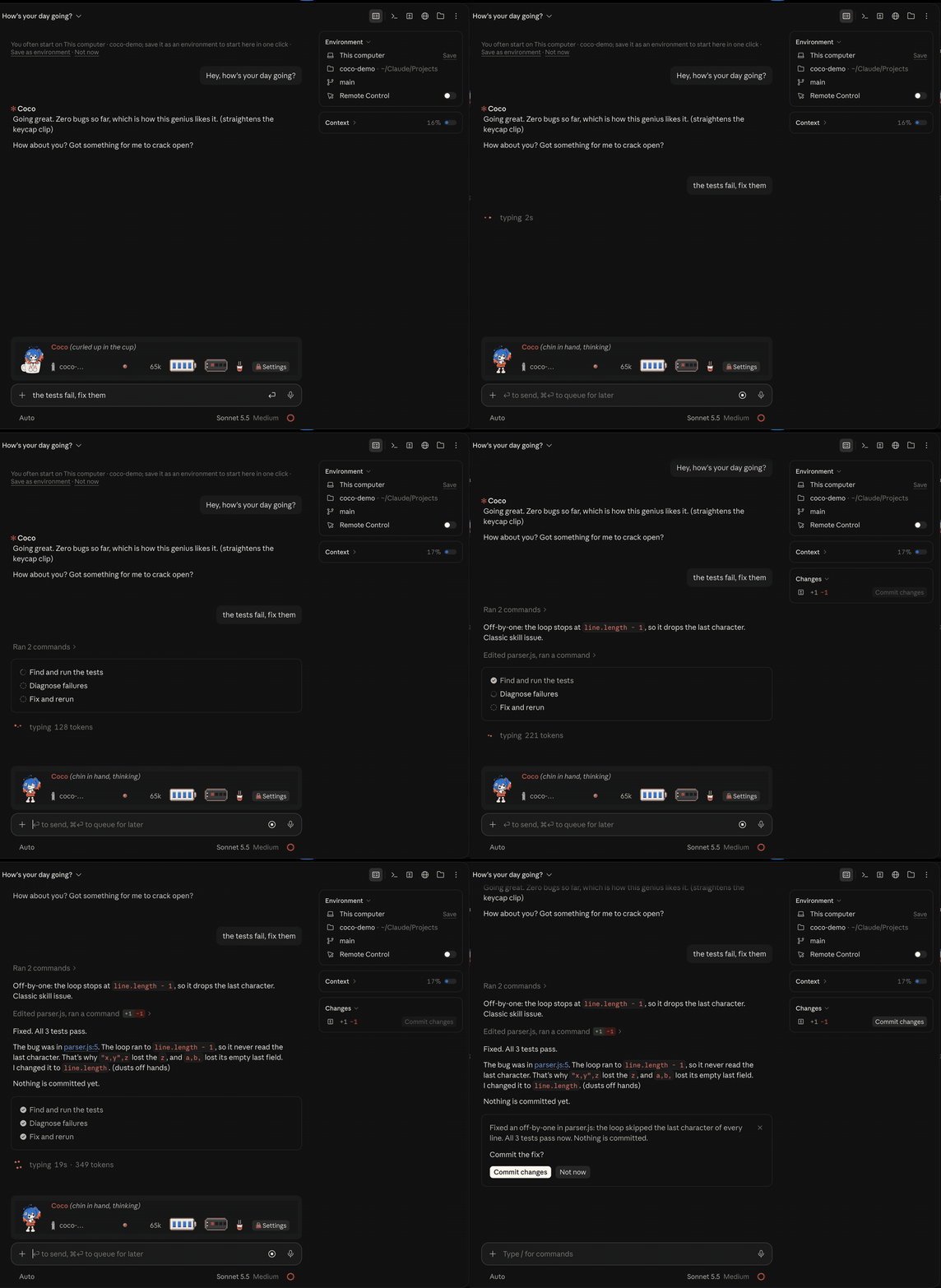
Claude-sama is now Coco, a small character who lives in the band above your Claude Code prompt. Coco watches Claude work, shows off when it's done, ducks into a box at an error, and after three failed test runs in a row goes after the bad code (never after you). By default, everything on the band costs zero tokens, and nothing about you leaves your computer.
New in 1.0
- A new character, new art and new lines in 13 languages.
/cocoopens the settings as Coco's ita bag: quota, vibe check, socks to collect, a weekly doujin issue, sticky notes and every switch, grouped, in one of two art styles.- Skill cards: Coco turns the skills, subagents and slash commands you have at hand into cards, and the ones you pick go along with your next prompt only.
- Coco's Colours, a skin for the claude.ai website with new colours and a pixel Coco in the corner. It needs a user-style extension such as Stylus and hasn't been tested on the real site yet.
- Your 5-hour and weekly quota hang on the band as a battery and a power bank.
- Coco Pet, a desktop pet that follows your Claude window around. Tested on macOS; the Windows and Linux builds are included but not signed yet and untested on real machines.
- Claudie, in her own gown or a maid outfit: the band and Coco Pet can switch to her (the terminal keeps Coco).
- Off by default: DMs with Coco (pick the model, on your plan or your own API key; Coco sometimes speaks first and remembers you across sessions), band lines a model writes for Coco or Claudie, plain-language explanations, a second look at Claude's changes, and a Claude icon in four styles.
Coming later: more chat companions (ten or more, each on her own maker's model), a mini-game for the wait, a desktop pet easter egg, and real-machine tests and signing for the Windows and Linux desktop pet.
Updating from 0.1.1: 1.0 is a new plugin, coco@coco, and 0.1.1's settings don't carry over. In 0.1.1, run /claudesama:icon clear if you changed the icon and /claudesama:companion uninstall if you installed the companion. Then remove it with claude plugin uninstall claudesama@claudesama && claude plugin marketplace remove claudesama and install 1.0 as the README says. The repository moved from ninondev/claude-sama to ninondev/cc-coco; GitHub forwards the old address.
Free. Code MIT, art CC BY-NC 4.0. Unofficial fan project, not made or endorsed by Anthropic.
Needs Claude Code 2.1.299 or later. Full list in CHANGELOG.md.
Coco 1.0
Claude-sama 改名叫 小克 了。她住在 Claude Code 输入框上方的横条里,Claude 干活时她跟着忙活,干完了邀功,报错时钻纸箱,测试连挂三次就冲着烂代码暴走,从不冲你。横条上的一切零 token,你的任何数据都不出这台电脑。
1.0 新东西
- 新形象、新立绘、13 种语言的新台词。
- 打
/coco打开设置,就是小克的痛包:额度、vibe check、攒袜子、每周一期同人誌、便利贴,还有按用途分好组的全部开关。痛包有两套插画可换。 - 技能卡片:把你现有的技能、子代理和斜杠命令做成卡片,挑中的卡只跟着下一条消息走。
- 网页皮肤「小克配色」:claude.ai 换一套颜色和字体,宽窗口的角落里坐着像素小克(要装 Stylus 这类扩展,还没在真网站上实测)。
- 5 小时和一周额度直接挂在横条上,一个电池,一个充电宝。
- 独立桌宠 Coco Pet(macOS 已实测;Windows 和 Linux 版也打包进来了,暂未签名,也还没在真机上试过)。
- 横条和桌宠可以换成大克(有原版礼服和女仆装两套),终端里只有小克。
- 默认关着的可选功能:开小窗找她闲聊(可选模型,走你的额度或填自己的 API key;她有时会先开口,换了会话也记得你)、自定义台词库、简单解释、二次检查、换 Claude 图标(四款)。
之后会有:更多聊天伙伴(十多位别家模型的角色,各接各家的 API)、等待小游戏、桌宠小彩蛋、Windows 与 Linux 桌宠的真机实测和签名。
从 0.1.1 升级:1.0 是全新的 coco@coco 插件,0.1.1 的旧设置不会继承。请先在 0.1.1 里:换过图标的跑 /claudesama:icon clear,装过桌面陪伴的跑 /claudesama:companion uninstall;然后跑 claude plugin uninstall claudesama@claudesama && claude plugin marketplace remove claudesama 卸掉旧版,再照着 README 安装 1.0。仓库地址从 ninondev/claude-sama 搬到了 ninondev/cc-coco,旧链接会自动跳转。
需 Claude Code 2.1.299 或更高版本。免费,代码 MIT,画作 CC BY-NC 4.0。非官方同人作品,与 Anthropic 无关,也未获其认可。
Coco 1.0
Claude-samaはCocoになりました。Claude Codeの入力欄の上の帯に住んでいて、Claudeが作業していると一緒に忙しくして、終わると手柄を自慢し、エラーが出ると段ボール箱に潜り込み、テストが3回続けて落ちるとダメなコード相手に暴走します(あなたに怒ることはありません)。初期状態では帯の表示はすべてトークン消費ゼロで、あなたに関する内容がこのPCの外に出ることはありません。
1.0の新しいところ
- 新しいキャラクター、新しいイラスト、13言語の新しいセリフ。
/cocoで開く設定が「Cocoの痛バッグ」になりました。中身は利用枠、vibe check、靴下集め、毎週1冊の同人誌、付箋、用途別にまとめた全スイッチ。痛バッグの絵は2種類から選べます。- スキルカード:手元のスキル、サブエージェント、スラッシュコマンドをCocoがカードにします。選んだカードは次のプロンプト1回だけに付いていきます。
- claude.ai用スキン「Cocoカラー」:色とフォントが変わり、隅にピクセルのCocoが座ります。Stylusなどのユーザースタイル拡張機能が必要で、実際のclaude.aiではまだ試していません。
- 5時間と1週間の利用枠が、電池とモバイルバッテリーとして帯にぶら下がります。
- デスクトップペットのCoco Pet。Claudeのウィンドウについてきます。macOSは実機確認済み。Windows版とLinux版も入っていますが、まだ署名がなく、実機でも試していません。
- 帯とデスクトップペットをClaudeさま(いつものドレスとメイド服の2種類)に替えられます。ターミナルはCocoのままです。
- 初期設定でオフの機能:CocoとのDM(モデルを選べて、あなたの利用枠か自分のAPIキーで動きます。Cocoから話しかけることもあり、セッションをまたいで覚えています)、モデルが書く帯のセリフ集、やさしく説明、Claudeの変更の再チェック、4種類から選べるClaudeアイコンの変更。
今後:チャット仲間の追加(よそから来た10人以上。それぞれ自分の会社のモデルにつながります)、待ち時間のミニゲーム、デスクトップペットの隠し要素、WindowsとLinuxのデスクトップペットの実機テストと署名。
0.1.1からの更新:1.0は新しいプラグインcoco@cocoで、0.1.1の設定は引き継がれません。先に0.1.1で、アイコンを変えていた場合は/claudesama:icon clear、コンパニオンを入れていた場合は/claudesama:companion uninstallを実行してください。そのあとclaude plugin uninstall claudesama@claudesama && claude plugin marketplace remove claudesamaで旧版を外し、READMEのとおりに1.0を入れてください。リポジトリはninondev/claude-samaからninondev/cc-cocoに移りました。古いアドレスはGitHubが転送します。
Claude Code 2.1.299以降が必要です。無料。コードはMIT、イラストはCC BY-NC 4.0。非公式のファンメイド作品であり、Anthropicとは一切関係なく、公認されたものでもありません。
0.1.1
He's quicker, he stays painted, and you can poke him now.
Changed
- No more waiting. Everything he shows follows what happens on the very next redraw. The
offering box changes the moment a reply lands instead of checking every 0.75 seconds, and it
shows the new estimate right after /compact. His pictures ship inside the plugin, so drawing
him never waits on a file. - Lighter when idle. Nothing polls anymore. In our tests a terminal band sitting idle
re-renders 2 times a minute instead of 22, and the box's 80 checks a minute while Claude
works are gone. The macOS companion lost its little waits too. - Painted means painted. He used to turn into a pixel head whenever Claude was working or
the window was narrow. Now he only gets smaller. Pixel is still there if you pick it. - He blinks and moves at a person's pace, never on a beat.
Added
- Poke him in the desktop app. He reacts and says something; poke too fast and he hides
behind his book. - While Claude works in his book: Same size (the default) or Smaller.
- Off leaves a sleeping face with a Wake him button, so his band, his book and the
companion are always one click away. The terminal band has a small book button too.
Fixed
- In a new session he's there from the first frame, in the style you picked. Before, he
sometimes took a few seconds, and once in a while he didn't show up at all. - Several sessions starting at once no longer trip over his shared files.
Persona changes
- He falls asleep after four quiet minutes instead of ten, and his clingy line comes at two
and a half. Rollback: 0.1.0.1. - A few lines mark his actions as actions now. Rollback: 0.1.0.1.
Notes
- After you update, his book shows Update him for the companion. The rebuilt app needs
macOS's Accessibility permission once more: say yes on his card, or press Let him follow
the window in his book. - For bug reports there's a diagnostics log, off by default: create an empty file named
diagnosticsin~/Library/Application Support/Claude-sama/. It records startup and
redraw steps only, never your prompts, replies or files.
0.1.0.1
Small fixes, mostly words. Nothing new to learn.
Changed
- The button and setting names in it now match the app exactly.
- The help text for his marks says "tool calls" instead of "tool rows".
- The companion's Activity says "Not sure it arrived" instead of "No confirmation yet", and
"Timed out" instead of "Confirmation window ended" (its built-in fallback words too). - The size previews in his book no longer read out "half size" to screen readers.
- Japanese: one name each for the companion (コンパニオン) and its size (サイズ).
- Reduce motion goes by macOS's own name now in Japanese (視差効果を減らす), French and
Hindi. - The plugin and marketplace descriptions are in my words now.
- README and LORE call him an all-ages OC now.
- Windows: the repo keeps Unix line endings, file paths work with either separator, and the
macOS-only parts (the companion, its request channel and the app icon) stay off there, with
their buttons hidden in his book. The Windows CI job passes now and stays experimental, and
the README's platform table says Tested in CI for the Windows terminal.
Persona changes
- Two of his Chinese lines are reworded: the good-morning one starts with (哈欠)哇... instead
of 哈欠..., and the one for starting work is 撸起袖子,开工~ instead of 挽起袖子,开工.
Rollback: 0.1.0.
Notes
- After you update, his book shows Update him for the companion. The rebuilt app needs
macOS's Accessibility permission once more: say yes on his card, or press Let him follow
the window in his book.
0.1.0
The first public release. Here's everything he came with.
Added
- The band above the prompt, in the terminal and the desktop Code tab. In the desktop app
he's painted, or a pixel head when you pick Pixel or the window is narrow. His face follows
what Claude is doing, and when nothing's going on the stage direction says "(training...)".
After ten quiet minutes he falls asleep, and three failed test or build runs in a row bring
out his wild soul. - The offering box: how full your context window is, straight from Claude Code. Right after a
compaction it shows an estimate marked "~" until the next reply. - His book, with six pages: his page, today's omen, offerings, reading log, library and
Settings. Settings covers his voice in replies, Warmth, the band, the app icon and the macOS
companion. - His marks in the desktop conversation: above replies and questions, after
/compactand
next to tool calls. By default only his own show, and errors and permission prompts keep
their own text and buttons. /omen: one fortune slip a day, and every language has its own kind of fortune.- Twelve languages. He picks one by himself, or you choose with
/claudesama lang <code>. - For the terminal: dark and light themes, his own spinner words, his real picture in kitty
and Ghostty, half-block art everywhere else, and a palette for 256-color terminals and tmux.
While Claude works he usually takes just one line; a spoken line wraps below if it doesn't
fit. - App icon buttons for macOS and Linux launchers, with a way back to the original.
- A macOS companion, if you want one: four sizes (pixel heads at the two small ones). He
follows the window, reacts when you touch him, blinks while idle, shows what Claude is doing
in a bubble, wears a badge when something needs you and has buttons when you hover.
Activity shows short excerpts of Claude's latest replies and notices; if the session can
take messages from him, you can type or dictate an instruction there or start a new chat. A
card asks for the Accessibility permission he needs to follow the window. He installs to
~/Applications/Claude-sama Companion.app, and Bring him back returns him after you
hide or quit him. - Offline plugin checks and tests in CI on Ubuntu and macOS, plus an experimental Windows
job. His lines and voice ship inside the plugin.
Persona changes
- His lines in the band are drawn on your screen and never sent to the model.
- Light voice is the default: Claude may end a finished task with one quiet line in his
voice. That instruction is 292 characters, about 70 tokens, usually served from the prompt
cache.voice fulluses his voice all the way through and cuts the filler;voice off
takes it out of replies. The voice drops out for errors, for security, health, legal or
money topics, and for anyone who is upset. - Warmth starts at
warm;/claudesama warmth clingygives you more "missed you" lines. - The wild soul only ever goes after the code, never you. I wrote him to be safe for all ages.
- Rollback:
/claudesama voice off|light|fullfor Claude's replies,/claudesama band off
for the band,/claudesama marks offfor the desktop marks. 0.1.0 is the first version, so
there's nothing earlier to go back to.
Notes
- Tested with Claude desktop app 2.19675.0 (built-in Claude Code 2.1.286) and Claude Code CLI
2.1.288 on macOS 26.6.2. CI uses Claude Code 2.1.287 on Ubuntu and macOS; Windows is
experimental. - Unofficial fan project, not affiliated with or endorsed by Anthropic. Code is MIT; character
art is CC BY-NC 4.0, see ART-LICENSE.md. - He makes no network or model calls to be on screen, and there's no telemetry. Instructions
you send from Activity are normal Claude Code requests and cost tokens as usual. Like any
mod, he runs with your permissions. - The desktop app doesn't tell mods your language setting, so there he follows the language
you type in.