The surface of Mars can be modelled by a rectangular grid around which robots are able to move according to instructions provided from Earth. The program determines each sequence of robot positions and reports the final position of the robot. A robot position consists of a grid coordinate (a pair of integers: x-coordinate followed by y-coordinate) and an orientation (N, S, E, W for north, south, east, and west). A robot instruction is a string of the letters "L", "R", and "F" which represent, respectively, the instructions:
- Left: the robot turns left 90 degrees and remains on the current grid point.
- Right: the robot turns right 90 degrees and remains on the current grid point.
- Forward: the robot moves forward one grid point in the direction of the current orientation and maintains the same orientation.
Since the grid is rectangular and bounded, a robot that moves "off" an edge of the grid is lost forever. However, lost robots leave a robot "scent" that prohibits future robots from dropping off the world at the same grid point. The scent is left at the last grid position the robot occupied before disappearing over the edge. An instruction to move "off" the world from a grid point from which a robot has been previously lost is simply ignored by the current robot.
The first line of input is the upper-right coordinates of the rectangular world, the lower-left coordinates are assumed to be 0, 0. The remaining input consists of a sequence of robot positions and instructions (two lines per robot). A position consists of two integers specifying the initial coordinates of the robot and an orientation (N, S, E, W), all separated by whitespace on one line. A robot instruction is a string of the letters "L", "R", and "F" on one line.
Each robot is processed sequentially, i.e., finishes executing the robot instructions before the next robot begins execution. The maximum value for any coordinate is 50. All instruction strings will be less than 100 characters in length.
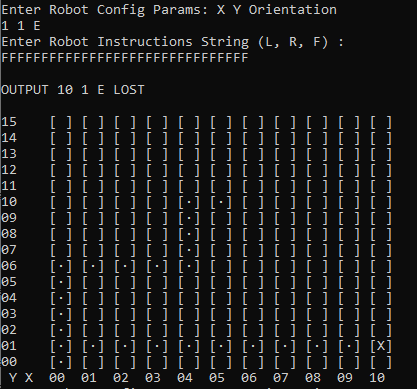
For each robot position/instruction in the input, the output indicates the final grid position and orientation of the robot. If a robot falls off the edge of the grid the word "LOST" will be printed after the position and orientation. In addition, a basic ASCII map will be drawn showing the current situation of the map, including explored points and lost robots.
The requirement has been implemented by a .Net Core console application which is able to run in docker container (Windows image) as well as run it directly in a Windows machine. In addition to the Console application, a REST service has been implemented in order to serve the Maps and Robots operations.
- MarsMaps: .Net Core Console application. Main entry point which runs a CLI to interact.
- MarsMaps.Entities: Entities involved in the model.
- MarsMaps.Persistence: Layer for persist the data to database. LiteDB no-sql has been used as database. CRUD operations implemented for maps and robots.
- MarsMaps.REST: Web API project that exposes two controllers: MarsMap and Robot. CRUD operations implemented.
- MarsMaps.Business: Business Core for MarsRobots.
- MasrMasp.UnitTest: Some basic Unit Test based on MsTEst project. Not so much tests, just as ilustration.
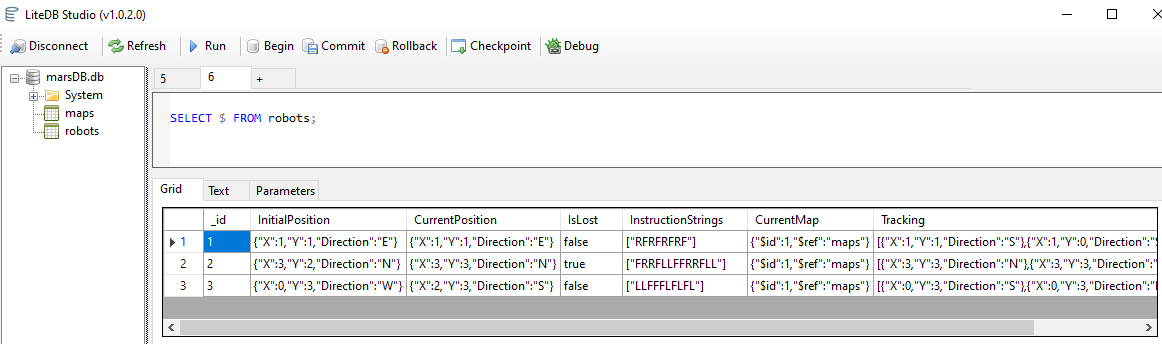
- No-SQL peristence through LiteDB
Note: MarsDB.db file is created after first run. You can query database with LiteDB Studio, included into release or by downloading from https://github.com/mbdavid/LiteDB.Studio/releases/tag/v1.0.2
-
In-CLI map draw
-
Web API RESTFull ready library to deploy. (View source code)
You have several ways to run the solution:
- Download latest release from this repository releases.
https://github.com/nitrocked/MarsRobots/releases/tag/v1.0.0-release
- Extract the files from zip.
- Execute MarsRobots.console.exe
-
Clone the repository https://github.com/nitrocked/MarsRobots.git
git clone https://github.com/nitrocked/MarsRobots.git -
Enter the folder and open MarsRobots.sln with Visual Studio
-
Hit 'Ctrl + F5' to build and run the application.
'Switch to Windows containers' could be required to execute the container properly.
- Open you favourite local terminal / bash / command line
- Login
docker login- Pull the docker image from theklint/marsrobotsconsole
docker pull theklint/marsrobotsconsole- Run the image.
docker run -it theklint/marsrobotsconsole:latest exec MarsRobots.Console.exe