Lesson 13: Aspects
Our repository has a growing collection of rules and new tools to simplify their use. However, with the new rules, we have increasing complexity. As the graph grows larger and larger, we'll need new tools in our mental toolkit to navigate the larger problem space.
Back in Lesson 8, we added a new rule target //rules:one_hundred_twenty.
This used the rule named product to multiply all of its transitive dependencies, which equals 120.
Let's say we wanted to see all of the factors of that rule target.
Ultimately, we'd like to see something like:
In our case, our dependencies are multiplied together, so we might be able to use that information to get the answer we're looking for. Lesson 4 showed us how we can query all dependencies of a target. Let's start with that:
bazelisk query "deps(//rules:one_hundred_twenty)" --output=graph > visualizations/src/factors.gv
dot -Tpng < visualizations/src/factors.gv > visualizations/out/factors.png
Which renders as:
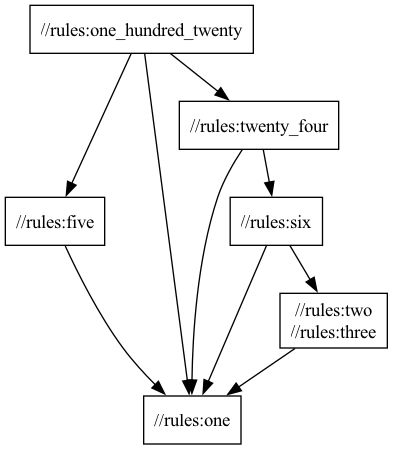
This shows us the dependency path, but if we consider the mathematical definition of factors, we're definitely missing information.
For example, //rules:twenty_four only has dependencies on //rules:six and //rules:one; and 6 times 1 is not 24.
If we look back at //rules:twenty_four, we can see the disconnect.
product(
    name = "twenty_four",
    number = 4,
    deps = [
        ":one",
        ":six",
    ],
)
In the above, we're using the number attribute to supply information directly to the rule outside of the dependency graph.
If we wanted the dependency graph to represent factors, we'd need a rule target for 4.
product(
    name = "four",
    deps = [
        ":two",
        ":two
    ],
)

product(
    name = "twenty_four",
    deps = [
        ":one",
        ":four",
        ":six",
    ],
)
Before fixing up the dependencies of //rules:twenty_four, let's try building //rules:four:
$ bazelisk build //rules:four

Starting local Bazel server (8.3.1) and connecting to it...
ERROR: ~/bite-sized-bazel/rules/BUILD:73:8: Label '//rules:two' is duplicated in the 'deps' attribute of rule 'four'
WARNING: Target pattern parsing failed.
ERROR: Skipping '//rules:four': Error evaluating '//rules:four': error loading package 'rules': Package 'rules' contains errors
ERROR: Error evaluating '//rules:four': error loading package 'rules': Package 'rules' contains errors
INFO: Elapsed time: 2.701s
INFO: 0 processes.
ERROR: Build did NOT complete successfully
If we read the output, we see the following: Label '//rules:two' is duplicated in the 'deps' attribute of rule 'four'
Adding the same dependency twice is an error.
Which means we'd need to represent four differently.
Let's try using the number attribute instead.
product(
    name = "four",
    number = 2,
    deps = [
        ":two",
    ],
)
And we'll try building the target again:
$ bazelisk build //rules:four

INFO: Analyzed target //rules:four (5 packages loaded, 9 targets configured).
INFO: Found 1 target...
Target //rules:four up-to-date:
  bazel-bin/rules/four.product
INFO: Elapsed time: 7.116s, Critical Path: 0.02s
INFO: 2 processes: 2 internal.
INFO: Build completed successfully, 2 total actions

$ cat bazel-bin/rules/four.product
4
We have a working build- so let's try visualizing it again:
bazelisk query "deps(//rules:one_hundred_twenty)" --output=graph > visualizations/src/factors_refactored.gv
dot -Tpng < visualizations/src/factors_refactored.gv > visualizations/out/factors_refactored.png
Which looks like:
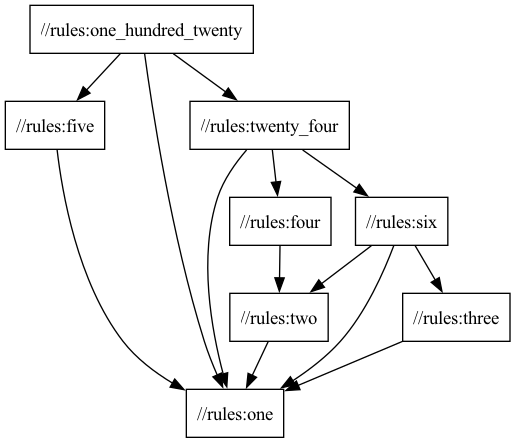
However, we still have a problem- 4 has two identical factors. The dependency graph still doesn't carry enough information for us to reconstruct everything we're interested in.
To begin, let's understand why Bazel didn't let us use the naive solution of:
product(
    name = "four",
    deps = [
        ":two",
        ":two
    ],
)
In the rule definition, we can view the type information of the deps attribute:
"deps": attr.label_list(doc = "A list of NumberInfo provider dependencies to multiply the number by."),The label_list method we used to define the attribute, has the following documentation:
Creates a schema for a list-of-labels attribute. This is a dependency attribute. The corresponding ctx.attr attribute will be of type list of Targets.
This attribute contains unique Label values. If a string is supplied in place of a Label, it will be converted using the label constructor. The relative parts of the label path, including the (possibly renamed) repository, are resolved with respect to the instantiated target's package.
For software dependencies, this is intuitive: Two identical instances of the same direct dependency would be redundant.
For transitive dependencies, like //rules:twenty_four depending upon //rules:two through both //rules:six and //rules:four, the constraint is relaxed.
Similar to GoLang's philosophy on formatting, Bazel has taken the approach that redundant information is incorrect.
While it prevents our naive solution, it also helps prevent our real rule targets from incidentally accumulating accidental complexity.
We're now at an important decision-making point: how important is understanding the factors of our product rules?
With what we've learned so far, we could:
- Extend the
productrule to carry this information along theNumberInfoprovider we wrote in Lesson 7. - Create a new rule and provider concerned only with factors, and author new rule targets to answer the question at hand.
Option 1 permanently increases the size and scope of both NumberInfo and product- making them more difficult to maintain in the future.
Option 2 is a lot of similar code and configuration, and would need to be replicated in parallel to any product rule targets we wanted to know the factors of.
Ultimately, the product rule already has the dependency information we care about, and we want to reuse it.
At the same time, if we don't know how important factorization is, we probably don't want to permanently embed that functionality into our build rules.
Thankfully, Bazel has Aspects, which gives us a third option.
BUILD files describe the source code, tests, and artifacts that make up a package- as well as the dependencies between those files, artifacts, and other packages.
We've been able to visualize those relationships with the dependency graph so far.
Aspects are similar to rules: they both perform several actions and return one or more providers.
However, aspects are attached to rule attributes, like deps, and not rule targets/macros.
Aspects follow the existing structure of our dependency graph and apply to all applicable transitive dependencies. They can also be queried independently of our normal targets, providing a lot of flexibility.
To begin accumulating numeric factors together, we'll need a provider for our aspect:
mkdir providers
touch providers/BUILD
touch providers/factor-info.bzl
First, we'll define what a FactorInfo is:
"""
A provider for communicating the factors of a number.
"""

FactorInfo = provider(
    doc = "Stores the factors for dependents",
    fields =
        {"factors": "The list of numeric factors of the product"},
)
We'll eventually want to provide documentation for this feature too, so we'll define a bzl_library for Stardoc to reference later.
"""
Providers for communicating information between dependencies.
"""

load("@bazel_skylib//:bzl_library.bzl", "bzl_library")

bzl_library(
    name = "providers_source",
    srcs = [
        "factor-info.bzl",
    ],
    visibility = ["//visibility:public"],
)
Like rules and macros, aspects are defined in .bzl files.
We'll follow this repository's general organizational scheme and make a directory for them.
mkdir aspects
touch aspects/BUILD
touch aspects/print_factors.bzl
For our first attempt at implementing an aspect to communicate factors, we'll follow what we did when we defined our first rule: seeing what we can print to STDOUT.
Our linter, buildifier, will discourage us from using the print function.
However, we're just experimenting for now, so we'll disable that warning in this context.
"""
Accumulates and prints the factors from attributes and dependencies.
"""

load("//providers:factor-info.bzl", "FactorInfo")

def _factors_impl(_target, ctx):
    factors_list = []

    # Our dependencies have already been factorized
    # We can copy that information to understand our context's prime factors
    for dep in ctx.rule.attr.deps:
        if FactorInfo in dep:
            factors_list.extend(dep[FactorInfo].factors)

    # Directly referencing an attribute which is undeclared by a rule target triggers an Error
    #     The `hasattr` method checks to make sure access is safe
    if hasattr(ctx.rule.attr, "number"):
        # The product rule takes the product of all dependencies, as well as the `number` attribute
        factors_list.append(ctx.rule.attr.number)

    # buildifier: disable=print
    print(ctx.label.name + ": " + str(sorted(factors_list)))

    # Like rules, we need to pass information down to our dependents
    return [FactorInfo(factors = factors_list)]

print_factors = aspect(
    doc = "Accumulates the factors from attributes and dependencies.",
    implementation = _factors_impl,
    attr_aspects = ["deps"],
)
Our aspect is a small program.
For each of a rule's deps, we'll find those that already provide FactorInfos and concatenate them together.
Then, if the rule we're attached to has an attribute named number, we'll append that value to the list of factors.
Before providing that information downstream, we'll sort and print it out.
We'll also be providing documentation about our aspects, so we'll create another bzl_library rule target:
"""
Aspects for communicating information across dependencies.
"""

load("@bazel_skylib//:bzl_library.bzl", "bzl_library")

bzl_library(
    name = "aspects_source",
    srcs = [
        "print_factors.bzl",
    ],
    visibility = ["//visibility:public"],
    deps = [
        "//providers:providers_source",
    ],
)
With all of that in place, we can begin using our aspect!
Unlike rules, aspects can be directly applied to the build command.
This gives us a quick mechanism to test and use aspects without coupling them to our critical build code.
Let's try it out:
$ bazelisk build //rules:one_hundred_twenty --aspects aspects/print_factors%print_factors

DEBUG: ~/bite-sized-bazel/aspects/print_factors.bzl:23:10: one: [1]
DEBUG: ~/bite-sized-bazel/aspects/print_factors.bzl:23:10: three: [1, 3]
DEBUG: ~/bite-sized-bazel/aspects/print_factors.bzl:23:10: two: [1, 2]
DEBUG: ~/bite-sized-bazel/aspects/print_factors.bzl:23:10: five: [1, 5]
DEBUG: ~/bite-sized-bazel/aspects/print_factors.bzl:23:10: four: [1, 2, 2]
DEBUG: ~/bite-sized-bazel/aspects/print_factors.bzl:23:10: six: [1, 1, 1, 1, 2, 3]
DEBUG: ~/bite-sized-bazel/aspects/print_factors.bzl:23:10: twenty_four: [1, 1, 1, 1, 1, 1, 1, 2, 2, 2, 3]
DEBUG: ~/bite-sized-bazel/aspects/print_factors.bzl:23:10: one_hundred_twenty: [1, 1, 1, 1, 1, 1, 1, 1, 1, 1, 2, 2, 2, 3, 5]
INFO: Analyzed target //rules:one_hundred_twenty (5 packages loaded, 14 targets configured).
INFO: Found 1 target...
Target //rules:one_hundred_twenty up-to-date:
  bazel-bin/rules/one_hundred_twenty.product
INFO: Elapsed time: 6.945s, Critical Path: 0.01s
INFO: 1 process: 1 action cache hit, 1 internal.
INFO: Build completed successfully, 1 total action
For each transitive dependency of //rules:one_hundred_twenty, as well as that rule target, we can see a list of all of its factors.
one: [1]three: [1, 3]two: [1, 2]five: [1, 5]four: [1, 2, 2]six: [1, 1, 1, 1, 2, 3]twenty_four: [1, 1, 1, 1, 1, 1, 1, 2, 2, 2, 3]one_hundred_twenty: [1, 1, 1, 1, 1, 1, 1, 1, 1, 1, 2, 2, 2, 3, 5]
While our rule targets did include dependencies on //rules:one more than necessary, we can see our output is remarkably close to what we were originally after:
Now that we've validated the aspect works the way we want it to, we'll create a version that does not print results out.
touch aspects/factors.bzlWhich is almost identical to our original implementation:
"""
Accumulates the factors from attributes and dependencies.
"""

load("//providers:factor-info.bzl", "FactorInfo")

def _factors_impl(_target, ctx):
    factors_list = []

    # Our dependencies have already been factorized
    # We can copy that information to understand our context's prime factors
    for dep in ctx.rule.attr.deps:
        if FactorInfo in dep:
            factors_list.extend(dep[FactorInfo].factors)

    # Directly referencing an attribute which is undeclared by a rule target triggers an Error
    #     The `hasattr` method checks to make sure access is safe
    if hasattr(ctx.rule.attr, "number"):
        # The product rules takes the product of all dependencies, as well as the `number` attribute
        factors_list.append(ctx.rule.attr.number)

    # Like rules, we need to pass information down to our dependents
    return [FactorInfo(factors = factors_list)]

factors = aspect(
    doc = "Accumulates the factors from attributes and dependencies.",
    implementation = _factors_impl,
    attr_aspects = ["deps"],
)
This aspect can also be applied from the command line:
$ bazelisk build //rules:one --aspects aspects/factors%factors

INFO: Analyzed target //rules:one (0 packages loaded, 1 target configured).
INFO: Found 1 target...
Target //rules:one up-to-date:
  bazel-bin/rules/one.product
INFO: Elapsed time: 0.158s, Critical Path: 0.00s
INFO: 1 process: 1 action cache hit, 1 internal.
INFO: Build completed successfully, 1 total action
However, we're neither printing additional information back to ourselves nor consuming the FactorInfo results we're providing.
So, we really only see the output of the base build command.
For the rest of this lesson, we'll stick to this version of the aspect.
We'll also update the aspects/BUILD file to make sure aspects_source contains both factors.bzl as well as print_factors.bzl.
You may find yourself regularly executing specific builds with some of your custom aspects. However, it may not be useful information for every use of a rule. Rather than extending rules to contain the aspect's logic, we can write new rules to apply the aspects to existing targets.
Let's repeat the steps we just took in a slightly different way.
We'll begin by creating a print_factors rule:
touch rules/print_factors.bzlNow we'll implement the new rule:
"""
Prints the factors of arguments of dependencies.
"""

load("//aspects:factors.bzl", "factors")
load("//providers:factor-info.bzl", "FactorInfo")

def _print_factors_impl(ctx):
    for dep in ctx.attr.deps:
        # buildifier: disable=print
        print(dep.label.name + ": " + str(dep[FactorInfo].factors))

print_factors = rule(
    implementation = _print_factors_impl,
    doc = "Prints the list of factors for a product target.",
    attrs = {
        "deps": attr.label_list(
            doc = "The dependencies whose factors should be accumulated.",
            aspects = [factors],
        ),
    },
)
In the above, you can see that the label_list attribute named deps now declares the factors as an aspect to apply to the dependencies.
The rule's implementation can then access the FactorInfo provider our aspect provides.
To see this in action and in isolation, we'll create a package:
mkdir numbers
touch numbers/BUILD
We'll start by populating it with some basic rule targets to test.
"""
Example usage of our product rules and their factors.
"""

load("//rules:print_factors.bzl", "print_factors")
load("//rules:product.bzl", "product")

product(
    name = "one",
    number = 1,
)

product(
    name = "two",
    number = 2,
    deps = [
        ":one",
    ],
)

product(
    name = "three",
    number = 3,
    deps = [
        ":one",
    ],
)

product(
    name = "four",
    number = 2,
    deps = [
        ":two",
    ],
)

product(
    name = "five",
    number = 5,
    deps = [
        ":one",
    ],
)

product(
    name = "six",
    deps = [
        ":three",
        ":two",
    ],
)

product(
    name = "seven",
    number = 7,
    deps = [
        ":one",
    ],
)

product(
    name = "eight",
    number = 2,
    deps = [
        ":four",
    ],
)

product(
    name = "nine",
    number = 3,
    deps = [
        ":three",
    ],
)

product(
    name = "ten",
    deps = [
        ":five",
        ":two",
    ],
)

print_factors(
    name = "one_factors",
    deps = [
        ":one",
    ],
)

print_factors(
    name = "eight_factors",
    deps = [
        ":eight",
    ],
)
The rule targets //numbers:one_factors and //numbers:eight_factors both depend on targets built by the product rule.
They should apply the FactorInfo aspect to those dependencies, and their transitive dependencies, and then print that information out:
$ bazelisk build //numbers:one_factors

DEBUG: ~/bite-sized-bazel/rules/print_factors.bzl:11:14: one: [1]
INFO: Analyzed target //numbers:one_factors (5 packages loaded, 8 targets configured).
INFO: Found 1 target...
Target //numbers:one_factors up-to-date (nothing to build)
INFO: Elapsed time: 7.124s, Critical Path: 0.01s
INFO: 1 process: 1 internal.
INFO: Build completed successfully, 1 total action

$ bazelisk build //numbers:eight_factors

DEBUG: ~/bite-sized-bazel/rules/print_factors.bzl:11:14: eight: [1, 2, 2, 2]
INFO: Analyzed target //numbers:eight_factors (0 packages loaded, 4 targets configured).
INFO: Found 1 target...
Target //numbers:eight_factors up-to-date (nothing to build)
INFO: Elapsed time: 0.116s, Critical Path: 0.00s
INFO: 1 process: 1 internal.
INFO: Build completed successfully, 1 total action
Notice that the build command did not require us to specify an --aspect flag this time- our rule applied that aspect for us.
If we wanted to see the factors for //numbers:six, we now have a choice:
- Execute
bazelisk build //numbers:six --aspects aspects/print_factors%print_factors - Configure a
print_factorsrule target which depends upon//numbers:six - Extend an existing
print_factorsrule target to also depend upon//numbers:six
We can now choose where we need to extend our graph- depending on the information that we need, how frequently we need it, and what it's normally connected to. Right now, this information is only being sent to STDOUT. However, we've previously used rules to write results to a file. Let's create a new rule that writes factors to a JSON-encoded document.
touch rules/factors_file.bzlWe'll now work off of the print_factors rule we previously wrote to establish a new rule:
"""
Writes the factors of arguments to a JSON file.
"""

load("//aspects:factors.bzl", "factors")
load("//providers:factor-info.bzl", "FactorInfo")

def _factors_file_impl(ctx):
    out = ctx.actions.declare_file(ctx.label.name + ".json")

    # We're making a lookup table from full labels to lists of factors
    factors_dict = {}

    for dep in ctx.attr.deps:
        if FactorInfo in dep:
            factors_dict.update({str(dep.label): dep[FactorInfo].factors})

    ctx.actions.write(
        output = out,
        content = json.encode(factors_dict),
    )

    return [DefaultInfo(files = depset([out]))]

factors_file = rule(
    implementation = _factors_file_impl,
    doc = "Writes the list of factors for a product target to a JSON file.",
    attrs = {
        "deps": attr.label_list(
            doc = "The dependencies whose factors should be accumulated.",
            aspects = [factors],
        ),
    },
)
This rule declares a new JSON file and uses the built-in json.encode function to populate it with a dictionary from dependency labels to their factors.
To see it in action, we'll load and try it out in numbers/BUILD:
# NOTE: buildifier automatically sorts `deps` by their label
factors_file(
    name = "factors",
    deps = [
        ":eight",
        ":five",
        ":four",
        ":nine",
        ":one",
        ":seven",
        ":six",
        ":ten",
        ":three",
        ":two",
    ],
)
Let's build this target and see what we get:
$ bazelisk build //numbers:factors

INFO: Analyzed target //numbers:factors (5 packages loaded, 17 targets configured).
INFO: Found 1 target...
Target //numbers:factors up-to-date:
  bazel-bin/numbers/factors.json
INFO: Elapsed time: 7.196s, Critical Path: 0.01s
INFO: 2 processes: 2 internal.
INFO: Build completed successfully, 2 total actions
For readability's sake, let's view the contents of bazel-bin/numbers/factors.json formatted.
The default json.encode function chooses the most compact encoding, which puts all of the content on a single line.
{
  "@@//numbers:eight": [1, 2, 2, 2],
  "@@//numbers:five": [1, 5],
  "@@//numbers:four": [1, 2, 2],
  "@@//numbers:nine": [1, 3, 3],
  "@@//numbers:one": [1],
  "@@//numbers:seven": [1, 7],
  "@@//numbers:six": [1, 3, 1, 2, 1],
  "@@//numbers:ten": [1, 5, 1, 2, 1],
  "@@//numbers:three": [1, 3],
  "@@//numbers:two": [1, 2]
}
We see our targets and their factors, but the formatting may seem unusual.
Normally, they'd look like //numbers:eight.
In Lesson 4, we learned that the @ prefix with a name could be used to refer to targets from other repositories and modules.
In Lesson 1, we defined our repository with the name bite-sized-bazel.
The //numbers:eight syntax we've used so far is actually shorthand- giving us a convenient way to refer to targets in our own repository.
We can also refer to //numbers:eight as @bite-sized-bazel//numbers:eight or @@//numbers:eight.
Depending on the context, the different levels of specificity can be an important tool to disambiguate the functionality we've created from functionality we depend upon.
Ultimately, aspects give us a mechanism to reuse the dependency graph for new functionality. They also provide a natural evolutionary path for developing new features with Bazel.
- Dependency information can first be enriched with an aspect applied during command-line invocations
- Frequently referred to aspect output can be codified in standalone rules
- Aspect output that needs to be used as a dependency elsewhere can be generated through more complex rules
- Rules can be extended with additional functionality that is broadly required
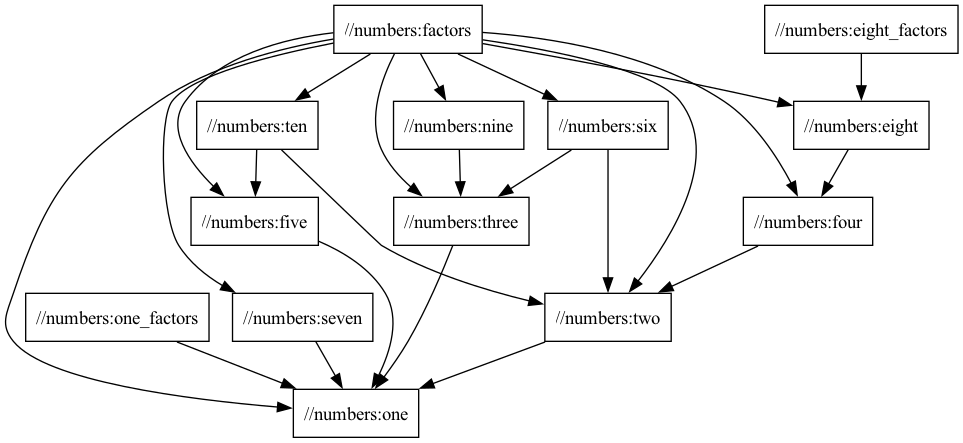
Now that our aspect's responsibilities are codified into rules, we can visualize them using familiar commands:
bazelisk query //numbers:all --output=graph > visualizations/src/numbers_subgraph.gv
dot -Tpng < visualizations/src/numbers_subgraph.gv > visualizations/out/numbers_subgraph.png
Which looks like:
Now that we've extended the repository, we'll take a moment to perform some slight cleanup. The rules, aspects, and providers we've built will all need documentation at some point. We've also begun co-locating extensions to Bazel based on type.
Before continuing on, we'll do the following:
- Move the
NumberInfoprovider into its own.bzlfile in theproviderspackage - Update the
productrule to loadNumberInfofrom its new location - Update all
bzl_libraryrule targets to aggregate the.bzlfiles in their respective packages - Update any dependencies between
bzl_librarytargets we've defined or refactored - Create
doc_hub/aspects.bzlanddoc_hub/providers.bzlto collect the references to our new build system extensions - Update
doc_hub/rules.bzlto include references to our two new rules - Add
stardocrule targets for aspect and provider documentation - Update
//doc_hub:all_docsto include our newstardoctargets.
Once these changes are complete, we can validate that our documentation still builds correctly:
bazelisk build //doc_hub:concated_docsAs our tools grow in count and complexity, we accumulate more maintenance tasks for the API we're providing to users.
We've seen how buildifier and buildozer can alleviate some of this burden, but we'll need to investigate new tools and approaches going forward.
Our repo has a few new packages, so our build graph has grown considerably. As always, we'll take a moment to inspect the bigger picture:
bazelisk query "//..." --output=graph > visualizations/src/aspects_graph.gv
dot -Tpng < visualizations/src/aspects_graph.gv > visualizations/out/aspects_graph.png
Which renders as:

As always, you can view the changes from this Lesson on GitHub.
Previous - Lesson 12: Stardoc | Next - Lesson 14: Modifying The Source Tree