


A customizable Vue.js chat widget for integrating n8n-powered chatbots into any website.
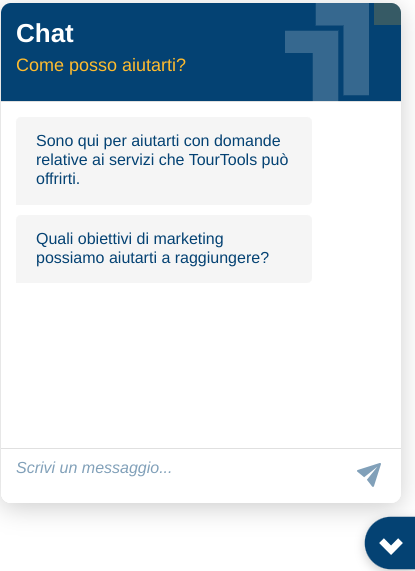
- 🚀 Easy Integration: Simple API to add a chat widget to any website
- 🎨 Highly Customizable: Extensive theming and configuration options
- 🔄 Session Management: Automatic conversation history persistence
- 📱 Responsive Design: Works on both desktop and mobile devices
- 💬 Markdown Support: Rich text formatting in bot responses
- 🔘 Interactive Actions: Support for buttons and privacy consent workflows
- 📎 File Uploads: Optional file attachment capability
- 🌐 Internationalization: Customizable text for multilingual support
npm install tt-chat-n8nOr using yarn:
yarn add tt-chat-n8nimport { createChat } from 'tt-chat-n8n';
import 'tt-chat-n8n/style.css';
createChat({
webhookUrl: 'YOUR_N8N_WEBHOOK_URL',
title: 'Chat Support',
subtitle: 'How can we help you today?'
});<link href="https://unpkg.com/tt-chat-n8n/dist/style.css" rel="stylesheet">
<script src="https://unpkg.com/tt-chat-n8n/dist/tt-chat.umd.js"></script>
<script>
document.addEventListener('DOMContentLoaded', function() {
TTChatN8N.createChat({
webhookUrl: 'YOUR_N8N_WEBHOOK_URL'
});
});
</script>createChat({
// Required: n8n webhook URL
webhookUrl: 'https://n8n.example.com/webhook/your-id',
// HTTP request configuration
webhookConfig: {
method: 'POST', // 'GET' or 'POST'
headers: {} // Custom HTTP headers
},
// DOM target element or selector
target: '#tt-chat-n8n',
// Display mode
mode: 'window', // 'window' (popup) or 'fullscreen'
// Initial welcome messages
initialMessages: [
'Hello! 👋',
'How can I help you today?'
],
// Request parameter key names
chatInputKey: 'chatInput', // Parameter name for input text
chatSessionKey: 'sessionId', // Parameter name for session ID
// Session management
loadPreviousSession: true, // Load previous conversation
// File upload feature
allowFileUploads: false, // Enable file uploads
// UI text customization
title: 'Chat',
subtitle: 'How can I help you?',
placeholder: 'Type your message...',
// Tooltip customization
showTooltip: true,
tooltipText: "Try our chatbot",
// Theme customization
theme: {
primaryColor: '#044273',
backgroundColor: '#ffffff',
userMessageColor: '#e0f7fa',
botMessageColor: '#f5f5f5',
userTextColor: '#000000',
botTextColor: '#000000',
headerColor: '#044273',
headerTextColor: '#ffffff'
subHeaderTextColor: '#FEBB2E',
fontFamily: '"Plus Jakarta Sans", sans-serif'
},
// Icon customization (SVG as base64 strings)
icons: {
openChat: 'data:image/svg+xml;base64,...', // Icon for opening chat
closeChat: 'data:image/svg+xml;base64,...', // Icon for closing chat
send: 'data:image/svg+xml;base64,...', // Send button icon
headerLogo: 'data:image/svg+xml;base64,...' // Header logo
}
});You can customize all SVG icons used in the chat interface by providing base64-encoded SVG strings:
createChat({
  webhookUrl: 'YOUR_N8N_WEBHOOK_URL',
  icons: {
    openChat: 'data:image/svg+xml;base64,PHN2ZyB3...', // Base64 encoded SVG
    closeChat: 'data:image/svg+xml;base64,PHN2ZyB3...', // Base64 encoded SVG
    send: 'data:image/svg+xml;base64,PHN2ZyB3...', // Base64 encoded SVG
    headerLogo: 'data:image/svg+xml;base64,PHN2ZyB3...' // Base64 encoded SVG
  }
});
To convert your SVG to base64, use an online converter or the following Node.js script:
const fs = require('fs');
const path = require('path');

const svgPath = path.join(__dirname, 'your-icon.svg');
const svgContent = fs.readFileSync(svgPath, 'utf-8');
const base64 = Buffer.from(svgContent).toString('base64');

console.log(`data:image/svg+xml;base64,${base64}`);The widget communicates with an n8n workflow through two main actions:
When the widget initializes, it attempts to load previous conversation history:
Request:
{
  "action": "loadPreviousSession",
  "sessionId": "unique-session-id"
}
Expected Response:
{
  "data": [
    {
      "id": "HumanMessage_1",
      "kwargs": {
        "content": "User message"
      }
    },
    {
      "id": "AIMessage_1",
      "kwargs": {
        "content": "Bot response"
      }
    }
  ]
}When a user sends a message:
Request:
{
  "action": "sendMessage",
  "sessionId": "unique-session-id",
  "chatInput": "User message text"
}
Expected Response:
{
  "output": "Bot response message",
  "actions": [
    {
      "type": "button",
      "label": "Visit Website",
      "action": "https://example.com"
    }
  ]
}The chat supports several types of interactive elements that can be included in bot responses:
{
  "output": "Would you like to visit our website?",
  "actions": [
    {
      "type": "button",
      "label": "Visit Website",
      "action": "https://example.com"
    }
  ]
}To trigger a privacy consent form:
{
  "output": "Before we continue, we need your consent.",
  "actions": [
    {
      "type": "privacy",
      "label": "Accept Privacy Policy",
      "action": "https://example.com/privacy"
    }
  ]
}
The user's response will be sent back with a privacy field:
{
  "action": "sendMessage",
  "sessionId": "unique-session-id",
  "chatInput": "",
  "privacy": true
}To trigger an Italian province selection dropdown:
{
  "output": "Per fornirti informazioni più precise, puoi indicarmi la tua provincia di residenza?",
  "actions": [
    {
      "type": "select_province",
      "label": "Provincia",
      "action": ""
    }
  ]
}
The user's selection will be sent back as the province code:
{
  "action": "sendMessage",
  "sessionId": "unique-session-id",
  "chatInput": "MI"
}To trigger a date picker component:
{
  "output": "Data di nascita?",
  "actions": [
    {
      "type": "datepicker",
      "label": "Data di nascita",
      "action": ""
    }
  ]
}
The user's selection will be sent back in DD/MM/YYYY format:
{
  "action": "sendMessage",
  "sessionId": "unique-session-id",
  "chatInput": "15/03/1990"
}The chat supports various specialized input types with validation:
{
  "output": "Il tuo indirizzo email?",
  "actions": [
    {
      "type": "input_type_email",
      "label": "E-Mail",
      "action": ""
    }
  ]
}{
"output": "Il tuo numero di telefono?",
"actions": [
{
"type": "input_type_tel",
"label": "Numero",
"action": ""
}
]
}The widget supports various HTML5 input types:
input_type_text- Plain text inputinput_type_url- URL input with validationinput_type_number- Numeric input
Example for URL input:
{
  "output": "Please provide your website URL:",
  "actions": [
    {
      "type": "input_type_url",
      "label": "Website",
      "action": ""
    }
  ]
}
All special inputs return their validated values as regular text messages:
{
  "action": "sendMessage",
  "sessionId": "unique-session-id",
  "chatInput": "user@example.com"
}
Callback actions allow the bot to set a specific value that will be sent back to the webhook with the next message the user sends. This is useful for passing context or state silently.
n8n Response to set a callback for the next message:
{
  "output": "Okay, I'll remember that. What would you like to do next?",
  "actions": [
    {
      "type": "callback",
      "value": "user_is_authenticated"
    }
  ]
}// Create chat instance
const chatInstance = createChat({
webhookUrl: 'YOUR_WEBHOOK_URL'
});
// Remove the widget
chatInstance.unmount();- Chrome/Edge (latest 2 versions)
- Firefox (latest 2 versions)
- Safari (latest 2 versions)
# Clone repository
git clone https://github.com/nonzod/n8n-chatbot.git
cd tt-chat-n8n

# Install dependencies
npm install

# Start development server
npm run dev

# Build for production
npm run build

# Type checking
npm run typecheckContributions are welcome! Please feel free to submit a Pull Request.