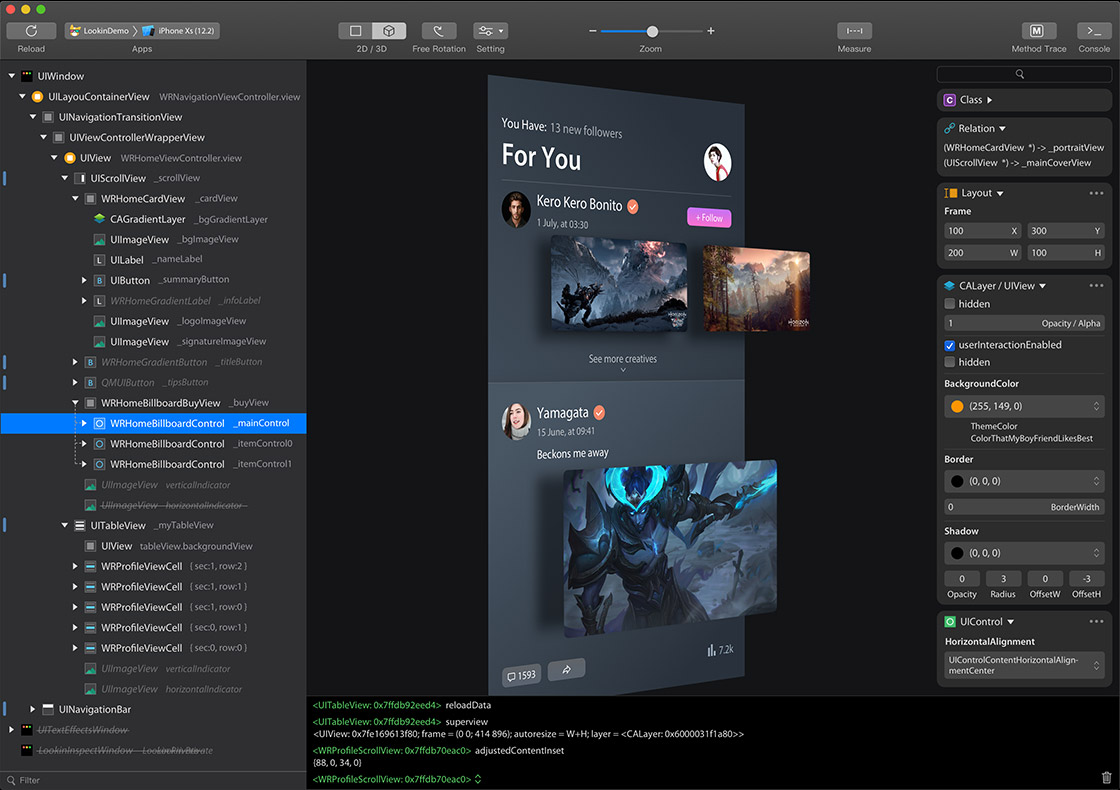
You can inspect and modify views in iOS app via Lookin, just like UI Inspector in Xcode, or another app called Reveal.
Official Website:https://lookin.work/
Fork maintenance notes: Imported Upstream Patches
To use Lookin macOS app, you need to integrate LookinServer (iOS Framework of Lookin) into your iOS project.
Warning Never integrate LookinServer in Release building configuration.
This repository also includes lookinctl, an adb-like standalone CLI for apps that integrate LookinServer. It talks to LookinServer directly and does not depend on Lookin.app.
Practical skills include:
- list connected LookinServer apps and select targets by serial, bundle id, app name, or index
- capture high-quality screenshots
- dump the view hierarchy as JSON
- find the current business view controller
- inspect coordinates with hit-test
- perform best-effort semantic tap with explicit machine-readable failure reasons
- inspect attributes, selectors, objects, images, gesture recognizers, and runtime patches
See LookinCLI/README.md for CLI usage and Docs/lookinctl使用与维护.md for development, build, publish, and directory structure design.
pod 'LookinServer', :subspecs => ['Swift'], :configurations => ['Debug']
pod 'LookinServer', :configurations => ['Debug']
https://github.com/QMUI/LookinServer/
This fork pairs with the codex/upstream-wireless branch of nova286/LookinServer. The inspected app and Mac must be on the same trusted local network. Start wireless discovery explicitly in the iOS app as documented by LookinServer, then use Wireless Connections in the launch window or workspace toolbar and confirm the request on the iOS device.
The transport is not encrypted or cryptographically authenticated. Remembered identifiers reduce repeated prompts but do not prove peer identity, so this feature is for Debug builds on trusted networks only. The client limits authorization waits to 30 seconds, accepts bounded protocol frames from the paired server, does not log device identifiers, and supports one inspecting Mac per app session.
Manual verification requires a physical iOS device:
- Start the Debug app and post
Lookin_startWirelessConnectionafter it becomes active. - Open this Lookin client, choose Wireless Connections, and select the device.
- Approve the prompt on the iOS device, load the hierarchy, and verify an attribute edit.
- Post
Lookin_endWirelessConnectionand verify that the wireless session closes.
This fork pairs with the codex/swiftui-attached-macro branch of nova286/LookinServer. When the inspected app exposes SwiftUI semantic nodes, the toolbar shows a SwiftUI mode with source types and source locations. Registered nodes provide editable temporary overrides for size, offset, scale, visibility, opacity, and background color. After an edit, Lookin automatically reloads the hierarchy and screenshot while preserving the selected node and expansion state.
Build the client with:
pod install
xcodebuild -workspace Lookin.xcworkspace -scheme LookinClient -configuration Debug -destination 'platform=macOS' build
These controls are intended only for local debugging. The matching server package must remain excluded from production app binaries.
GitHub Actions builds the Release client and universal lookinctl binary for every push and pull request. Every push and manual Build Lookin Desktop run uploads the ad-hoc signed app ZIP, CLI archive, and SHA-256 checksums as workflow artifacts. Pushing a v* tag publishes the same files to GitHub Releases.
LookinServer: https://github.com/QMUI/LookinServer
macOS app: https://github.com/hughkli/Lookin/
- How to display custom information in Lookin: https://bytedance.larkoffice.com/docx/TRridRXeUoErMTxs94bcnGchnlb
- How to display more member variables in Lookin: https://bytedance.larkoffice.com/docx/CKRndHqdeoub11xSqUZcMlFhnWe
- How to turn on Swift optimization for Lookin: https://bytedance.larkoffice.com/docx/GFRLdzpeKoakeyxvwgCcZ5XdnTb
- Documentation Collection: https://bytedance.larkoffice.com/docx/Yvv1d57XQoe5l0xZ0ZRc0ILfnWb
https://qxh1ndiez2w.feishu.cn/docx/YIFjdE4gIolp3hxn1tGckiBxnWf
Lookin 可以查看与修改 iOS App 里的 UI 对象,类似于 Xcode 自带的 UI Inspector 工具,或另一款叫做 Reveal 的软件。
如果这是你的 iOS 项目第一次使用 Lookin,则需要先把 LookinServer 这款 iOS Framework 集成到你的 iOS 项目中。
Warning 记得不要在 AppStore 模式下集成 LookinServer。
本仓库也包含 lookinctl,它是一个接近 adb 命令风格的独立 CLI。它直接连接已集成 LookinServer 的 App,不依赖 Lookin.app。
实用能力包括:
- 列出已连接的 LookinServer App,并按 serial、bundle id、App 名称或 index 选择目标
- 截取高清当前页面截图
- 导出视图层级 JSON
- 定位当前业务 View Controller
- 对坐标执行 hit-test
- 执行尽力而为的语义点击,并在不可点击时返回明确、可机器读取的失败原因
- 查看属性、selector、对象、图片、手势状态和运行时 patch
CLI 使用见 LookinCLI/README.md,开发、构建、发布和目录结构设计见 Docs/lookinctl使用与维护.md。
pod 'LookinServer', :subspecs => ['Swift'], :configurations => ['Debug']
pod 'LookinServer', :configurations => ['Debug']
https://github.com/QMUI/LookinServer/
此 fork 与 nova286/LookinServer 的 codex/upstream-wireless 分支配套使用。被检查 App 与 Mac 必须处于同一个可信局域网;按 LookinServer 文档在 iOS App 中显式启动无线发现后,在启动窗口或工作区工具栏点击 Wireless Connections,选择设备并在 iOS 端确认。
传输内容没有加密,记住的设备标识也不是密码学身份证明,因此只应用于可信网络上的 Debug 构建。客户端会在 30 秒后结束未完成的授权等待,配套 Server 会限制协议帧大小;两端不会记录设备标识,且同一 App 会话同时只允许一台 Mac 检查。
完整验证需要真机:启动 Debug App 并在 active 后发送 Lookin_startWirelessConnection,从 macOS 客户端选择设备,在 iOS 端允许连接,然后验证层级加载与属性修改;最后发送 Lookin_endWirelessConnection 并确认会话关闭。
此 fork 与 nova286/LookinServer 的 codex/swiftui-attached-macro 分支配套使用。被检查的 App 暴露 SwiftUI 语义节点后,工具栏会出现独立的 SwiftUI 模式,显示真实源码类型和源码位置。每个注册节点都提供尺寸、偏移、缩放、隐藏、透明度和背景色等临时调试属性;修改后客户端会自动重新抓取层级与截图,并保留当前选中节点和展开状态。
客户端构建命令:
pod install
xcodebuild -workspace Lookin.xcworkspace -scheme LookinClient -configuration Debug -destination 'platform=macOS' build
这些能力只用于本地调试,配套 Server 包必须继续从生产 App 二进制中排除。
GitHub Actions 会为每次 push 和 pull request 构建 Release 客户端和通用架构 lookinctl。每次 push 和手动运行 Build Lookin Desktop 都会上传经过 ad-hoc 签名的 App ZIP、CLI 压缩包及 SHA-256 校验文件;推送 v* tag 时会把同一组文件发布到 GitHub Releases。
iOS 端 LookinServer:https://github.com/QMUI/LookinServer
macOS 端软件:https://github.com/hughkli/Lookin/
- 如何在 Lookin 中展示自定义信息: https://bytedance.larkoffice.com/docx/TRridRXeUoErMTxs94bcnGchnlb
- 如何在 Lookin 中展示更多成员变量: https://bytedance.larkoffice.com/docx/CKRndHqdeoub11xSqUZcMlFhnWe
- 如何为 Lookin 开启 Swift 优化: https://bytedance.larkoffice.com/docx/GFRLdzpeKoakeyxvwgCcZ5XdnTb
- 文档汇总:https://bytedance.larkoffice.com/docx/Yvv1d57XQoe5l0xZ0ZRc0ILfnWb
https://qxh1ndiez2w.feishu.cn/docx/YIFjdE4gIolp3hxn1tGckiBxnWf