
Your personal reading cloud library
Report bug
·
Request feature
- Table of contents
- About
- Status
- Roadmap
- Quick start
- Bugs and feature requests
- Creators
- Copyright and license
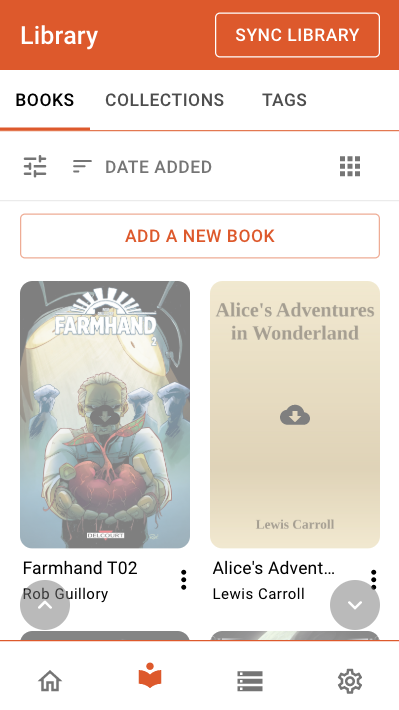
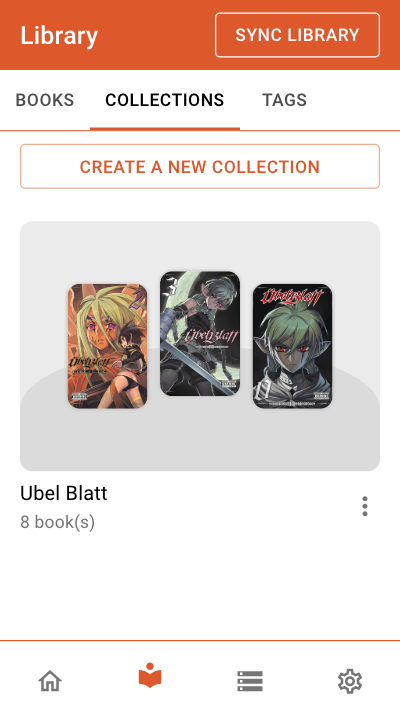
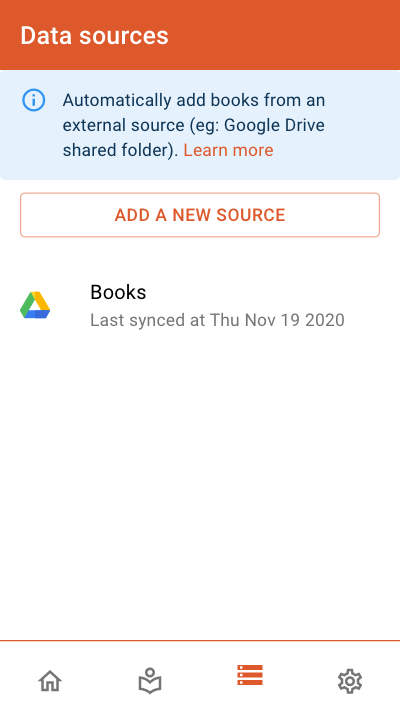
oboku is a reading cloud library which allows you to synchronize your own books from various sources and provide a friendly reading app.
The service is different from kindle, kobo or google play book since it emphazise and focus on your own content (sometime named side loaded books). By connecting your own datasource to the service you will be able to synchronize and access your content wherever you with any devices.
One of the main focus of oboku is the accessibility no matter the device. In that way, e-ink devices always comes first in mind when developing new features. There are no fancy animation or complexe ui. The experience will also be adapted based on your screen size.
At this point in time oboku is in early stage of development and very limited in term of features. Many more will be added over time but the phylosophy behind it will stay the same.
Here are some of the key features you can expect:
- Offline first, the app will work no matter your connectivity. You will still need to pre-download your book if you plan to go offline and synchronize your library if you add book.
- Connect various data sources to automatically synchronize your books from (Google Drive, dropbox, ...)
- Manage collections and tags
- Hide sensitives books behind protected tags
- Follow your book progress
- Visualize, sort and filter your books
If you are still wondering whether or not you should use it, the following points might help you decide.
You should try oboku if you:
- Possess your own book files. For now the synchronization support is limited and paid services such as kobo or kindle are not supported.
- Read from different devices (e-ink, tablet, web, ...)
- Like to organize your books automatically
- Manage your books with calibre
- Often goes offline
You should not try it if you:
- Wants a complete and bug free service. This is still an early and heavily developed product
- Only buy and read books from paid or closed platform (without API we cannot synchronize from them, ever) (ex: kobo, kindle, ...)
- Like fancy animation or UI such as turning page
The main intent of oboku is to be hosted and served through oboku.me for conveniance but the entire project is open source so you can fork it and install it wherever you want.
If you like the idea behind oboku you are very welcome to contribute. It can be as simple as opening an issue with a feature you would want integrated in it.
BookFusion is yet another cloud based book library which let you organize and read your own books. It does look similar to oboku in some of the aspects and could ultimately gives you the same experience. However there are some missing key features from BookFusion that are the very reason oboku exist:
- The service is paid. Oboku is and will stay free and open source.
- You have to upload your book to their server (or use calibre plugin). Oboku is meant to be used with any storage of your choice. We do not host any of your book files, we just synchronize them.
- The reading app is not e-ink friendly
- No offline support (at least on the web)
- Unfortunately quite closed since it's provided by a company as a paid product ultimately
Calibre Web is another similar project that was created many years ago and provide a also similar experience. It obviously provide a lot more of features at this time and you might want to give it a try as well. Most specifically if you are using calibre as your source of data. Although it is also a similar project here are some of the key differences:
- No offline support
- Not e-ink friendly
- Limited choice of source prodivers (Calibre and Kobo sync)
- It is a self hosted product and comes with the hassle of maintenance.
In no way oboku wishes to undermine calibre-web and I want to personally thanks janeczku and all the contributors for making the calibre-web project.
This project is still under heavy development and is not officialy released yet. If you like it and want to contribute, we are looking for translators and general contributors. If you would like to see a specific feature please open a new issue.
- Add support for Calibre datasource
- Add metadata support from Google Book API
- Add reader annotations
- Add reader bookmark
- Add reader font size change
$ npm install
$ npm startHave a bug or a feature request? Please search for existing and closed issues. If your problem or idea is not addressed yet, please open a new issue.
Maxime Bret
Code released under the MIT License.
Enjoy 🤘