A hand-crafted, statically-typed scripting language interpreter built entirely from scratch in modern C++ (C++20).
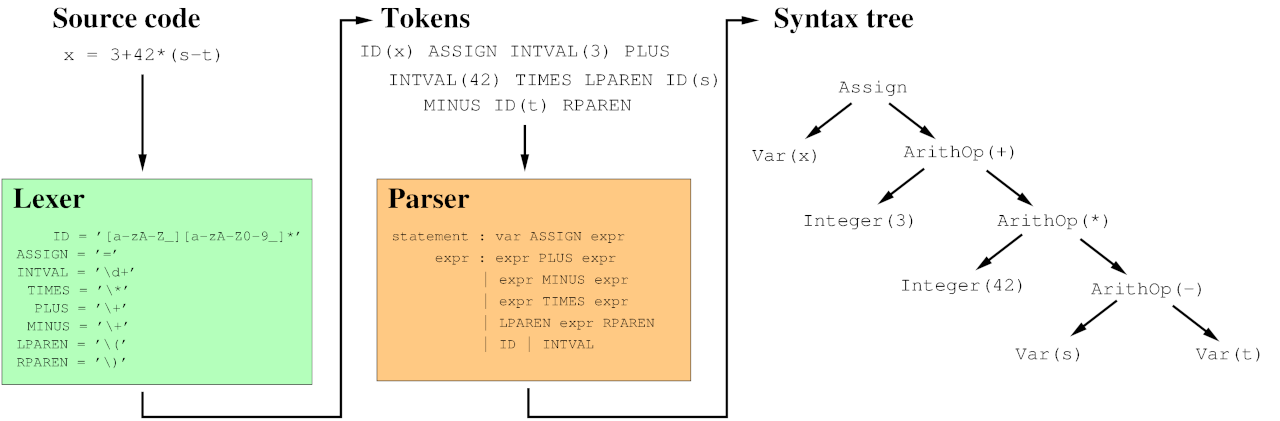
Image credit: https://haqr.eu/tinycompiler/sly/
This project demonstrates systems-level programming, memory management, and compiler theory. It bypasses automated parser generators (like YACC/Bison) in favor of a custom Recursive Descent Parser and a manually managed, memory-safe Abstract Syntax Tree (AST).
Repository: https://github.com/okyoiu/custom-interpreter.git
For more detailed information on the theoretical foundations of this project, please refer to the Wikipedia article on Lexical Analysis.
The interpreter follows a classic multi-stage pipeline.
| Stage | Responsibility | Status |
|---|---|---|
| Lexer (Scanner) | Converts raw characters into a stream of typed Tokens. | Complete |
| Parser | Validates grammar and builds the Abstract Syntax Tree (AST). | Complete |
| Evaluator | Executes the logic within lexical scopes and environments. | Planned |
- Language: C++20 (utilizing std::unique_ptr, enum class, etc.)
- Build System: CMake (Version 3.10+)
- Testing: Google Test (gtest) integrated via FetchContent
- Platform: macOS (Apple Silicon), Linux, or WSL
Ensure you have a modern C++ compiler and CMake installed on your system.
macOS:
brew install cmake googletest
Ubuntu/Debian:
sudo apt install build-essential cmake libgtest-dev
This project uses CMake for out-of-source builds to keep the repository clean.
# Clone the repository
git clone https://github.com/okyoiu/custom-interpreter.git
cd custom-interpreter

# Generate the build files
cmake -S . -B build

# Compile the interpreter and test suite
cmake --build build
Verification is baked into the development workflow using Google Test. To run the test suites and verify your build:
./build/tests/interpreter_tests
(Alternatively, you can navigate into the build directory and run ctest --output-on-failure)
Once compiled, you can start the REPL (Read-Eval-Print Loop) environment:
./build/interpreter