What issue are you seeing?
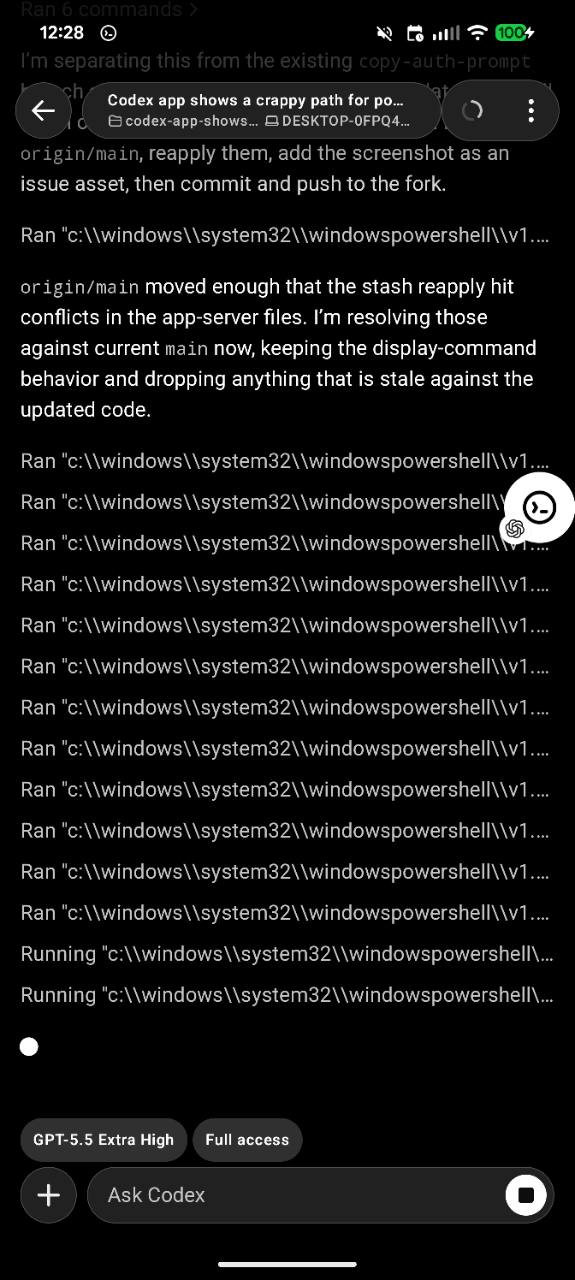
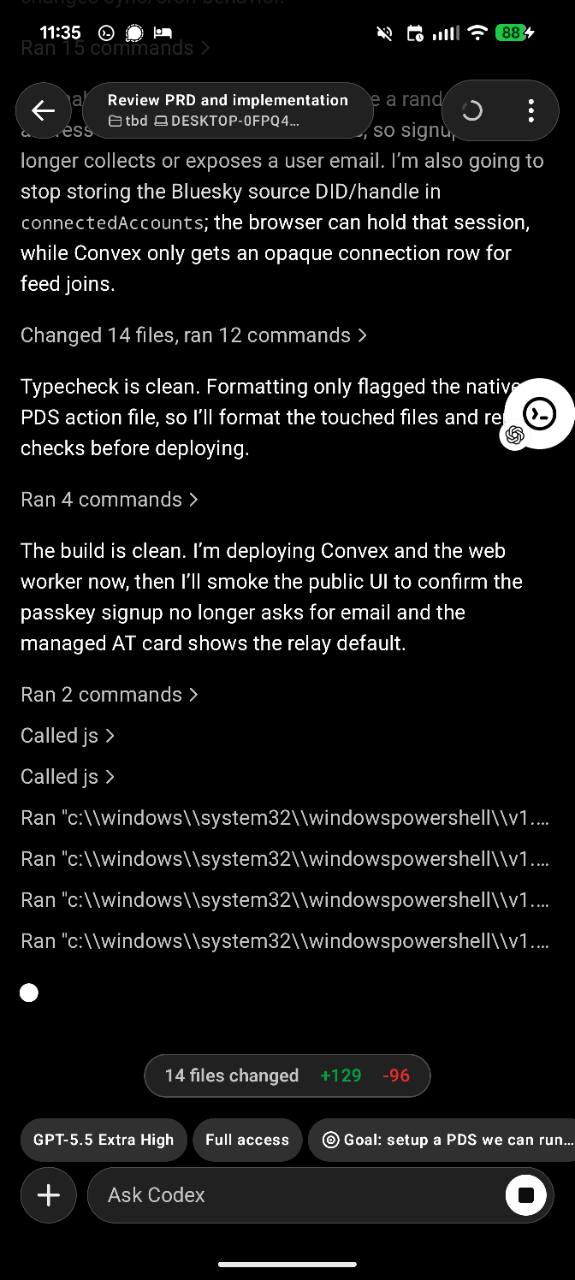
On the new Codex mobile app surface connected to a Windows desktop/app-server session, command-execution rows render the full Windows PowerShell launcher path instead of the actual command/script body.
Because the mobile row is narrow, the useful command is truncated away and the history becomes a list of near-identical entries like:
Ran 'c:\\windows\\system32\\windowspowershell\\v1...
Running "c:\\windows\\system32\\windowspowershell\\v1...
Primary screenshot:
Original screenshot:
What steps can reproduce the bug?
- Use the Codex App mobile client with a Windows desktop/app-server session.
- Run several shell commands in a thread where the Windows shell invocation is PowerShell, for example through a command vector equivalent to:
C:\windows\system32\windowspowershell\v1.0\powershell.exe -NoProfile -Command "git status --short"
- View the thread on mobile.
Observed: command-execution summaries show the launcher path and truncate before the actual command.
Environment captured from the Windows host:
Microsoft Windows NT 10.0.26200.0 x64
Codex App version/subscription: not captured in the screenshots. This is from the new Android app + Windows integration flow; likely the same app-server payload issue would affect iOS if it renders the same commandExecution.command field.
What is the expected behavior?
Mobile should show a display-oriented command string that starts with the useful script/command body, not the shell launcher.
Examples:
Before: Ran 'c:\windows\system32\windowspowershell\v1.0\powershell.exe' -NoProfile -Command 'git status --short'
After:  Ran git status --short

Before: Running "c:\windows\system32\windowspowershell\v1.0\powershell.exe" -NoProfile -Command "cargo test -p codex-app-server"
After:  Running cargo test -p codex-app-server
The full argv can still exist internally for execution/debugging, but the app-facing commandExecution.command display value should strip known shell wrappers (powershell.exe -Command, pwsh -c, bash -lc, etc.) when possible.
Additional information
I checked docs/contributing.md; external PRs are invitation-only, so I am filing an issue with analysis and a proof-of-concept branch instead of opening an unsolicited PR.
Support branch: https://github.com/tzarebczan/codex/tree/codex/mobile-command-display
The branch demonstrates a small app-server-side approach:
codex-rs/app-server-protocol/src/protocol/item_builders.rs: use codex_shell_command::parse_command::extract_shell_command for CommandExecution display strings in approval, begin, and end item builders.codex-rs/app-server/src/bespoke_event_handling.rs: use the same display helper for v2 command approval request/completion items.codex-rs/app-server/README.md: document that commandExecution.command is display-oriented.- Tests updated to assert that app-server v2 emits the inner command (
echo second turn, python3 -c 'print(42)') rather than the platform shell wrapper.
Validation run on the branch:
cargo fmt -- --config imports_granularity=Item
cargo test -p codex-app-server-protocol
cargo test -p codex-app-server command_display_string --lib -- --nocapture
cargo test -p codex-app-server --test all thread_shell_command_uses_existing_active_turn -- --nocapture
cargo test -p codex-app-server --test all turn_start_updates_sandbox_and_cwd_between_turns_v2 -- --nocapture
Note: the repo's just argument-comment-lint path currently fails on this Windows checkout because the generated C:\... script path is interpreted as C:... by the recipe shell, and the direct source runner then fails because the Dylint toolchain is nightly-2025-09-18/rustc 1.92 while current dependencies require rustc 1.94+ (sqlx@0.9.0).

What issue are you seeing?
On the new Codex mobile app surface connected to a Windows desktop/app-server session, command-execution rows render the full Windows PowerShell launcher path instead of the actual command/script body.
Because the mobile row is narrow, the useful command is truncated away and the history becomes a list of near-identical entries like:
Primary screenshot:
Original screenshot:
What steps can reproduce the bug?
Observed: command-execution summaries show the launcher path and truncate before the actual command.
Environment captured from the Windows host:
Codex App version/subscription: not captured in the screenshots. This is from the new Android app + Windows integration flow; likely the same app-server payload issue would affect iOS if it renders the same
commandExecution.commandfield.What is the expected behavior?
Mobile should show a display-oriented command string that starts with the useful script/command body, not the shell launcher.
Examples:
The full argv can still exist internally for execution/debugging, but the app-facing
commandExecution.commanddisplay value should strip known shell wrappers (powershell.exe -Command,pwsh -c,bash -lc, etc.) when possible.Additional information
I checked
docs/contributing.md; external PRs are invitation-only, so I am filing an issue with analysis and a proof-of-concept branch instead of opening an unsolicited PR.Support branch: https://github.com/tzarebczan/codex/tree/codex/mobile-command-display
The branch demonstrates a small app-server-side approach:
codex-rs/app-server-protocol/src/protocol/item_builders.rs: usecodex_shell_command::parse_command::extract_shell_commandforCommandExecutiondisplay strings in approval, begin, and end item builders.codex-rs/app-server/src/bespoke_event_handling.rs: use the same display helper for v2 command approval request/completion items.codex-rs/app-server/README.md: document thatcommandExecution.commandis display-oriented.echo second turn,python3 -c 'print(42)') rather than the platform shell wrapper.Validation run on the branch:
Note: the repo's
just argument-comment-lintpath currently fails on this Windows checkout because the generatedC:\...script path is interpreted asC:...by the recipe shell, and the direct source runner then fails because the Dylint toolchain isnightly-2025-09-18/rustc 1.92 while current dependencies require rustc 1.94+ (sqlx@0.9.0).