-
Notifications
You must be signed in to change notification settings - Fork 307
Learning Stenography
Stenography was traditionally taught in schools, and still is today. However, because of Open Steno, there are increasingly self-taught stenographers. Plover has everything you need to teach yourself stenography.
Also see this Wiki's Glossary to learn some common terminology that comes up in steno materials.
Table of Contents
These sites aim to teach you steno, from the layout to the terminology to the strokes.
-
Learn Plover! is a free online textbook by Zack Brown, based on his steno tutoring sessions with Mirabai Knight. It offers a step-by-step introduction to Plover for beginners, with practice material at the end of every chapter. The accompanying exercises are available online in several places, notably:
-
Steno Jig: Nice stroke hints and lookahead display, but only has the lessons that are written into Learn Plover (the first four chapters), plus drills for common words and random sentences with numbers.
-
Di's Plover, Learn! Has user-contributed lessons for the later chapters where Learn Plover doesn't provide exercises, plus some additional lessons of its own, including a large collection of fairy tales. Requires Adobe Flash or Google Chrome.
-
-
Qwerty Steno is a fantastic resource which has a tutorial on steno theory written by Mike Neale of the Open Steno community.
-
A lovely visual approach to learning the keyboard and basic chords, using a standard QWERTY keyboard, by JR, Jay Liu, and Myrntillae Nash.
-
Top 100 Words in Plover's Dictionary
Just a small tutorial covering the top 100 English words according to Wikipedia. Many of them are briefs and this text gives some insight as to why these strokes are the way they are.
If you want to eventually caption speakers, you will need to be able to take dictation.
-
Steno Arcade Steno Arcade is a project funded by the Open Steno Project, developed by For All To Play. It contains Steno Hero, a game where you write lyrics in time with a singer and get graded on accuracy. You can create custom song files for use in the game by using wavelyric.
-
YouTube
YouTube videos will offer a good start for dictation. You can find dictations on YouTube, as well as material designed for ESL students, and speeches by your favorite speaker.
-
Television
Try captioning your favorite TV show once you are able to.
-
CRH has some free dictation posts. Especially useful is the Magic Drill, for beginners and experts alike.
There are two decks available:
-
Steno3000 An Anki flash card deck has been created to help review the the 3000 most common English words as a flash card deck. Going through these basic flash cards is one way to become familiar with which strokes correspond to which sounds or letters, and to briefs in general. Eventually, this can help learners memorize the most basic and common English words.
The deck is entirely based off the Dictionary included in Plover 2.1.1. It is divided up into levels from 1 to 15, starting at the most common words. On each card, on the front is the common word. Anki gives you a field where you can use Plover to type in the word that you see. Press Enter (or in steno, R-R) and Anki will show you all the briefs that produce the word, starting from the most abbreviated. From there, you can report back to Anki how difficult it was to recall the brief. Anki will schedule the next time that word is shown to you, accordingly.
The deck also includes briefs for phrases (where each word in the phrase is one of the most common 3000 words).
The Steno3000 Anki deck can be downloaded here
-
An Anki deck with the complete Plover dictionary as flash cards is available here
Sites not made for steno are not ideal for use with Plover, but they offer good quality practice material for the intermediate stenographer, or to judge your skills with a metric.
-
Online realtime typing competition.
-
Short test of most common words.
-
Copy practice.
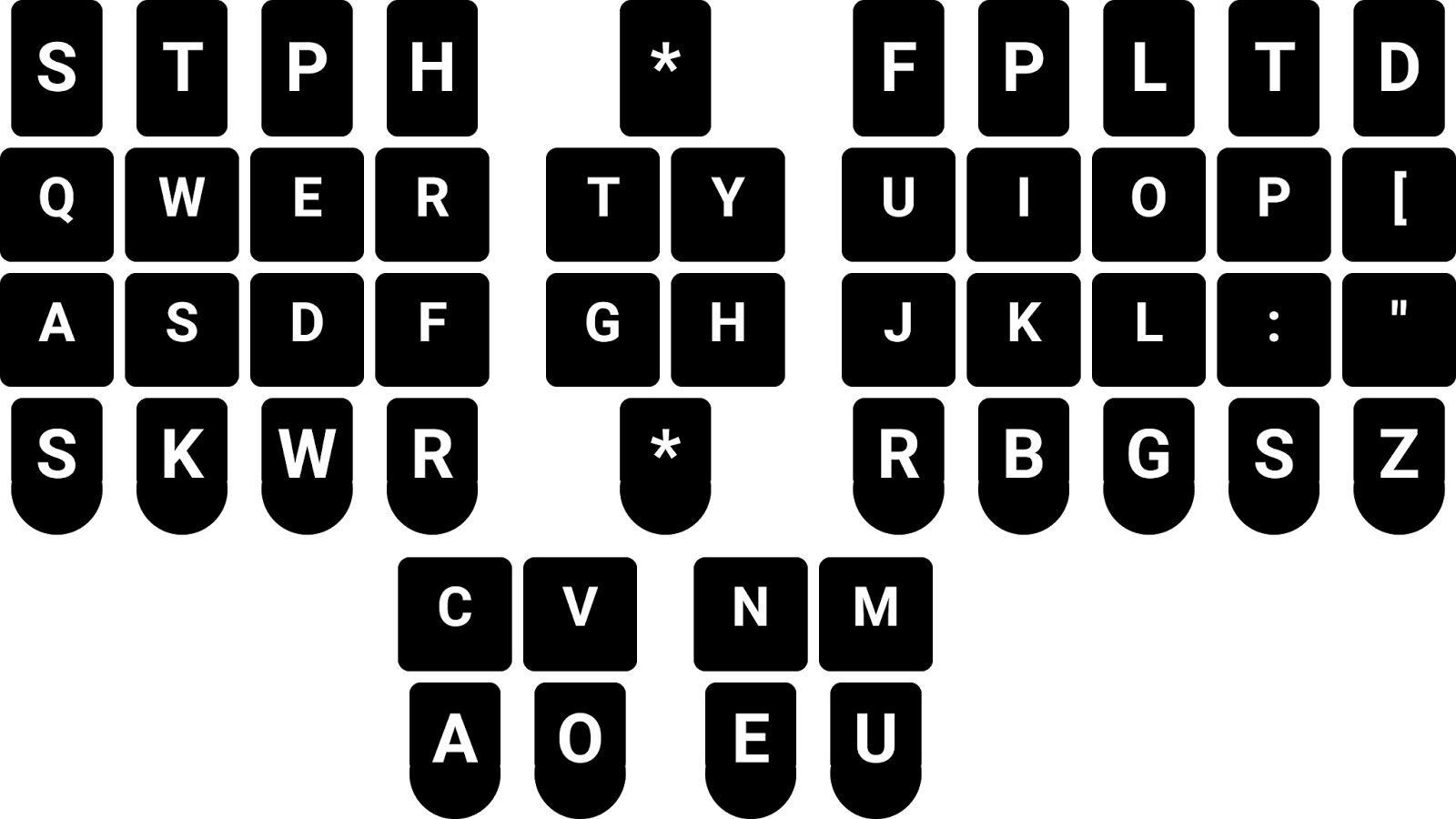
When starting to learn the steno layout, you might be using a QWERTY keyboard and you'll need to map between them. It's helpful to have a chart printed in case you get lost.