Releases: opf/openproject
Release list
OpenProject 17.7.2

2160257  oliverguenther
Oliver Günther
oliverguenther
Oliver Günther
Release date: 2026-08-13
We released OpenProject 17.7.2.
The release contains several bug fixes and we recommend updating to the newest version.
Below you will find a complete list of all changes and bug fixes.
Bug fixes and changes
- Bugfix: The hourly rate cannot be adjusted for individual projects [#78111]
- Bugfix: Non-working days saved while reschedule job is running are not applied to work packages [#78219]
- Bugfix: Bubble with + in timeline view does not make sense [#78284]
- Bugfix: When using multiple seeded custom styles, most are lost [#78397]
OpenProject 17.7.1
bdbc664
oliverguenther
Oliver Günther
Release date: 2026-08-06
We released OpenProject 17.7.1.
The release contains several bug fixes and we recommend updating to the newest version.
Below you will find a complete list of all changes and bug fixes.
Bug fixes and changes
OpenProject 17.7.0
3cf9def
oliverguenther
Oliver Günther
Release date: 2026-08-05
We released OpenProject 17.7.0. The release contains several bug fixes and we recommend updating to the newest version. In these Release Notes, we will give an overview of important feature changes. At the end, you will find a complete list of all changes and bug fixes.
Important feature changes
OpenProject 17.7 introduces new resource management capabilities to help teams plan capacity and staffing more effectively. The release also brings major improvements to agile project management, wiki collaboration, and new features for project management with PM² or PMflex.
Take a look at our release video showing the most important features introduced in OpenProject 17.7:
Release video of OpenProject 17.7
Organizational management
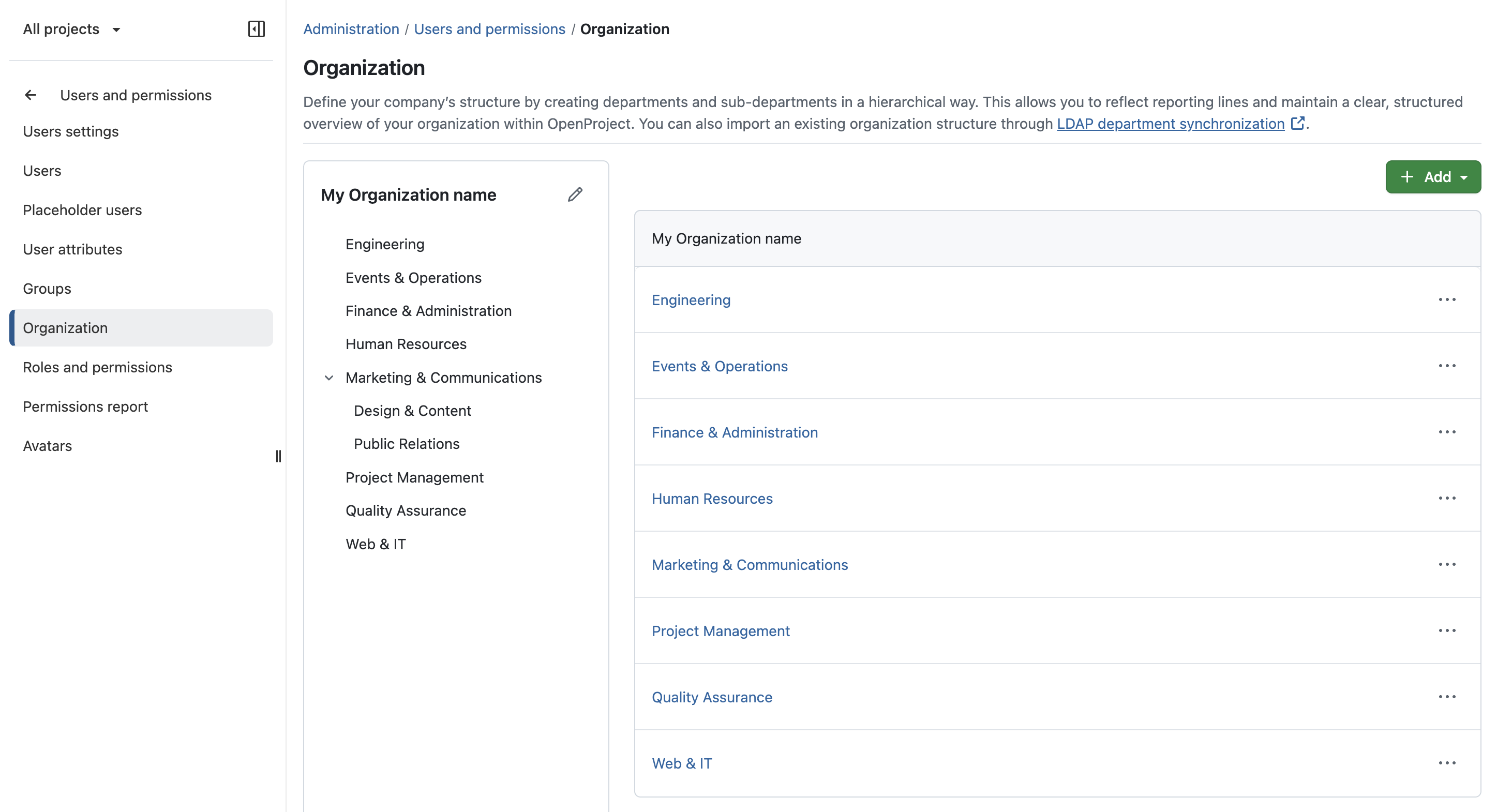
OpenProject 17.7 introduces new organizational management capabilities that provide the foundation for the new Resource management module. Departments, work-related user attributes, and individual work schedules help organizations represent their workforce more accurately and enable realistic capacity planning and staffing.
These features are also available independently of the Resource management module, allowing organizations on other OpenProject plans to better structure user information and organizational data.
Departments
OpenProject now introduces Departments as a new way to organize users. Under Administration → Users and permissions → Organization, administrators can create and manage a hierarchical organizational structure with departments and sub-departments. Departments are also available as a user attribute and help structure users consistently across OpenProject.
Organizations using LDAP (Enterprise add-on) can automatically synchronize departments with their directory service, reducing administrative effort.
Work-related user attributes
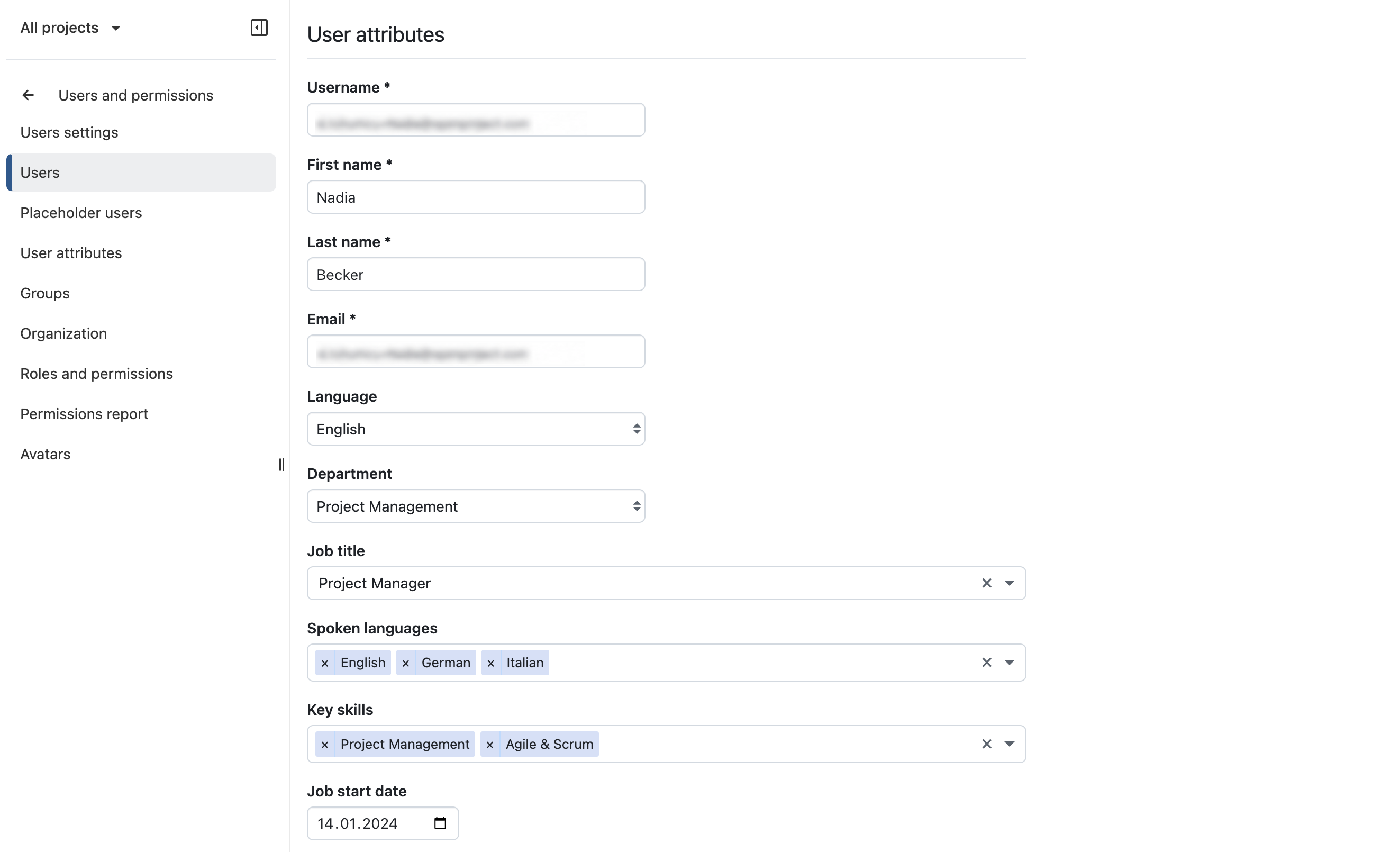
Under Administration → Users and permissions → Users, you can now set organization-specific user attributes such as job title, key skills, spoken languages, or employment information. Depending on their permissions, users can update these attributes for themselves or on behalf of others, making it easier to keep workforce information up to date.
Work schedule
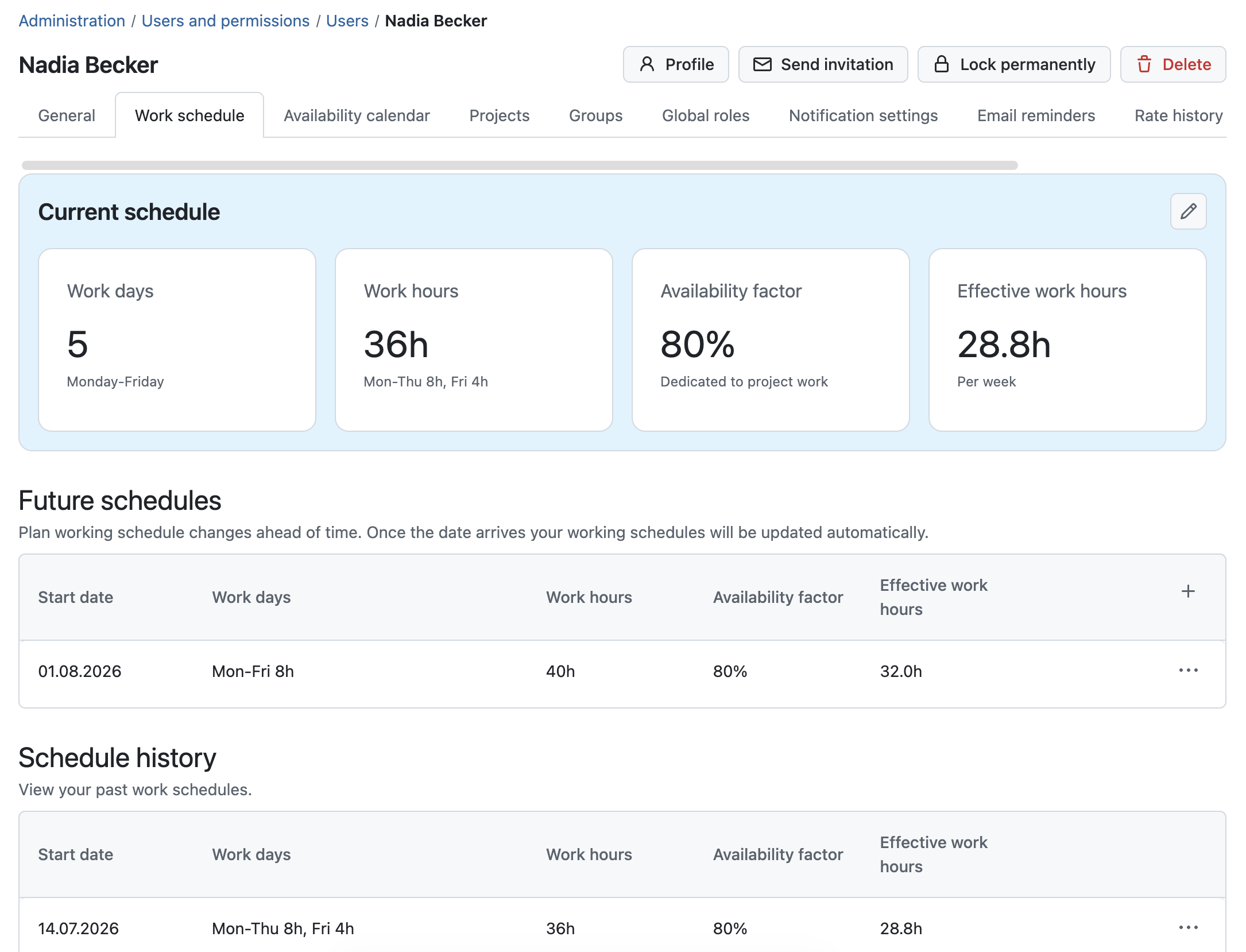
Under Administration → Users and permissions → Users, you can now configure individual work schedules for every user, including working days, work hours, availability factors, and future schedule changes. Users can also update their own work schedules or those of others, depending on their permissions.
Resource management module (Enterprise add-on)
The new Resource management module helps organizations plan capacity, allocate work, and balance workloads across teams. It provides dedicated tools for resource planning and staffing while giving project managers greater visibility into team availability and utilization. Learn more about the new capabilities and the Resource management module in our dedicated blog article. For a detailed documentation, please refer to our user guide on resource management.
Resource planner
The Resource planner provides a centralized overview of your workforce, allowing you to search, filter, and compare users based on departments, work-related attributes, availability, and current workload
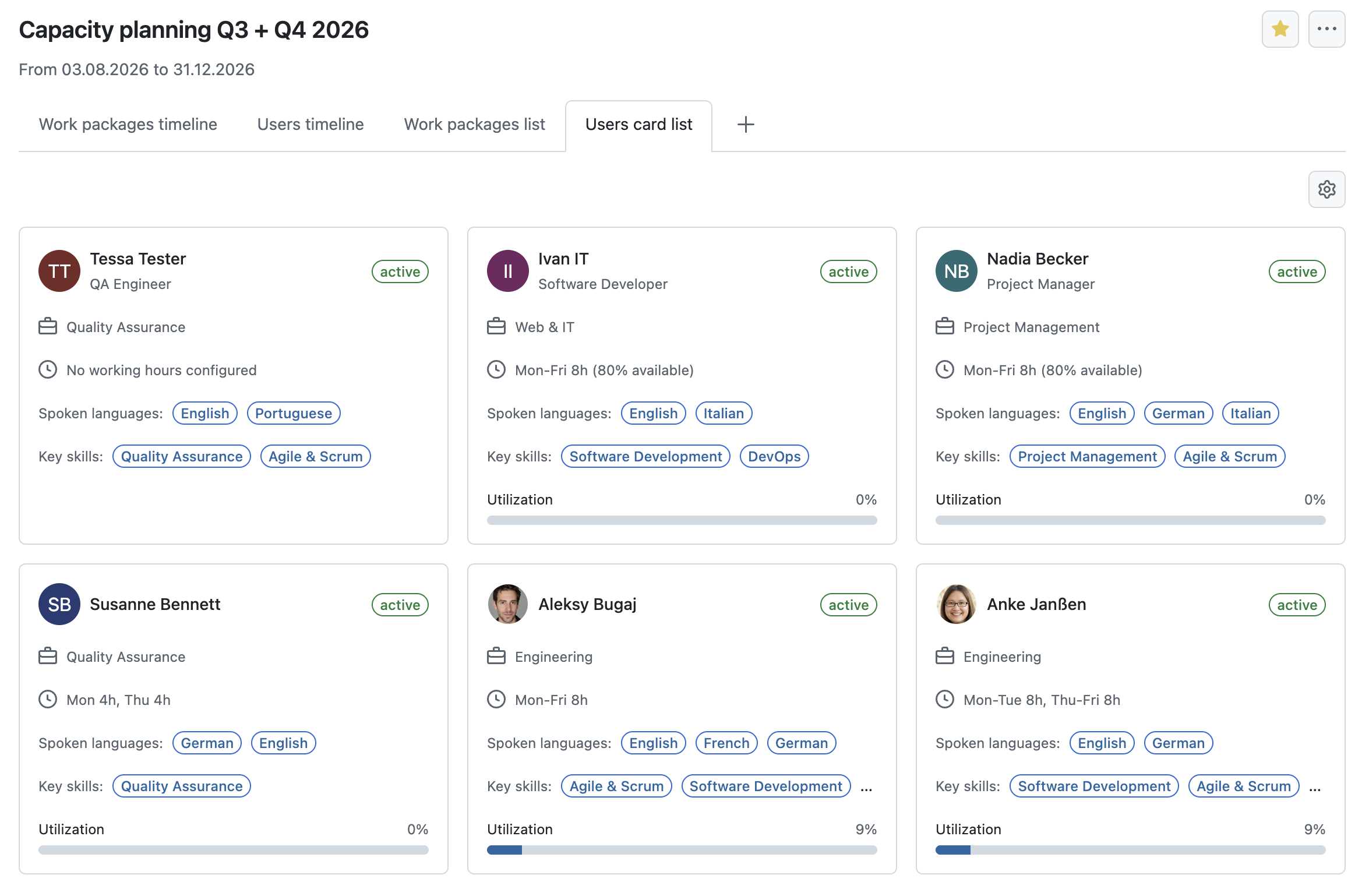
The timeline view visualizes each user's workload over time, helping project managers understand resource utilization, identify conflicts early, and make informed planning decisions. Project managers can allocate resources directly from the timeline, streamlining resource planning and staffing.
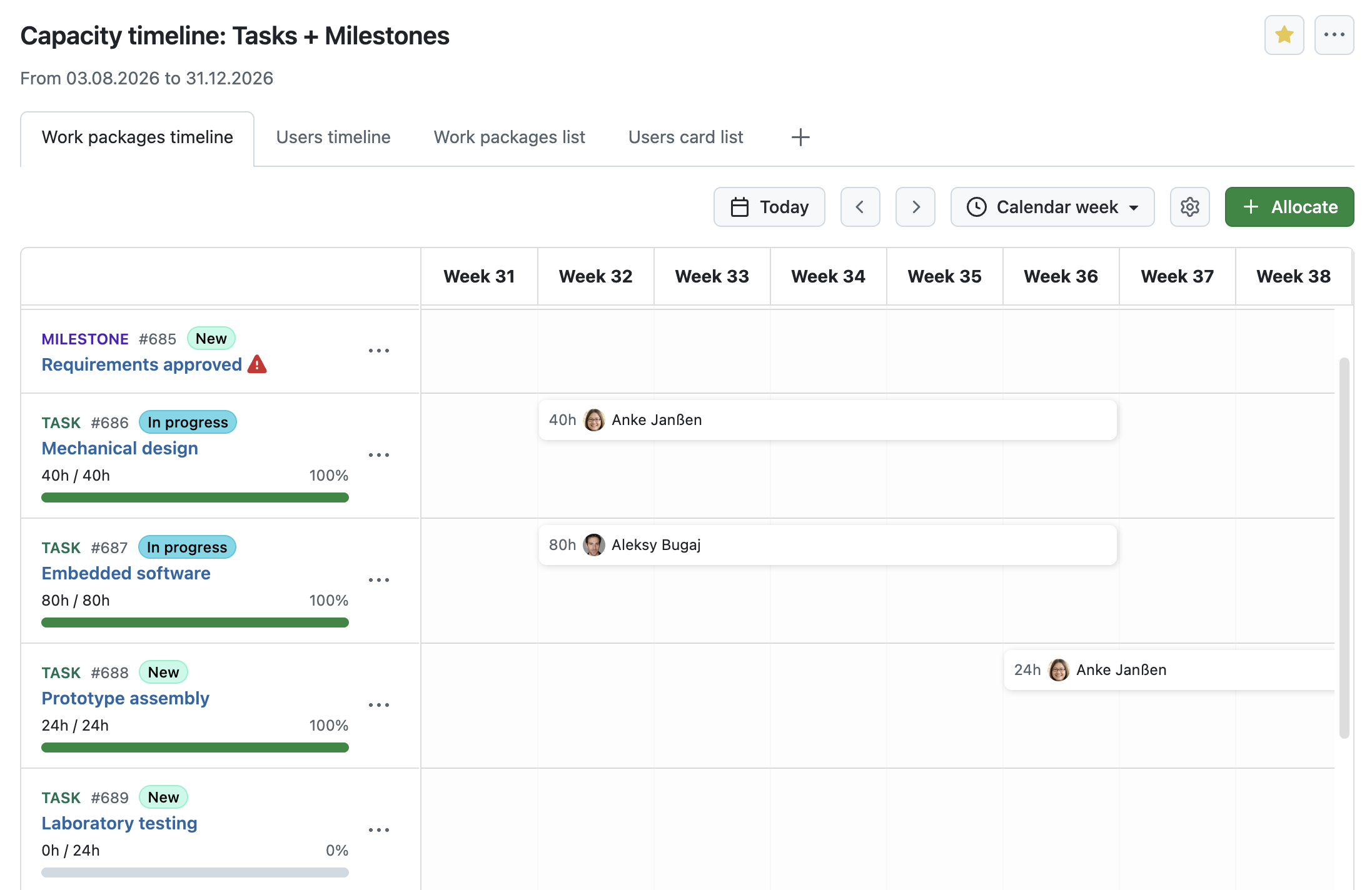
Staffing
The Staffing view allows project managers to assign work while taking each team member's availability and existing workload into account. Resource requests can be allocated to suitable team members, helping organizations distribute work more effectively and avoid overallocations.
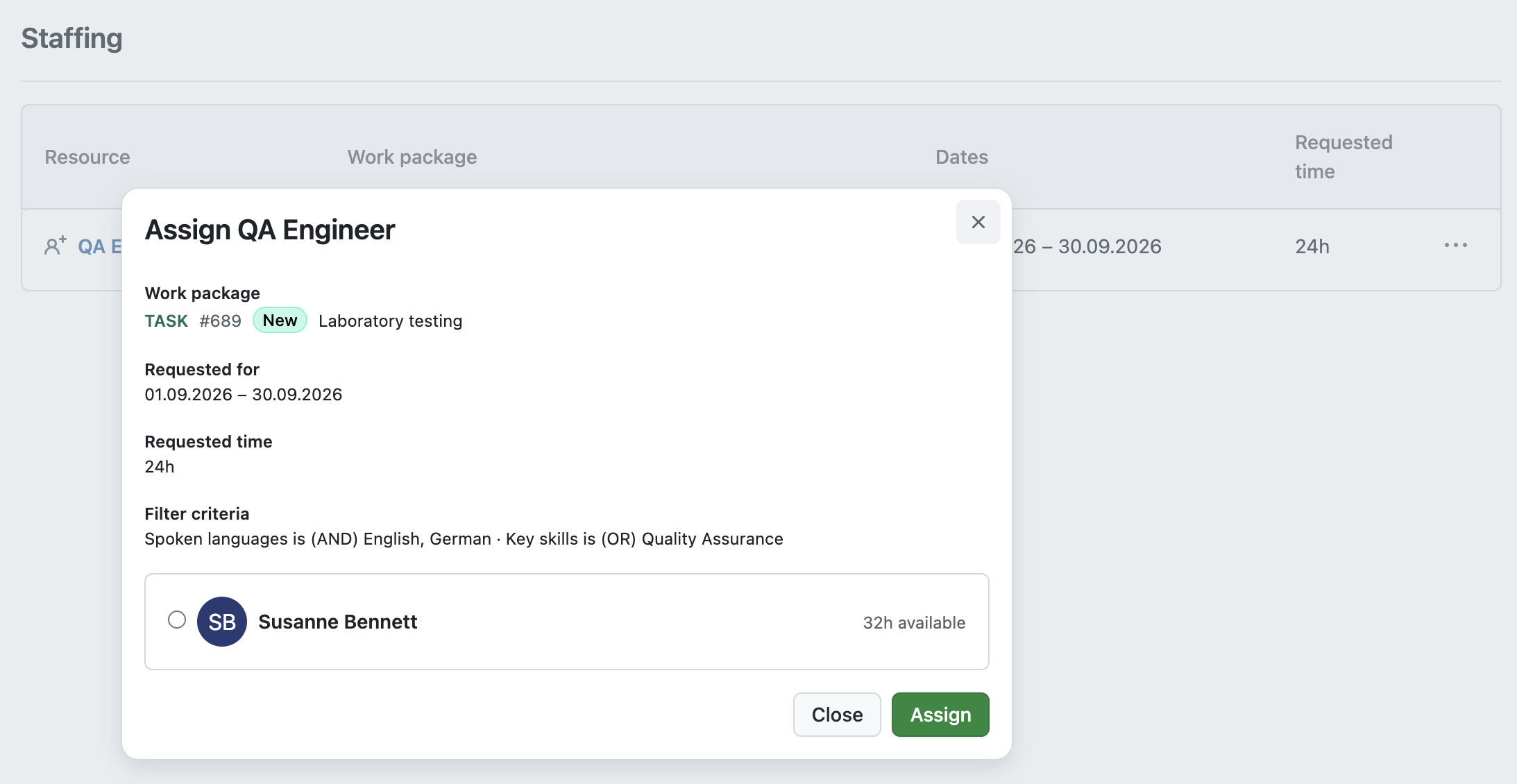
Multiple active sprints without sharing (Enterprise add-on)
OpenProject 17.7 introduces support for multiple active sprints within a single project, eliminating the need to share sprints across projects. Teams can now manage multiple active sprints while keeping all sprint planning in one project. This also provides a consolidated overview of active sprints and backlog items on the Backlogs and Sprints page.
Community improvements for Backlog and Sprints
OpenProject 17.7 also includes several other improvements for Backlog and Sprints that make sprint planning and backlog management more efficient.
Add existing work packages to a sprint, backlog bucket or backlog inbox
You can now add existing work packages directly to sprints, backlog buckets, and the backlog inbox from the Backlogs view. This lets you organize work without leaving the page, helping you stay focused and maintain context while planning your backlog.
Multi-select for sprint and backlog filters
Backlog and Sprint views now support selecting multiple sprints and backlog buckets to show. This makes it easier to focus on the work that matters most by displaying only the relevant sprints and backlog buckets.
Improved drag and drop
Drag-and-drop interactions in the Backlogs and Sprints view have been improved to provide a smoother planning experience across desktop and mobile devices. Moving work packages between the backlog and sprints or changing their order is now more intuitive and reliable.
Improvements for PM² and PMflex management
OpenProject 17.7 introduces several improvements for organizations using the PM² and PMflex project management methodologies, making it easier to manage project information and monitor project progress.
Show project attributes as separate tab in a work package
Project attributes can now be displayed in a dedicated Project attributes tab within work packages. This provides quicker access to project-specific information while keeping work package details and project metadata clearly separated.
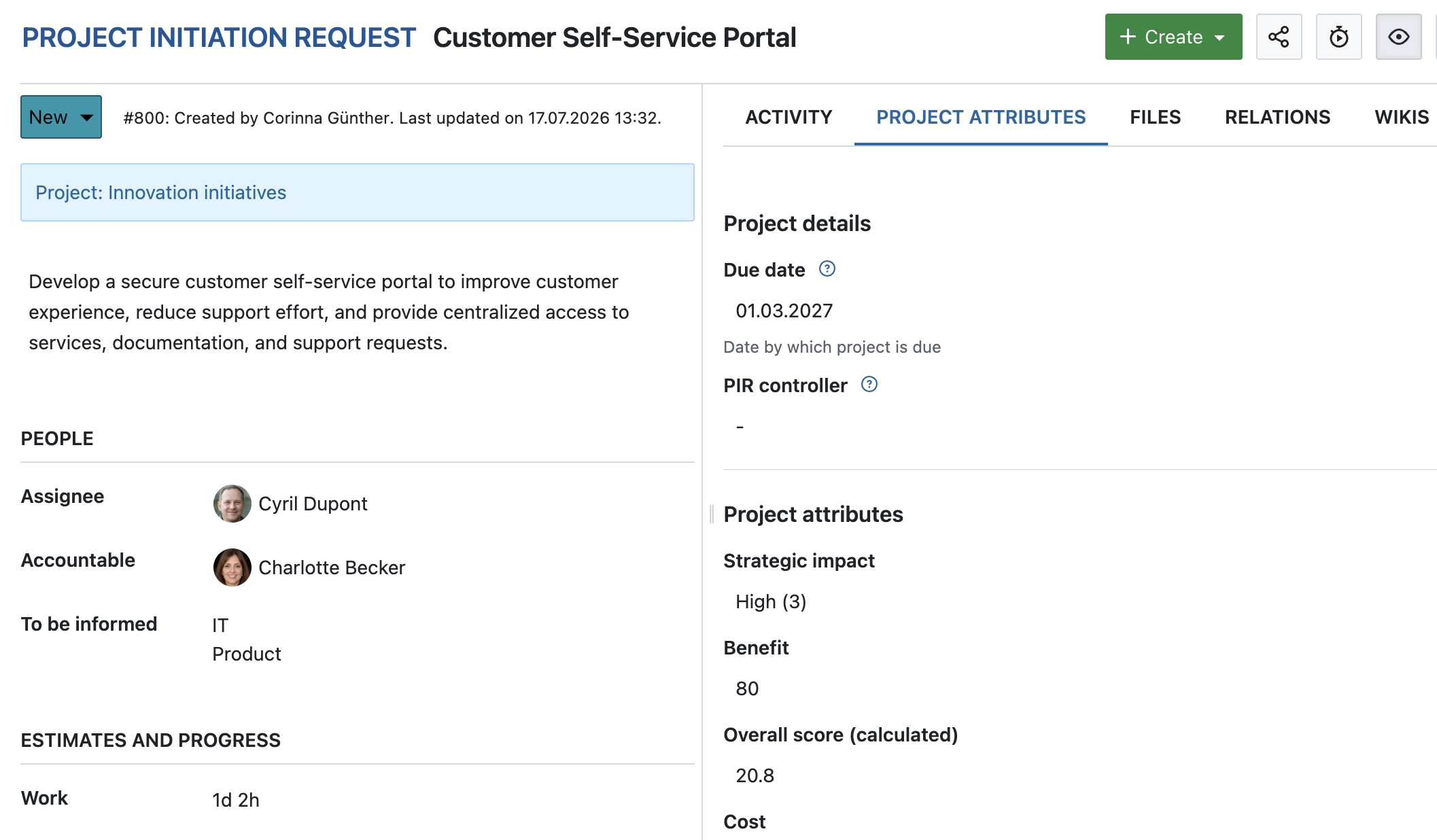
PMflex Artefact PDF export
Work packages can now be exported using a dedicated PMflex Artefact PDF template. The export combines project attributes, work package attributes, custom fields, and related work packages into a structured document suitable for project documentation and governance.
Administrators can configure PMflex artefacts to be generated automatically when a work package reaches a defined status. Generated artefacts can either be uploaded to the project's connected Nextcloud folder or added directly as work package attachments.
Project phases and gates widget
A new project timeline widget is available for project overviews. It provides a visual representation of the project's current phase and gate status, helping project managers and stakeholders quickly understand project progress at a glance.

OpenProject 17.6 introduces a new integration with XWiki, enabling teams to connect project work and documentation more closely. Together, OpenProject and XWiki provide an integrated open source solution for organizations looking to manage both projects and documentation on their own infrastructure. This makes the integration a natural choice for existing XWiki users and for organizations looking to replace proprietary combinations such as Jira and Confluence with a sovereign open source solution. Learn more about the motivation behind the integration and our collaboration with XWiki in our dedicated blog article.
To use the XWiki integration, system administrators first need to configure an external wiki as a Wiki provider in the OpenProject administration settings. See our system admin guide for more information.
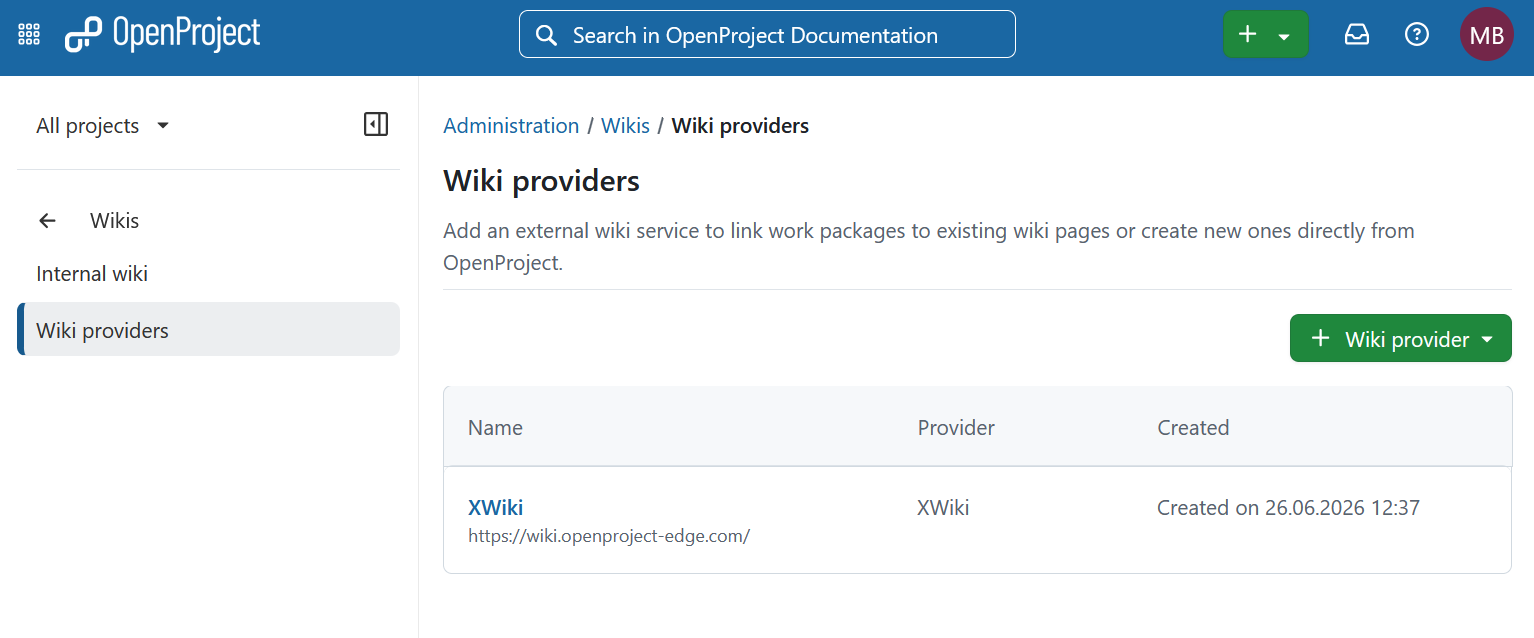
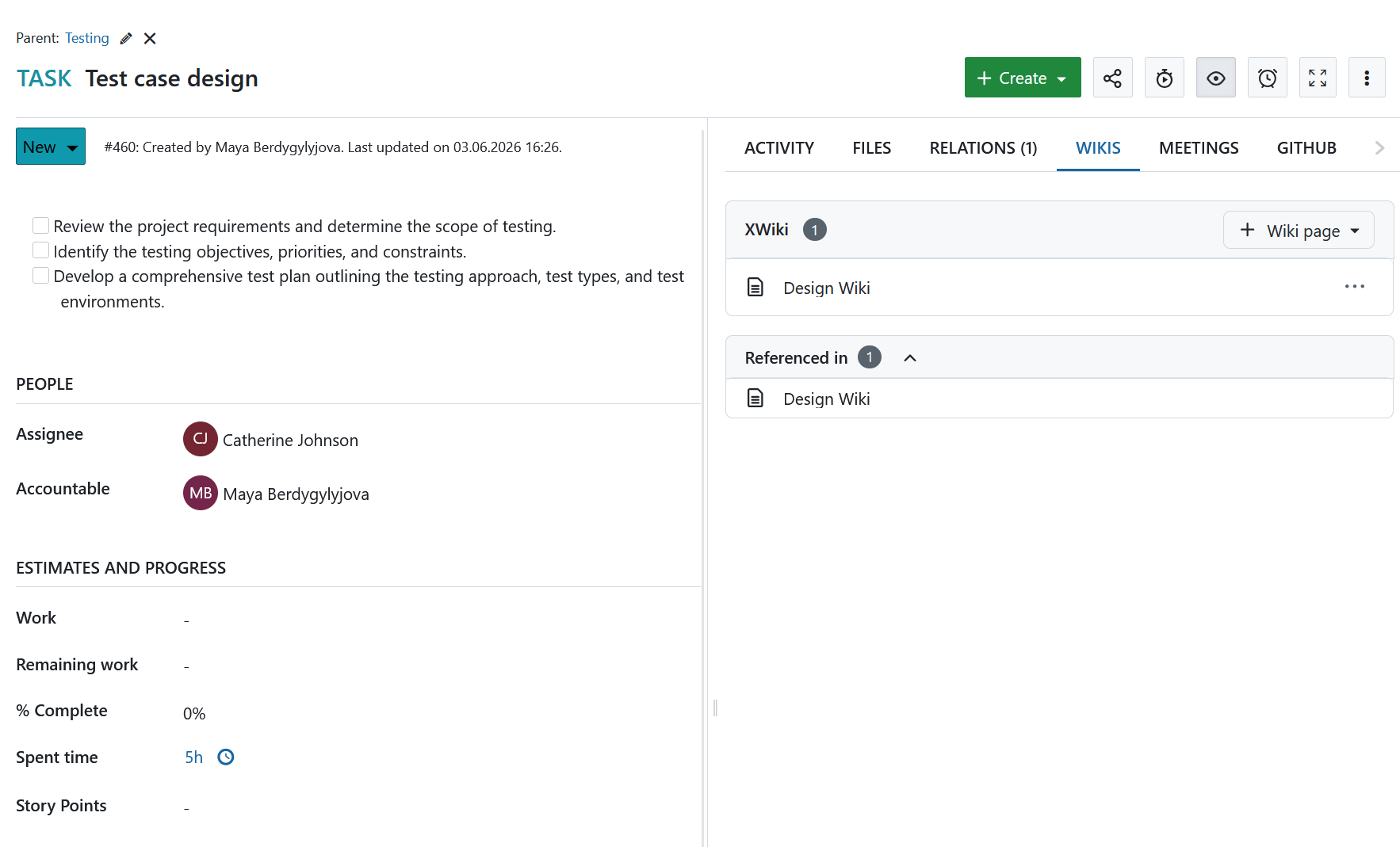
Work packages now include a dedicated Wiki tab where users can view related wiki pages, create new pages, and link existing content from XWiki. This makes it easier to access relevant documentation directly from the work package where the work is planned and executed.
The integration also supports references between OpenProject and XWiki. Users can see which wiki pages reference a work package and insert links to wiki pages directly from descriptions, comments, and documents. This helps teams keep project work and documentation connected across both platforms.
Note
The XWiki integration is designed for organizations that require advanced wiki and documentation capabilities. It is available as an Enterprise add-on in the Corporate plan.
Internal wiki improvements
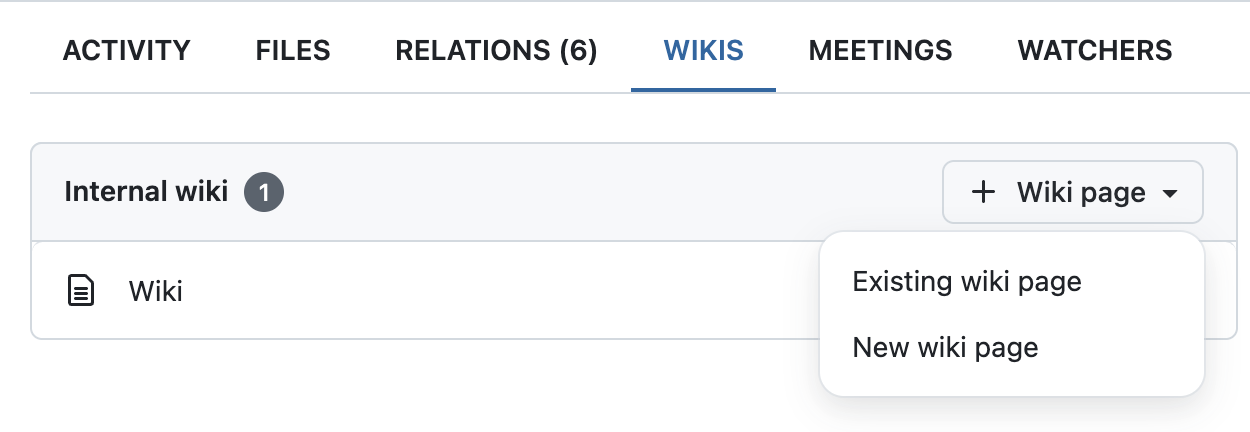
OpenProject's built-in Wiki module is also improved with OpenProject 17.6. It can be used through the new integration as internal provider. System administrators can activate this under Administration → Wikis → Internal wiki.
Users can link to all activated wikis, including internal ones, from the new Wikis tab in work packages. If disabled, the internal wiki is still available as a project module.
In future releases, we plan to further improve the internal wiki.
Sprint goals
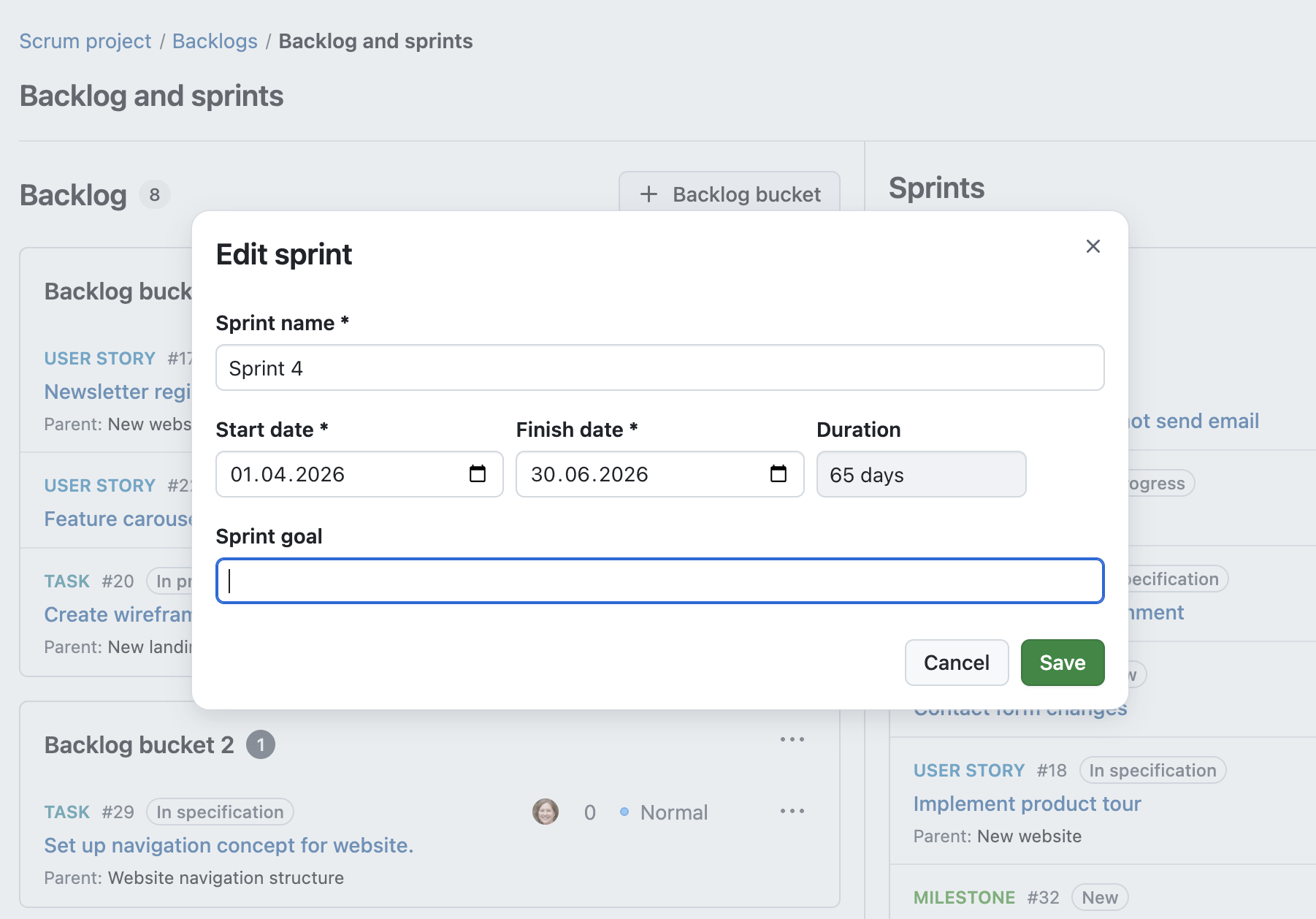
OpenProject 17.6 introduces sprint goals for Backlogs. When creating or editing a sprint, you can now define a sprint goal directly within the sprint settings.
The sprint goal is then displayed on the sprint header, making it visible to everyone working on the sprint.
All sprints overview
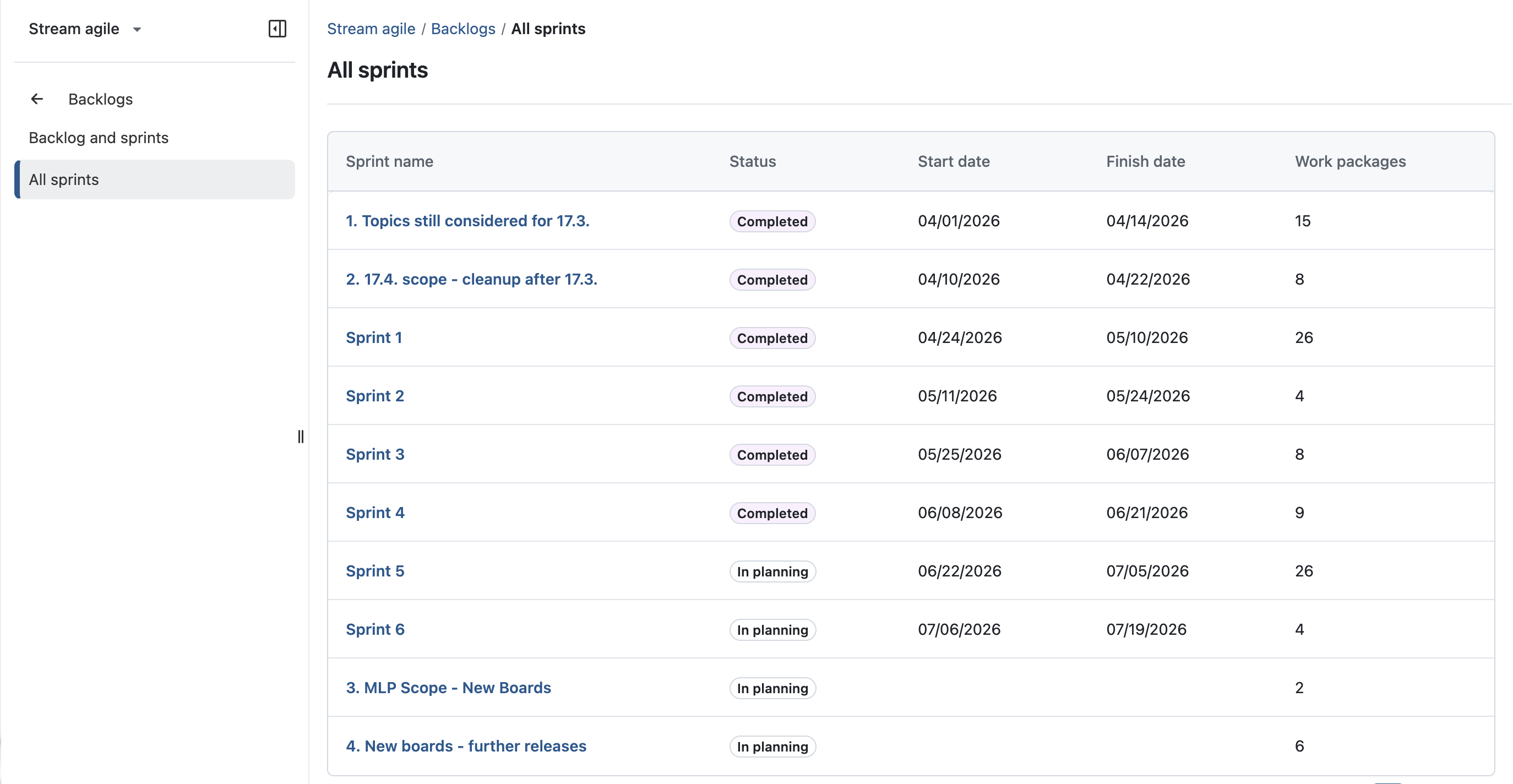
OpenProject 17.6 introduces a new All sprints view in the Backlogs module. The new page provides an overview of all sprints in a project.
For each sprint, the overview displays key information such as its status, start and finish dates, and the number of assigned work packages.
Display backlog buckets in work packages
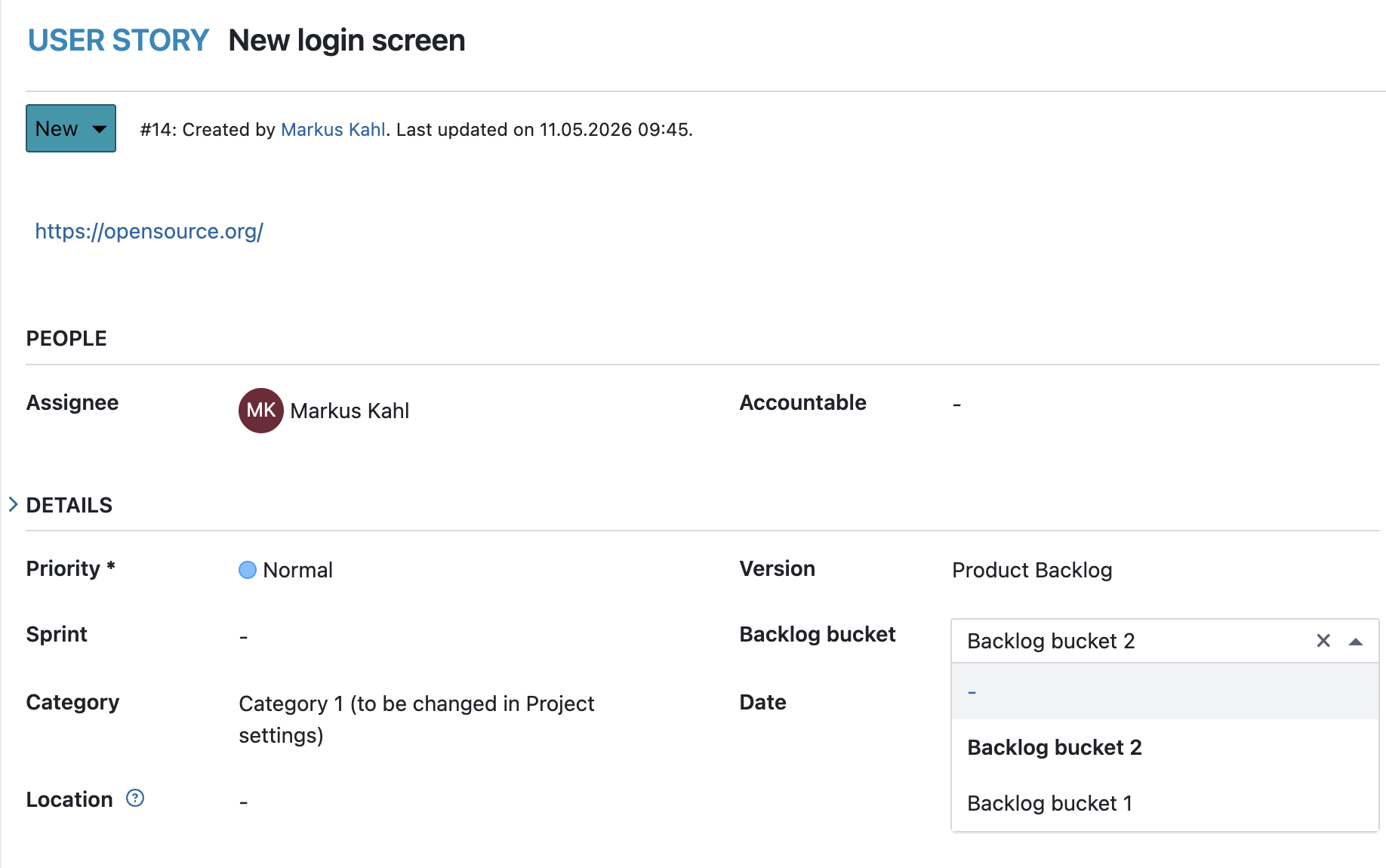
OpenProject 17.6 introduces a new Backlog bucket attribute for work packages. If enabled for a work package type, users can view and manage backlog bucket assignments directly from the work package details.
Work packages can now be assigned to backlog buckets without navigating to the Backlogs module. Since a work package can only belong to either a sprint or a backlog bucket, selecting one will automatically remove the other assignment.
Group, sort and filter work packages by backlog bucket
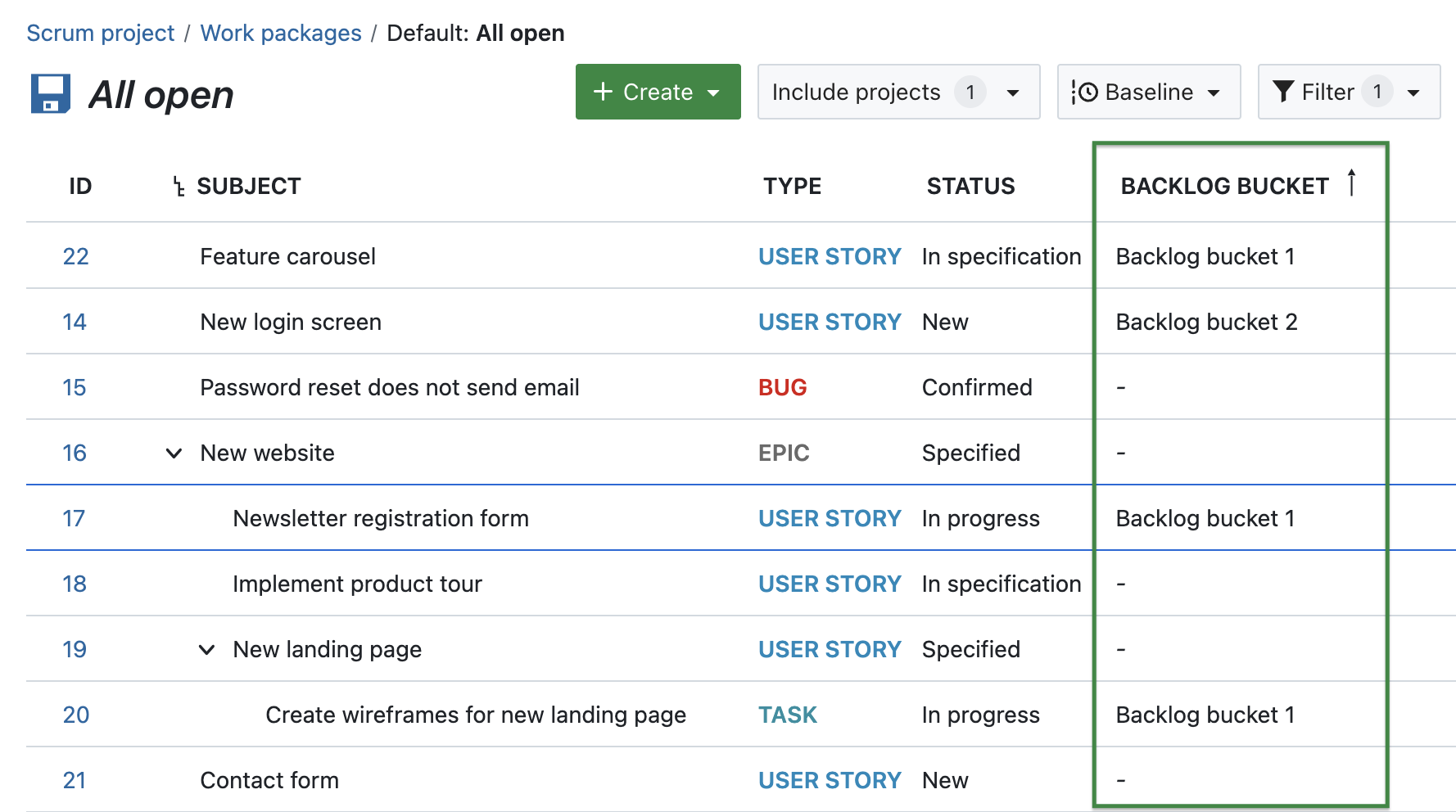
OpenProject 17.6 adds support for backlog buckets in work package tables. You can now add the Backlog bucket column to a work package table and use it to filter, sort, and group work packages.
This makes backlog bucket assignments visible in work package tables, allowing teams to organize, filter, and analyze backlog items more effectively.
Sprint sharing now available in the Basic Enterprise plan
Based on customer feedback, sprint sharing is now included in the Basic Enterprise plan instead of the Corporate plan. This makes the feature available to many more Enterprise customers.
Thank you to everyone who shared constructive feedback and helped shape this decision.
Support project-based (semantic) identifiers in exports
OpenProject 17.6 extends support for project-based (semantic) identifiers across exports. Semantic identifiers are now included consistently in:
- Excel and CSV exports
- Meeting PDF exports
- Timesheet PDF exports
This ensures that exported data uses the same identifiers that users see throughout OpenProject.
Unreserve old project-based (semantic) identifiers
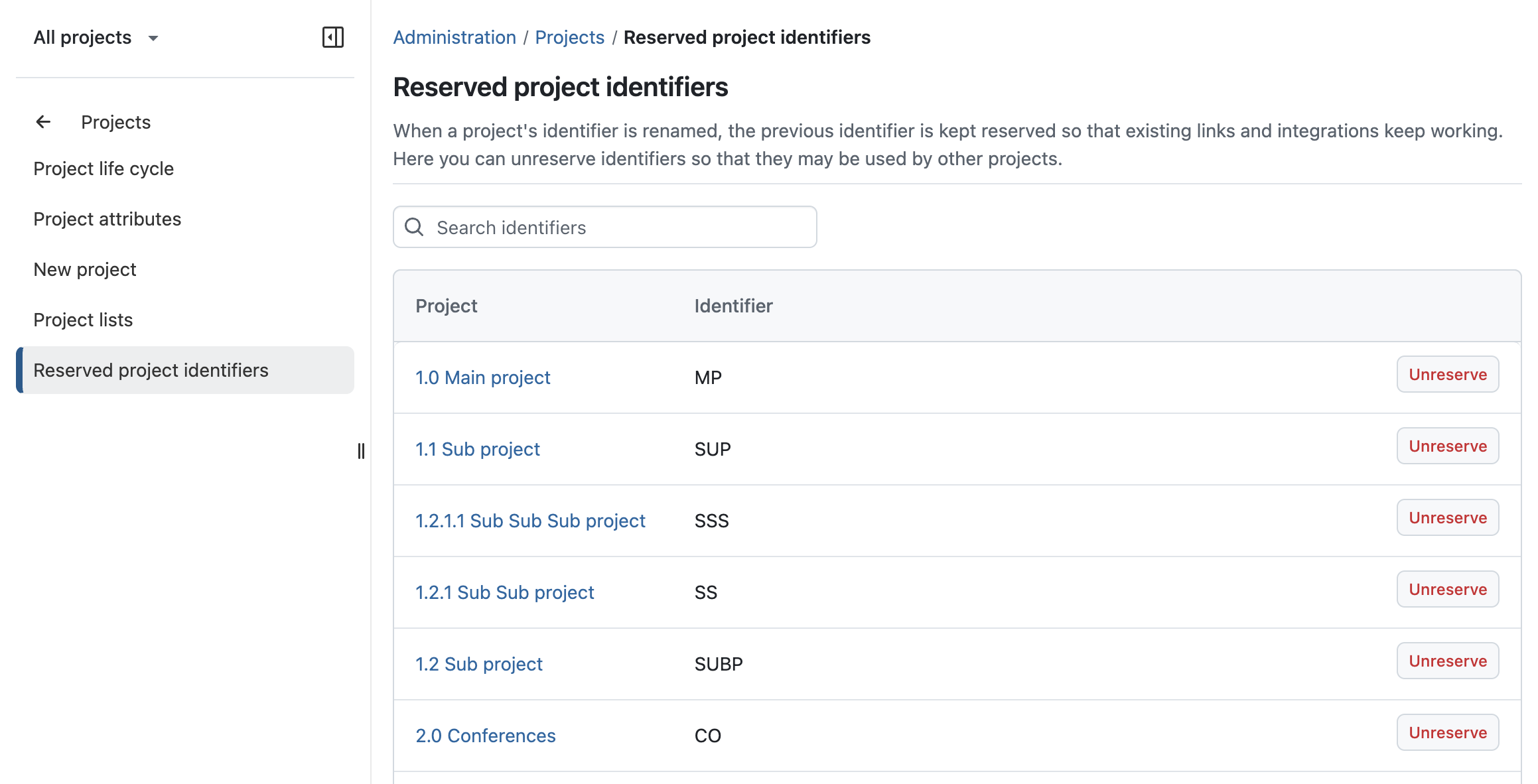
OpenProject 17.6 extends support for reserved project identifiers to project-based (semantic) identifiers. When a project identifier is renamed, previous identifiers remain reserved so that existing links and integrations continue to work.
Administrators can now unreserve old project-based (semantic) identifiers and make them available for reuse by other projects.
Convert meeting agenda items into work packages
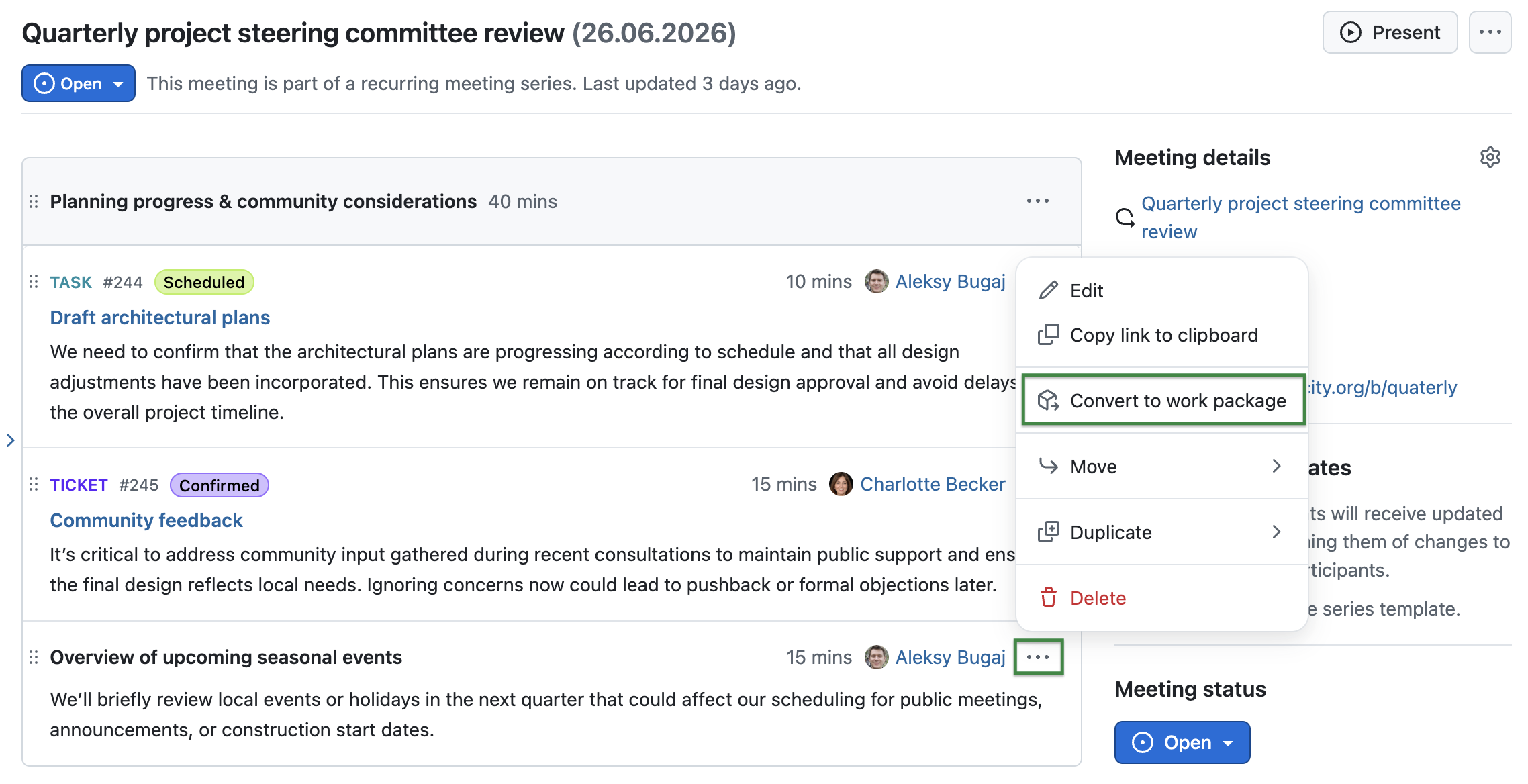
OpenProject 17.6 adds a new Convert to work package action for meeting agenda items. This allows users to turn agenda items directly into work packages without leaving the meeting.
The newly created work package remains linked to the agenda item, helping teams connect meeting discussions with follow-up work.
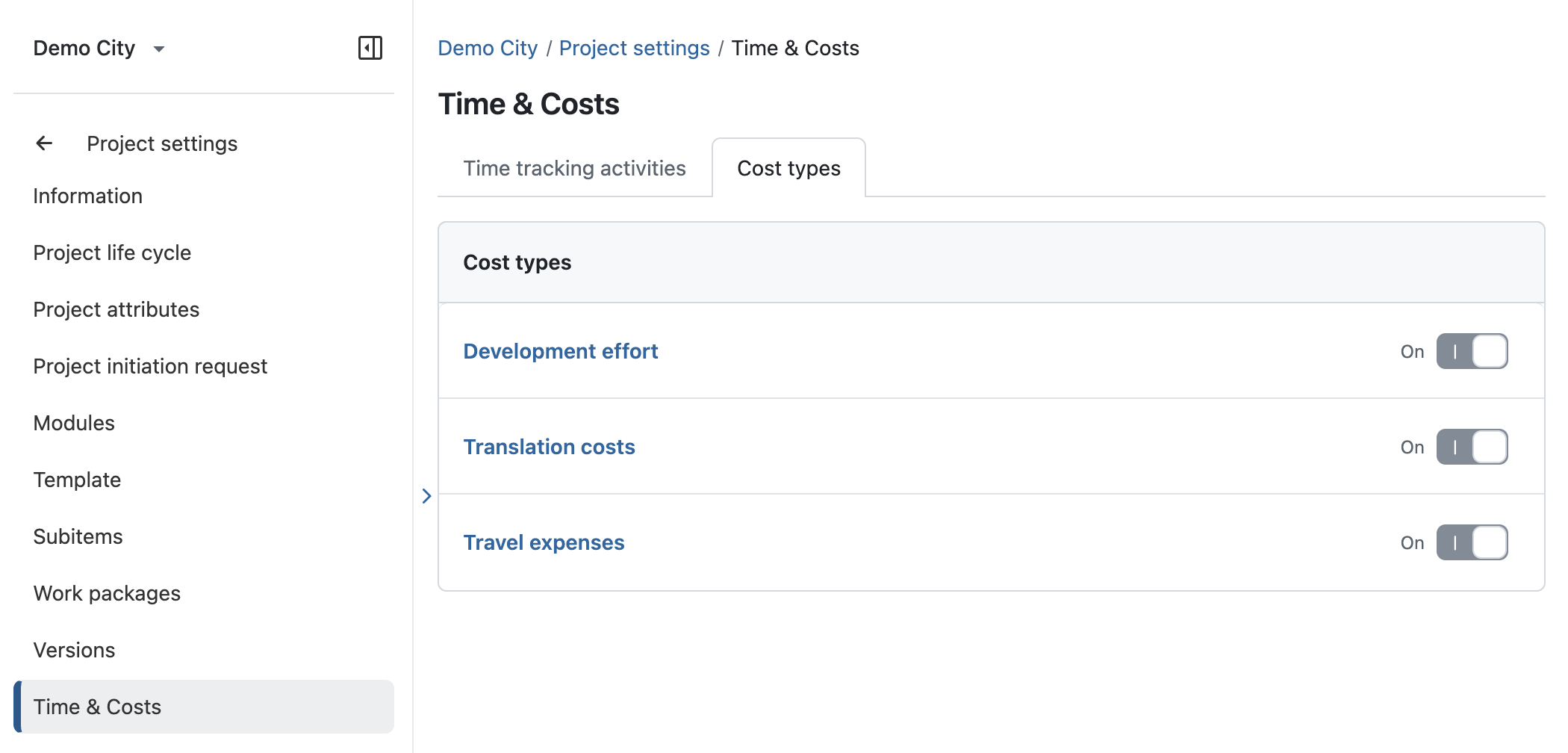
Configure cost types per project
OpenProject 17.6 introduces project-specific cost type configuration. Project administrators can now control which cost types are available within each project.
To support this, project settings now include a new Time and costs section with a dedicated Cost types tab where available cost types can be configured.
Important technical changes
Escape control characters in CSV exports
OpenProject 17.6 improves CSV export security by escaping control characters in exported data. This helps prevent spreadsheet applications from interpreting exported values in unintended ways.
If you need to escape unmodified machine-readable CSV exports, you can disable this flag on the new Exports page Administration → System settings → Exports.
This change was originally reported as [a security advisory on GitHub](https:...
OpenProject 17.5.1

Release date: 2026-06-15
We released OpenProject 17.5.1.
The release contains several bug fixes and we recommend updating to the newest version.
Below you will find a complete list of all changes and bug fixes.
Bug fixes and changes
- Bugfix: Capital letters in user email or login break import with error. [#75924]
- Bugfix: Page scrolls down to the bottom if user clicks on WP description when top of description is out of screen [#74186]
- Bugfix: Creation of new work packages and status transitions not possible aber upgrade to 17.5 [#75961]
- Bugfix: Renaming of projects causes AMPF sync to fail [#76022]
- Bugfix: Direct upload failing on SaaS since new prefix key is added [#75811]
OpenProject 17.5.0
3542248
oliverguenther
Oliver Günther
Release date: 2026-06-10
We released OpenProject 17.5.0. The release contains several bug fixes and we recommend updating to the newest version. In these Release Notes, we will give an overview of important feature changes. At the end, you will find a complete list of all changes and bug fixes.
Important feature changes
Take a look at our release video showing the most important features introduced in OpenProject 17.5.0:
Release video of OpenProject 17.5
Project-based work package identifiers for clearer references and Jira migrations
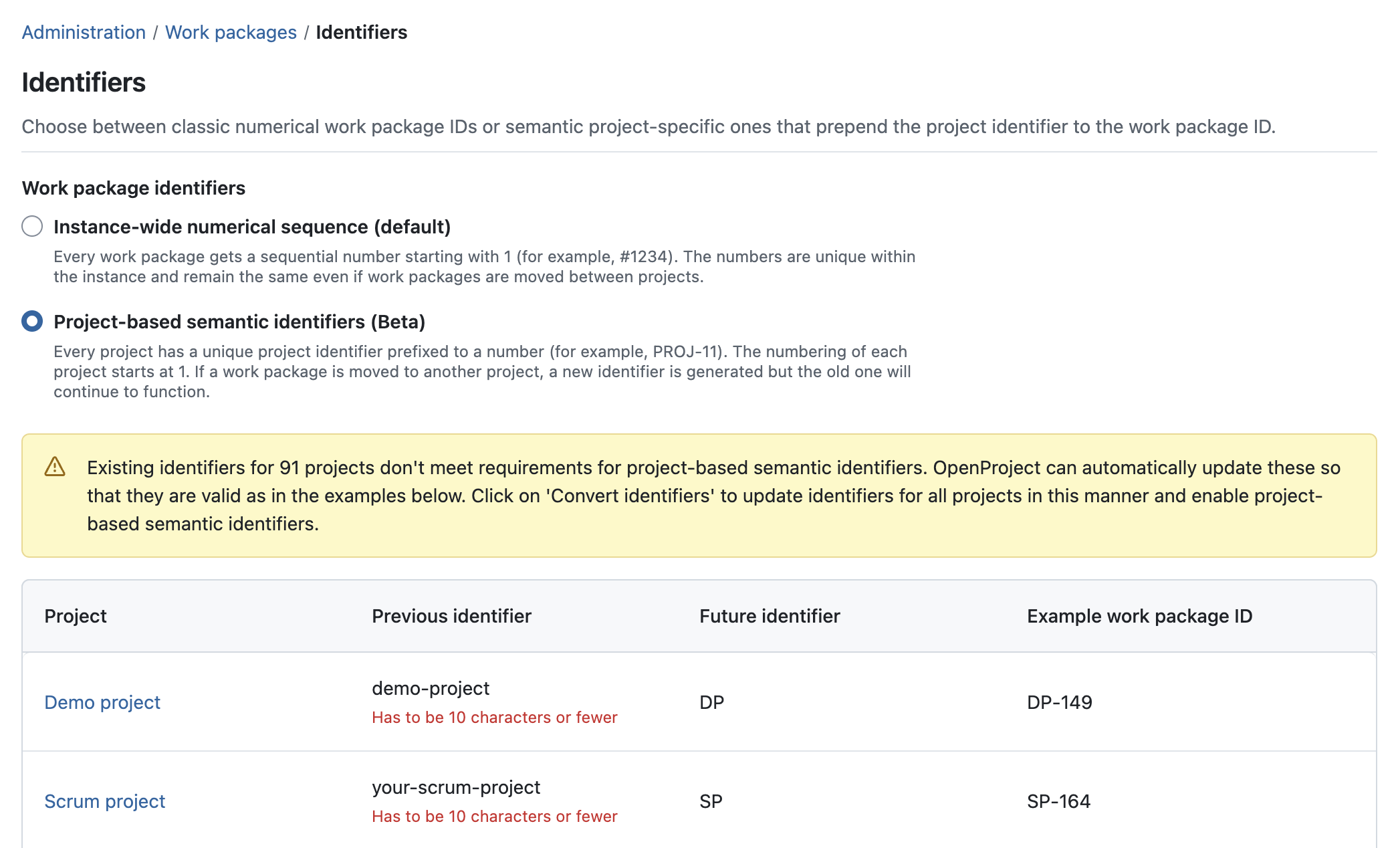
OpenProject 17.5 introduces optional project-based work package identifiers in Beta. Administrators can choose between the default numerical sequence and project-based IDs for the entire OpenProject instance.
Note
The setting can be reverted later. Existing numerical IDs remain valid and continue to resolve to the same work packages throughout the application, including existing URLs, bookmarks, and references.
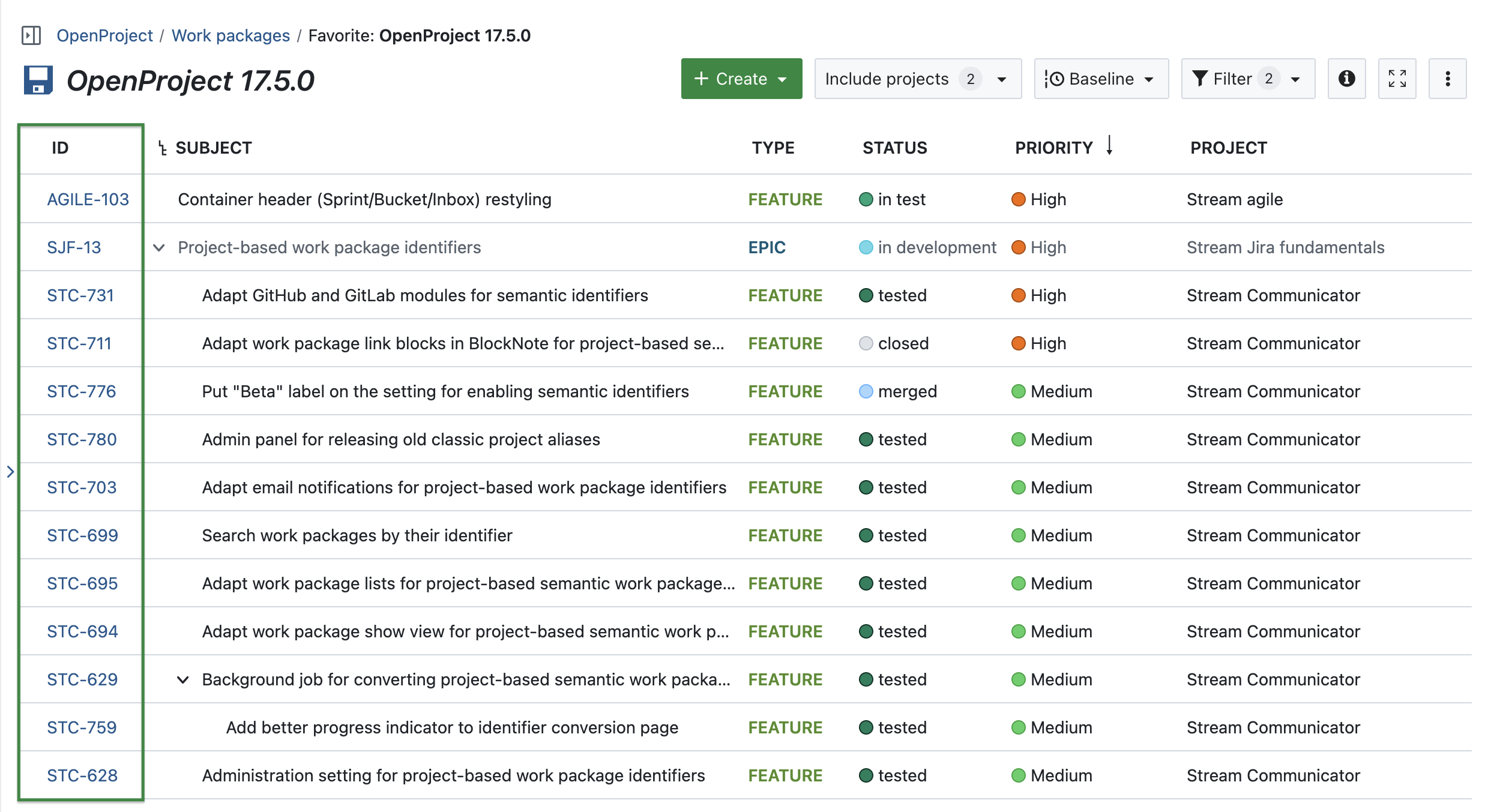
Project-based work package identifiers are especially useful for organizations migrating from Jira, as existing Jira issue identifiers can now be preserved in OpenProject. Beyond migrations, project-based IDs provide shorter sequence numbers and clearer project context, making it easier to recognize, reference, and share work packages across projects, emails, documents, chats, and integrations.
Switching between numerical and project-based IDs
Switching to project-based work package identifiers is an instance-wide administrative change that affects how work packages are referenced throughout OpenProject. Administrators should communicate the change to users before enabling it in production environments, as work package identifiers, URLs, and references will use the new format. OpenProject validates existing project identifiers and can automatically generate shorter, compatible identifiers where necessary.
Note
Historical references remain functional when project identifiers change.
Support across URLs, searches, exports, and integrations
Even in Beta, project-based work package identifiers are supported across important areas of OpenProject, including URLs, searches, filters, exports, email notifications, APIs, and work package references in Documents and text editors.
Existing integrations such as GitHub and GitLab already support the new identifier format.
Note
Project-based work package identifiers are still in Beta. While the feature is supported across important areas of OpenProject, some areas may continue to display numerical identifiers until support for project-based identifiers is fully implemented. In these cases, numerical identifiers remain fully functional and continue to resolve to the same work packages.
See our system admin guide for detailed information on how to manage work package identifiers.
Releasing unused numerical identifiers
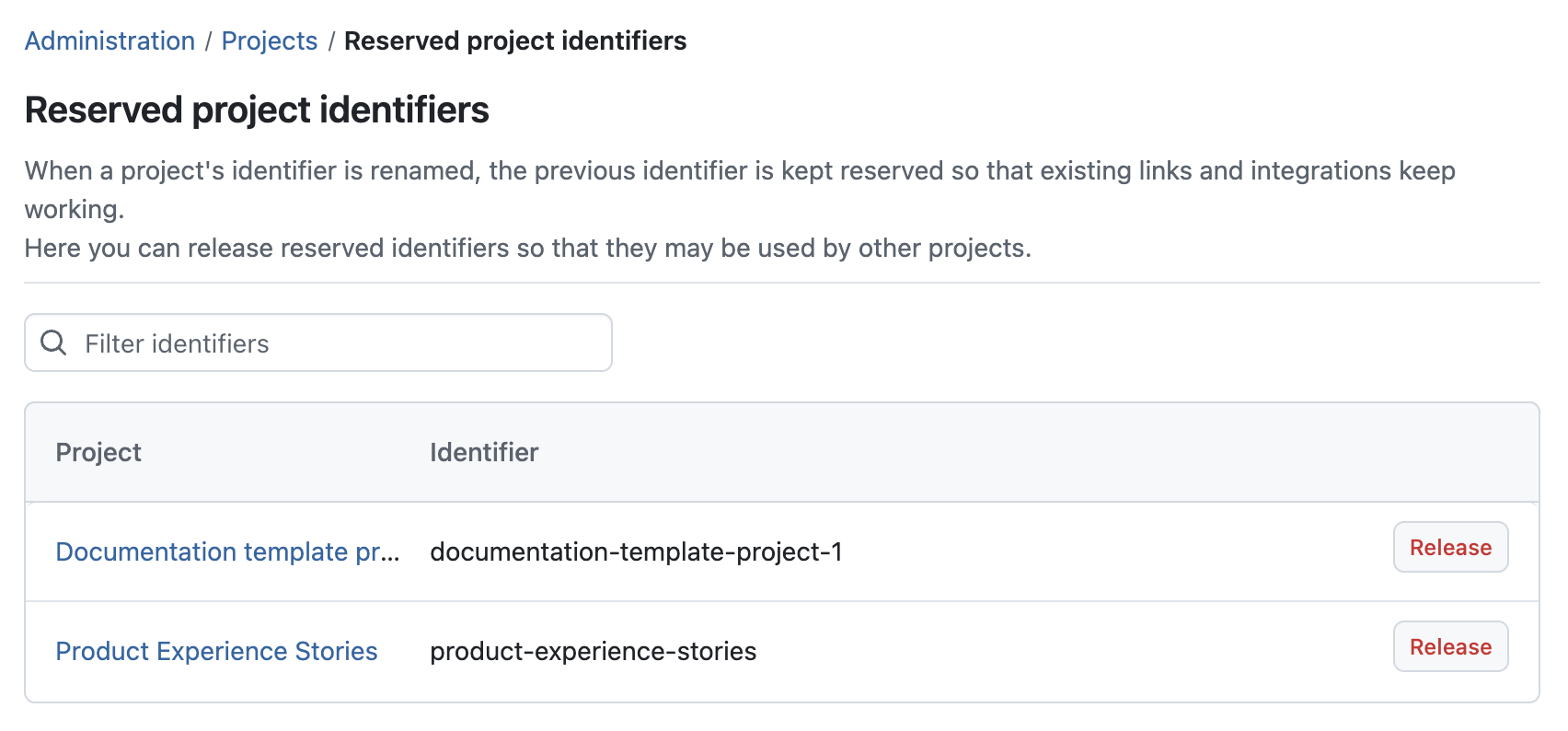
When switching from the default numerical sequence to project-based work package identifiers, previously reserved numerical identifiers can be released again if they are no longer needed. This helps administrators avoid unnecessary gaps and keep numerical identifiers available if they later revert to the default sequence.
Note
Releasing an identifier cannot be undone. External links and integrations using it will stop resolving, and the name becomes available for any new project to claim.
Jira Migrator support for Jira identifiers, due dates, and more
OpenProject 17.5 further improves the Jira Migrator that was introduced in Beta with OpenProject 17.4. Jira issue identifiers can now be preserved during migration when using project-based work package identifiers.
This helps organizations maintain existing references, naming conventions, and established workflows when transitioning from Jira to OpenProject.
In addition to Jira identifiers, OpenProject 17.5 also adds support for migrating due dates, estimated hours, and remaining hours. Read more about the Jira Migrator in our documentation.
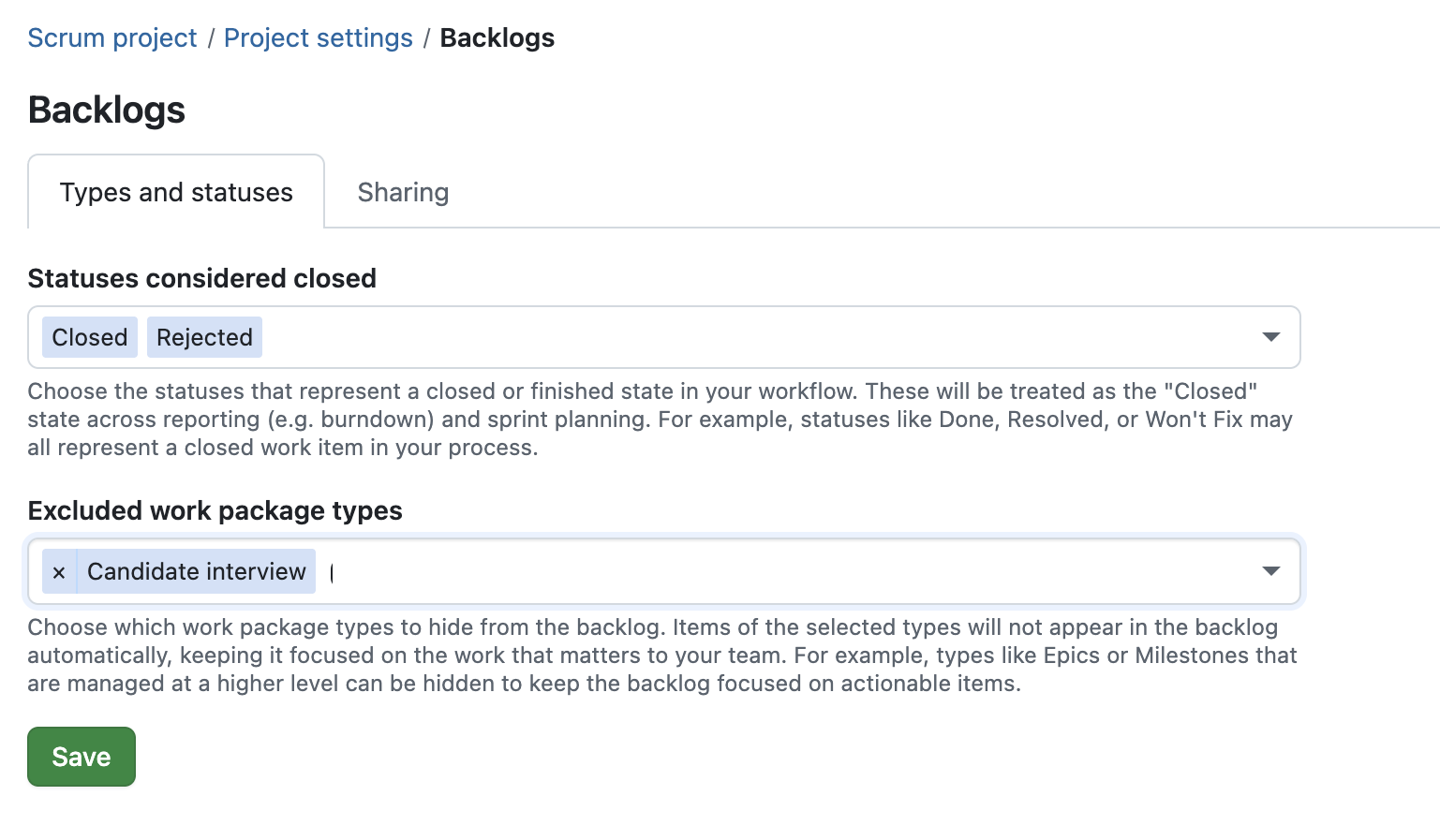
Option to exclude work package types from Backlogs
OpenProject 17.5 introduces more flexible backlog configuration by allowing project administrators to exclude specific work package types from Backlogs. This helps teams keep sprint planning and backlog refinement focused on actionable work items.
For example, higher-level planning items such as Epics or Milestones can now be excluded from backlog views while still remaining available elsewhere in the project. The configuration is available in the Backlogs project settings and can be customized per project.
OpenProject 17.5 also extends project-specific "done" status configuration to the Backlogs module. Work packages with statuses configured as done are now handled consistently across backlog views and sprint completion. For example, teams can treat development work as complete once testing is finished, even if documentation tasks remain open, allowing sprints to be completed without carrying over already finished development work.
Read more about the OpenProject Backlogs module.
Redesigned sprint views and work package cards
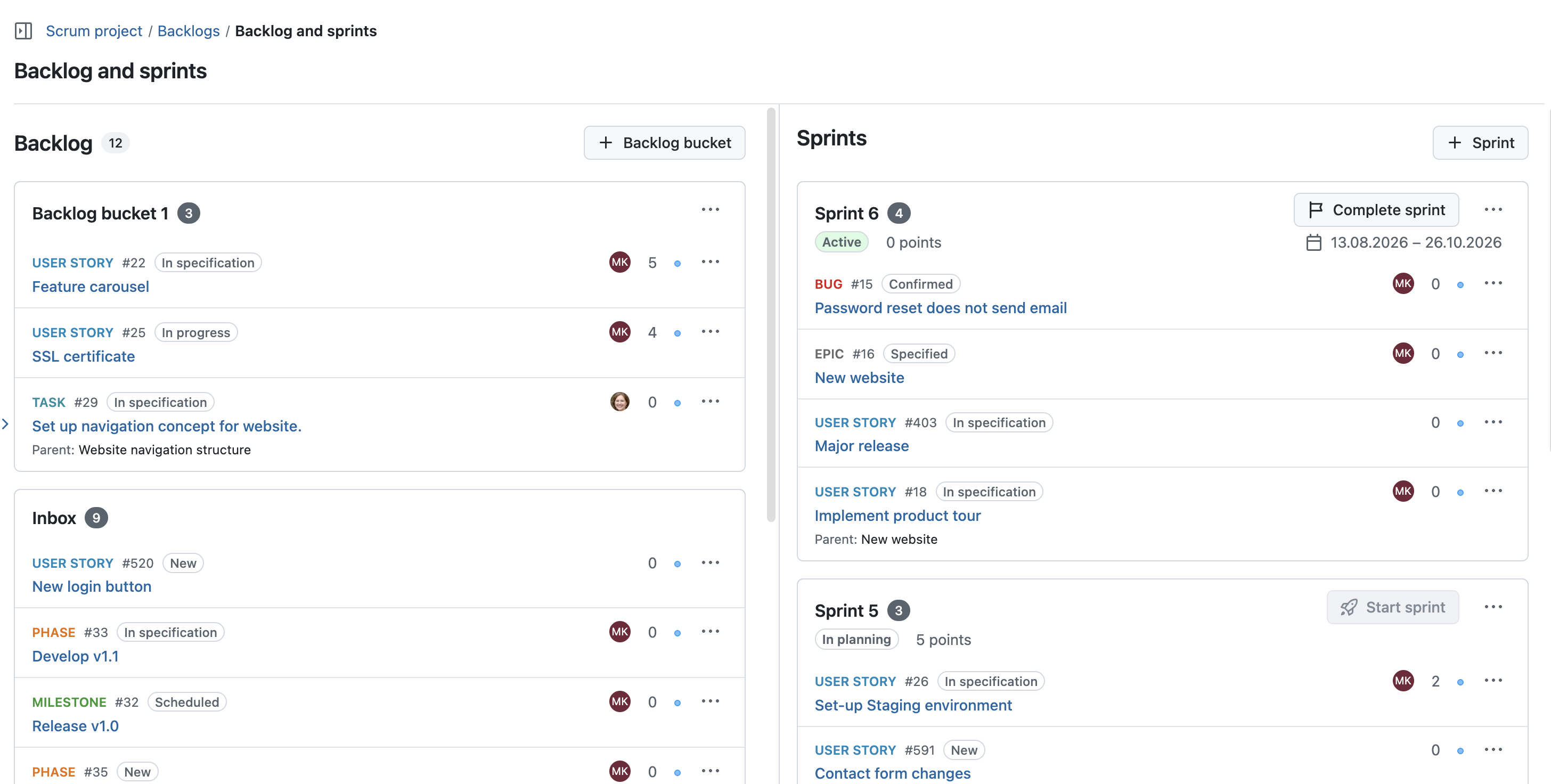
OpenProject 17.5 redesigns sprint headers, backlog containers, and work package cards in the Backlogs module to improve readability and usability during agile planning.
Sprint views now provide clearer visual hierarchy, more consistent actions, and improved visibility of important information such as parent work packages, story points, priorities, assignees, and sprint status. Work package cards have also been redesigned to make important work item details easier to scan during sprint planning and backlog refinement.
Allow inline work package links within text paragraphs in the Documents module
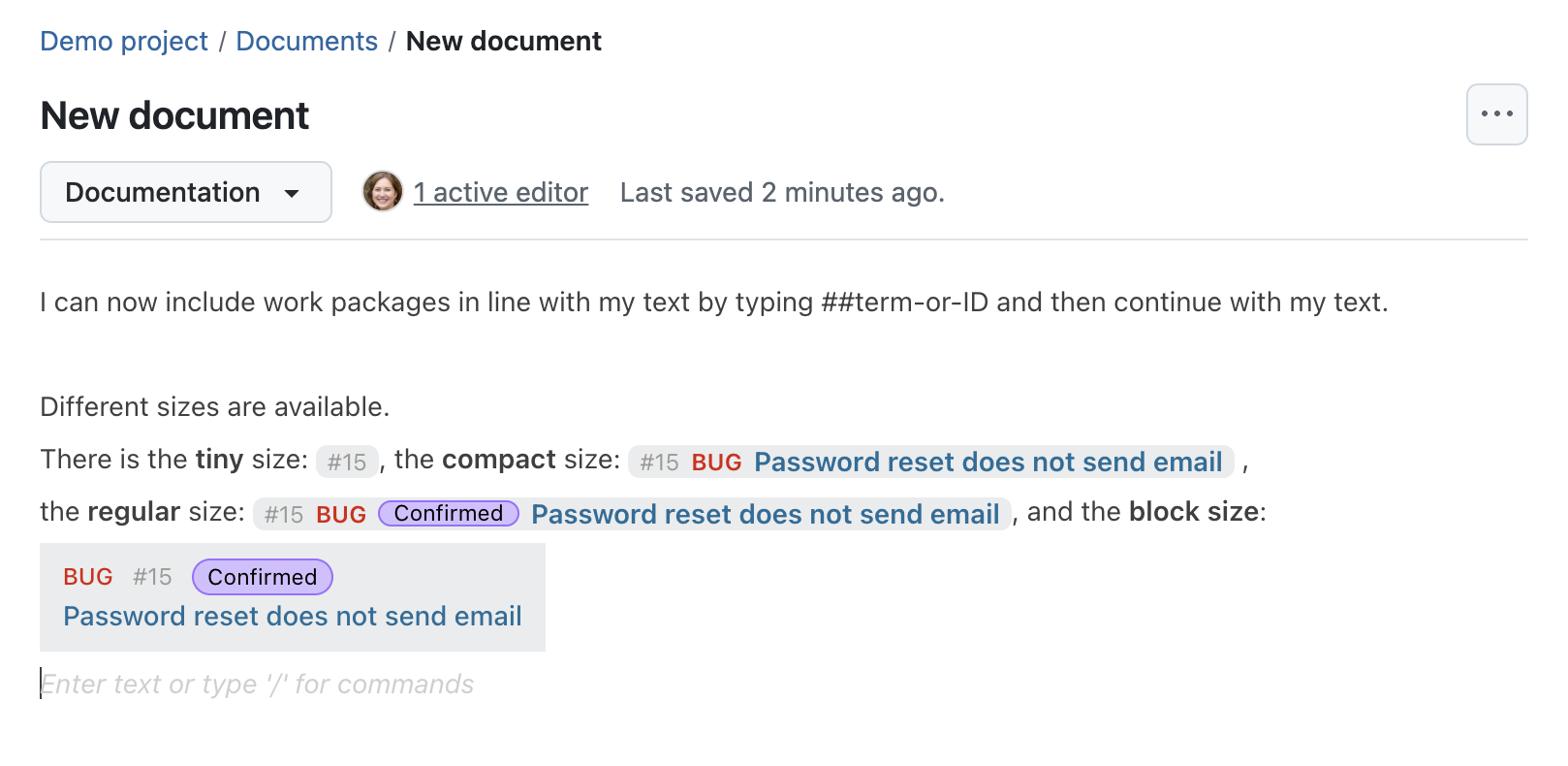
OpenProject 17.5 makes it easier to reference work packages naturally within Documents, which use the BlockNote editor. Work package links can now be inserted directly inside text paragraphs instead of always appearing as separate blocks.
This allows teams to create more readable and structured documentation while still linking directly to relevant work packages. Inline work package links behave like regular inline elements and continue to open the referenced work package in a new tab.
Read more about OpenProject's Documents module.
Expanded work package mentions in CKEditor
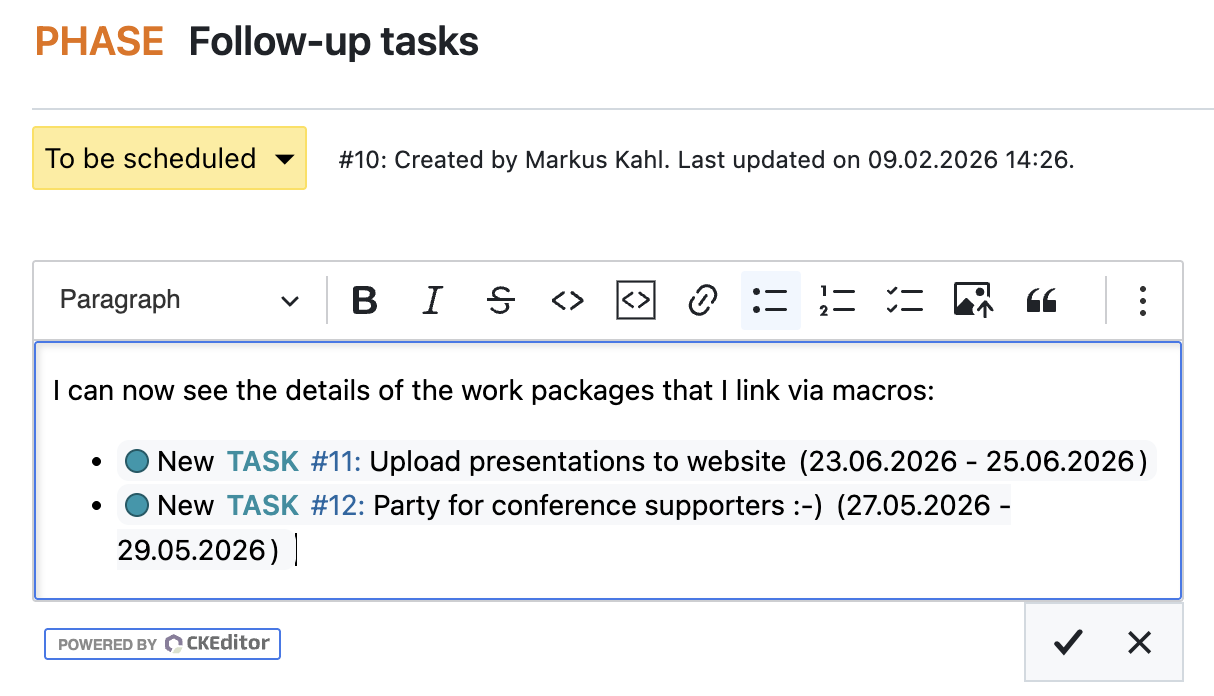
OpenProject 17.5 also improves work package references in CKEditor-based text fields such as work package descriptions, agenda items in meetings, and wiki pages.
Work package mentions using the ## and ### notation now expand directly inside the editor. Instead of displaying only the identifier, OpenProject now shows additional context such as the work package type, status, and subject while still editing.
This makes referenced work packages easier to recognize without leaving the editor.
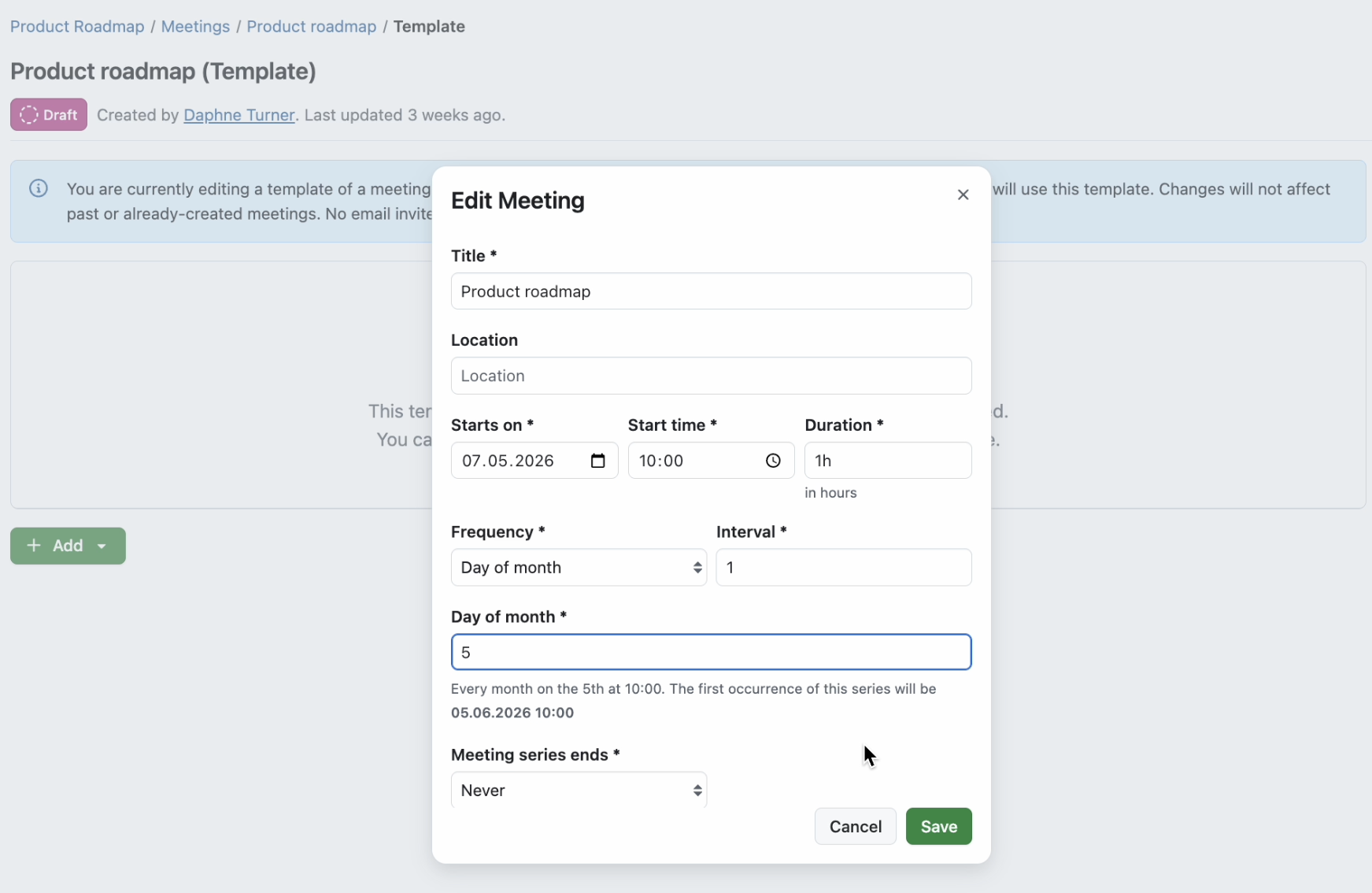
Monthly scheduling options for meeting series
OpenProject 17.5 adds more flexible scheduling options for recurring meetings. Meeting series can now repeat monthly based on patterns such as the first Monday or last Friday of a month.
This makes it easier to schedule recurring coordination meetings, steering committees, retrospectives, or review meetings that follow common organizational schedules.
Debounce meeting emails to reduce email...
OpenProject 17.4.1
8203fc2
oliverguenther
Oliver Günther
Release date: 2026-06-08
We released OpenProject 17.4.1.
The release contains several bug fixes and we recommend updating to the newest version.
Below you will find a complete list of all changes and bug fixes.
Security fixes
CVE-2026-47193 - Journal diff endpoint bypasses object, journal, and field visibility checks
This vulnerability was reported as part of the YesWeHack.com OpenProject Bug Bounty program, sponsored by the European Commission.
For more information, please see the GitHub advisory #GHSA-f2rx-x2qj-2hgj
CVE-2026-49355 - Private work package data disclosure through single meeting agenda item API
GET /api/v3/meetings/:meeting_id/agenda_items/:agenda_item_id discloses private work package data from a linked work package that belongs to a private/inaccessible project.
This vulnerability was reported as part of the YesWeHack.com OpenProject Bug Bounty program, sponsored by the European Commission.
For more information, please see the GitHub advisory #GHSA-g387-6rm2-xw88
GHSA-3vpx-94qx-xpw6 - IDOR through /projects//settings/project_storages/<A_ps_id> via PATCH parameter "storages_project_storage[project_folder_id]" leads to Access to Unauthorized Resources
A project-admin in one project can hijack the managed Nextcloud or OneDrive folder of another project on the same storage by writing the victim project's project_folder_id into the attacker's Storages::ProjectStorage row. The next managed-folder sync overwrites the ACL on the referenced folder with the attacker project's user list.
This vulnerability was reported as part of the YesWeHack.com OpenProject Bug Bounty program, sponsored by the European Commission.
For more information, please see the GitHub advisory #GHSA-3vpx-94qx-xpw6
GHSA-6crw-7f5r-4qj9 - CSRF on TARGET through /users/:id via POST parameter "user[admin]"
Turbo Drive auto-injects CSRF tokens (from <meta name="csrf-token">) on forms injected via the XSS's append Turbo Stream action. A second action, dispatch_event with name="submit", auto-submits the form with no victim interaction beyond viewing the work package, resulting in a CSRF attack
This vulnerability was reported as part of the YesWeHack.com OpenProject Bug Bounty program, sponsored by the European Commission.
For more information, please see the GitHub advisory #GHSA-6crw-7f5r-4qj9
GHSA-98vw-2r87-fx2r - SQL injection in timestamps functionality
OpenProject baseline comparison allows callers to request historic work-package attributes using the timestamps parameter.
The timestamp parser accepts a relative date keyword on the first line because its regular expression uses line anchors. The parser validates the input, but the original multi-line string is kept and later interpolated into a raw SQL CASE ... THEN '<timestamp>' expression.
An authenticated user who can save a query can persist a timestamp array value containing literal commas and trigger a top-level data-modifying CTE. This gives the attacker a generic database write primitive as the OpenProject application database role.
The demonstrated impact is administrator privilege escalation: the attacker uses that write primitive to update their own account record, setting the account's administrator flag to true. The same injection also allows in-band data disclosure through work-package timestamp metadata.
This vulnerability was reported as part of the YesWeHack.com OpenProject Bug Bounty program, sponsored by the European Commission.
For more information, please see the GitHub advisory #GHSA-98vw-2r87-fx2r
GHSA-h83w-5q5x-pq27 - Information Disclosure (cleartext storage of data) on localhost through memcached via Others "storage..httpx_access_token" leads to Sensitive Data Exposure
OpenProject's Storages module writes the OneDrive/SharePoint userless OAuth access_token plaintext to Rails.cache under the deterministic key storage.<id>.httpx_access_token, repopulated continuously by an hourly cron and every userless-OAuth call site (see Write cadence). None of the three allowed cache backends (file_store, memcache, redis) encrypts at rest. An attacker with read access to the cache backend recovers the Azure-AD application-tier bearer with an anonymous get over the memcached binary protocol (or the equivalent against Redis)
This vulnerability was reported as part of the YesWeHack.com OpenProject Bug Bounty program, sponsored by the European Commission.
For more information, please see the GitHub advisory #GHSA-h83w-5q5x-pq27
GHSA-q33w-f822-hg8x - Stored XSS on openproject.example.com through /api/v3/projects/{project}/work_packages via POST parameter "description"
The HTML sanitizer grants <macro> elements unrestricted data-* attributes via :data wildcard. An attacker injects data-controller="poll-for-changes" into a work package description, causing Stimulus.js to mount a controller that fetches an attacker-uploaded attachment and passes it to renderStreamMessage(). This executes arbitrary Turbo Stream actions — including redirect_to — in every victim's authenticated browser session, redirecting them to an attacker-controlled server.
This vulnerability was reported as part of the YesWeHack.com OpenProject Bug Bounty program, sponsored by the European Commission.
For more information, please see the GitHub advisory #GHSA-q33w-f822-hg8x
GHSA-qj96-f42f-6336 - Cache store poisoning leads to Remote Code Execution (RCE)
This vulnerability was reported as part of the YesWeHack.com OpenProject Bug Bounty program, sponsored by the European Commission.
For more information, please see the GitHub advisory #GHSA-qj96-f42f-6336
Bug fixes and changes
- Bugfix: Migration 20250929070310 failing due to update code failing on not-yet fully migrated schema [#75286]
Contributions
A big thanks to our Community members for reporting bugs and helping us identify and provide fixes.
This release, special thanks for reporting and finding bugs go to Alexander Aleschenko.
OpenProject 17.3.4
3f49de9
oliverguenther
Oliver Günther
Release date: 2026-06-08
We released OpenProject 17.3.4.
The release contains several bug fixes and we recommend updating to the newest version.
Below you will find a complete list of all changes and bug fixes.
Bug fixes and changes
- Bugfix: Memcached serialization is broken in 17.3.3 [#75753]
OpenProject 17.3.3
5ee515c
oliverguenther
Oliver Günther
Release date: 2026-06-08
We released OpenProject 17.3.3.
The release contains several bug fixes and we recommend updating to the newest version.
Below you will find a complete list of all changes and bug fixes.
Security fixes
CVE-2026-47193 - Journal diff endpoint bypasses object, journal, and field visibility checks
This vulnerability was reported as part of the YesWeHack.com OpenProject Bug Bounty program, sponsored by the European Commission.
For more information, please see the GitHub advisory #GHSA-f2rx-x2qj-2hgj
GHSA-3vpx-94qx-xpw6 - IDOR through /projects//settings/project_storages/<A_ps_id> via PATCH parameter "storages_project_storage[project_folder_id]" leads to Access to Unauthorized Resources
A project-admin in one project can hijack the managed Nextcloud or OneDrive folder of another project on the same storage by writing the victim project's project_folder_id into the attacker's Storages::ProjectStorage row. The next managed-folder sync overwrites the ACL on the referenced folder with the attacker project's user list.
This vulnerability was reported as part of the YesWeHack.com OpenProject Bug Bounty program, sponsored by the European Commission.
For more information, please see the GitHub advisory #GHSA-3vpx-94qx-xpw6
GHSA-6crw-7f5r-4qj9 - CSRF on TARGET through /users/:id via POST parameter "user[admin]"
Turbo Drive auto-injects CSRF tokens (from <meta name="csrf-token">) on forms injected via the XSS's append Turbo Stream action. A second action, dispatch_event with name="submit", auto-submits the form with no victim interaction beyond viewing the work package, resulting in a CSRF attack
This vulnerability was reported as part of the YesWeHack.com OpenProject Bug Bounty program, sponsored by the European Commission.
For more information, please see the GitHub advisory #GHSA-6crw-7f5r-4qj9
GHSA-98vw-2r87-fx2r - SQL injection in timestamps functionality
OpenProject baseline comparison allows callers to request historic work-package attributes using the timestamps parameter.
The timestamp parser accepts a relative date keyword on the first line because its regular expression uses line anchors. The parser validates the input, but the original multi-line string is kept and later interpolated into a raw SQL CASE ... THEN '<timestamp>' expression.
An authenticated user who can save a query can persist a timestamp array value containing literal commas and trigger a top-level data-modifying CTE. This gives the attacker a generic database write primitive as the OpenProject application database role.
The demonstrated impact is administrator privilege escalation: the attacker uses that write primitive to update their own account record, setting the account's administrator flag to true. The same injection also allows in-band data disclosure through work-package timestamp metadata.
This vulnerability was reported as part of the YesWeHack.com OpenProject Bug Bounty program, sponsored by the European Commission.
For more information, please see the GitHub advisory #GHSA-98vw-2r87-fx2r
GHSA-h83w-5q5x-pq27 - Information Disclosure (cleartext storage of data) on localhost through memcached via Others "storage..httpx_access_token" leads to Sensitive Data Exposure
OpenProject's Storages module writes the OneDrive/SharePoint userless OAuth access_token plaintext to Rails.cache under the deterministic key storage.<id>.httpx_access_token, repopulated continuously by an hourly cron and every userless-OAuth call site (see Write cadence). None of the three allowed cache backends (file_store, memcache, redis) encrypts at rest. An attacker with read access to the cache backend recovers the Azure-AD application-tier bearer with an anonymous get over the memcached binary protocol (or the equivalent against Redis)
This vulnerability was reported as part of the YesWeHack.com OpenProject Bug Bounty program, sponsored by the European Commission.
For more information, please see the GitHub advisory #GHSA-h83w-5q5x-pq27
GHSA-q33w-f822-hg8x - Stored XSS on openproject.example.com through /api/v3/projects/{project}/work_packages via POST parameter "description"
The HTML sanitizer grants <macro> elements unrestricted data-* attributes via :data wildcard. An attacker injects data-controller="poll-for-changes" into a work package description, causing Stimulus.js to mount a controller that fetches an attacker-uploaded attachment and passes it to renderStreamMessage(). This executes arbitrary Turbo Stream actions — including redirect_to — in every victim's authenticated browser session, redirecting them to an attacker-controlled server.
This vulnerability was reported as part of the YesWeHack.com OpenProject Bug Bounty program, sponsored by the European Commission.
For more information, please see the GitHub advisory #GHSA-q33w-f822-hg8x
GHSA-qj96-f42f-6336 - Cache store poisoning leads to Remote Code Execution (RCE)
This vulnerability was reported as part of the YesWeHack.com OpenProject Bug Bounty program, sponsored by the European Commission.
For more information, please see the GitHub advisory #GHSA-qj96-f42f-6336
Bug fixes and changes
OpenProject 17.4.0
57fb3ab
oliverguenther
Oliver Günther
Release date: 2026-04-23
We released OpenProject 17.4.0. The release contains several bug fixes and we recommend updating to the newest version. In these Release Notes, we will give an overview of important feature changes. At the end, you will find a complete list of all changes and bug fixes.
Security fixes
GHSA-r85r-gjq2-f83r - Docker Container starts with SECRET_KEY_BASE default value
When an attacker knew the secret key base that the application used to derive internal keys from, they could construct encrypted cookies that on the server side were decoded using Object Marshalling which allowed the attacker to execute almost arbitrary ruby code within the container, up to a complete remote code execution. This was especially present in Docker containers that shipped with a default value as the secret key base, when it was not manually overwritten, as mentioned in the documentation.
As a fix, the docker containers now validate that a proper SECRET_KEY_BASE environment variable is set Otherwise the application aborts the boot process with an error message. The documentation has been updated to make it even clearer, that the SECRET_KEY_BASE env variable must be set. And the decoding of the encrypted cookies has been updated to use JSON encoding instead of Object Marshalling.
Administrators that have not set a **SECRET_KEY_BASE** environment before need to set one now. Otherwise the application will not boot.
This will force all users using 2 factor authentication to authenticate on their next login, even if they have saved a cookie to skip 2FA for the next 14 days.
Guides to setting this for your installation method:
-
Packaged installations: This secret is already being generated automatically. You are not affected
-
Docker-compose: Add
SECRET_KEY_BASE=<your-secret-key-base>to your .env file. See https://www.openproject.org/docs/installation-and-operations/installation/docker-compose/ for more information -
Docker All-in-One: Add
SECRET_KEY_BASE=<your-secret-key-base>to your docker run call. See https://www.openproject.org/docs/installation-and-operations/installation/docker/ for more information -
Helm-charts: Version 13.5.4 and higher of the helm chart will automatically create a kubernetes secret using a random string.
-
If you have not used a
SECRET_KEY_BASEenv previously, we recommend updating to the newest helm version. -
If you have an existing strong secret, you are safe already and nothing needs to be done. You can optionally place it as the
existingSecretas shown in the Helm chart documentation to use the conventional secret to pass it into the specs.
-
This vulnerability was responsibly reported by GitHub user hkolvenbach.
For more information, please see the GitHub advisory #GHSA-r85r-gjq2-f83r
CVE-2026-44696 - Stored CSS injection via Sanitize::Config::RELAXED[:css] enables phishing overlays and data exfiltration
OpenProject's rich text (markdown) rendering pipeline uses Sanitize::Config::RELAXED[:css] for inline style sanitization. This configuration permits essentially all CSS properties in style attributes on permitted HTML elements (figure, img, table, th, tr, td).
This allows any authenticated user with write access to formattable text fields (work package descriptions, comments, project descriptions, news) to inject CSS that:
This vulnerability was reported by GitHub user NOTTIBOY137
For more information, please see the GitHub advisory #GHSA-j9q2-49mp-hmq5
CVE-2026-44731 - Improper Access Control on OpenProject through /projects/[projectName]/meetings via "invited_user_id" in GET parameter "filters" leads to user names disclosure
The web application's meetings filter feature leaks whether a given user ID corresponds to a valid account and discloses the user's full name, allowing an attacker to enumerate all existing user accounts by probing user IDs and observing differences in the server response.
This vulnerability was reported by user tuannq_gg as part of the YesWeHack.com OpenProject Bug Bounty program, sponsored by the European Commission.
For more information, please see the GitHub advisory #GHSA-x7j3-cfgf-7mc4
CVE-2026-44732 - IDOR on OpenProject through /api/v3/documents/{id} via PATCH parameter "project_id" leads to Unauthorized Modification of Resources
OpenProject exposes a document update endpoint used to modify existing documents. The target document is loaded with visibility checks and then updated .
During update, attacker-controlled attributes are applied to the persisted record before authorization is enforced. As a result, a user without :manage_documents in the source project can move and modify foreign project documents by setting project_id in a single PATCH request.
This vulnerability was reported by sam91281 as part of the YesWeHack.com OpenProject Bug Bounty program, sponsored by the European Commission.
For more information, please see the GitHub advisory #GHSA-mqvv-5mvc-7pg7
CVE-2026-44733 - Business Logic Error on OpenProject through PATCH request to /api/v3/users/me permits to bypass password requirements
A password validation flaw in the change password behavior allows attackers to change a user's password only with an active session takeover.
This vulnerability was reported by user herdiyanitdev as part of the YesWeHack.com OpenProject Bug Bounty program, sponsored by the European Commission.
For more information, please see the GitHub advisory #GHSA-px7f-cj9f-7m4m
CVE-2026-44734 - Improper Access Control on OpenProject through the POST request to /projects/[PROJECT_NAME]/cost_reports/[REPORT_ID]/rename
A Missing Authorization vulnerability exists in OpenProject's CostReportsController. The rename and update actions allow any authenticated user to modify the name, filters, and grouping of any Public cost report in the system without verifying ownership or permission level.
An attacker who discovers or guesses a public report's numeric ID can rename or overwrite its filter configuration without any warning to the report's owner.
This vulnerability was reported by user herdiyanitdev as part of the YesWeHack.com OpenProject Bug Bounty program, sponsored by the European Commission.
For more information, please see the GitHub advisory #GHSA-c767-34gh-gh2h
CVE-2026-44735 - Shares API Information Disclosure
The GET /api/v3/shares endpoint returns share details for ALL work packages in a project to any user with the view_shared_work_packages permission. The authorization check operates at the project level only — it does not verify the requesting user can actually view each individual shared work package.
This vulnerability was reported by GitHub user DAVIDAROCA27.
For more information, please see the GitHub advisory #GHSA-cfg3-f34w-9xx5
CVE-2026-44736 - Relations API Filter Bypasses Visibility Scope, Leaking Cross-Project Work Package Subjects
The GET /api/v3/relations endpoint allows any authenticated user to retrieve relations — and the subject (title) of work packages they have no permission to view — by supplying an arbitrary work package ID in the involved, fromId, or toId filter. This bypasses the Relation.visible scope due to a flawed performance optimization in RelationQuery.
This vulnerability was reported by GitHub user mlgzackfly.
For more information, please see the GitHub advisory #GHSA-p9gq-hrgh-2645
Important feature changes
Take a look at our release video showing the most important features introduced in OpenProject 17.4.0:
Release video of OpenProject 17.4
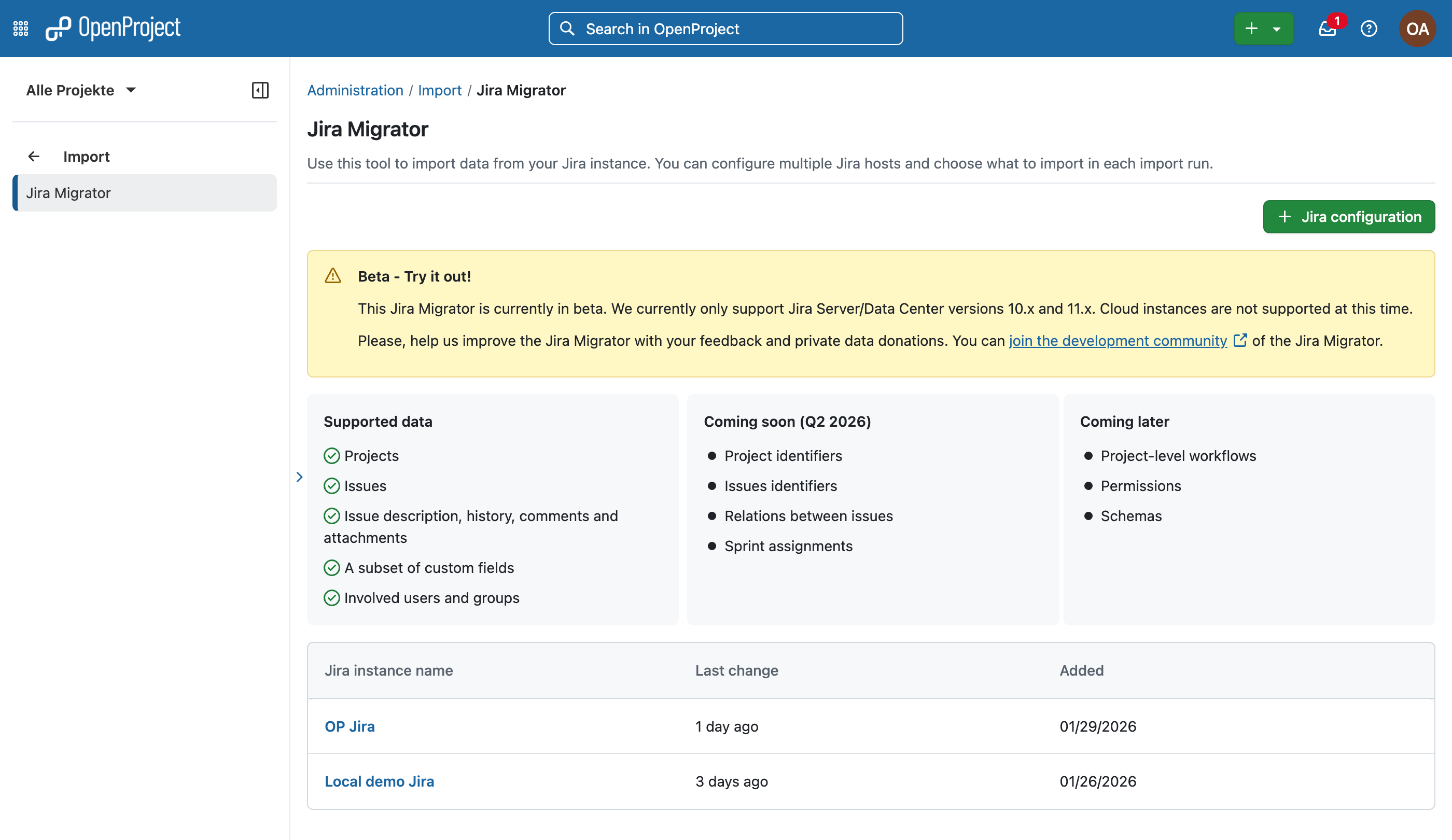
Support basic custom fields migration from Jira
With the release of OpenProject 17.4, the Jira Migrator is now available without a feature flag and can be used directly. While the feature is not yet fully complete and still in Beta, it is ready to be tested – preferably first in a non productive environment. We encourage users to try the Jira Migrator and share their feedback.
Note
If you would like to share anonymized data from your Jir...