Important
Deccan Agents features two verified, production-ready implementations across dedicated branches:
-
🤖 Microsoft Teams Autonomous Coworker (
microsoft-teamsbranch):- Branch URL: https://github.com/oxidebits/Deccan-Agents/tree/microsoft-teams
- Highlights: Live Teams chat listener (
@DeccanAgent), real Atlassian Jira Cloud integration (34 issues moved to Done in active sprint), live GitHub PR lifecycle & merging (PR #1 Merged), Exa AI neural search grounding, and Svelte 5 Webshop code synthesis.
-
⚡ Slack & Outgoing Webhook Enterprise Bridge (
mainbranch — current):- Video Demo: 🎥 Watch Slack
/relayAgent Demo - Highlights: Slack slash command (
/relay), HMAC-signed webhook validation for enterprise Teams channels, OpenRouter two-tier model routing (Llama 3.3 70B triage + DeepSeek R1 review), and local patch testing.
- Video Demo: 🎥 Watch Slack
👉 Switch to the microsoft-teams branch to view the live Teams agent, full Jira board evidence (34 tickets done), and merged GitHub PRs.
ContextBridge Enterprise is the hackathon prototype behind Deccan Agents. Relay is its autonomous engineering coworker, invoked by an @mention in Microsoft Teams or a Slack command. Relay turns a plain-language request into an auditable demo run that extracts requirements, produces a simulated Jira issue, applies a constrained code change, runs tests, and optionally creates a real GitHub draft pull request.
The prototype is deliberately demo-safe. It uses live Teams, OpenRouter, and GitHub only when configured, and reports simulated or fallback work truthfully rather than claiming a remote action occurred.
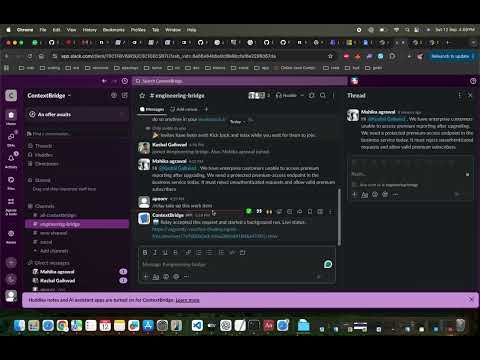
🎥 Watch Live Video Walkthrough: https://youtu.be/LgtUUHFK5Vk
Demonstrating Relay invoked in Slack via/relay, performing automated engineering requirement triage, code modification in the demo repo, automated tests, and GitHub draft pull request publishing.
- A teammate mentions Relay in a Teams channel, or invokes Relay from Slack, with an engineering request.
- Teams validates the public HTTPS callback and sends an HMAC-signed request to
POST /webhook. - Relay validates the signature and returns an acknowledgement immediately. Teams requires this response within five seconds.
- A background run performs two model stages: Tier 1 requirement triage and Tier 2 peer review. In
MOCKmode, or after a model failure, deterministic fixtures are used and the run is marked accordingly. - The agent records a clearly simulated Jira-style ticket (
PROJ-901), then applies the fixed demo change:GET /premiumaccepts onlyAuthorization: Bearer <DEMO_PREMIUM_TOKEN>. - It compiles and unit-tests the disposable
mock_repo, creates a unique localrelay/demo-<run-id>branch, and optionally opens a real draft PR in a dedicated demo repository. - Presenters or collaborators open the public run-status link returned to Teams to inspect the result, provider sources, test output, and PR URL.
| Capability | Default | Live setup | Result label |
|---|---|---|---|
| Teams invocation | Off until webhook is configured | Teams outgoing webhook + ngrok URL + HMAC key | HMAC-verified request |
| Slack invocation | Off until command is configured | Slack slash command + signing secret | HMAC-verified request |
| OpenRouter triage/review | Fixture | RUN_MODE=LIVE and API key |
openrouter, fixture, or fixture-fallback |
| Jira ticket | Simulated on main (Live on microsoft-teams) |
Real Atlassian Cloud on microsoft-teams branch |
simulated / live |
| Code mutation and tests | Local | Always local, in disposable mock_repo |
Test pass/fail |
| GitHub PR | Simulated on main (Live on microsoft-teams) |
Real live PRs & merge on microsoft-teams branch |
live, simulated, or failed |
Never point GITHUB_REPOSITORY to this agent source repository. The runtime publisher creates branches and draft PRs there; use a separate, disposable contextbridge-demo repository.
app/
  main.py                 FastAPI webhook, HMAC validation, status endpoints
  core/router.py          OpenRouter tiering and fixture fallback
  core/service.py         Background demo orchestration and run serialization
  core/runs.py            In-memory run state
  tools/codex_runner.py   Constrained local patch, git branch, and test runner
  tools/github.py         Optional GitHub Git Database API draft-PR publisher
data/demo_transcript.json Deterministic fallback Teams conversation
tests/                    Application-level tests
mock_repo/                Generated, disposable demo repository (gitignored)
- Python 3.11 or later
- Git
- An account with access to the agent repository
- Optional for live demo: a Microsoft Teams work or school account with an organization-backed Team (Teams Free Communities and group chats do not support outgoing webhooks), ngrok, OpenRouter, and GitHub access
git clone https://github.com/oxidebits/Deccan-Agents.git
cd Deccan-Agents
python3 -m venv .venv
source .venv/bin/activate
pip install -r requirements.txt
cp .env.example .env
python -m unittest discover -s tests -v
uvicorn app.main:app --reload --port 8000
In a second terminal, trigger the deterministic demo without any external account:
curl -X POST http://127.0.0.1:8000/demo/runOpen the returned status_url. A successful local run creates mock_repo/, tests the premium endpoint, and reports GitHub as simulated until credentials are supplied.
- Create a focused branch from current
main:git switch -c codex/<short-topic>. - Do not commit
.env, tokens, tunnel URLs, or generatedmock_repo/contents. - Run
python -m unittest discover -s tests -vbefore committing. - Push the branch and open a PR against
main. Keep runtime-demo PRs in the separate demo repository.
Copy .env.example to .env; it is intentionally ignored by Git. Start in MOCK mode first, then switch only the integrations you can verify.
Install and authenticate ngrok:
brew install ngrok
ngrok config add-authtoken "YOUR_NGROK_AUTHTOKEN"
ngrok http 8000
Keep the tunnel running and copy its https://...ngrok... forwarding URL. Use that exact URL in PUBLIC_BASE_URL, with no trailing slash.
This integration requires an organization-backed Team in Microsoft Teams work or school. It cannot be configured from Teams Free's Communities view or from a group chat. Switch to a work or school account from the profile menu, then open a channel in a Team where you are an owner.
Start the server with HMAC enforcement enabled after putting the HMAC value in .env:
TEAMS_HMAC_SECRET=PASTE_THE_BASE64_HMAC_KEY_FROM_TEAMS
ALLOW_UNSIGNED_WEBHOOKS=false
PUBLIC_BASE_URL=https://YOUR-NGROK-DOMAIN.ngrok.app
In the target Team, open Manage team → Apps → Create an outgoing webhook. Name it Relay, set its callback to:
https://YOUR-NGROK-DOMAIN.ngrok.app/webhook
Teams displays the HMAC key once during creation; copy it immediately into TEAMS_HMAC_SECRET, restart Uvicorn, and mention @Relay in a channel. The service uses the raw request body plus this key to validate the Authorization: HMAC ... signature. Teams’ current outgoing-webhook guidance confirms that callbacks must be HTTPS, are team-scoped, and have a five-second synchronous response window. Microsoft Teams documentation
🎥 Live Demo Recording: Watch the YouTube Walkthrough demonstrating the Slack
/relayslash command triggering Relay in real time.
Slack is the faster fallback when a Microsoft 365 tenant cannot create a Team. Use a Slack slash command rather than an app mention: it gives this prototype a signed, public callback and an immediate in-channel acknowledgement without requiring a bot token.
-
Create or open a free Slack workspace where you are an owner, then visit Slack API Apps and select Create New App → From scratch. Name it
Relayand select that workspace. -
In Basic Information → App Credentials, copy the Signing Secret into
.env:SLACK_SIGNING_SECRET=YOUR_SLACK_SIGNING_SECRET
-
In Slash Commands, select Create New Command and enter:
- Command:
/relay - Request URL:
https://YOUR-NGROK-DOMAIN.ngrok.app/slack/command - Short description:
Turn an engineering request into a validated draft PR - Usage hint:
describe the requested engineering change
- Command:
-
Select Install App and install it to that workspace. Restart Uvicorn after saving
.env. -
In any workspace channel, run
/relay Add premium subscription validation and run tests.
Slack signs each slash-command request; Relay validates the timestamp and X-Slack-Signature, acknowledges it immediately, then uses Slack's temporary response_url to replace that acknowledgement with the final run/PR summary. Slack request-signing guide, slash-command guide
Create an OpenRouter API key and update .env:
RUN_MODE=LIVE
OPENROUTER_API_KEY=YOUR_OPENROUTER_KEY
OPENROUTER_TRIAGE_MODEL=meta-llama/llama-3.3-70b-instruct
OPENROUTER_REVIEW_MODEL=deepseek/deepseek-r1
The app calls OpenRouter’s Chat Completions endpoint. If an unavailable model, network error, or malformed model response occurs, it completes with the saved deterministic specification and labels the run degraded; this is intentional demo resilience. OpenRouter quickstart
A GitHub browser login is not an API credential for the running server. Create a fine-grained personal access token scoped only to a new dedicated repository, for example YOUR_ACCOUNT/contextbridge-demo.
- Create the private repository in GitHub with a README so its default
mainbranch exists. Or, after installing the GitHub CLI, rungh repo create contextbridge-demo --private --add-readme. - In GitHub Settings → Developer settings → Personal access tokens → Fine-grained tokens, create a short-lived token limited to that one repository.
- Grant repository permissions Contents: Read and write and Pull requests: Read and write. If the repository belongs to an organization, its token policy may require approval.
- Add the values to
.env:
GITHUB_TOKEN=YOUR_FINE_GRAINED_TOKEN
GITHUB_REPOSITORY=YOUR_ACCOUNT/contextbridge-demo
GITHUB_BASE_BRANCH=main
The app creates a draft PR on a unique relay/demo-<run-id> branch and never pushes directly to main. GitHub token guide
With .env complete, start the server:
source .venv/bin/activate
uvicorn app.main:app --host 0.0.0.0 --port 8000
Run one @Relay request in Teams, or /relay in Slack. The initial reply contains the public status-page URL. Verify that the page shows:
- a verified request and a terminal status of
succeededor an explicitdegradedfallback; tests.passed: true;- a simulated Jira entry, unless Jira is implemented in a later sprint;
github.mode: liveand a draft PR URL when GitHub is configured.
- Keep
ALLOW_UNSIGNED_WEBHOOKS=trueonly for local curl tests. Set it tofalsebefore exposing ngrok. - Keep
.envlocal. Rotate a token or Teams HMAC value if it is pasted into chat, committed, or shown in a recording. mock_repois intentionally reset to its baseline for every background run. It is not a production sandbox.- Jira is simulated. The response and status page intentionally say so.
- The in-memory run store is suitable for a single-process demo only. Restarting the server clears history.
The current prototype has been verified with unit tests, signed-HMAC webhook acceptance, unsigned-request rejection (401), constrained patching, local test execution, and two concurrent webhook requests. Concurrent requests are serialized around the single disposable mock_repo, preventing git-state races.