Repository navigation
Releases: ozaimoglu/arc
Release list
Arc 0.1.19 preview

Arc 0.1.19 improves Windows game launching and process tracking.
- Fix process detection when Windows reports an 8.3 path such as
WORKSP~1instead of a folder's long name. Both paths resolve to the same installation before Arc starts or ends a tracked session. - Include the Sekiro launch-path fix from 0.1.18. Canonical validation remains in place; the game receives an ordinary Windows executable path when it identifies the same file.
- Launch installed Steam games through verified App IDs and route supported local store registrations through their owning clients. Track game processes across supported client handoffs.
- Refresh verified Steam and Metacritic ratings every 72 hours, keeping saved scores offline and retrying failed updates later.
- Support the optional SCSKiller 1.2.5-arc.1 compatibility build. The source pin follows upstream's rebuilt release history with an identical complete source tree. SCSKiller remains a separate installation; see the compatibility guide.
The unsigned Windows x64 NSIS installer is about 3.5 MiB. Existing library records, preferences and artwork are retained. WebView2 is provided by Windows or the installer bootstrapper.
Validation includes 77 frontend tests, 86 Rust tests, strict Clippy, TypeScript/Vite bundling and Windows packaging. The separate SCSKiller workflow passed 706 synthetic regressions. The short-path failure was reproduced locally and covered by a native Windows regression; Sekiro's corrected native launch was confirmed by the user. Gameplay coverage and remaining limitations are recorded in the validation notes.
Shader support still depends on available game pipeline data. Requiem recording remains unavailable where upstream detects the DLSS/NVIDIA DirectX 12 load-order conflict; that guard is retained. Standalone and console sessions track the directly launched process.
Installer SHA-256:
6b2678293236c80bf5df3124f09eb6dd8af244c12f9b3c180288f7ac1bfb2aac
Arc 0.1.18 — Reliable Play, fresh ratings
Arc 0.1.18 improves Play reliability and keeps your ratings up to date.
- Fix Windows executable-path compatibility affecting games such as Sekiro. Canonical file validation is retained; the child process receives an ordinary Windows path when it identifies the same executable.
- Launch installed Steam games through their verified Steam App ID. Supported local Epic, Riot, EA, Ubisoft, Battle.net, Rockstar and GOG registrations use their owning clients; Knight Online uses its own launcher.
- Follow game processes across supported store-client handoffs without counting the shared client as gameplay.
- Refresh verified Steam and Metacritic ratings every 72 hours, including checks after resume or reconnect. Keep saved scores offline and retry failed updates later.
- Update the optional SCSKiller compatibility build to 1.2.5-arc.1 with matching upstream native tools. SCSKiller remains a separate installation; build/connect instructions are in the compatibility guide.
- Display the actual package version in Arc's footer.
The unsigned Windows x64 NSIS installer is about 3.5 MiB. Existing library records, preferences and artwork are retained. WebView2 is provided by Windows or the installer bootstrapper.
Local validation passed 77 frontend tests, 86 Rust tests, strict Clippy, TypeScript/Vite bundling, SQLite checks and Windows packaging. The separate SCSKiller build passed 706 synthetic regressions. Sekiro's corrected native launch was confirmed by the user; other store routes have synthetic and installation-plan coverage, with live gameplay coverage described in validation notes.
Requiem recording remains unavailable where upstream detects the DLSS/NVIDIA DirectX 12 load-order conflict. Arc retains this guard. Shader support depends on the game's available pipeline data; standalone and console sessions still track the directly launched process.
Installer SHA-256:
4fb96b97240278b17b02669204c768a5f02057d0d22b99273f28e8d4c0df4cca
The maintained compatibility guide/build recipe follows upstream's rebuilt v1.2.5 history. Its current source pin has the same complete source tree as the tested build; Arc's installer and checksum are unchanged.
Arc 0.1.14 — Custom window chrome
Arc 0.1.14 adds a title bar that follows the rest of the app: drag to move, double-click to maximize or restore, and minimize/restore/close controls that remain accessible while a dialog is open.
This preview also brings the shader preparation and cache features introduced since 0.1.8 into the downloadable Windows installer.
What's included
- Custom window chrome, native focus/maximize state and accessible window buttons.
- Optional SCSKiller 1.2.4 integration, portable-store migration support and clearer partial/unreached/no-stutter results.
- Live shader preparation progress, graceful Stop, and compatible recording setup through the separately licensed compatibility CLI.
- GPU cache usage, NVIDIA size controls and confirmed per-game cache cleanup.
- Existing local game discovery, artwork, critic/user/Steam ratings and shadPS4 launch support.
Download
Install Arc_0.1.14_x64-setup.exe for Windows x64. The installer is approximately 3.45 MiB and installs for the current Windows user. WebView2 is supplied by Windows or its separate bootstrapper. SHA256SUMS.txt contains the installer checksum.
Upgrading keeps Arc's library and settings. SCSKiller is a separate optional installation; neither its binaries nor games/emulators are bundled in Arc. See shader setup and the compatibility CLI build instructions.
Validation and limits
71 frontend tests and 64 Rust tests passed, as did strict TypeScript/Vite bundling, Clippy and schema checks. This NSIS package was installed and restarted on Windows; the executable matched its frozen build and all existing SQLite library/settings/ratings/session records were preserved.
This remains an unsigned early preview. Game detection is heuristic and alternate executables can produce duplicate entries. Whole-library SCSKiller scans can be slow on large archives, and a complete 1.2.4 audit of every installed game was not established. Existing gameplay recorder DLLs were preserved rather than automatically upgraded. Unsupported/encrypted shader formats still require upstream support; recording-required games need actual gameplay captures. Native pointer/pixel QA and gameplay stutter improvements have not been measured.
Full check details: validation.
Arc 0.1.8 — Eclipse
Arc's first public preview: a cinematic home for your local Windows game collection.
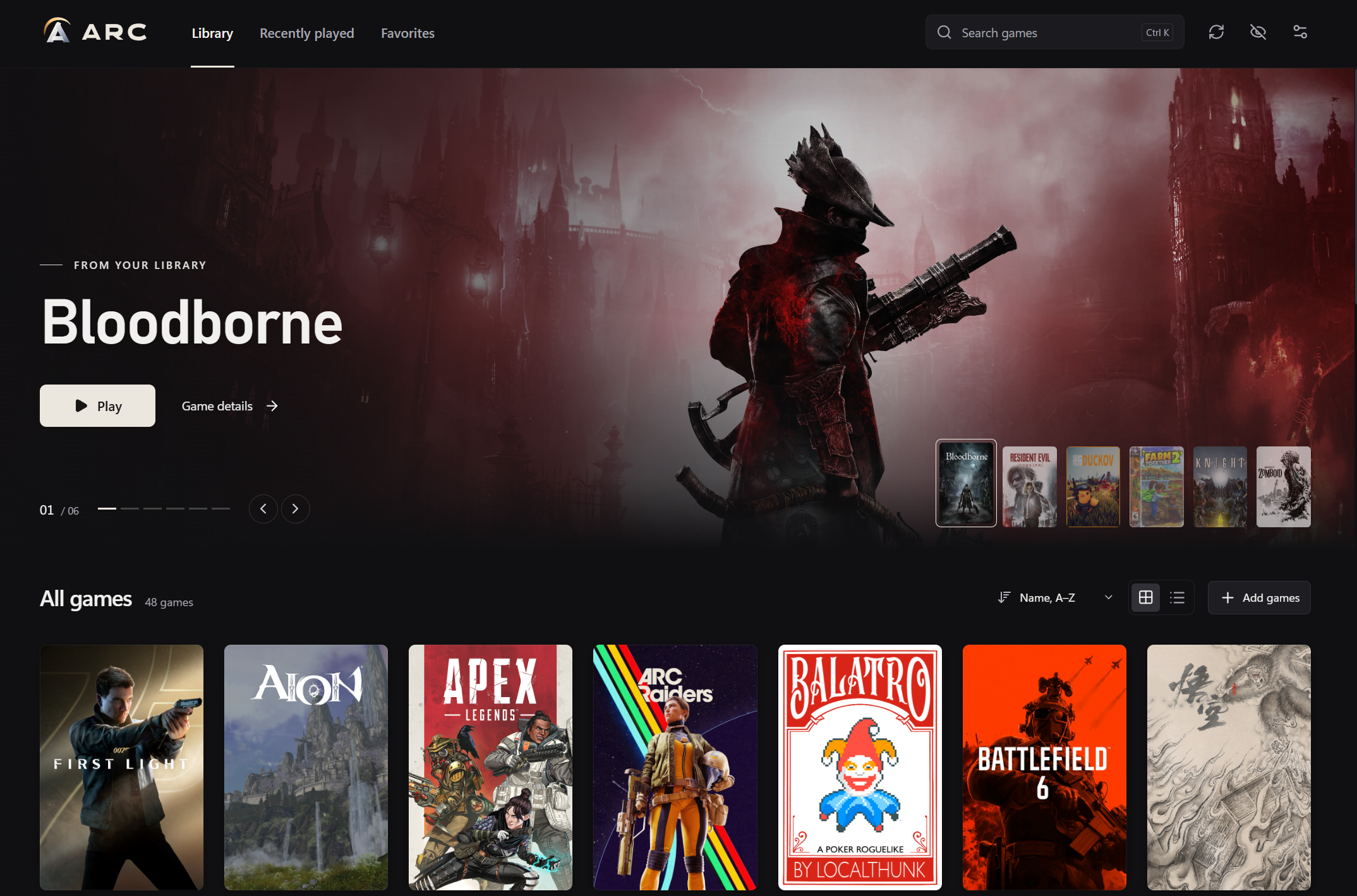
What is included
- Rust folder discovery with Windows EXE metadata and helper/installer filtering.
- Portrait covers, heroes and logos with SteamGridDB selection or local artwork import.
- Compact colored ratings: MC 84/7.4 · Steam 87; critics, users and Steam keep their own scales and source links.
- SQLite library and offline artwork/rating cache, favorites, recently played, search, editing and hide/restore.
- Extracted PS4 game discovery with existing shadPS4/compatible Bloodborne BBLauncher setups.
- Filesystem watching, direct process launching and basic session timing.
- Original Eclipse logo and Windows icons; MIT source, contribution guide and Windows CI.
Install
Download Arc_0.1.8_x64-setup.exe, install, then add your game folders in Settings. The installer is about 3.4 MiB and uses system WebView2 with a bootstrapper fallback. A personal SteamGridDB key is optional; ratings require no key or Chrome extension.
This is an early, unsigned Windows x64 preview. Games, ROMs, firmware and shadPS4 are not bundled. Detection is heuristic. Playtime tracks the directly started process; broader store imports, collections and controller navigation are planned.
Assets and verification
- Arc_0.1.8_x64-setup.exe — Windows installer.
- arc-source-v0.1.8.zip — source from this release's Git commit, including MIT license and editable artwork.
- Arc-v0.1.8-SHA256SUMS.txt — SHA-256 checksums for both files.
Checks: 29 frontend tests + 42 Rust tests, SQLite migration verification, strict TypeScript/Vite build, Clippy with warnings denied and optimized NSIS packaging. Startup/RAM benchmarks and long gameplay sessions are not claimed.
Read the README, architecture or contribution guide. Report reproducible problems through the repository's issue templates.