Repository navigation
Home en
📄 Page générée automatiquement depuis
README.en.md— modifiez ce fichier dans le dépôt, pas cette page.


🇫🇷 Français | 🇬🇧 English
A brand-new GLPI instance, configured to ITIL/ISO 27001 best practices, in 19 guided steps instead of days of manual tweaking.
Configuration GLPI Auto is a GLPI plugin that aims to turn a blank installation into an operational platform in just a few clicks.
A fresh GLPI install is a blank page: no entities, no calendar, no SLAs, no ticket categories, no templates. Configuring all of that correctly by hand, while following ITIL best practices and ISO 27001 requirements, typically takes a newcomer administrator several days, with the risk of missing something important (SLA escalation, document classification, per-site rights...). This plugin condenses that work into a guided 19-step wizard: you answer questions about your organization, the wizard builds the matching configuration, and nothing is created in GLPI until you confirm the final summary.
See CHANGELOG.md for the release history (the "Latest Release" badge above shows the most recent one) and ROADMAP.md for what's planned.
📖 See the full tutorial: all 19 wizard steps, one screenshot per step (available in French and English).
- What sets it apart
- Screenshots
- Features
- Requirements
- Installation
- Usage
- Documentation
- Contributing
- License
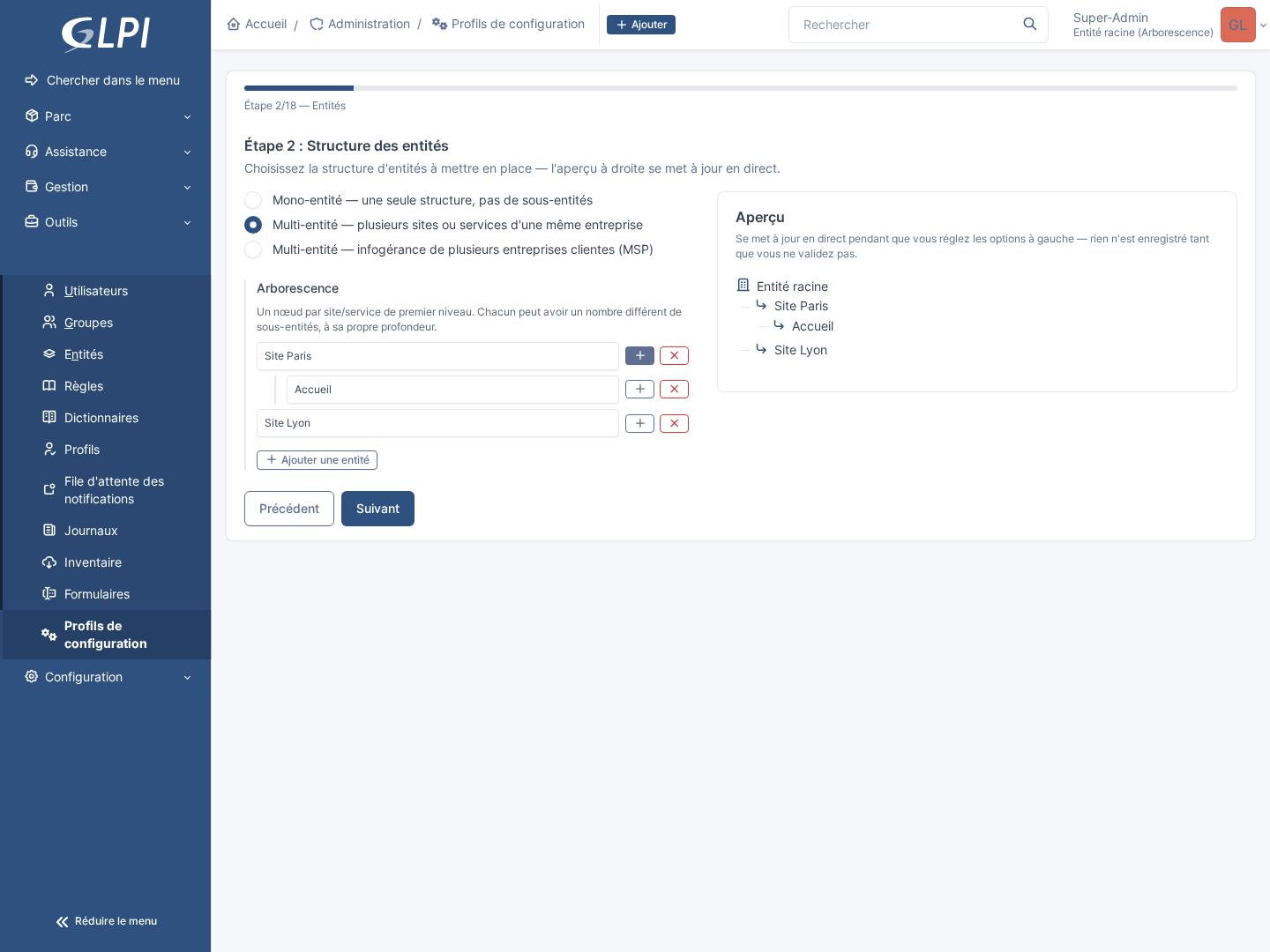
- Nothing is created until the end: the 19 steps only build up a configuration in memory, with a live-updating preview (see screenshot below); you can go back, change anything, start over, without ever touching GLPI before confirming the final summary.
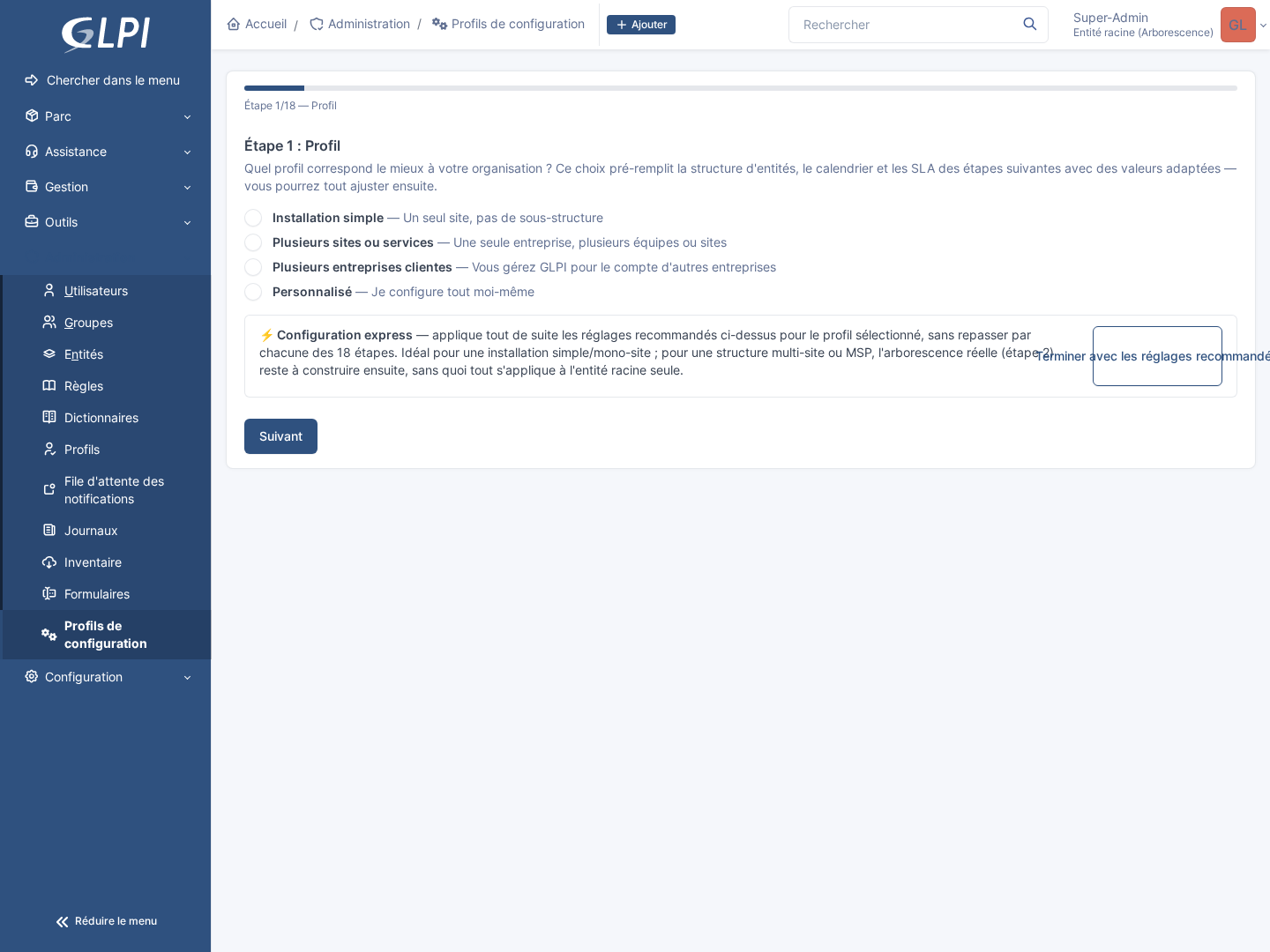
- An express mode for the impatient: a single click at step 1 applies the chosen profile's recommended settings directly, without going through the following 18 steps one by one: for a simple installation, an operational GLPI instance in a few seconds.
- Built for multi-site and MSP from the start: the same entity tree, the same SLAs and the same visual customization can be differentiated per site or per client, without juggling several separate GLPI installations.
- ISO 27001 compliance built in: knowledge base document topics and criticality levels are offered right in the wizard, not bolted on afterwards by digging through GLPI's documentation.
- No orphaned data: every setting the wizard proposes (categories, statuses, templates...) is immediately usable: the service catalog generated in step 7 already routes automatically to the right category created in step 6, for example.
The starting profile choice: four predefined profiles pre-fill the following 18 steps with values suited to your organization, freely adjustable afterwards; an express mode applies the recommended settings directly without going through every step:
The entity structure, with a live preview: single-site, multi-site or MSP: the tree is built on the left, the preview on the right updates with every change, before anything is saved:
All other screenshots (all 19 steps in detail) are in the tutorial.
- A 19-step graphical wizard with a progress bar and an express mode (applies the recommended settings directly, without going through every step)
- 4 predefined profiles (Simple install, Multiple sites or departments, Multiple client companies / MSP, Custom) that pre-fill the following steps with values suited to each
- Entity structure (single-site, multi-site, or MSP) with a real-time preview
- Calendar, SLA/OLA with automatic escalation between support tiers (L1 -> L2 -> L3), fixed-date public holidays per country (dedicated calendar per country, France by default)
- Topic-based ticket categories (11 selectable branches, up to 3 levels) and a self-service catalog (native GLPI 11 forms, automatic routing to the right category)
- Asset statuses, additional project statuses and pending reasons with automatic follow-up/closure
- If the assetsign-glpi plugin is active: its form triggers (handover, return, donation, sale, destruction, decommissioning) linked to the created statuses, never changing an existing setting
- Visual customization: color and logo, native or custom GLPI palette, settings differentiated per client/site in MSP mode
- Ticket templates (simplified / full) automatically assigned based on the user's GLPI profile, LDAP rights (per site and per role/department)
- Libraries of task, solution, follow-up and validation templates, with dynamic Twig variables (real ticket/requester data), change and problem templates
- A library of ticket templates for common recurring tasks (user review, maintenance, updates) - ready-to-use content only, no automatic scheduling imposed
- Locations, manufacturers, knowledge base categories, document topics (ISO 27001 classification) and criticality levels, Projects module dropdowns
- Optional custom assets: Vehicle, Server, Building/Local (dedicated branches), Fire Safety & First Aid and Physical Security (aligned with ISO/IEC 27001 Annex A.7), each with its own compliance fields (verification dates, warranty...)
- Software license types, certificate types (SSL/TLS, code signing, S/MIME...) and database instance types, on top of standard equipment types (computers, monitors, network, peripherals, phones)
- Optional activation of GLPI's native inventory (FusionInventory/GLPI Agent)
- Configuration audit of the GLPI instance (default accounts, password policy, notifications, SLAs, statuses...) with one-click fixes when the right setting is unambiguous, continuous checking and a periodic email report (weekly or monthly, editable GLPI notification, no secret sent)
- Useful RSS feeds (CERT-FR security advisories, GLPI release notes) and plugin version tracking against the latest GitHub release
- Interface translated into 6 languages (French, English, German, Italian, Spanish, Brazilian Portuguese)
- PHP 8.2+
- GLPI 11.0+ or GLPI 12 (one package for both versions, it adapts at load time)
On GLPI 12 (checked in CI on GLPI 12.0.0, final release of 7 October 2026):
- "knowledge base categories" become container articles under the root article (GLPI 12 removed categories);
- each OLA is attached to the "Support N1" group (GLPI 12 requires a group per OLA);
- known limitation, in GLPI core (still present in 12.0.0): the item picked in a form's "Item" question (vehicle, room, equipment) is not linked to the created ticket yet.
- Database: the one required by GLPI 11 (MySQL 8.0+ or MariaDB 10.6+); GLPI does not support PostgreSQL
No Composer package (GLPI isn't distributed via Packagist). Two ways to get the plugin:
Ideal for a production GLPI instance, including a minimal Docker container.
- Download
configuration-glpi-auto-X.Y.Z.zipfrom GitHub Releases (the "Latest Release" badge at the top of this page links to the newest one). - Extract the archive into GLPI's
plugins/folder:The archive already contains acd /path/to/glpi/plugins unzip configuration-glpi-auto-X.Y.Z.zipconfigurationglpiauto/folder at its root,vendor/included (nocomposer installstep needed on the target server), nothing to rename. - Install and activate it, either from the UI (Configuration > Plugins, search for
"Configuration GLPI Auto") or from the command line:
php bin/console plugin:install configurationglpiauto
php bin/console plugin:activate configurationglpiauto
vendor/autoload.php is a hard runtime requirement (PSR-4 autoloading for src/, see
setup.php), but the plugin has no real production dependency (composer.json: php >= 8.2
only), so composer install --no-dev is fast, nothing else gets downloaded.
cd /path/to/glpi/plugins
git clone https://github.com/parime/Configuration-glpi-auto.git
mv Configuration-glpi-auto configurationglpiauto
cd configurationglpiauto
composer install --no-dev
Then install/activate as above (UI or bin/console).
An update is never signaled automatically (this plugin is outside the official Marketplace):
fetch the new code the same way you installed it (a new release ZIP, or git pull +
composer install --no-dev if installed from source), then re-run plugin:install --force
(database migration if needed) and plugin:activate.
A ready-to-use Docker stack (GLPI + MariaDB) for testing the plugin is provided in
docker-compose.test.yml: see the comments at the top of that file for the full walkthrough
(installing GLPI, installing the plugin, known permission/cache pitfalls).
Once the plugin is active, the wizard is available from Configuration > Configuration profiles > Configuration. Choose a starting profile (step 1), then go through the 19 steps, adjusting each setting to your needs; nothing is created in GLPI before the last step (Summary). Express mode (a button available from step 1) applies the chosen profile's recommended settings directly, without going through every step. See the tutorial for a screenshot of each step.
- Tutorial: a step-by-step walkthrough of the wizard's 19 steps, with a screenshot of each.
- ITIL Guide: why the wizard suggests what it suggests - which ITIL 4 practice each step translates into concrete GLPI settings.
- CHANGELOG.md and ROADMAP.md for the technical detail of each feature.
Contributions are welcome! Please read CONTRIBUTING.md for the guidelines.
GPLv3 - See LICENSE for details.