Releases: parth-thakre/squiggly-music
Release list
Squiggly Music 0.2.0

What's new
- Android. An app for Android phones that connects to your Navidrome server itself and plays with the screen off, with controls on the lock screen and in the notification. Install
Squiggly-Music-0.2.0-android.apk. - Tracks. A page with every track in your library, next to Records and Artists, sorted the same ways as Records: newest, A to Z, by artist, most played, recently played, or random.
- Flip cover screen. On the Galaxy Z Flip 5, 6, and 7, the cover screen gets a view of its own: the sleeve, the song, the seek bar, and big controls, with the queue and lyrics a tap away. Nothing sits under the cameras.
- Updates. The installed Windows app now checks this repository's releases, downloads a new version in the background, and installs it when you restart or quit. The portable exe and the RPM tell you when a new version is out. Settings › Updates turns the check off. 0.1.0 had no updater, so install this version by hand.
- Gapless playback. Songs on a record run into each other without a break.
- Artists. Songs credited to several artists ("A & B", "A, B") link to each artist separately.
- Navidrome's demo. The connect screen can sign in to Navidrome's public demo, so you can try Squiggly without a server.
- The deck's Lyrics, Queue, and Mini player toggles are icons.
Fixes
- A click on the seek bar seeks to the spot you clicked. It used to land up to about five seconds off near either end.
- Starting radio from the song that's playing keeps it playing instead of starting it over.
- Gapless playback no longer resamples, and the next song no longer opens early.
- The header's buttons respond to hover and clicks again.
- Right-clicking a song leaves the selection alone, and the row highlight is even.
- A record's sleeve shows once in the deck, not twice.
Install
Download the file for your system from Assets below, or with the GitHub CLI:
gh release download v0.2.0 -R parth-thakre/squiggly-music- Windows 10/11 (x64): run
Squiggly-Music-0.2.0-windows-x64-setup.exe. To run without installing, useSquiggly-Music-0.2.0-windows-x64-portable.exe. The builds are not code-signed yet, so SmartScreen may warn: choose More info, then Run anyway. - Fedora (x86_64):
sudo dnf install ./squiggly-music-0.2.0.x86_64.rpm. dnf also installsmpv-libs, the libmpv runtime the player needs. - Android 7 or later: open
Squiggly-Music-0.2.0-android.apkon the phone and allow your file manager to install apps when Android asks. Its signing certificate's SHA-256 fingerprint is7ed770f4573789c6a28136adcc36525fa19ce9e6ae161b14cf4bff1faa47fbda.
Verify
SHA256SUMS lists the SHA-256 of every asset. On Linux, from the download folder:
sha256sum --ignore-missing -c SHA256SUMSOn Windows (PowerShell), compare the output with the matching line in SHA256SUMS:
(Get-FileHash .\Squiggly-Music-0.2.0-windows-x64-setup.exe -Algorithm SHA256).Hash.ToLower()Third-party software
The packages include third-party software under their own licenses. The notices are installed in resources/licenses/ inside the app directory; see THIRD-PARTY-NOTICES.md. The Windows packages include an audio-only build of libmpv, licensed under the LGPL version 2.1 or later. Squiggly-Music-0.2.0-libmpv-windows-x64-source.tar below holds its complete source and build recipe; see licenses/libmpv-windows/NOTICE.md.
Squiggly Music 0.1.0
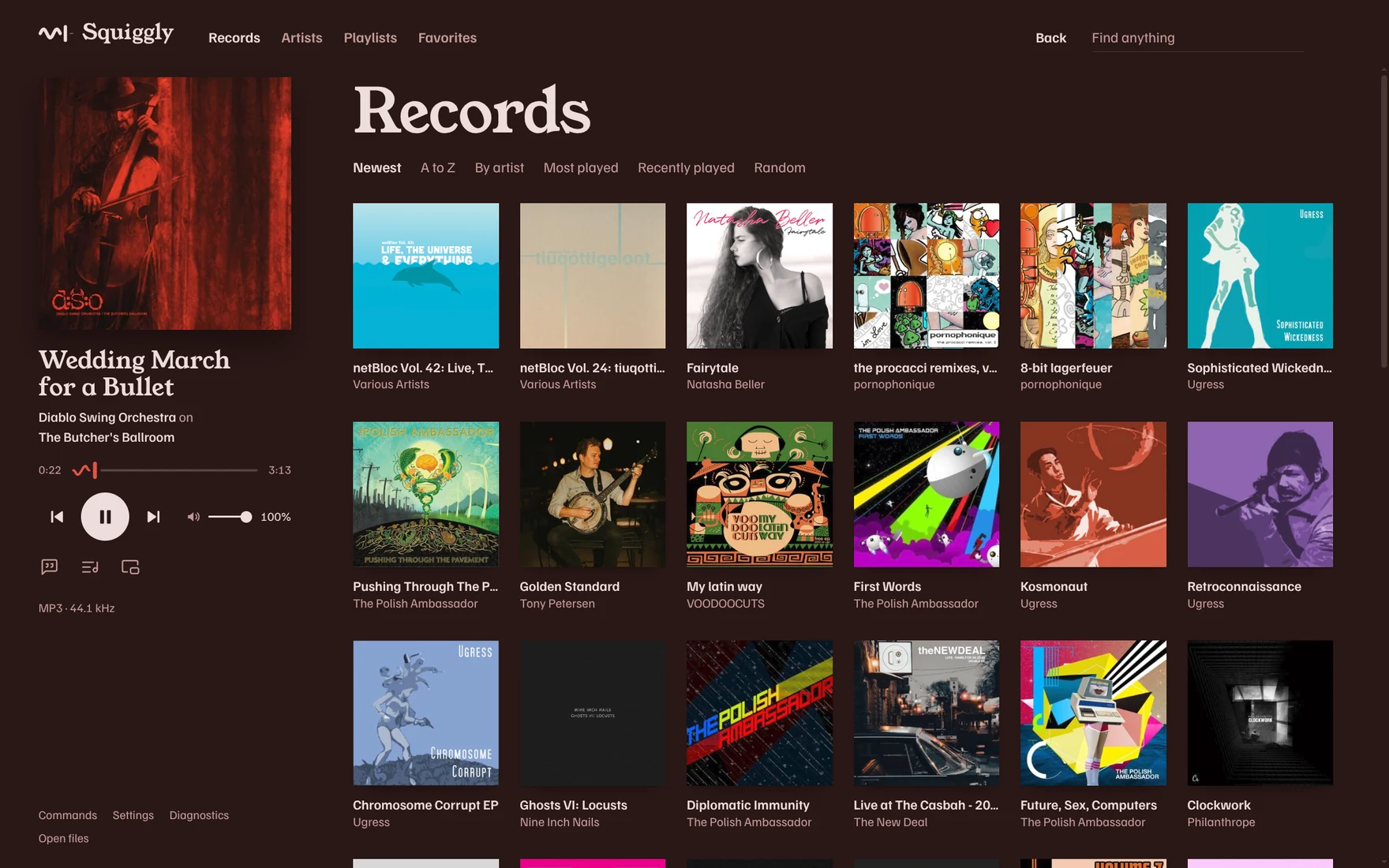
The first release. Squiggly plays your own music from Navidrome: it asks the server for the original files, plays them through libmpv, and leaves the signal alone.
- Records, artists, playlists, favorites, search, and automatic playlists from your library, with one click to play any of them.
- A queue that follows you between devices, radio from any song, record, or artist, and word-by-word synced lyrics.
- Covers that colour the room, a mini player, the tray, media keys, and the system media controls (the Windows media flyout, MPRIS on Linux).
- Files from your computer play with their own covers and tags.
- A command palette (Ctrl+K), your own keybindings and themes, and extensions from the config folder.
It's early software, for Windows 10/11 and Fedora.
Install
Download the file for your system from Assets below, or with the GitHub CLI:
gh release download v0.1.0 -R parth-thakre/squiggly-music- Windows 10/11 (x64): run
Squiggly-Music-0.1.0-windows-x64-setup.exe. To run without installing, useSquiggly-Music-0.1.0-windows-x64-portable.exe. The builds are not code-signed yet, so SmartScreen may warn: choose More info, then Run anyway. - Fedora (x86_64):
sudo dnf install ./squiggly-music-0.1.0.x86_64.rpm. dnf also installsmpv-libs, the libmpv runtime the player needs.
Verify
SHA256SUMS lists the SHA-256 of every asset. On Linux, from the download folder:
sha256sum --ignore-missing -c SHA256SUMSOn Windows (PowerShell), compare the output with the matching line in SHA256SUMS:
(Get-FileHash .\Squiggly-Music-0.1.0-windows-x64-setup.exe -Algorithm SHA256).Hash.ToLower()Third-party software
The packages include third-party software under their own licenses. The notices are installed in resources/licenses/ inside the app directory; see THIRD-PARTY-NOTICES.md. The Windows packages include an audio-only build of libmpv, licensed under the LGPL version 2.1 or later. Squiggly-Music-0.1.0-libmpv-windows-x64-source.tar below holds its complete source and build recipe; see licenses/libmpv-windows/NOTICE.md.