Having trouble port-forwarding with Mullvad #1172


|
Hi, I got Gluetun up and running and connected to Mullvad successfully, but I can't seem to get port forwarding to work. I'm trying to forward qbittorrent's listening port, while it's running through Gluetun. Here's what I've done: No matter what port checking service I try I can't get a successful response. I've been trying Mullvad's connection checker mostly, but also some open port checkers using the public IP given in gluetun's log once connected. I have also tried using Quentin's port checker but didn't have any luck as I wasn't really sure what I was doing. I have some questions, which may help me solve whatever is wrong: -if i set qbittorrent's network back to bridge, and assign the ports 78910:78910 for qbittorrent, then connect to Mullvad using the desktop app, I get an immediate positive port check from Mullvad connection checker. Does it matter which device I use to check the port is reachable? i.e. is Mullvad connection checker failing to reach the port because it's not running through gluetun? Here's (https://pastebin.com/7SjKUFJE) what I used to run gluetun -Edit: I should add I’m aware the port mapping is missing from this run line - I do those separately in portainer Any help greatly appreciated, no matter how basic the suggestion. I have been known to be stuck for two days because I mistyped one number |
Replies: 3 comments 5 replies

|
I've tested this recently with AirVPN and Deluge, and it does work -- at least for OpenVPN-based connections. Since you mentioned Portainer, I knocked together a Portainer Stack that you could compare against what you're doing to see if they match -- or use for testing: version: '3.7'
services:
gluetun:
container_name: gluetun
image: qmcgaw/gluetun:latest
cap_add:
- NET_ADMIN
ports:
- 8080:8080 # Mullvad
- ****:**** # Your Mullvad forwarded listening port
- ****:****/udp # Your Mullvad forwarded listening port/udp
environment:
- VPN_SERVICE_PROVIDER=mullvad
- VPN_TYPE=wireguard
- WIREGUARD_PRIVATE_KEY=**** # Your Wireguard Private Key
- WIREGUARD_ADDRESSES=10.68.1.147/32
- SERVER_CITIES=London
- FIREWALL_VPN_INPUT_PORTS=**** # Your Mullvad forwarded listening port
- PUID=1000
- PGID=1000
- TZ=Europe/London
volumes:
- /Documents/gluetun:/gluetun
restart: unless-stopped
qbittorrent:
image: lscr.io/linuxserver/qbittorrent:latest
container_name: qbittorrent
environment:
- WEBUI_PORT=8080
- PUID=1000
- PGID=1000
- TZ=Europe/London
volumes:
- /Documents/qbittorrent:/config
- /Documents/downloads:/downloads
network_mode: 'service:gluetun'
depends_on:
- gluetun
restart: unless-stoppedIn Deluge anyway, there are also settings that need to be changed from the web interface including: unchecking a box that controls use of random listening ports, setting the specific listening port, and disabling UPnP and NAT-PMP. Then, assuming the Mullvad port checker tests all London Servers, you should get an "open" hit on the one you're connected to only. |

|
Thanks very much for taking the time to put this together for me, it's much appreciated. I have used this stack, with a fresh wireguard key, and the forwarded port is now reachable with qbittorrent listening on it. |

|
I just want to drop a little thank you for helping out @bnhf 🚀 🏅 |

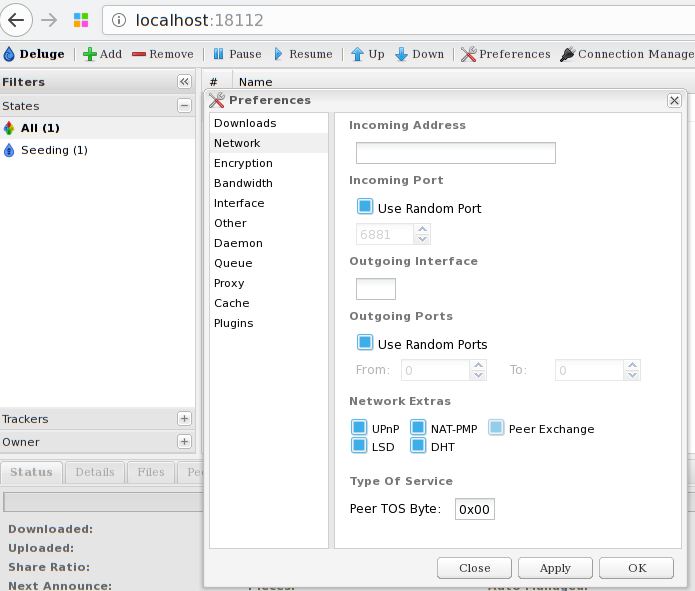
Hello, @bnhf I think I found what I am looking for for a while :) I will test it but to be sure, how I have to configure this?
What to put in incoming and outgoing port? Assuming my listening port in mullvad is 53045? Of course UPnP will be unchecked ;) |

|
It's just the incoming port that needs to be configured. Uncheck "Use Random Port" and enter your assigned port from Mullvad -- 53045 using your example. You'll also need to open that same port through the Gluetun firewall using the FIREWALL_VPN_INPUT_PORTS environment variable. |

|
Thanks! |
|
Yes. |

|
I just want to mention that a healthcheck could be a good workarround or switching to the libtorrentv1 instead of latest image from qtbittorrent. |


I've tested this recently with AirVPN and Deluge, and it does work -- at least for OpenVPN-based connections. Since you mentioned Portainer, I knocked together a Portainer Stack that you could compare against what you're doing to see if they match -- or use for testing: