A Pretty Ok Short-Read Assembly Workflow
- You'll need some reads
- Preferably paired-end
- Preferably one file each for foward and reverse reads
- You'll need conda/mamba (recommended: mamba) and to install the main conda environment, provided by
shortle.yamlin the main directory of this repository. The remaining software is provided inworkflow/envs/redundans.yaml, which will be used by Snakemake, so you don't need to worry about it.
conda env create -f shortle.yamlThis command will create an environment called shortle. Activate it with:
conda activate shortle-
You'll need to modify the first few lines that specify the forward/reverse read information in
Snakefileto match your data. You'll also want to modify any parameters forsparseassembler,dbg2olcandabyssas you see fit. The values there are from previous projects and reflect those data. Adjust yourkparamters accordingly (or wing it). -
You'll need to run it once with the specific command to end it prematurely (at the purge_haplotigs stage):
snakemake -j 20 --use-conda purge_haplotigs/mapped2.bam.gencovwhere j is how many cores you are willing to reserve for the Snakemake workflow.
-
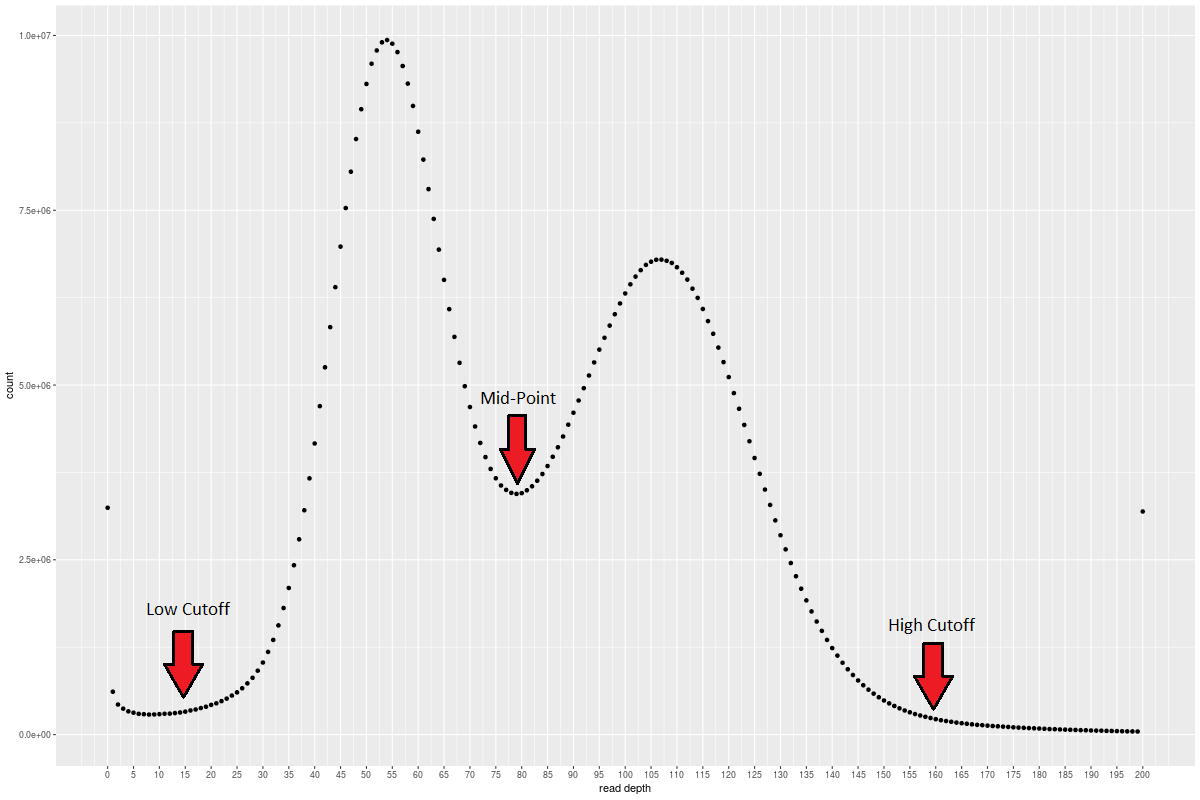
Inspect
purge_haplotigs/mapped2.bam.histogram.pngto figure out your cutoffs as described here: -
Modify
rule purge_haplotigs_suspectsto match your chosen cutoffs and rerun the entire workflow:
snakemake -j 20 --use-conda- Your resulting assembly will be in
polish_2