








Teach your AI coding agent what your XAF application actually does.
Point it at an XAF module. It reads your entities, controllers, actions, business rules, navigation and Model Editor customizations straight from source — and hands the result to whatever agent you code with.
DevExpress has done excellent work making AI agents fluent in XAF. Two pieces already exist, and this is the third:

| Teaches the agent… | Tool |
|---|---|
| How XAF works in general | DevExpress agent-skills |
| What the official documentation says | DevExpress Docs MCP Server |
| What YOUR application does | XAF Logic Explainer ← you are here |
An agent that has read every page of the XAF documentation still does not know that your Invoice
total is calculated from its lines, that ApproveController refuses to run when the period is
closed, or that three columns were hidden in the Model Editor and appear in no C# file at all. It
will confidently invent all three.
That gap is not solvable by better prompting. It is solvable by extraction.
These tools compose. Install the DevExpress skills for framework knowledge, use the Docs MCP for the official reference, and use this for your own codebase. None of them replaces the others.

Everything below is read as syntax, using Roslyn. Your project never has to compile, and this tool never links against DevExpress assemblies:
- Entities — properties, types, associations, and the XAF attributes that give them meaning
(
[Association],[Aggregated],[RuleRequiredField],[Appearance],[ModelDefault], …). XPO and EF Core, auto-detected from yourusingstatements. - Controllers and actions —
SimpleAction,PopupWindowShowAction,SingleChoiceAction, their target criteria, and the handler code that runs when they fire. - Business rules — validation attributes and code rules, with the conditions attached.
- Module setup —
ModuleUpdaterseed data and what gets created on first run. - Navigation — the groups and items your users actually see.
- Model Editor (
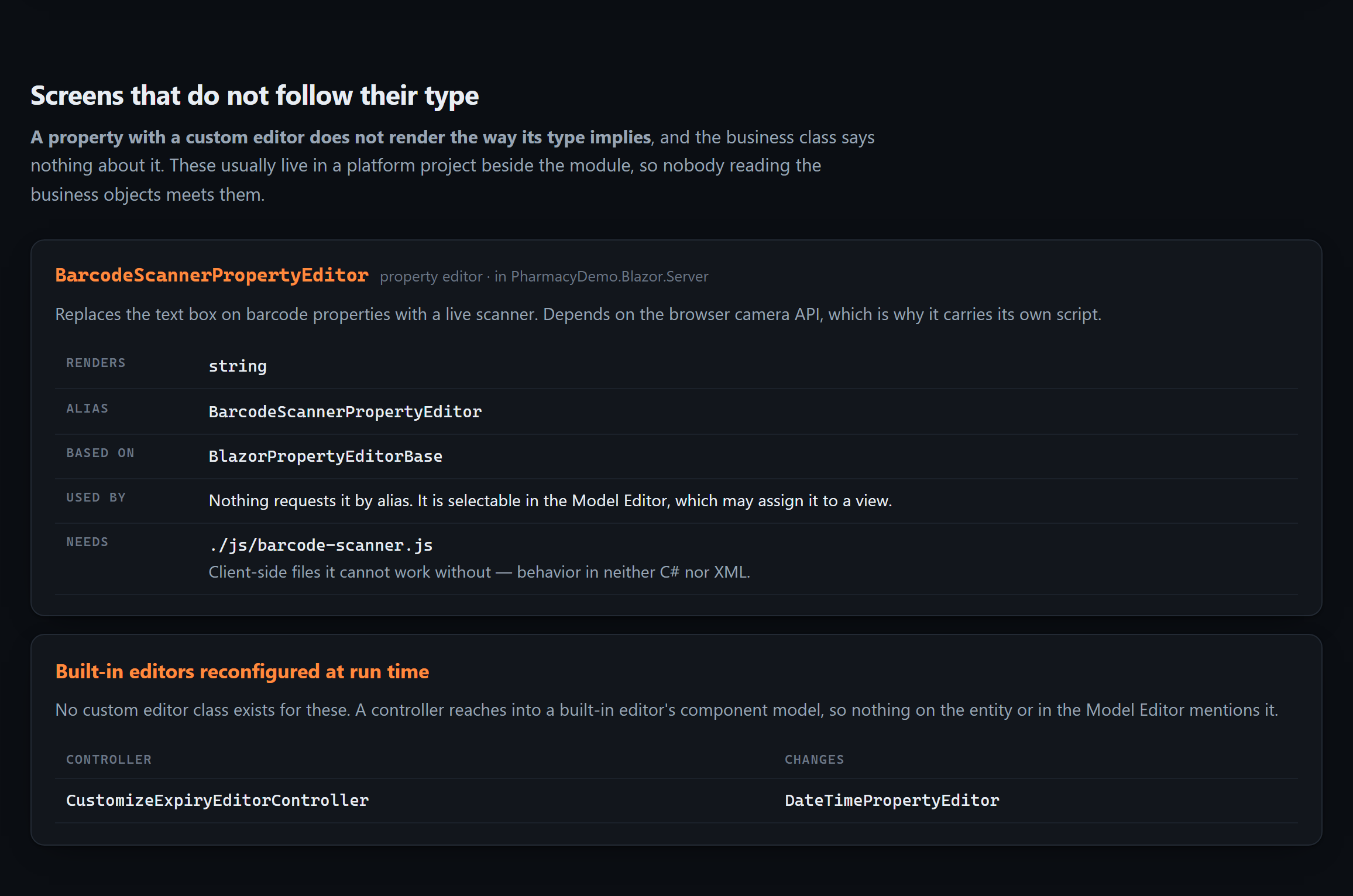
.xafml) — the customizations that exist only in XML and are invisible to anyone reading your C#. Module and platform files are merged the way XAF merges them. - Custom property and list editors — including the JavaScript they cannot work without, and
built-in editors reconfigured at run time through
View.CustomizeViewItemControl<T>(). These live in the platform project beside the module, so nobody reading the business objects meets them. - Version-gated migrations — the
CurrentDBVersion < new Version(…)blocks in your updater. Each ran once, on somebody's production database, and is the only explanation for data the current code cannot account for.
The last two are the reason an agent that has read every business class can still be confidently wrong about the application:
dotnet tool install -g XafLogicExplainer.Cli

xaflogic agents --project "C:\MySolution\MyApp.Module"
That writes AGENTS.md, CLAUDE.md and .github/copilot-instructions.md at your solution root.
No account, no API key, no server. Your agent understands the application on its next question.
AGENTS.md is prepended to every request an agent makes in the repository, so its cost is paid
forever. Dumping 70 KB of entity detail there would crowd out the actual question. So the output is
tiered:

AGENTS.md |
~11 KB | Always loaded: ground rules, complete inventories, conventions, recipes |
.xaflogic/*.md |
~70 KB | Opened on demand: full properties, handler code, rule messages, .xafml |
The most valuable part is the smallest. AGENTS.md opens with ground rules — that this
application uses XPO and never EF Core, that the inventories are complete so anything absent
genuinely does not exist, and that some behavior lives in the Model Editor rather than in C#. Those
few paragraphs stop most of the confident invention agents produce about unfamiliar XAF codebases.
Existing files are never clobbered: generated text lives between markers, anything you wrote by hand is preserved, and regenerating is byte-identical when nothing changed.
Generated files are a snapshot. The MCP server is a live connection — the agent queries your application while you work on it, and cannot go stale.
/plugin marketplace add peopleworks/XAFLogicExplainer
/plugin install xaf-logic-explainer@peopleworks-xaf
That installs a skill and an MCP server in one step. For any other MCP client, either run it straight from NuGet with no install:
{
  "mcpServers": {
    "xaf": { "command": "dnx", "args": ["XafLogicExplainer.Mcp", "--yes"] }
  }
}
…or point at the CLI if you already have it:
{ "mcpServers": { "xaf": { "command": "xaflogic", "args": ["mcp"] } } }Started from a solution directory it finds the XAF module by itself, so neither form needs a path.
| Tool | Answers |
|---|---|
xaf_overview |
What this application is, and the complete list of everything in it |
xaf_search |
Where a field, concept or business term is defined |
xaf_entity |
Every property, relationship, rule and calculation on one entity |
xaf_controller |
What an action does — including the C# that runs when it fires |
xaf_rules |
What the application validates, computes, hides and disables |
xaf_model |
Model Editor customizations, which exist in no C# file |
xaf_editors |
Custom editors, the JavaScript they need, and built-in editors changed at run time |
xaf_migrations |
What ran once against a live database, and the comment explaining why |
xaf_refresh |
Re-read the source (changes are detected automatically) |
Ask for something that isn't there and the answer is the useful one:
There is no entity called 'PurchaseOrder' in this application. This is the complete list of 19 entities, extracted from the whole source tree: … If the user expects 'PurchaseOrder' to exist, it has not been created yet.
Pair it with the official DevExpress skills. /plugin install dx-xaf@DevExpress-agent-skills
teaches how XAF works; this teaches what your application does. An agent with only the first will
write correct XAF against entities you do not have.
An agent reads AGENTS.md or queries the MCP server. Someone who has just inherited a ten-year-old
XAF application needs the same facts arranged very differently:
xaflogic explain --project "C:\MySolution\MyApp.Module" --openOne HTML file. No server, no build step, no request to the network — it opens from an email attachment on a machine with no internet, which is how handovers actually happen.
It draws a map of your domain model from the association attributes scattered across your codebase. Most teams have never seen theirs: it exists in one person's head, which is exactly the knowledge that leaves when they do.
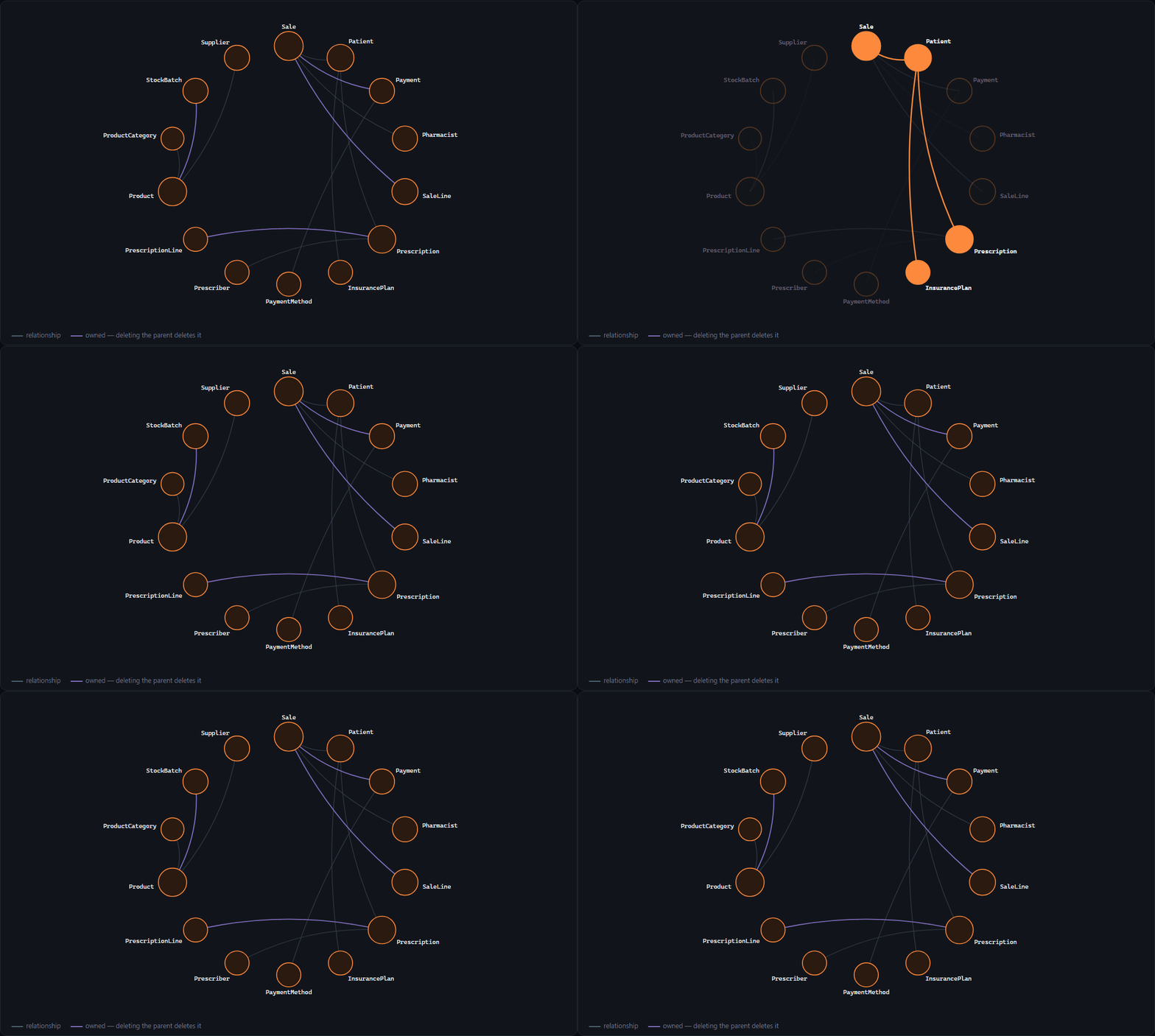
Real output, from the sample application in this repository. Hover an entity and everything it does not touch fades; purple means deleting the parent deletes the child.
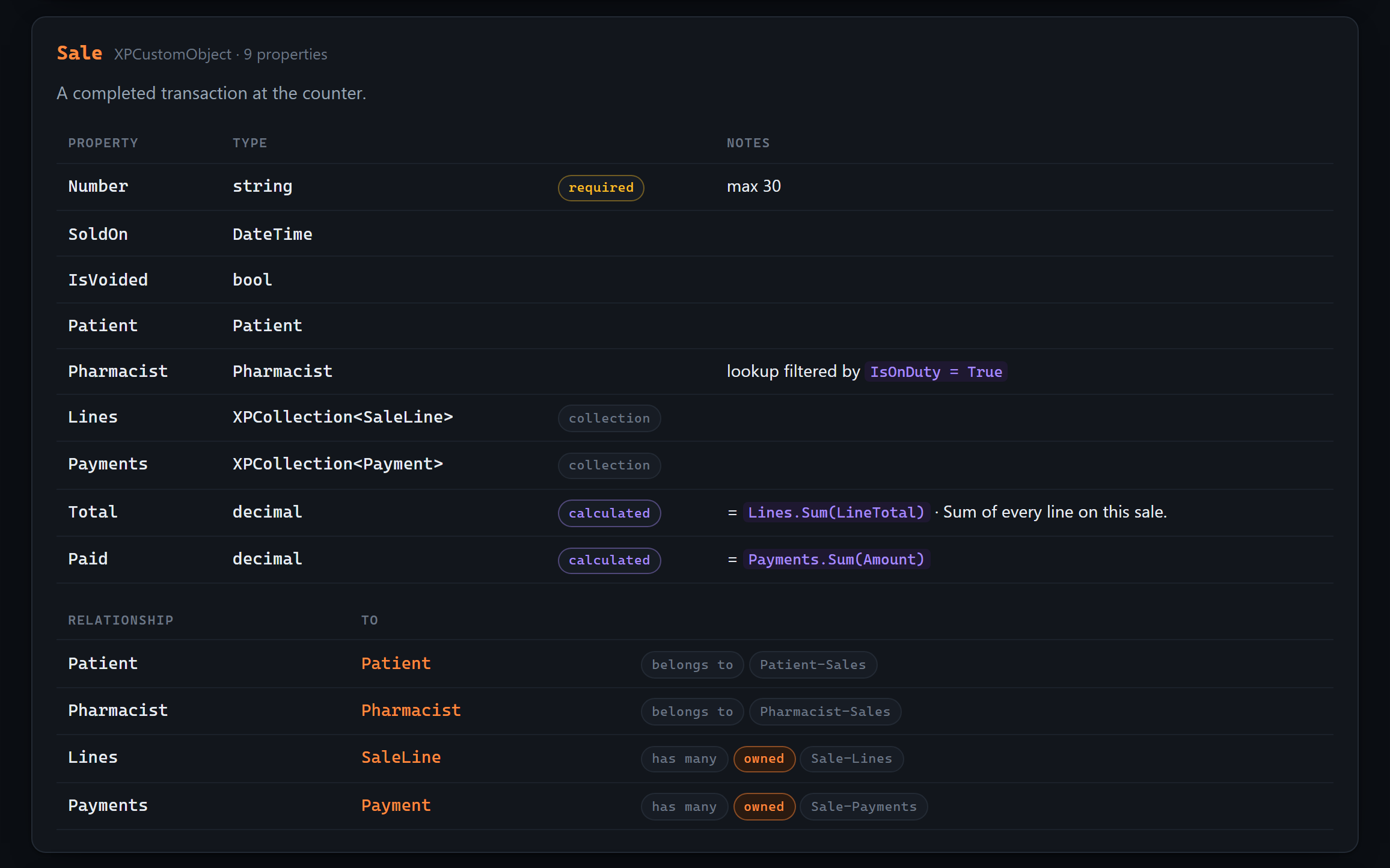
Alongside it: every entity and what each property is, every action with the code it runs, validation with the message the user will actually see, and the Model Editor settings that appear in no C# file.
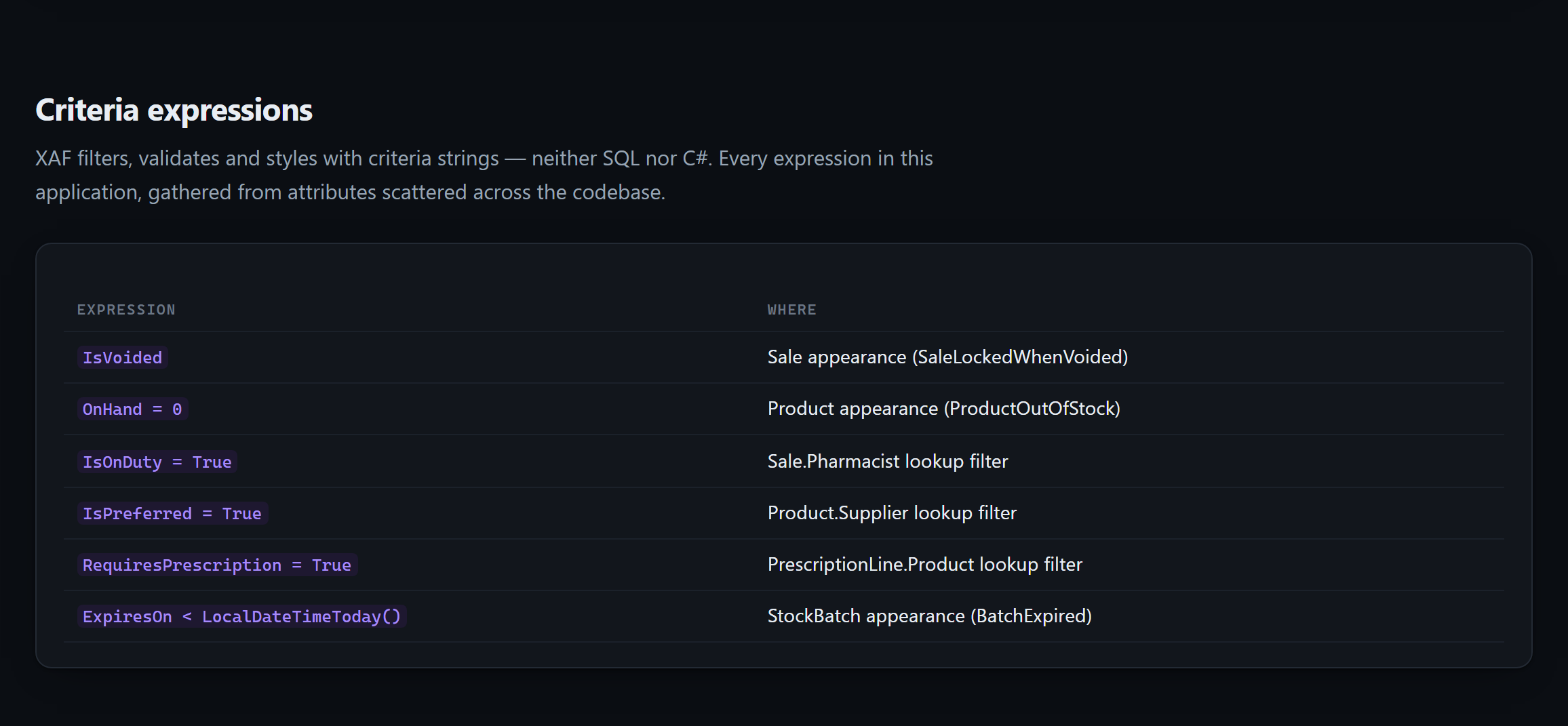
And an index of every criteria expression in the application — a dialect that is neither SQL nor C#, gathered from attributes spread across the source and otherwise collected nowhere:
Try it on the sample without touching your own code:
xaflogic explain --project tests/XafLogicExplainer.Tests/Fixtures/DemoSolution/PharmacyDemo.Module --openExtraction reads your source without knowing anything about the framework it is written against,
which leaves one question unanswerable: is DeleteObjectsViewController something your team wrote,
or something DevExpress ships? Without an answer, generated documentation presents framework
behavior and your own logic as the same thing.
If you have a DevExpress licence:
xaflogic catalog buildThat reads your own installation and records what XAF itself provides — attributes, controllers, model interfaces and modules, with the official summaries and documentation links DevExpress ships. On DevExpress 26.1 that is around 850 framework types.
Extraction then picks it up automatically and can say things it otherwise could not:
- "
ArchiveControllerextends the built-inDeleteObjectsViewController" — you are changing how deletion works application-wide, not adding a feature beside it. - "
[AuditedByFinance]is not an XAF or .NET attribute" — your team invented it, so its meaning lives in this codebase and in no documentation anywhere.
The catalog is written to ~/.xaflogic/catalog/, never into your repository: it is derived from
licensed software. Everything works without it — it only sharpens the output. See
NOTICE.md.
| Command | What it does |
|---|---|
agents |
Write AGENTS.md / CLAUDE.md / Copilot instructions for your agent |
mcp |
Run as an MCP server so agents can query the app live |
explain |
Write a self-contained HTML page explaining the app to a person |
catalog |
Build the DevExpress ground-truth catalog (build, status) |
extract |
Read the project, write Markdown + JSON locally |
diff |
Compare against the previous extraction and report what changed |
status |
Show the change-detection hash and whether a re-extract is needed |
watch |
Re-extract on file change, with debounce |
sync |
Extract and publish to a remote target |
chat |
Ask questions about the extracted project |
config |
Set defaults in ~/.xaflogic/config.json |
projects |
Manage several XAF projects; most commands accept --all |
Documentation is generated in English or Spanish (--lang en|es).
Useful flags: --orm auto\|xpo\|efcore, --lang en\|es, --enrich (AI-generated business-logic
summaries per controller and action), --force, --all.
Extraction is incremental — a SHA-256 over your .cs and .xafml files means an unchanged
project is a no-op. There is an MSBuild .targets file if you want it to run on build.
v0.11.0. The extraction engine is the mature part: it runs in production against real XAF applications. The agent-facing surface is what is landing now, in the open.
| ✅ | Roslyn extraction — entities, controllers, rules, updater, navigation, .xafml |
| ✅ | XPO and EF Core, auto-detected |
| ✅ | Custom property and list editors, their client assets, and built-in editors reconfigured at run time |
| ✅ | Version-gated data migrations — what happened to databases that were not fresh |
| ✅ | Incremental change detection, diff reports, multi-project, watch mode |
| ✅ | AI enrichment of controllers and actions (--enrich) |
| ✅ | Blazor in-app help panel |
| ✅ | AGENTS.md / CLAUDE.md / Copilot instructions — zero infrastructure, works for everyone |
| ✅ | xaflogic explain — one self-contained HTML page, for a person rather than an agent |
| ✅ | Pluggable publishing targets (IDocumentationSink) |
| ✅ | MCP server — 9 tools, live against your source |
| ✅ | Installable Claude Code plugin with skill and MCP server |
| ✅ | 177 tests over synthetic XPO and EF Core fixtures — no DevExpress needed |
| ✅ | DevExpress ground-truth catalog, generated locally by licensees |
PeopleWorks Copilot, where this tool grew up, is now one sink among several rather than the destination everything was built around. The outputs that matter most need no server at all.
src/
  XafLogicExplainer.Core                 Roslyn extraction engine — no DevExpress reference
  XafLogicExplainer.Mcp                  MCP server (ModelContextProtocol 2.1)
  XafLogicExplainer.Cli                  the `xaflogic` command
  XafLogicExplainer.CopilotSync          PeopleWorks Copilot target + AI enrichment
  XafLogicExplainer.DescriptionAnnotator generates missing [Description] attributes
  XafLogicExplainer.Blazor               in-app help panel for XAF Blazor apps
plugins/
  xaf-logic-explainer                    the installable Claude Code plugin
Built on .NET 10.
Only XafLogicExplainer.Blazor references DevExpress packages; it needs the DevExpress NuGet feed
and a license to build. Everything else builds anywhere, which is why CI can verify it for free.
The single most valuable contribution is telling us what the extractor missed. XAF is enormous, every codebase uses a different slice of it, and no single project exercises the whole framework. There is an extraction-gap issue template for exactly this: show the XAF pattern your project uses and what the tool failed to see.
See CONTRIBUTING.md. Bug reports, docs and translations are equally welcome.
MIT. See NOTICE.md for the relationship to DevExpress.
An independent community project — not affiliated with, endorsed by, or supported by Developer Express Inc. It contains no DevExpress source code and needs no DevExpress license to build or run. DevExpress, XAF and eXpressApp Framework are trademarks of Developer Express Inc.
Built by Pedro Hernández (PeopleWorks), Microsoft MVP for .NET — for the DevExpress and XAF community.