Tutorial 6 Provision Deploy
← 5. Build a Distribution + publish to S3 · Tutorial index · 7. Robot Framework test →
You now switch from developer to operator. In Chapter 5 you pushed two things
to S3: the runtime plane (theia release services --s3 → theia-runtime) and
your app SWP (theia release-swp --s3 → theia-swp). This chapter takes those
S3 artifacts all the way onto a running rig — driven entirely from the Ground
Station web UI, deploying into a local docker-compose rig so you can exercise
the whole fleet flow without any physical board.
The Ground Station fans out to two authorities behind one surface:
- colony — the base/runtime provisioner (installs the runtime + services from the S3 runtime plane over SSH).
- Mender — the OTA transport + device authorization (enrol/accept, deploy the app SWP as an overlay).
The tutorial's "boards" are two Docker containers that behave as bare rigs: colony SSHes into them and provisions them exactly as it would a real rpi4/jetson — but all-amd64, so no cross-build and no hardware. Bring them up from the framework checkout:
theia rig up          # docker compose up -d: theia-central + theia-compute
theia rig down        # tear the rig down when you're finished
theia rig up starts two containers:
| container | sshd port | role |
|---|---|---|
theia-central |
2201 |
the coordinator board (etcd + the singletons + mender-gateway) |
theia-compute |
2202 |
a zone worker board (ucm + shwa) |
Both run network_mode: host, so they share the host network and the host TIPC
namespace (one nametable; central=instance 0, compute=instance 1). Because they
share the host port space their sshd ports must differ — a real rig owns :22, but
two rigs on one host net can't. colony already has its provisioning public key in each
rig's authorized_keys (baked into the rig image), which is how it SSHes in.
The docker rig is a dev convenience, not part of the distribution. Theia's release artifacts (the runtime
.debs + the SWP.mender, in S3) contain no docker image — a real deployment provisions bare boards over SSH. Thetheia-rigcontainer image is built from this repo'sdeploy/tree (theia rig uprunsdocker compose build); a power user who wants a container test-bench builds their own from source the same way. Everything colony delivers to a rig (the runtime, the config, the Mender update-modules, the on-device launcher) is pulled from S3 and is identical for a container and a physical board — so what you exercise here is exactly the real fleet flow, minus the hardware.
# confirm the rigs are up and reachable
docker ps --filter name=theia-central --filter name=theia-compute
nc -z 127.0.0.1 2201 && echo "central sshd up"
nc -z 127.0.0.1 2202 && echo "compute sshd up"The Ground Station is the fleet operator's web UI. Open it in a browser:
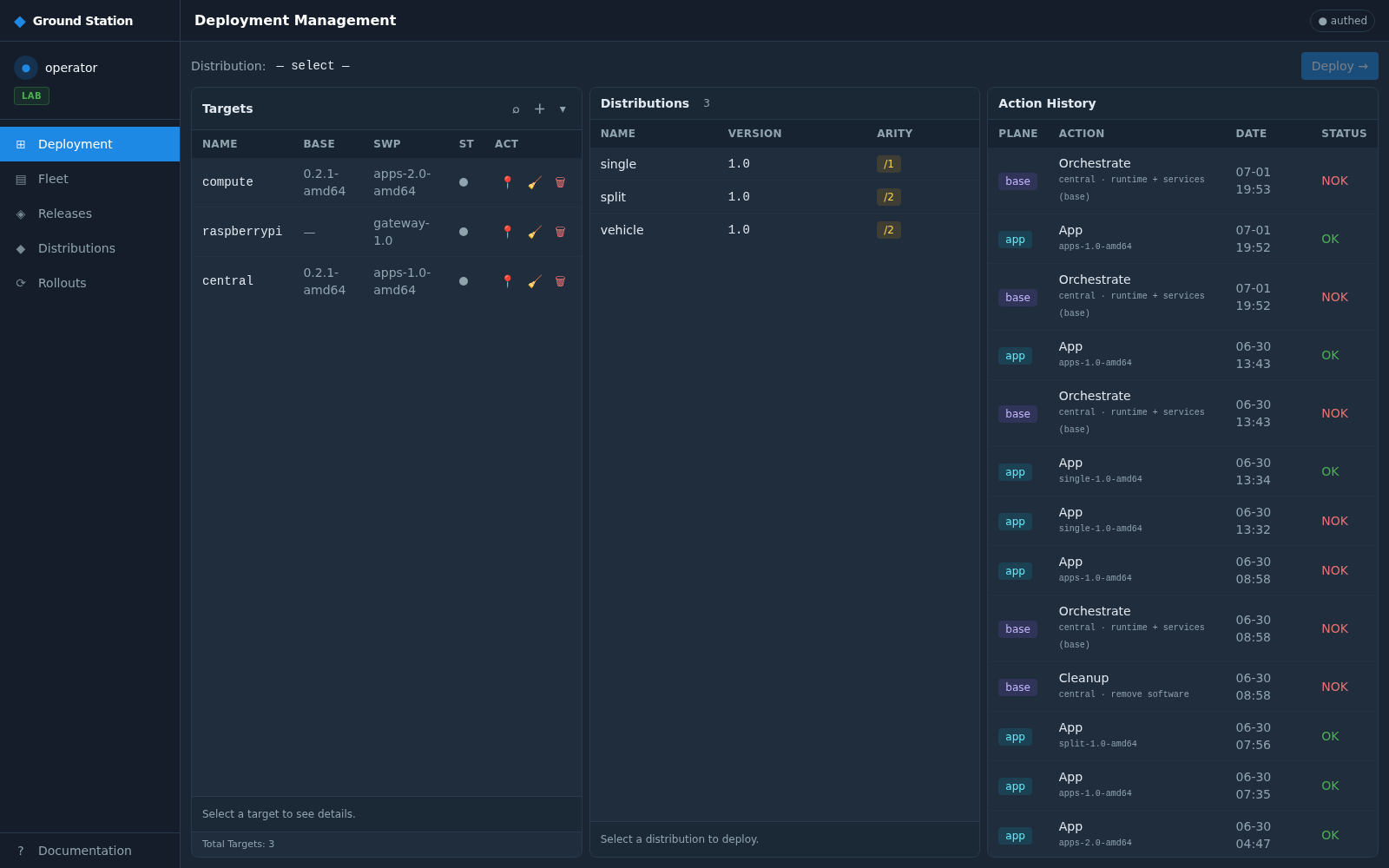
The left nav is the whole workflow: Deployment (the deploy board), Fleet
(enrolled devices), Releases (the S3 planes), Distributions (deployable
bundles), Rollouts (Mender/on-device transport state). The badge top-right shows
you're authed against the GS API.
Click Releases. This is the operator's view of what you pushed to S3 in Chapter 5:
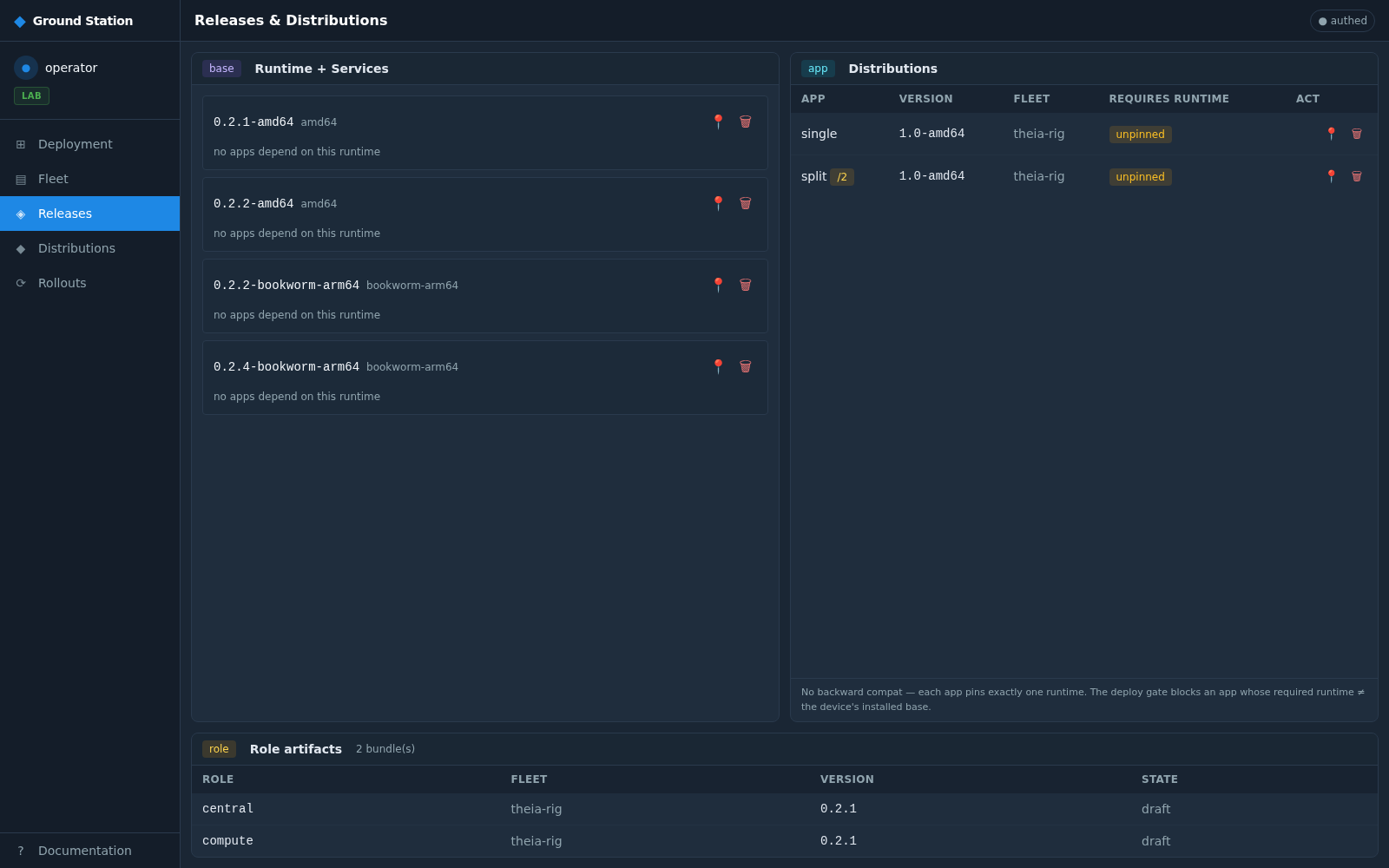
Three panes:
-
Runtime + Services (the
baseplane) — every runtime you published withtheia release services --s3, keyed<ver>-<abi>(0.2.2-amd64, the arm64 keys for real boards). This is thetheia-runtimebucket; colony installs one of these on a fresh board. -
Distributions (the
appplane) — your app SWPs (single 1.0-amd64), fromtheia-swp. Each shows its required runtime (unpinned= compatible with any base of the matching abi). -
Role artifacts — per-role
.menderbundles for the L4-C vehicle campaign path.
If a runtime you pushed isn't listed, the GS reads
<key>/index.jsonfrom S3 —theia release services --s3writes that index alongside the debs, so a fresh push shows up on the next Releases load.
Click Fleet. Enrolled devices appear with their fleet type, base runtime, app SWP, and health/SM/UCM/status columns:
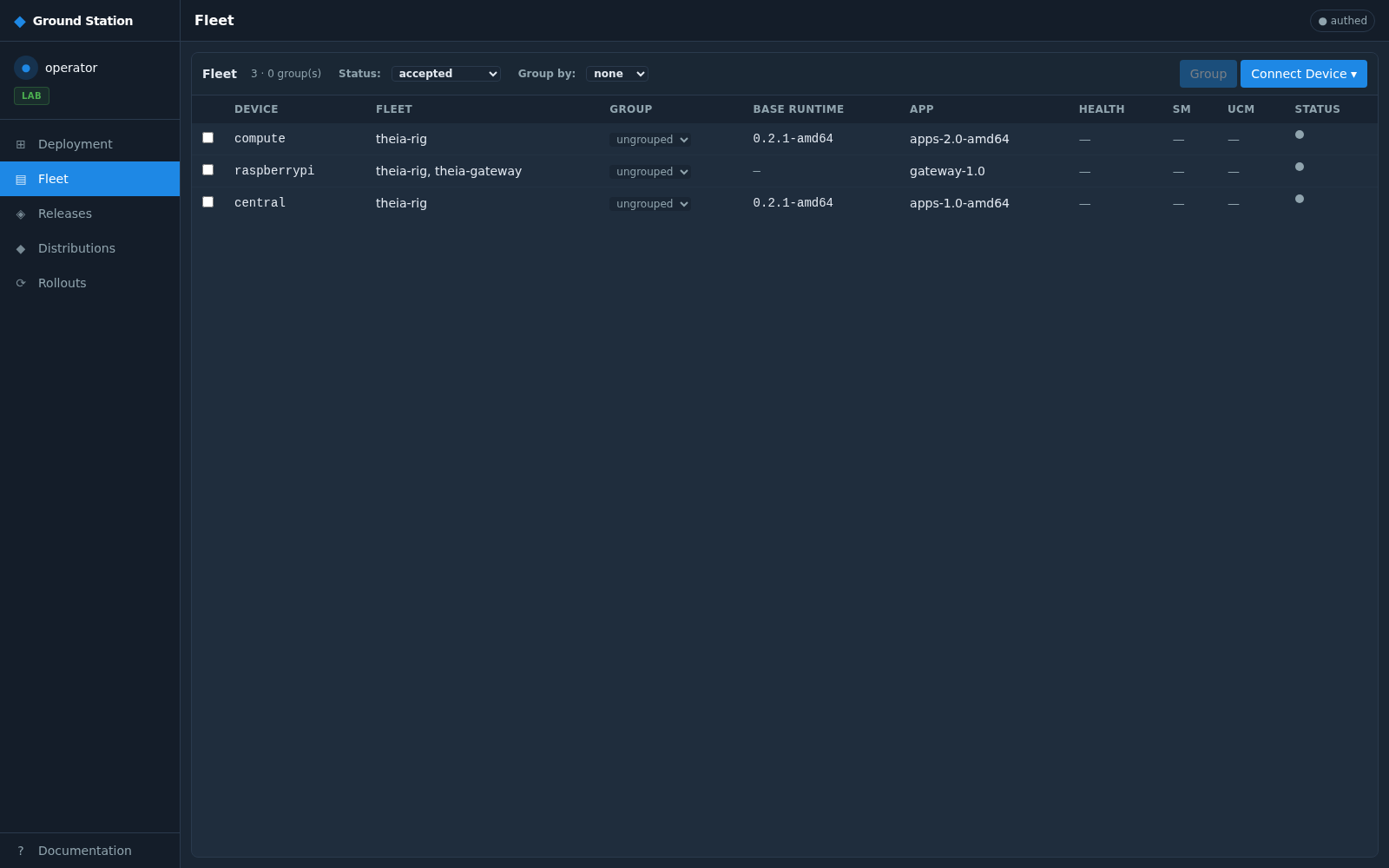
A freshly-upped rig starts as mender-only (red) — its Mender client is checking
in, but colony hasn't provisioned the runtime yet. To enrol a new rig, click
Connect Device ▾ (top right):
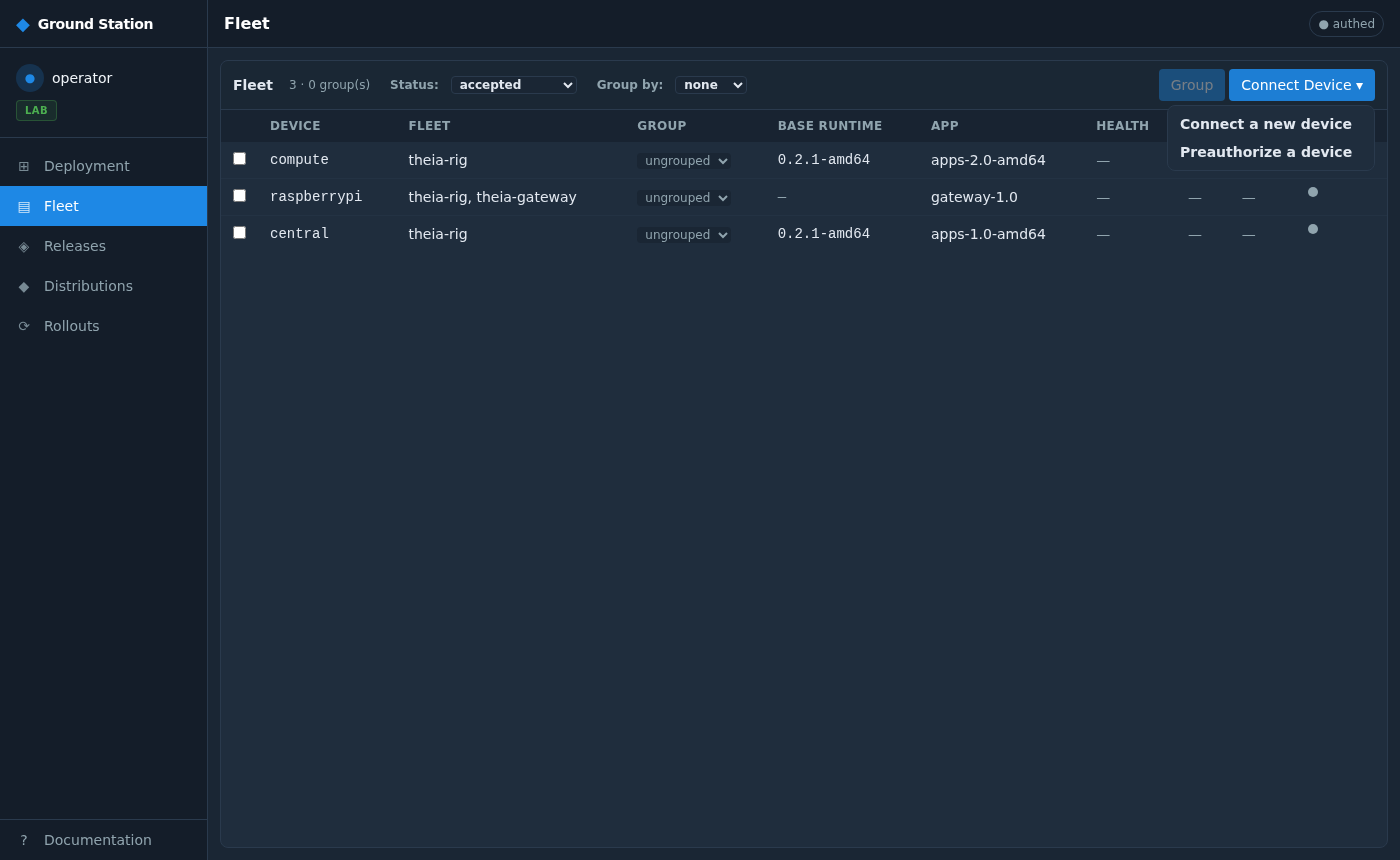
Two paths:
- Connect a new device — the rig's Mender client is already checking in (pending in Mender). The GS SSH-probes the host IP to prefill the Controller ID and name, then accepts the device.
- Preauthorize a device — register the device's identity before it checks in, so it's accepted the moment it does.
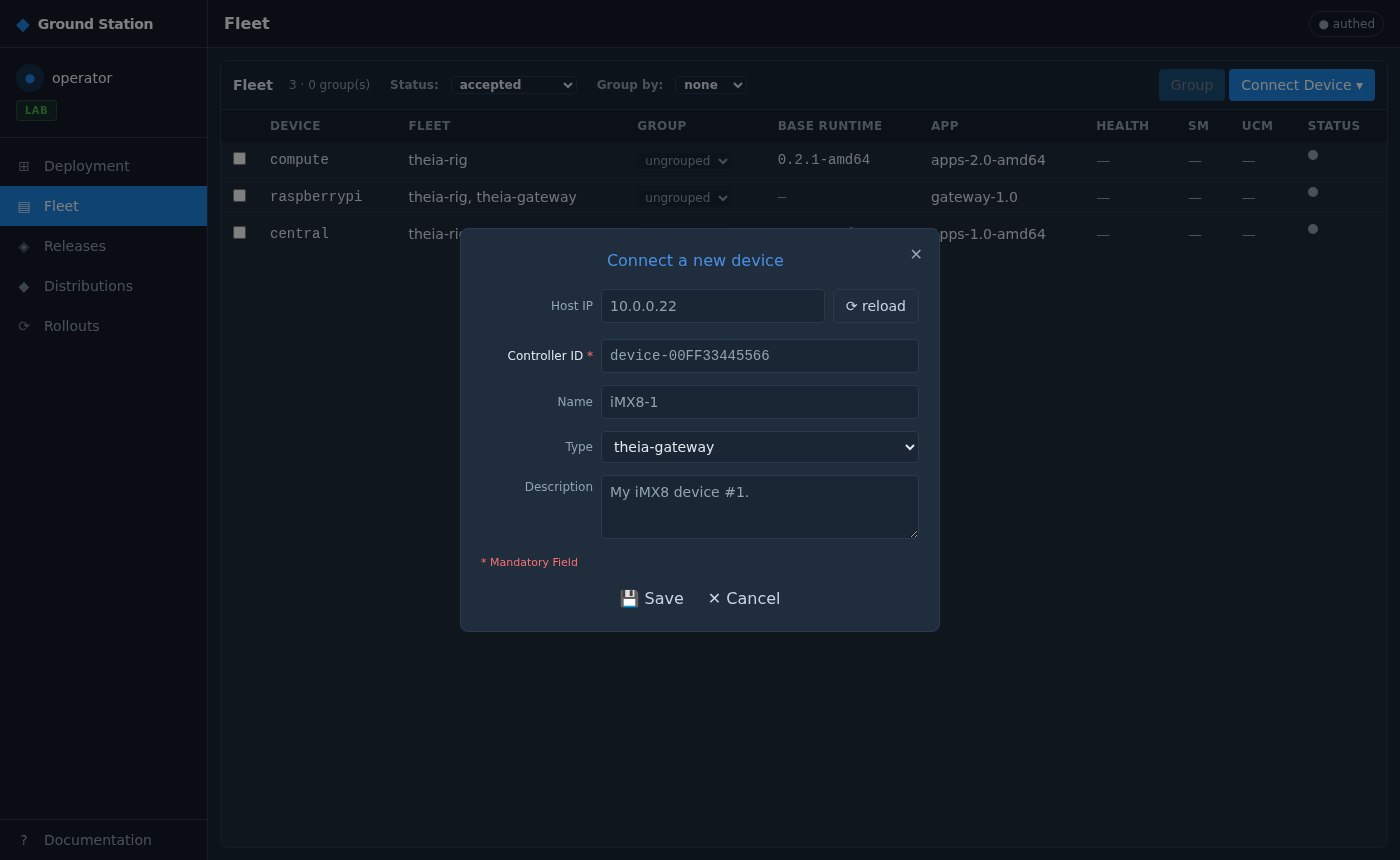
Enter the rig's Host IP (for the local rig, the docker host at its sshd port) and
click reload — the GS SSHes into the host using colony's provisioning key (the
same key that's in the rig's authorized_keys) and reads back the Controller ID, which
it prefills. This is the "the rig is prepared with the SSH key from the GS" step: the
GS↔rig trust is that one keypair — the GS holds the private key, every rig image ships
the public key. Confirm the Name and Type (theia-rig for a compute board,
theia-gateway for the gateway), add a description, and Save. The pending device
is accepted and appears in the Fleet.
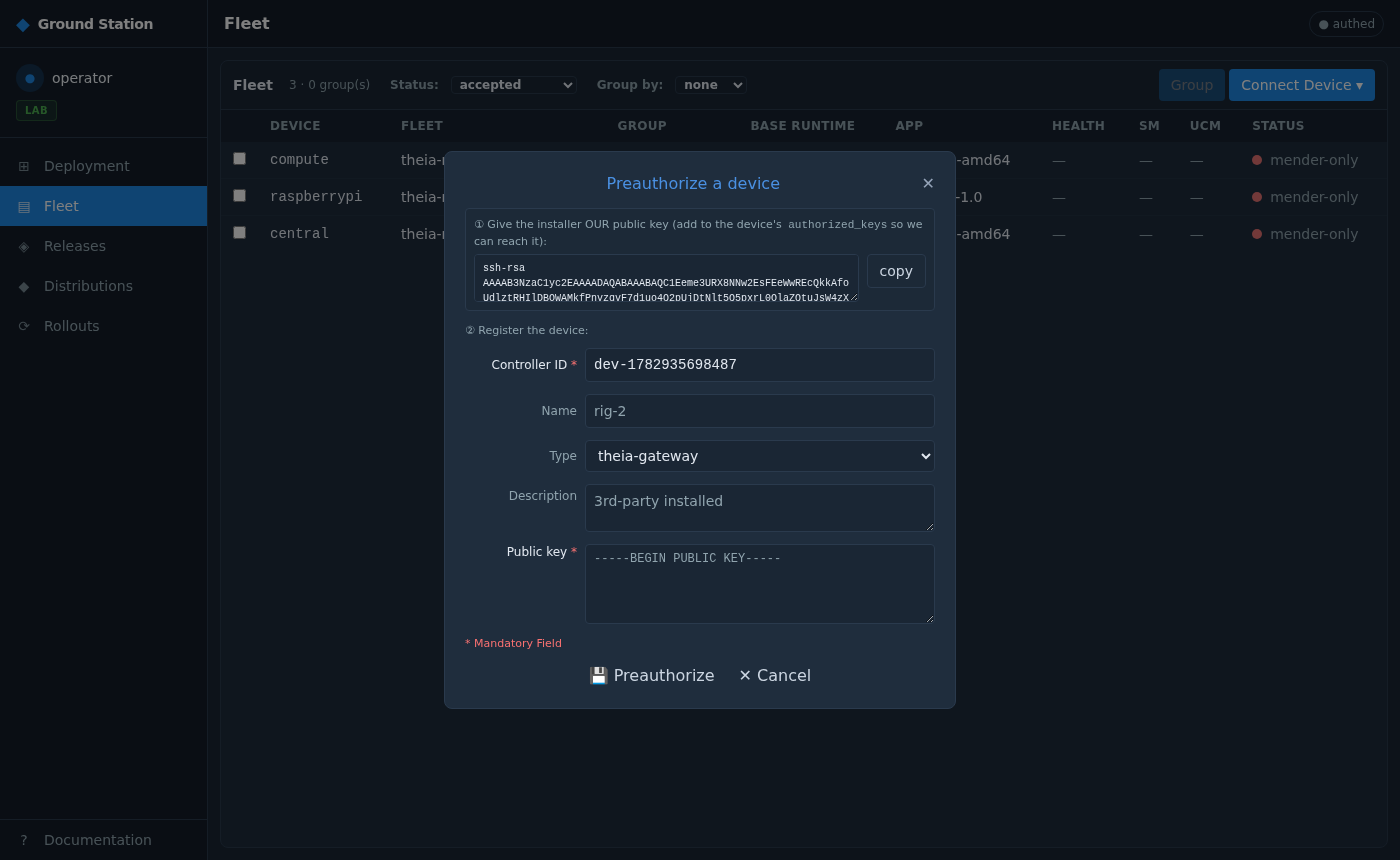
Same idea, before check-in: paste the device's Mender identity (its controller ID) and it's accepted the instant its client first polls. Use this when you're imaging boards in bulk.
A Distribution is the deployable unit: a name + version + a list of roles, each
resolved to {abi, runtime_build, swp_build}. It binds your app SWP to a runtime, so
runtime↔app compatibility is guaranteed by construction.
Open Distributions and create one from the single app you pushed. Behind the UI
it's a single API call:
arity = len(roles) — a single-master app is arity 1; a split app that also runs a
zone worker is arity 2 (central + compute), each role pinned to its own abi ·
runtime · SWP. The GS is stateless — the Distribution is stored as
s3://theia-distributions/<name>/<version>/index.json, nothing else.
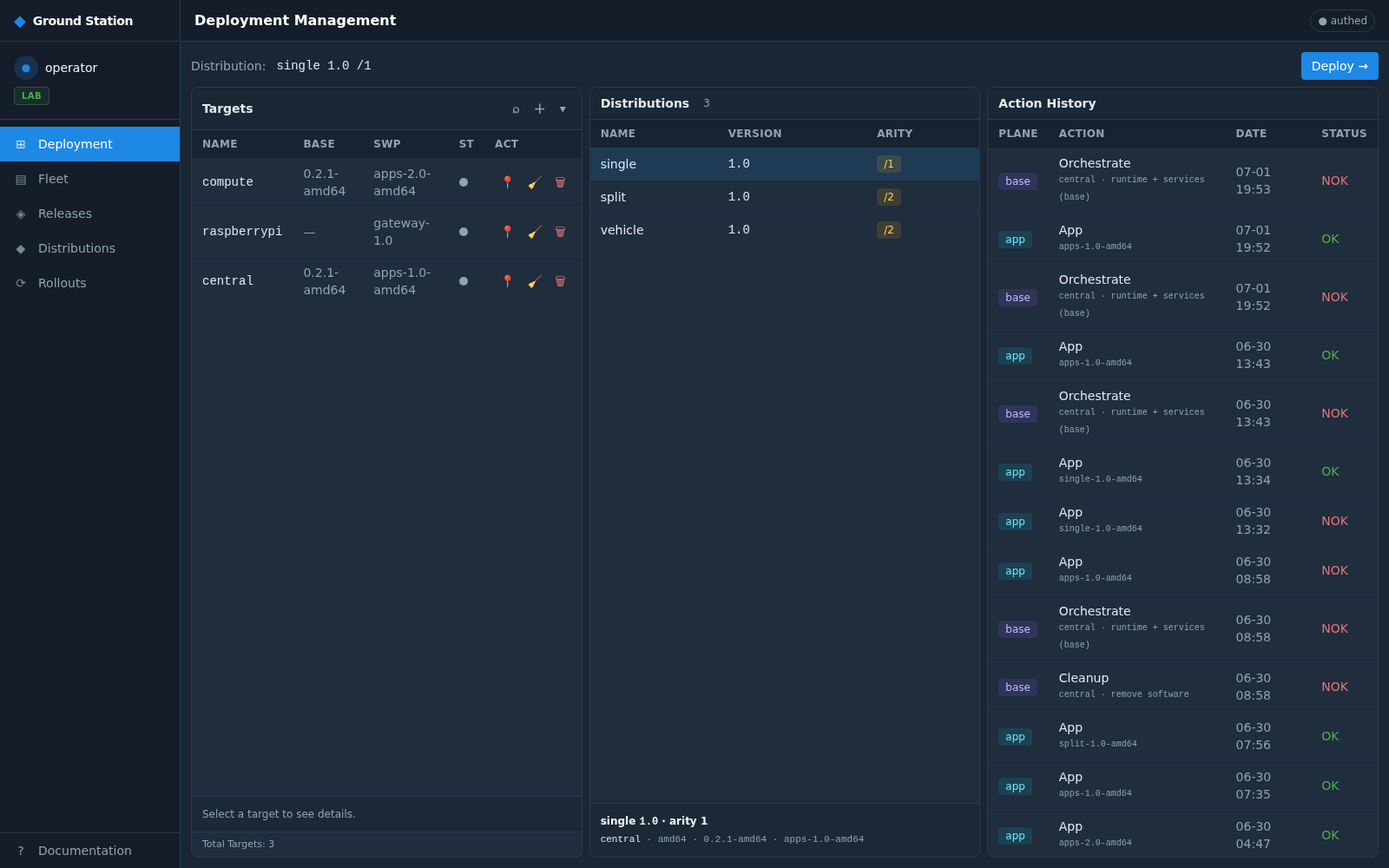
Back on Deployment, the board has three columns: Targets (your rigs, with the BASE runtime + SWP each currently carries), Distributions, and Action History.
Click the single Distribution in the middle column. The top bar shows the
selection (Distribution: single 1.0 /1), the Deploy → button activates, and the
footer resolves the role binding (central · amd64 · 0.2.2-amd64 · single-1.0-amd64):
Click Deploy →. The GS asks you to assign each role to a compatible machine (the abi must match — it validates all assignments before touching anything):
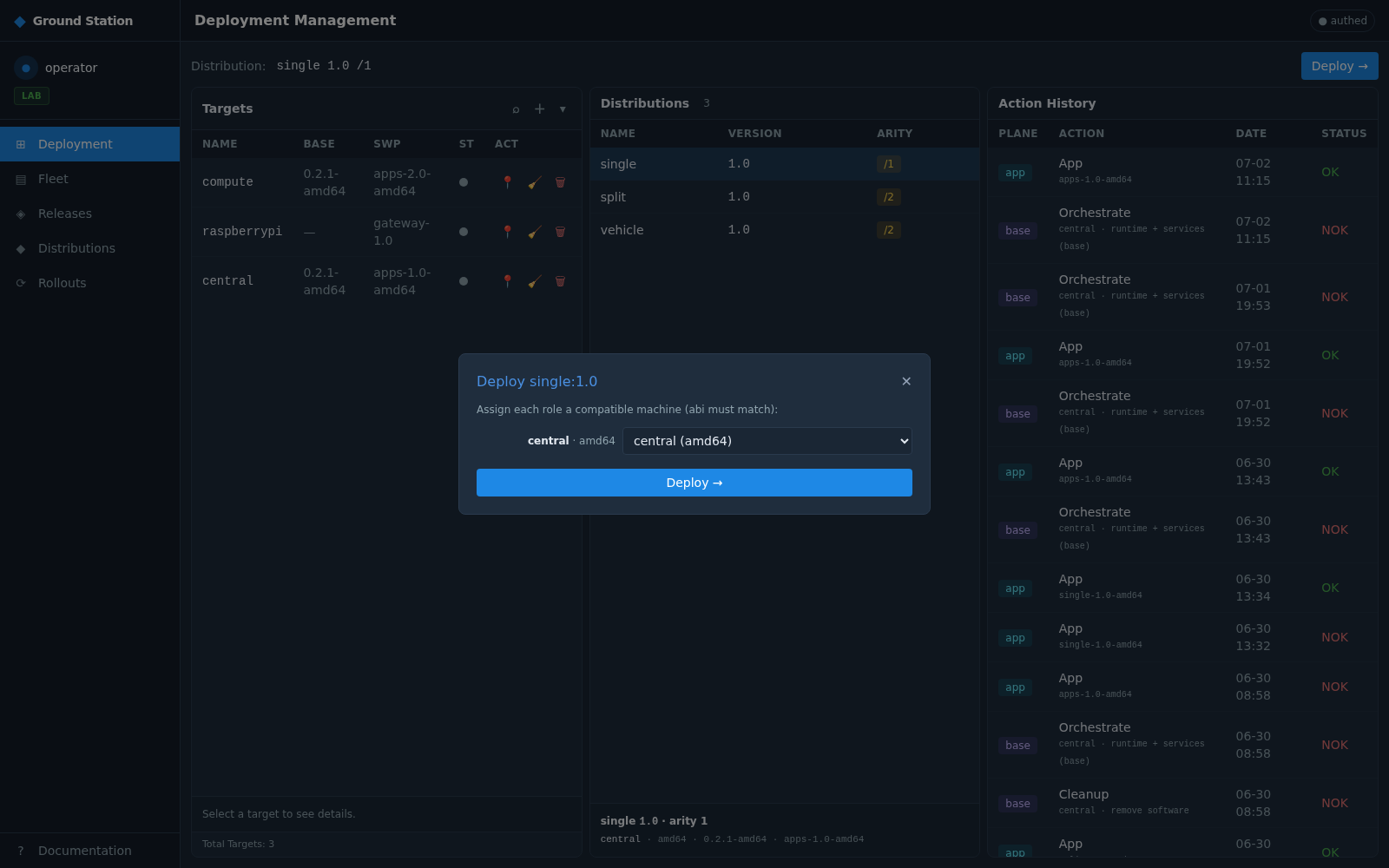
Pick central for the central role and confirm. One click, and the GS fans out
per role.
The deploy validates every assignment first, then for each role creates one colony base job + one Mender deployment:
deploy single:1.0 → central
  base:  runtime 0.2.2-amd64      → colony   (installs/refreshes the runtime base)
  swp:   single-1.0-amd64         → Mender   (creates a Mender deployment for the app)
The rig's Mender client picks up its deployment on its next poll, fetches the
.mender artifact, and runs the theia-swp update module — the on-device overlay
applier. It:
- unpacks the SWP and overlays every FC executable into
$CURRENT/bin/(p1lands alongside the running release), - merges the SWP's executor worker nodes into the supervised tree, keyed by the SWP name so a re-install replaces the same SWP's nodes (idempotent),
- records the install for rollback, and reloads the supervisor so it (re)spawns your app FCs.
The runtime + services underneath are never touched — that's what makes "apps are Mender-only day-2, the platform is factory-only" real.
The moment you confirm, a banner appears (deployed single:1.0 — 1 role(s); progress in Action History) and the deploy shows up at the top of Action History as
pending:
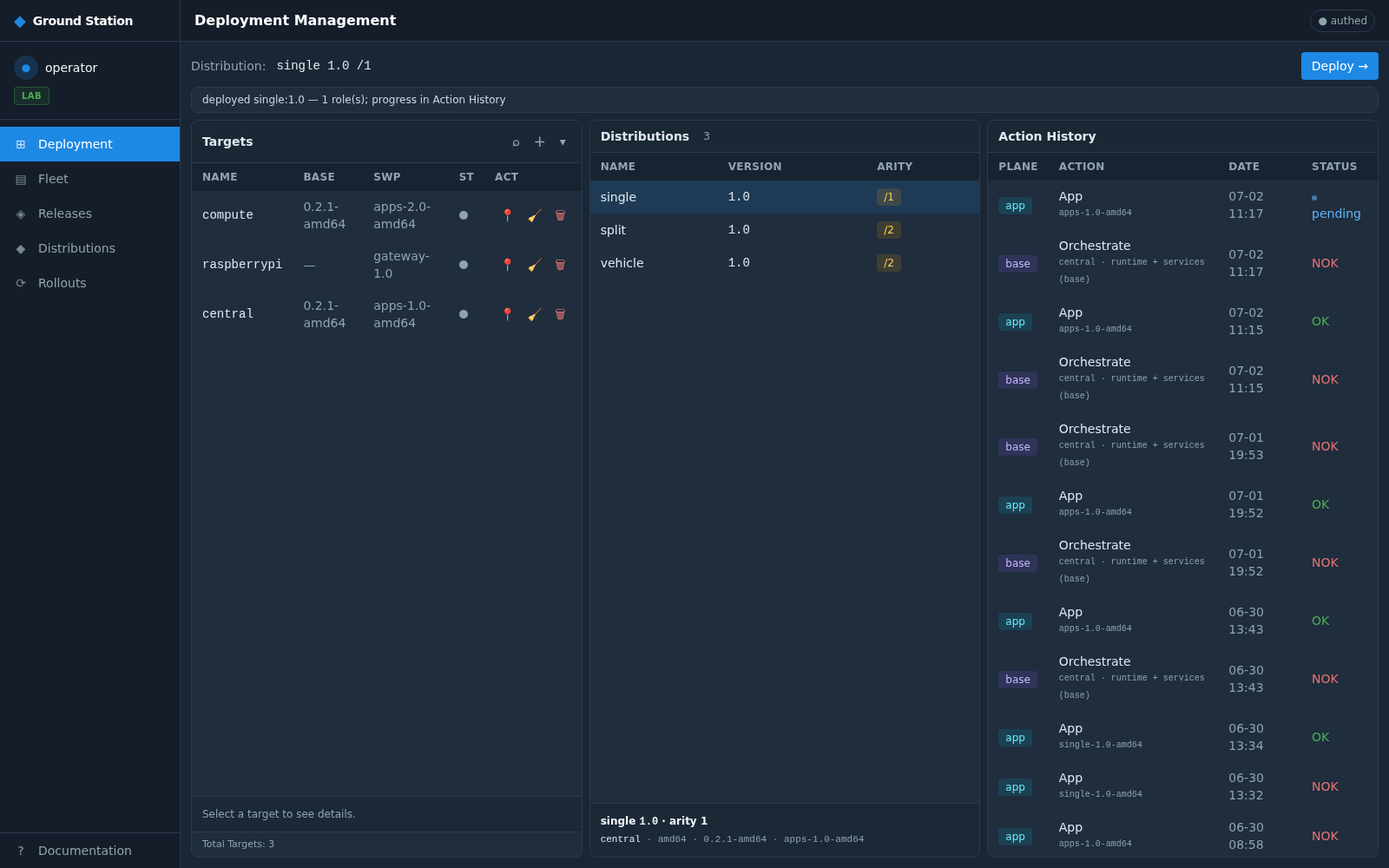
Each history row is one fanned-out action:
| column | meaning |
|---|---|
| PLANE |
base (a colony runtime action: Orchestrate / Cleanup) or app (a Mender SWP deploy) |
| ACTION |
Orchestrate = provision the runtime base; App = deploy the SWP overlay; Cleanup = remove software |
| DATE | when the action was created |
| STATUS |
pending (in flight) → OK (succeeded) / NOK (failed) |
A single logical deploy is two rows: the base Orchestrate (runtime) and the app
App (SWP). Watch them resolve — pending flips to OK when the colony job / Mender
deployment reports success:

This is the whole audit trail: every provision, every app deploy, every cleanup, with
its plane, target, and outcome. NOK rows are where a base or app action failed —
click through to the Rollouts view for the per-device Mender/UCM transport detail.
On the rig itself, once the app deploy is OK:
# on the rig (docker exec into theia-central, or via the operator tools)
ls /opt/theia/current/bin/          # p1 — your SWP executable landed
tdb apps # your app's nodes now in the supervised treeBecause Distributions are versioned and the overlay is idempotent, iterating is clean:
-
New SWP version — push
apps-2.0, make a new Distribution, deploy it: the module replaces the same app's binaries + nodes. Rollback restores the prior install. -
Add a role — deploy a
split(arity-2) Distribution:centralis re-overlaid andcomputegets its{ucm, shwa}slice, each from its own per-role fan-out — one click, both roles.
The whole chain, proven end to end:
theia release* → S3 → Distribution → per-role {colony base + Mender deployment} → rig fetch → theia-swp overlay → OK in Action History.
You now have: the full operator loop — a rig up (theia rig up), enrolled through
the Ground Station with the GS↔rig SSH key, its runtime provisioned from the S3 base
plane, and your app deployed as a versioned Distribution with the result tracked in
Action History.
Next: Chapter 7 — Write a Robot Framework test, to drive your app and assert on its behaviour.
← 5. Build a Distribution + publish to S3 · Tutorial index · 7. Robot Framework test →