End Stops
This guide uses an official build of Klipper and therefore may have different screens or screens that you may be missing altogether IF you have not already swapped out FLSun's build of Klipper for the official build.
This document describes Klipper's stepper phase adjusted endstop system. This functionality can improve the accuracy of traditional endstop switches. It is most useful when using a Trinamic stepper motor driver that has run-time configuration.
A typical endstop switch has an accuracy of around 100 microns. (Each time an axis is homed the switch may trigger slightly earlier or slightly later.) Although this is a relatively small error, it can result in unwanted artifacts. In particular, this positional deviation may be noticeable when printing the first layer of an object. In contrast, typical stepper motors can obtain significantly higher precision.
The stepper phase adjusted endstop mechanism can use the precision of the stepper motors to improve the precision of the endstop switches. A stepper motor moves by cycling through a series of phases until in completes four "full steps". So, a stepper motor using 16 micro-steps would have 64 phases and when moving in a positive direction it would cycle through phases: 0, 1, 2, ... 61, 62, 63, 0, 1, 2, etc. Crucially, when the stepper motor is at a particular position on a linear rail it should always be at the same stepper phase. Thus, when a carriage triggers the endstop switch the stepper controlling that carriage should always be at the same stepper motor phase. Klipper's endstop phase system combines the stepper phase with the endstop trigger to improve the accuracy of the endstop.
After updating Klipper to the official build using THIS GUIDE, Simply click "Configurations".
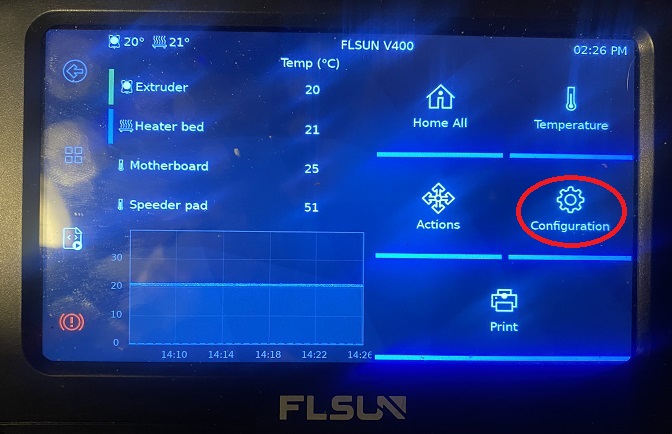
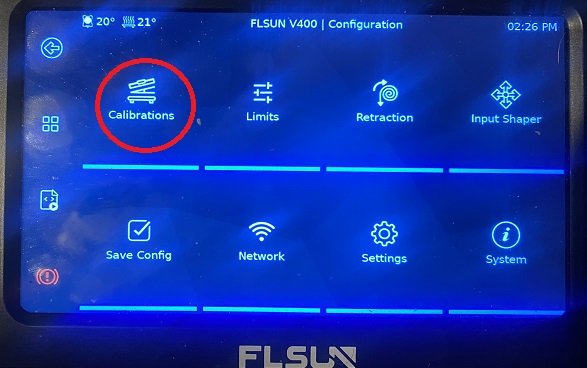
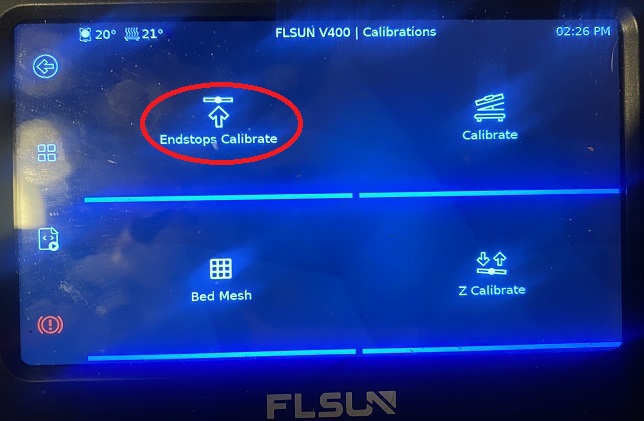
Allow the printer to go through its calibration moves and then allow the printer to restart to svae the configurations.
If you like my work, don't hesitate to support me by buying me a 🍺 or a ☕. Thank you 🙂