




日本語版 README はこちら → README.ja.md
A Python library that implements the .drawio.png file format — the
re-editable PNG format used by draw.io / diagrams.net.
With this library you can generate .drawio.png files programmatically,
without opening draw.io at all. The generated files are indistinguishable
from those exported by draw.io itself.
A .drawio.png file is simultaneously:
- a standard PNG image — viewable in any image viewer, browser, or AI agent
- a fully editable draw.io source — open it in draw.io to restore and edit the diagram
This is achieved by embedding the diagram XML inside a PNG tEXt chunk
(keyword=mxfile, value=URL-encoded UTF-8 XML), following the
draw.io open-source specification.
draw.io reads that chunk to restore the diagram; image viewers see only the PNG pixel data.
- AI agents / Bob: generate diagrams as code, embed them in Markdown docs, preview as PNG
- CI/CD pipelines: produce architecture diagrams from
.drawioXML without a GUI - Documentation automation: keep diagrams as re-editable sources alongside rendered images
pip install make-drawio-pngNote for Windows users — read the PATH section below before installing.
# embed only — re-editable but 1×1 placeholder image (no draw.io needed)
python -m make_drawio_png architecture.drawio

# render + embed — visually rendered AND re-editable (requires draw.io desktop)
python -m make_drawio_png --render architecture.drawio

# explicit output path
python -m make_drawio_png --render flow.drawio docs/images/flow.drawio.png
Windows / Bob shell users: Use
python -m make_drawio_pnginstead of themake-drawio-pngcommand — it works without any PATH changes. See the PATH guide below.
from make_drawio_png import drawio_export, drawio_to_png

# Recommended: render + embed (requires draw.io desktop)
drawio_export("architecture.drawio")
# → architecture.drawio.png  (rendered + re-editable)

# Zero dependencies: embed only (re-editable, 1×1 placeholder image)
drawio_to_png("architecture.drawio")
# → architecture.drawio.png (re-editable, no visual content)winget install JGraph.Draw # Windows
brew install --cask drawio # macOS
snap install drawio # LinuxThe CLI is auto-detected after installation.
Set DRAWIO_PATH to override the location.
On Windows, pip install places the make-drawio-png CLI script in a
Scripts directory that is not always in PATH by default.
The table below shows where scripts land depending on how you install:
| Install command | Scripts directory | In PATH by default? |
|---|---|---|
pip install make-drawio-png (system-wide) |
%LOCALAPPDATA%\Python\pythoncore-X.Y-64\Scripts |
❌ usually not |
pip install --user make-drawio-png |
%APPDATA%\Python\PythonXYZ\Scripts |
❌ usually not |
pip install make-drawio-png (venv active) |
<venv>\Scripts |
✅ while venv is active |
python -c "import sysconfig; print(sysconfig.get_path('scripts'))"
# e.g. C:\Users\you\AppData\Local\Python\pythoncore-3.14-64\Scripts

python -c "import sysconfig; print(sysconfig.get_path('scripts','nt_user'))"
# e.g. C:\Users\you\AppData\Roaming\Python\Python314\Scripts# Append to your user PATH permanently
$scripts = python -c "import sysconfig; print(sysconfig.get_path('scripts'))"
[System.Environment]::SetEnvironmentVariable(
"PATH",
"$([System.Environment]::GetEnvironmentVariable('PATH','User'));$scripts",
"User"
)
# → restart your terminal / shell after thisIf you don't want to touch PATH at all, call the module directly:
python -m make_drawio_png architecture.drawioThis always works regardless of PATH because Python itself is on PATH.
When using IBM Bob or Claude Code on Windows, the shell inherits the same PATH as the process that launched Bob/Claude — there is no separate Python environment.
| Scenario | python3 resolves to |
make-drawio-png CLI available? |
|---|---|---|
| Launched from a terminal where Python Scripts is in PATH | your Python installation | ✅ |
| Launched from Windows start menu / system tray | system PATH (Scripts likely missing) | ❌ use python -m |
| Launched inside an active venv | venv Python + Scripts | ✅ |
Recommended practice for Bob/Claude Code users:
Always invoke via python -m so the PATH question is irrelevant:
# In Bob's execute_command tool
python3 -m make_drawio_png "<path>.drawio"
Or reference the script by its absolute path after installation:
import subprocess, sysconfig, pathlib
scripts = pathlib.Path(sysconfig.get_path("scripts"))
subprocess.run([scripts / "make-drawio-png", "architecture.drawio"])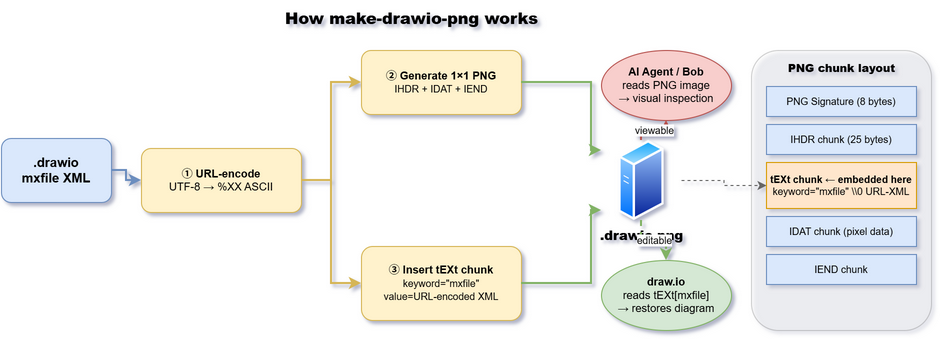
The .drawio.png file is both a valid PNG image and a re-editable draw.io
source. draw.io reads the embedded tEXt[mxfile] chunk to restore the full
diagram; image viewers and AI agents see only the PNG pixel data.
PNG Signature  (8 bytes)
IHDR chunk     (25 bytes)
tEXt chunk     (keyword="mxfile" \x00 URL-encoded-XML)   ← diagram XML here
IDAT chunk     (compressed pixel data)
IEND chunk
- Python ≥ 3.9
- No external dependencies (uses only
struct,zlib,urllib.parsefrom stdlib)
MIT © 2026 Shoichiro Sakaigawa