slipover_box.scad
This file has all the modules needed to generate a slipover box.
To use, add the following lines to the beginning of your file:
include <boardgame_toolkit.scad>
Topics: SlipoverBox
Usage: MakeBoxWithSlipoverLid([100, 50, 10]);
Description:
Makes the inside of the slip box, this will take a second lid that slides over the outside of the box.
Inside the children of the box you can use the $inner_height , $inner_width, $inner_length = length variables to deal with the box sizes.
Arguments:
| By Position | What it does |
|---|---|
size |
[width, length, height] outside size of the box |
foot |
how big the foot should be around the bottom of the box (default 0) |
size_spacing |
amount of wiggle room to put into the model when making it (default m_piece_wiggle_room) |
wall_height |
height of the wall if not set (default height - wall_thickness2 - size_spacing2) |
lid_thickness |
thickness of the lid (default default_lid_thickness) |
wall_thickness |
thickness of the walls (default default_wall_thickness) |
floor_thickness |
thickness of the floor (default default_floor_thickness) |
material_colour |
the colour of the material in the box (default default_material_colour) |
positive_only_children |
the list of children to be positive only |
positive_negative_children |
the list of children to be positive and negative |
positive_colour |
colour of the postive pieces default_positive_colour |
lid_catch |
CATCH_NONE - no catch, CATCH_LONG - length catch, CATCH_SHORT - width catch (default |
[default\_lid\_catch\_type](lids_base.scad#constant-default_lid_catch_type)) |
Example 1:
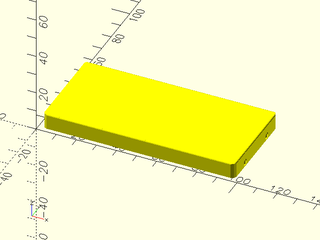
include <boardgame_toolkit.scad>
MakeBoxWithSlipoverLid([100, 50, 10]);
Topics: SlipoverBox
Usage: SlipoverBoxLid([100, 50, 10]);
Description:
Make a box with a slip lid, a lid that slips over the outside of a box.
Arguments:
| By Position | What it does |
|---|---|
size |
[width, length, height] outside size of the lid |
lid_thickness |
thickness of the lid (default default_lid_thickness) |
wall_thickness |
thickness of the walls (default default_wall_thickness) |
finger_hole_length |
finger hole on the length side (default6 false) |
finger_hole_width |
finger hole on the width side (default true) |
size_spacing |
how much to offset the pieces by to give some wiggle room (default m_piece_wiggle_room) |
foot |
size of the foot on the box. |
lid_rounding |
how much to round the lid (default wall_thickness) |
material_colour |
the colour of the material in the box (default default_material_colour) |
lid_catch |
CATCH_NONE - no catch, CATCH_LONG - length catch, CATCH_SHORT - width catch (default |
[default\_lid\_catch\_type](lids_base.scad#constant-default_lid_catch_type)) |
Example 1:
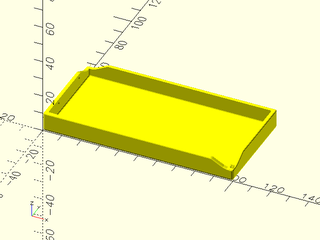
include <boardgame_toolkit.scad>
SlipoverBoxLid([100, 50, 10]);
Topics: SlipoverBox
Usage: SlipoverBoxLidWithLabelAndCustomShape(size=[100, 50, 20], text\_str = "Frog");
Description:
Lid for a slipover box. This uses the first child as the shape for repeating on the lid.
Arguments:
| By Position | What it does |
|---|---|
size |
[width, length, height] outside size of the lid |
text_str |
the string to use for the label |
lid_boundary |
boundary around the outside for the lid (default 10) |
layout_width |
the width of the layout pieces (default default_lid_layout_width) |
text_str |
the string to use for the label |
layout_width |
the width of the layout pieces (default default_lid_layout_width) |
aspect_ratio |
the aspect ratio (multiple by dy) (default default_lid_aspect_ratio) |
size_spacing |
extra spacing to apply between pieces (default m_piece_wiggle_room) |
lid_rounding |
how much rounding on the edge of the lid (default wall_thickness/2) |
lid_pattern_dense |
if the layout is dense (default false) |
lid_dense_shape_edges |
the number of edges on the dense layout (default 6) |
finger_hole_length |
finger hole on the length side (default6 false) |
finger_hole_width |
finger hole on the width side (default true) |
material_colour |
the colour of the material in the box (default default_material_colour) |
lid_catch |
CATCH_NONE - no catch, CATCH_SHORT - length catch, CATCH_LONG - width catch (default |
[default\_lid\_catch\_type](lids_base.scad#constant-default_lid_catch_type)) |
|
pattern_inner_control |
if the pattern needs inner control (default false) |
label_options |
options for the label (default undef) |
foot |
size of the foot on the box. |
lid_thickness |
thickness of the lid |
wall_thickness |
thickness of the walls |
Example 1:
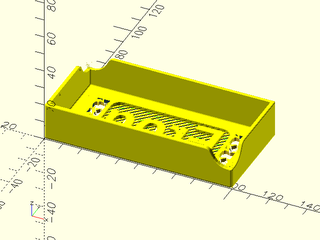
include <boardgame_toolkit.scad>
SlipoverBoxLidWithLabelAndCustomShape([100, 50, 20], text_str = "Frog") {
  ShapeByType(MakeShapeObject(shape_type = SHAPE_TYPE_SUPERSHAPE, shape_thickness = 2, supershape_m1 = 12, supershape_m2 = 12,
     supershape_n1 = 1, supershape_b = 1.5, shape_width = 15));
}
Topics: SlipoverBox
Usage: SlipoverBoxLidWithLabel(size=[20, 100, 10], text\_str = "Marmoset", shape\_options=MakeShapeObject(shape\_type = SHAPE\_TYPE\_CIRCLE, shape\_width = 14), layout\_width = 10)
Arguments:
| By Position | What it does |
|---|---|
size |
[width, length, height] outside size of the lid |
text_str |
the string to use for the label |
lid_boundary |
boundary around the outside for the lid (default 10) |
wall_thickness |
thickness of the walls (default default_wall_thickness) |
foot |
size of the foot on the box. |
layout_width |
the width of the layout pieces (default default_lid_layout_width) |
aspect_ratio |
the aspect ratio (multiple by dy) (default default_lid_aspect_ratio) |
size_spacing |
how much to offset the pieces by to give some wiggle room (default m_piece_wiggle_room) |
lid_thickness |
thickness of the lid (default default_lid_thickness) |
finger_hole_length |
finger hole on the length side (default6 false) |
finger_hole_width |
finger hole on the width side (default true) |
lid_rounding |
how much to round the lid (default wall_thickness) |
material_colour |
the colour of the material in the box (default default_material_colour) |
lid_catch |
CATCH_NONE - no catch, CATCH_LONG - length catch, CATCH_SHORT - width catch (default default_lid_catch_type) |
label_options |
options for the label (default undef) |
shape_options |
options for the shape (default undef) |
Example 1:
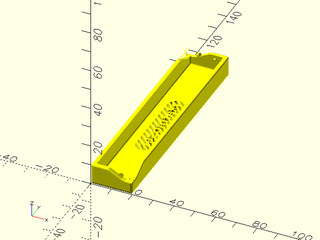
include <boardgame_toolkit.scad>
SlipoverBoxLidWithLabel(size=[20, 100, 10], text_str = "Marmoset",
    shape_options=MakeShapeObject(shape_type = SHAPE_TYPE_CIRCLE, shape_width = 14), layout_width = 10);