Features
DeepLore is feature-dense. This page is a quick catalog with links to the detail pages where each feature is fully explained.
For the core matching pipeline, see Pipeline. For AI search specifics, see AI Search.
DLE's persistent side panel shows real-time pipeline feedback. See Drawer for full details.
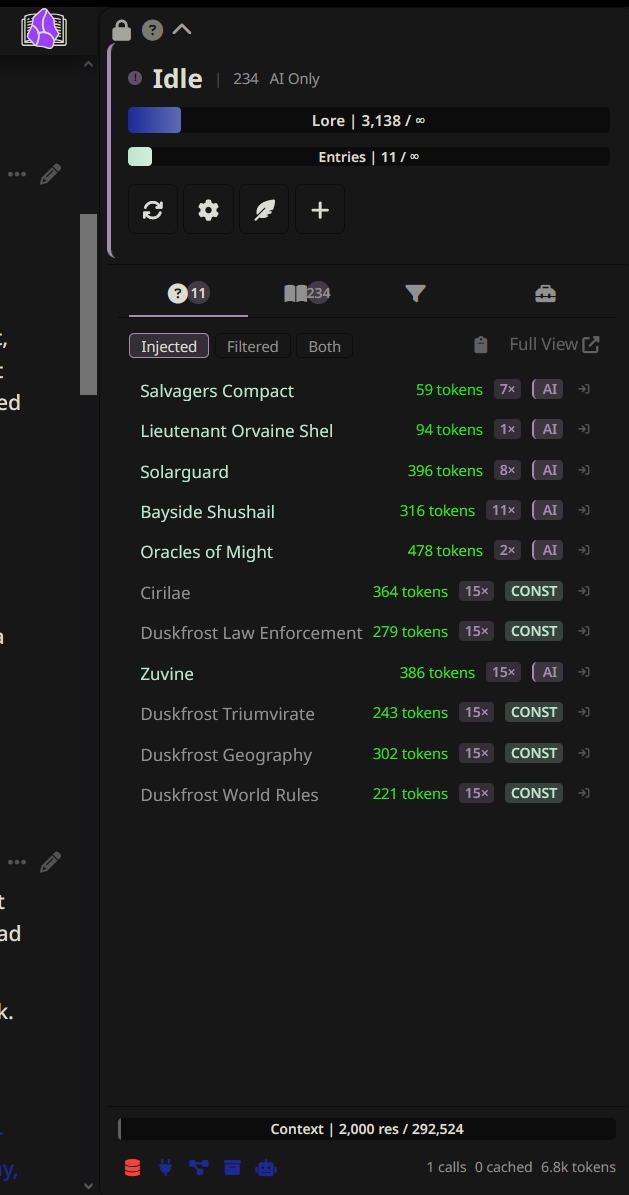
| Feature | What it does |
|---|---|
| Injection tab | Shows which entries were injected and why, with generation-to-generation diff |
| Browse tab | Searchable, filterable entry list with temperature heatmap, pin/block controls, and virtual scroll |
| Filters tab | View and edit contextual gating filters (built-in and custom fields) with live impact counts and folder filter |
| Librarian tab | Lore gap inbox, flagged entries, draft activity, and bulk actions |
| Tools tab | Quick-access buttons for slash commands, grouped by purpose |
| Status zone | Connection status, token/entry budget bars, active gating filters, quick action buttons |
| Footer | Context window bar, recent activity feed, health icons, AI session statistics |
Tools for understanding what DLE is doing and why. See Inspection and Diagnostics for full details.
| Feature | What it does |
|---|---|
| Context Cartographer | Book icon on each AI message showing which entries were injected and why |
| Pipeline Inspector | Detailed trace of the last generation (/dle-inspect) |
| Entry Browser | Searchable popup of all indexed entries (/dle-browse) |
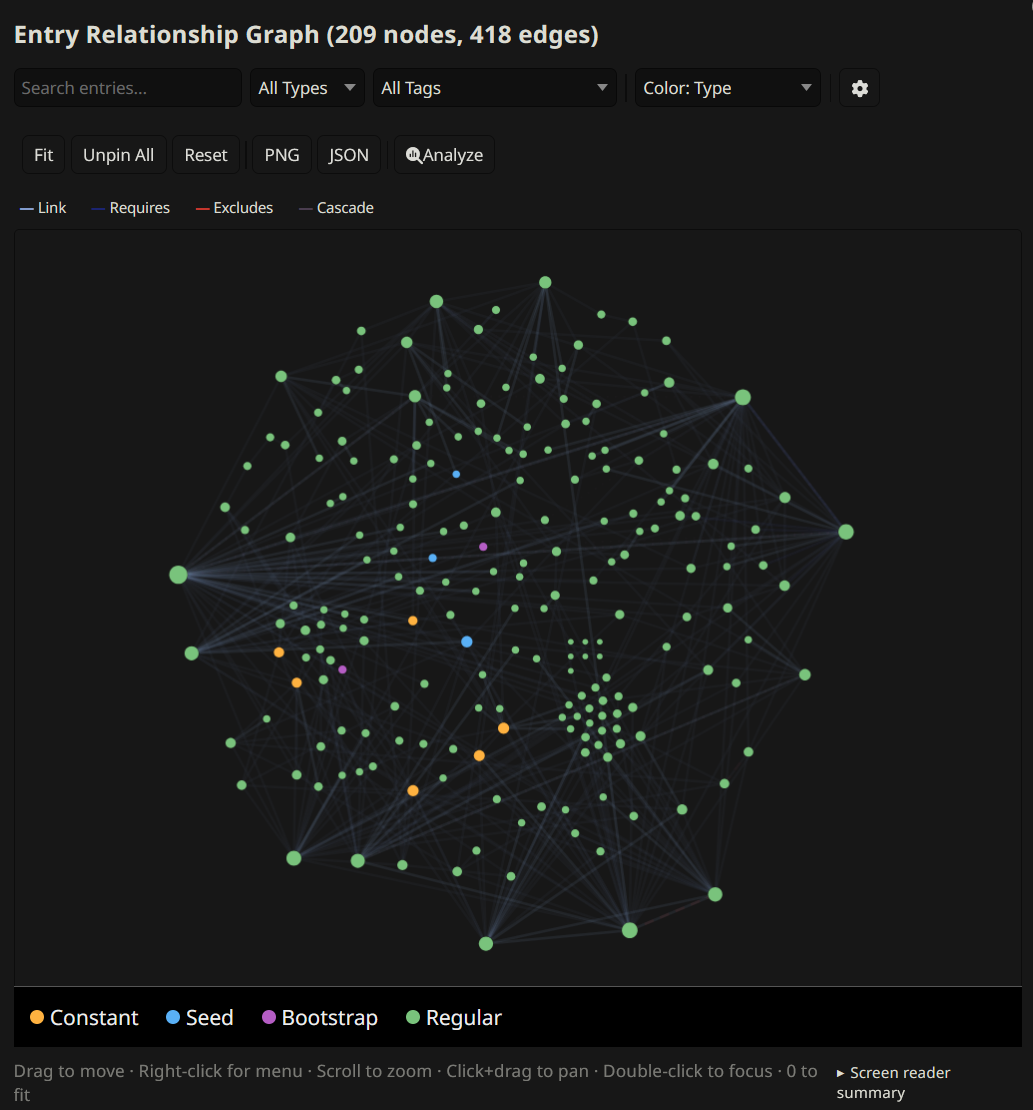
| Relationship graph | Interactive force-directed graph of entry connections (/dle-graph) |
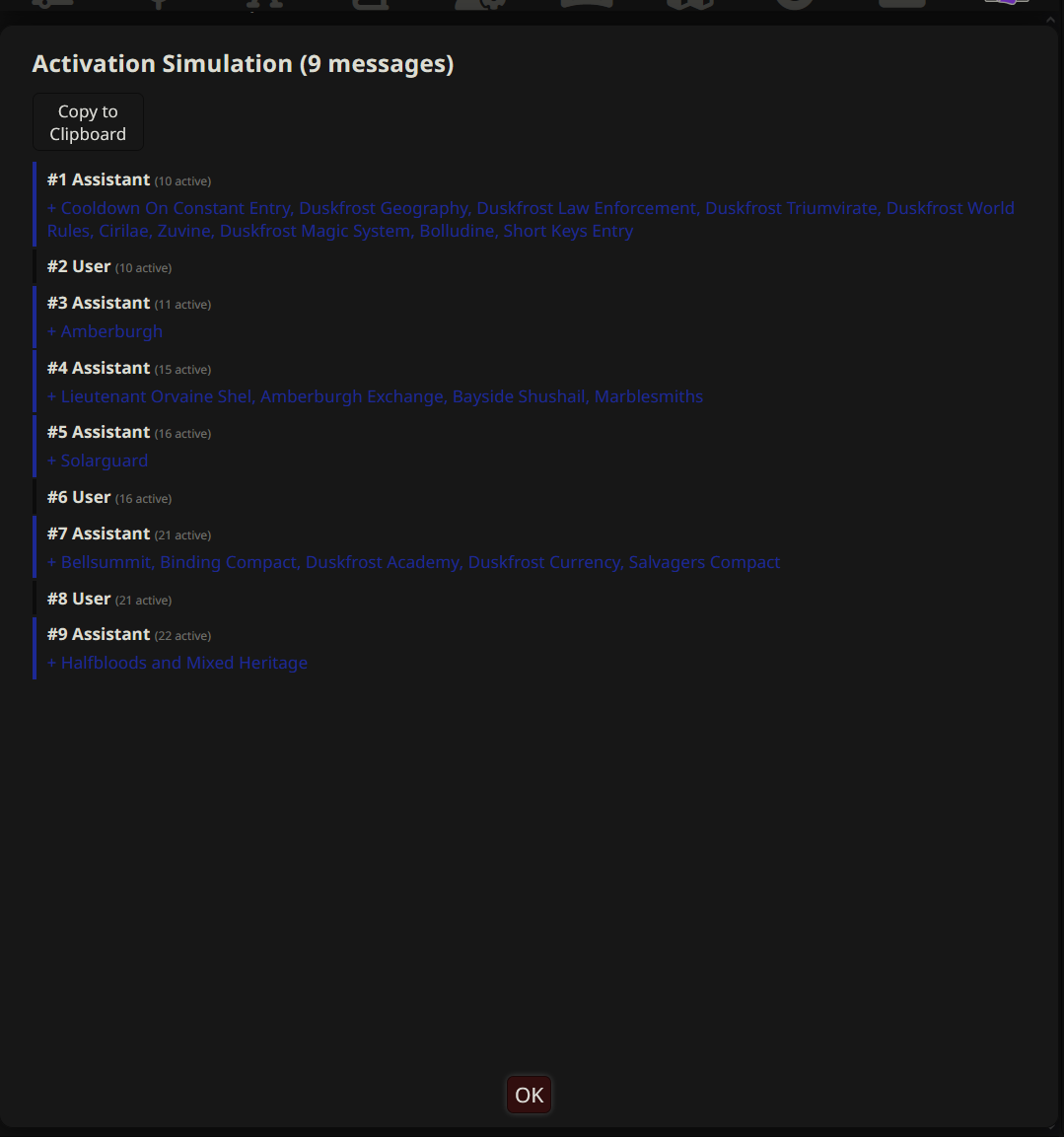
| Activation Simulation | Replay chat history showing entry activation timeline (/dle-simulate) |
| "Why Not?" diagnostics | Click any unmatched entry to see exactly why it was not injected |
| Entry analytics | Track match and injection counts per entry (/dle-analytics) |
| Health check | 30+ automated checks for common entry issues (/dle-health) |
| Diagnostics export | Pseudonymized bundle for bug reports (/dle-diagnostics); IPs, hostnames, API keys, profile names, vault names, and character names masked |
Features that use AI to help you build and maintain your vault. See AI-Powered Tools for full details.
| Feature | What it does |
|---|---|
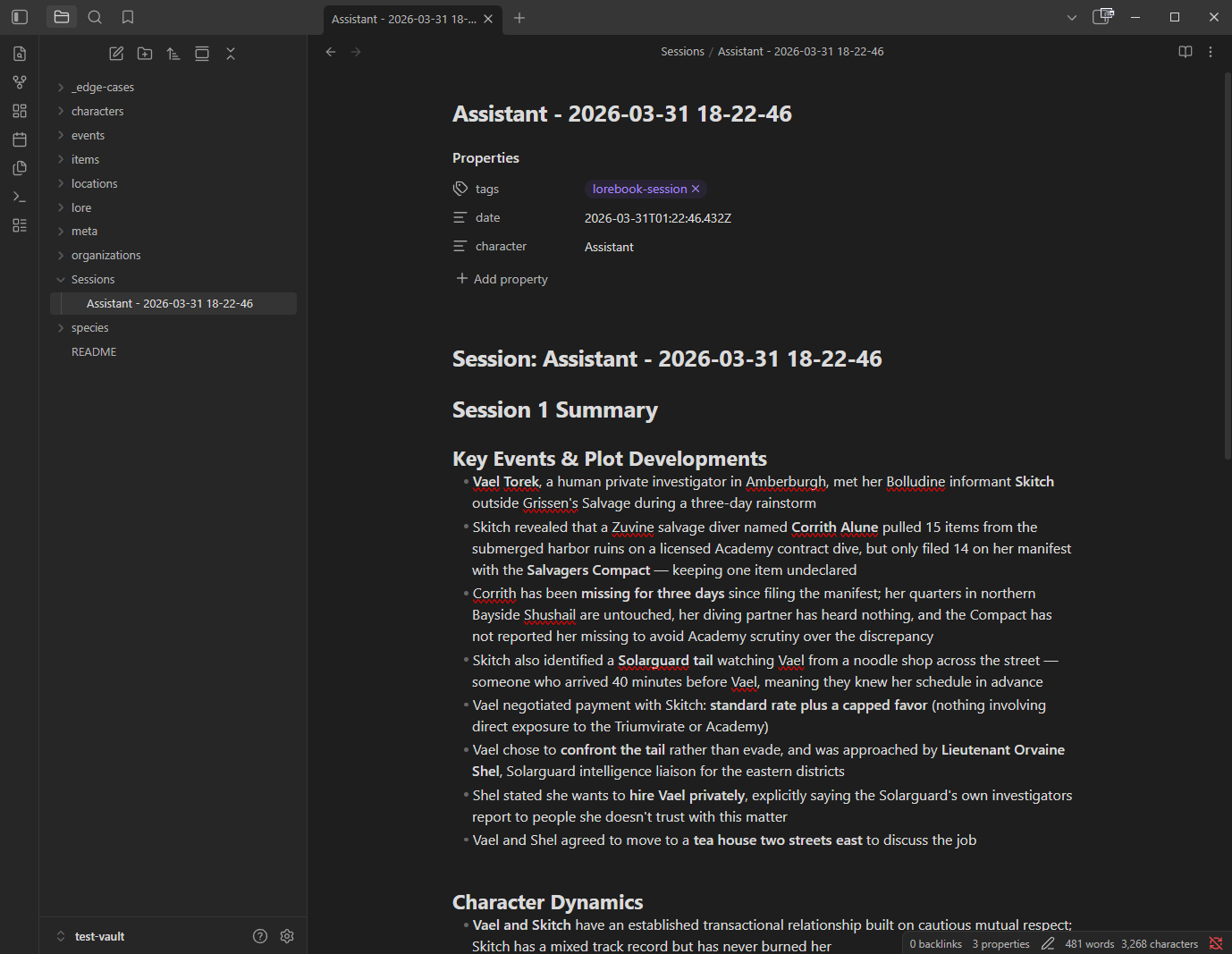
| Session Scribe | Auto-summarize sessions and write notes back to your vault |
| Auto Lorebook | AI suggests new entries based on chat content (/dle-newlore) |
| Optimize Keys | AI analyzes an entry and suggests better keywords (/dle-optimize-keys) |
| Auto-Summary | Generate AI summaries for entries missing a summary field (/dle-summarize) |
| Scribe-informed retrieval | Feed Scribe summaries into AI search for broader story awareness |
Two linked things: writing-AI tools (search and flag) that run during generation, and Emma, the chat agent for authoring entries from flagged gaps. The Librarian has its own drawer tab, settings subtab, and connection channel. Tool-calling provider required (Claude, Gemini, OpenAI-compatible, Cohere).
| Feature | What it does |
|---|---|
| Generation tools | Writing AI calls search and flag mid-generation to look up vault entries and flag gaps |
| Emma's toolset |
search_vault, get_entry, get_full_content, find_similar, list_flags, get_links, get_backlinks, list_entries, get_recent_chat, flag_entry_update, compare_entry_to_chat, and get_writing_guide
|
| Session continuity | Emma's session (messages, draft state, work queue) persists in chat_metadata across reloads and chat switches |
| Lore gap detection | Writing AI flags missing or stale lore mid-generation; gaps land in the Librarian inbox; Emma helps you draft the entry |
| Two-tier dismissal | Hide a gap to suppress it; dismiss again to bury it. Re-flagging a hidden gap resurfaces it |
| Vault audits |
/dle-librarian audit walks the entire vault and flags gaps, inconsistencies, and entries that need updates |
| Writing guides | Tag a vault entry with lorebook-guide to make it a Librarian-only style reference. Emma fetches these via get_writing_guide. They never reach the writing AI through any path |
| Drawer tab | Gap list, flagged entries, session stats, and quick-dismiss controls |
| Customizable persona | Tweak Emma's personality and focus through an editable prompt |
Important
Turning on the Librarian auto-enables function calling on the active connection profile. If you disable function calling elsewhere, tool invocations break.
Per-chat AI-extracted session notes injected into context. The AI maintains running notes about important story details (decisions, relationship changes, revealed secrets) using <dle-notes> tags. Notes are stripped from visible chat, accumulated per-chat in chat_metadata.deeplore_ai_notepad, and reinjected into future messages as context.
| Feature | What it does |
|---|---|
| Tag extraction | AI wraps notes in <dle-notes> tags; DLE extracts and stores them, then strips them from the visible message |
| Per-chat storage | Notes stored on chat_metadata.deeplore_ai_notepad; accumulate as the chat grows |
| Configurable injection | Position, depth, and role controls; same pattern as Author's Notebook |
| Independent connection | Separate connection channel for the extraction call |
/dle-ai-notepad |
View, edit, or clear accumulated notes |
Per-entry frontmatter fields and global settings that control when entries trigger. See Entry Matching and Behavior for full details.
| Feature | What it does |
|---|---|
| Cooldown | Skip an entry for N generations after it triggers |
| Warmup | Require N keyword occurrences before first trigger |
| Re-injection cooldown | Global setting to skip re-injecting recent entries |
| Injection dedup | Strip entries already injected in recent generations |
| Entry decay and freshness | Boost stale entries, penalize over-injected ones |
| Conditional gating |
requires and excludes dependency rules |
| Refine keys | Secondary AND_ANY filter on top of primary keywords |
| Cascade links | Unconditionally pull in related entries when one matches |
| Active character boost | Auto-match the active character's entry |
| Fuzzy search (BM25) | TF-IDF scored fuzzy matching alongside exact keywords; inverted-index posting list |
| Bootstrap and seed entries |
lorebook-bootstrap for chat-start force-injection; lorebook-seed for new-chat story context |
| Probability | 0.0-1.0 trigger chance for matched entries |
How and where entries are injected, plus per-chat overrides. See Injection and Context Control for full details.
| Feature | What it does |
|---|---|
| Per-entry injection position | Override position, depth, and role per entry |
| Prompt Manager integration | Register DLE injections as draggable Prompt Manager entries (injectionMode: prompt_list) |
| Author's Notebook | Persistent per-chat user scratchpad injected every generation (/dle-notebook) |
| Per-chat pin and block | Pin entries to always inject or block them, per chat |
| Contextual gating | Filter entries by era, location, scene type, characters present, and user-defined custom fields (configurable via the rule builder) |
| Confidence-gated budget | AI over-requests, then prioritizes high-confidence picks |
| Folder filter | Per-chat folder restriction; only entries in allowed folders are considered |
Under-the-hood systems that make DLE fast and reliable. See Infrastructure for full details.
| Feature | What it does |
|---|---|
| Multi-vault support | Connect multiple Obsidian vaults simultaneously; entries deduped by content hash across vaults |
| IndexedDB persistent cache | Instant startup from browser-side cache |
| Reuse sync | Skip re-parsing unchanged entries on refresh |
| Circuit breaker | Exponential backoff on Obsidian connection failures; AI search circuit trips after 2 consecutive failures (30s cooldown) |
| Sliding window AI cache | Reuse AI search results when recent chat changes don't mention any vault entity, so identical lookups skip the provider call entirely |
| Hierarchical manifest clustering | Two-call AI approach for vaults with 40+ entries |
| HTTPS support | Obsidian connections support HTTPS for remote or secured setups, with auto-diagnosis of cert/auth/unreachable failure modes |
| Flight recorder | Ring buffer captures recent extension activity (pipeline runs, tool calls, errors) for export |
Getting started and migrating from other lorebook systems. See Setup and Import for full details.
| Feature | What it does |
|---|---|
| Setup wizard | Guided first-time setup (/dle-setup) |
| Quick actions bar | One-click toolbar in the drawer |
| ST lorebook import | Convert SillyTavern World Info JSON into Obsidian vault notes (/dle-import); offers AI summary generation for imported entries |