Browser App
The browser application combines a Certificate Gadgets certificate tree with a detail pane, Validation pane, API Log, and embedded PkiStudioJS ASN.1 viewer.
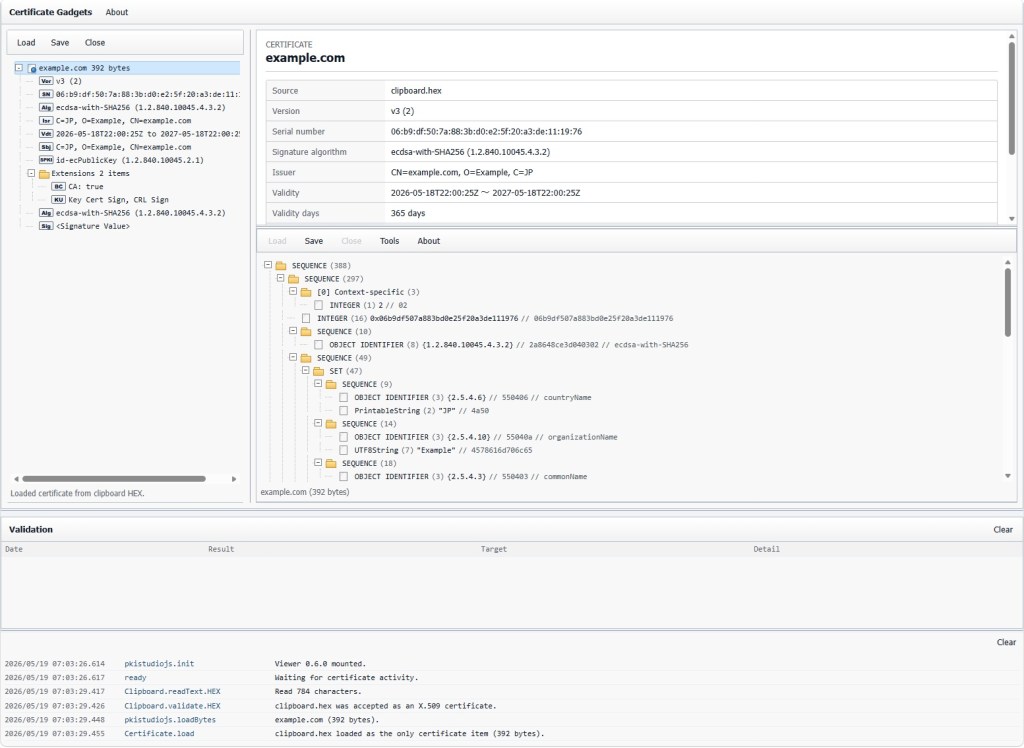
The left pane keeps one loaded certificate document at a time. Loading another certificate closes the previous certificate before opening the new one.
The certificate tree contains child items for:
- Version.
- Serial Number.
- Signature Algorithm.
- Issuer.
- Validity.
- Subject.
- Subject Public Key Info.
- Optional issuer and subject unique IDs.
- Extensions.
- Certificate Signature Algorithm.
- Certificate Signature Value.
Each X.509 extension is displayed as a child item under Extensions. The tree uses compact labels and truncates very long values while keeping fuller detail available in the detail pane and assistive text.
The compact toolbar provides:
-
Load: load certificate bytes from a file, clipboard PEM, or clipboard HEX. -
Save: save the selected DER-backed item as DER or save the loaded certificate as PEM. -
Close: clear the loaded certificate and validation results.
Supported certificate files include .cer, .crt, .der, and .pem.
Selecting a certificate tree item updates the detail pane with certificate-specific fields. The root certificate summary includes source, version, serial number, signature algorithm, issuer, validity, subject, public key, certificate signature algorithm, and signature size.
Issuer and subject Distinguished Name display is reversed for easier reading in the detail pane.
The detail pane also shows detected network resources and explicit validation actions when a selected node contains AIA, OCSP, CRL, or generic HTTP resources.
Certificate Gadgets parses extension OIDs, critical flags, encoded value lengths, decoded readable values, and network resources.
Readable summaries are provided for common extension types when possible, including:
- Basic Constraints.
- Key Usage.
- Extended Key Usage.
- Subject Alternative Name.
- Issuer Alternative Name.
- CRL Distribution Points.
- Certificate Policies.
- Authority Information Access.
- Subject Key Identifier.
- Authority Key Identifier.
GeneralName values such as DNS names, email names, URI values, IP addresses, and object identifiers are decoded for display.
The Validation pane records explicit network validation requests.
Each entry includes:
- Date.
- Result status:
OK,NG, or.... - Target, such as OCSP, AIA CA Issuers, CDP, or AIA.
- Detail summary.
Selecting a validation result shows its transcript in the detail pane. The newest 200 validation results are kept, and older entries are dropped automatically.
Validation artifacts can be opened after a request. Certificate artifacts open in a new Certificate Gadgets window, ASN.1 artifacts open in a standalone PkiStudioJS viewer window, and raw bytes can be wrapped in an OCTET STRING before opening in the ASN.1 viewer.
The right pane embeds the PkiStudioJS viewer.
Certificate Gadgets uses the viewer in read-only mode for certificate investigation. Selected certificate, TBSCertificate field, extension, signature algorithm, and signature value DER objects are routed into the viewer when DER bytes are available.
PkiStudioJS Save and New Window behavior remains available for the currently displayed DER object.
The bottom API Log records browser, parsing, viewer, file, clipboard, save, and network activity.
The newest 200 log entries are kept. Older entries are dropped automatically.
The application fills the browser viewport with resizable panes. Pane sizes are persisted in local storage.
The app follows the browser or operating system light/dark theme preference by default, and supports forcing a theme with:
?theme=light
?theme=dark