FAQ
No. The WebIDE is a serverless web application that runs locally in your browser.
Model processing and normal file operations happen locally. Your workspace does not need to be uploaded to a WebIDE backend in order to edit, parse, validate, visualize, or otherwise work with your models.
The following diagram shows the deployment architecture. Components inside the Laptop boundary execute locally. Connections to enterprise services such as a remote Flexo repository are optional.
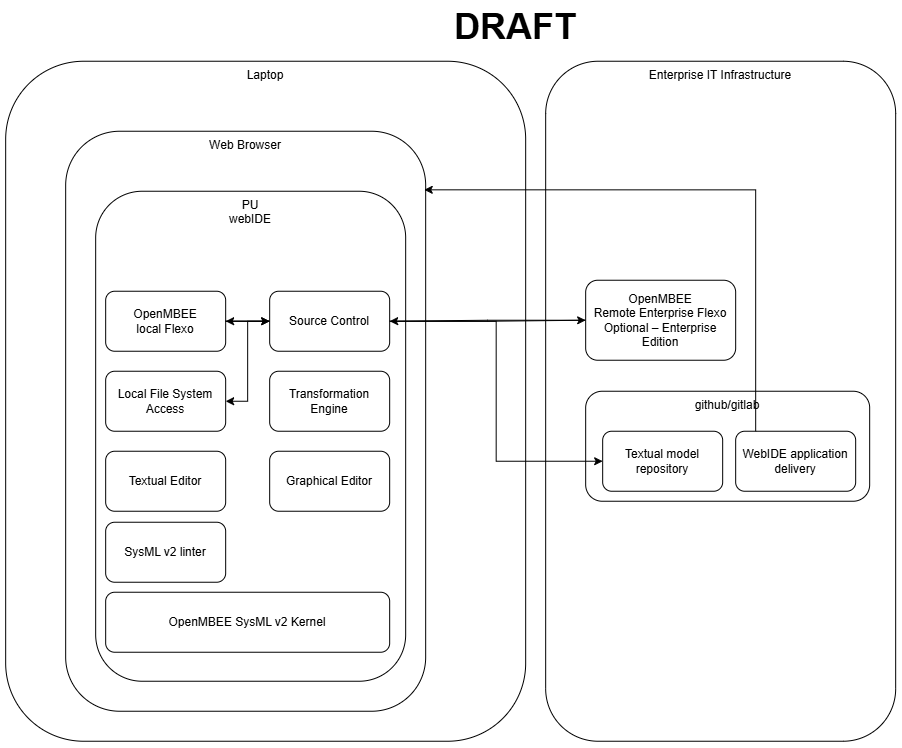
The WebIDE also supports direct access to files on your machine through the browser's File System Access capabilities.
This is different from web applications where the browser primarily acts as a front end and sends your content to a remote server for processing.
Remote communication only occurs when you explicitly use functionality configured to communicate with an external or shared service, such as a remote enterprise Flexo instance.
It is pronounced KOH-tar.
KOH sounds like the "ko" in Kodak, tar rhymes with "car" or "jar".
The WebIDE supports the browser's File System Access capabilities, allowing you to open and work directly with files stored on your local machine.
You can open a local workspace and work with its files directly from the WebIDE. The files remain normal files on your machine and are not uploaded to a WebIDE server.
Yes.
Files opened through local File System Access are normal files on your machine and can also be edited using other applications and development tools.
Changes made outside the WebIDE are supported, allowing the WebIDE to participate in normal local development workflows with tools such as:
- Git clients
- Other text editors and IDEs
- Scripts
- Command-line utilities
From a file-access perspective, the browser-based WebIDE therefore behaves much like a locally installed application: both the WebIDE and your other local tools can work with the same files.
No.
Granting the WebIDE access to a local file or directory allows the browser application to work with that file on your machine. It does not, by itself, upload the file to a remote WebIDE service.
Remote communication only occurs when you explicitly use functionality configured to communicate with a remote service.
For normal file-based workflows, very little.
The WebIDE can access an explicitly opened local workspace through the browser's File System Access capabilities, and files can be modified both inside and outside the WebIDE.
The main difference is access to other local services. Because the WebIDE runs within the browser's security environment, connecting directly to arbitrary local services may require those services to be exposed appropriately.
Support for accessing local services through file:///-based configuration can also be added where required.
The WebIDE is designed so that modeling can be performed entirely locally, without sending model data to a WebIDE backend.
The hosted WebIDE is a serverless web application: the application is delivered through the browser, while the modeling environment, workspace, and local Flexo instance run locally. A desktop-installable version is also available.
However, technical data locality should not be confused with formal authorization to handle export-controlled or company-proprietary information.
Whether the WebIDE is approved for EAR-controlled data, proprietary information, or a particular security classification depends on the applicable organizational IT, cybersecurity, export-control, and deployment requirements.
For environments with specific security requirements, the desktop/local deployment can be evaluated and approved through the applicable organizational security process.
Yes.
The WebIDE includes a local, in-browser Flexo instance. This Flexo instance is private to the individual user and does not require a separately deployed Flexo server.
For enterprise collaboration, the Enterprise Edition can optionally connect to a remote, shared Flexo instance. This enables workflows such as:
- Cloning models from a shared repository
- Pulling model changes
- Pushing model changes
- Collaborating through a shared model repository
Using a remote Flexo instance is optional.
The WebIDE includes a local, in-browser Flexo instance. Its model repository is local to the user's environment and is not a shared remote repository.
The local Flexo instance provides model persistence and identity management while allowing the WebIDE to operate without a separately deployed Flexo server.
Note: The exact browser persistence/storage mechanism is an implementation detail and may change. Applications should interact with the model through the provided interfaces rather than depending on the underlying storage representation.
No.
Git can be used for source-based model management without Flexo.
However, Flexo provides additional model repository capabilities, including persistence of model identities and graph-based model information.
The WebIDE therefore supports a hybrid configuration-management approach in which Git and Flexo work together.
Every valid model can be automatically committed during editing, providing fine-grained ("micro-commit") model history while Flexo maintains the repository-level model representation.
Potentially.
The architecture is designed around standard SysML v2 APIs rather than requiring the IDE itself to depend on a specific repository implementation.
A different repository implementation could therefore potentially be integrated if it provides the required compatible APIs and semantics.
Flexo is the currently integrated model repository and provides functionality beyond basic Git-based storage.
Potentially, but this is not currently a supported integration.
The WebIDE is designed around SysML v2 APIs and repository interfaces. If Teamwork Cloud, or an integration layer in front of it, exposes compatible APIs and the required model semantics, an integration could potentially be developed.
The currently integrated solution uses Flexo/OpenMBEE together with Git.
Flexo persists model identities, including UUIDs, as part of the repository representation.
The textual SysML v2 representation currently does not contain all of the information necessary to independently preserve UUID identity through arbitrary text operations.
For this reason, the WebIDE combines textual model management with repository-level identity management rather than relying exclusively on text files for model identity.
Currently, UUIDs are not directly tracked in the SysML v2 textual representation.
Git therefore primarily versions the textual model, while Flexo maintains repository-level model identities.
The WebIDE combines the two mechanisms so that Git can provide familiar source configuration management while Flexo provides model-aware persistence.
The WebIDE uses a hybrid Git + Flexo configuration-management approach.
Git provides fine-grained version history of the textual SysML v2 model. Valid model states can be automatically committed while editing, providing a micro-commit history.
Because a purely textual diff is not always sufficient to understand semantic model changes, model-aware diff capabilities are also being developed.
The WebIDE has an initial model diff capability, and integration with LieberLieber LemonTree is being investigated/developed for more advanced model comparison.
The WebIDE lets you develop and test queries directly from files in your workspace. This can be more convenient for developing and experimenting with queries than using the web service's stored-query functionality.
The query type is determined by the file extension:
| Extension | Query Type | Target |
|---|---|---|
.json / .jsonc
|
JSON query | Model/query services |
.rq |
SPARQL | MMS |
.sql |
SQL | Relational database |
.kq |
KerML Query | Live, in-memory model |
To workshop a query, create a file with the appropriate extension in your workspace, enter the query, and execute it from the WebIDE.
For example, create a .json or .jsonc file to develop a JSON-based model query:
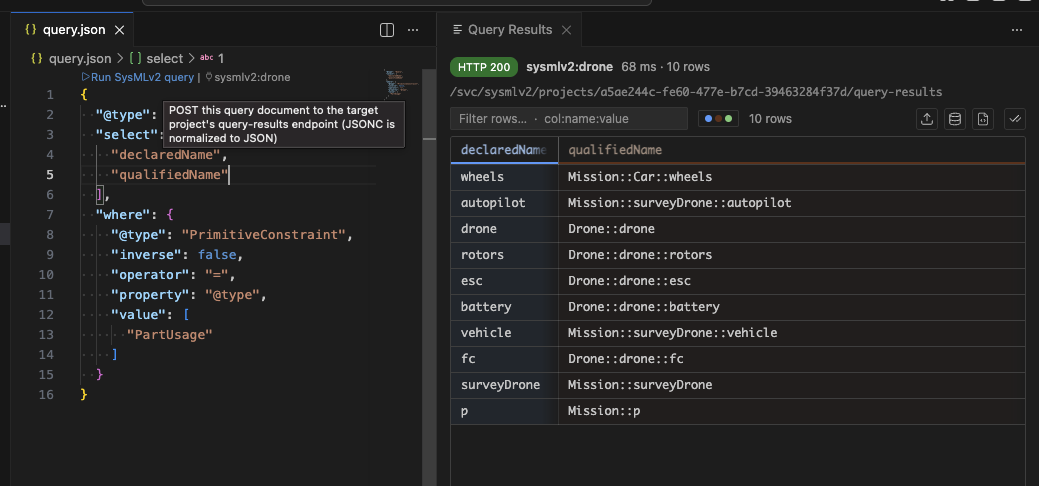
Similarly:
- Use
.rqfiles for SPARQL queries against MMS - Use
.sqlfiles for SQL queries against the relational database - Use
.kqfiles for KerML queries against the live, in-memory model
The RDF graph uses a minified storage representation of the SysML v2 model.
To reduce database size and avoid storing redundant information, flexo-sysml does not persist properties that are implied by the model or can be re-derived from other information.
This does not mean that these properties are lost. When accessing the model through the SysML v2 service endpoints, the service reconstructs the omitted properties and returns the expected SysML v2 representation.
As a result, there is an important distinction between:
- SysML v2 API queries — return the reconstructed SysML v2 model, including properties that can be derived from the stored representation.
- Direct SPARQL queries against the RDF graph — currently operate on the lower-level, minified RDF storage representation and may therefore not expose all properties that would appear in the SysML v2 API representation.
A future capability is planned to provide a SysML v2 view of the RDF graph for SPARQL queries. This may use a rule engine or "magic property" layer to derive omitted properties dynamically, allowing SPARQL queries to operate against a logically fully materialized SysML v2 representation without requiring all derived information to be physically stored in the graph.
Note: This SysML v2 SPARQL view has not yet been implemented. When writing
.rqqueries today, be aware that you are querying the minified RDF storage representation directly.
The WebIDE includes an in-house diagram generator.
Tom Sawyer can also be used as an option for diagram generation where its automatic layout capabilities are desired.
User control over automatic source-change detection has been identified as a desired capability.
If this option is not present in the current release, it is planned to be added.
Yes.
There are two primary deployment approaches:
- Hosted serverless WebIDE — delivered as a web application with no WebIDE application backend.
- Desktop installation — installable locally for environments where a browser-hosted deployment is not appropriate.
A shared backend is only required for capabilities that inherently require shared services, such as collaborative model repository access.
Yes, with some current limitations.
The WebIDE can use GitLab as the remote Git repository for model and workspace files. A separately deployed Flexo backend is not required.
Currently:
- GitLab repositories can be accessed using the WebIDE's built-in terminal.
- Git operations are routed through a same-origin Git proxy.
- The graphical Open from GitHub workflow currently only accepts
github.comrepository URLs. - Direct GitLab support in the graphical clone workflow is planned.
Note: GitLab integration is currently being validated. If you encounter an issue with clone, fetch, pull, or push, please report it through the WebIDE support repository.
No.
Flexo is included as a local, in-browser service and does not require a separately deployed backend.
If GitLab is your existing collaboration and source-control platform, you can initially use GitLab as the remote Git backend without deploying an enterprise Flexo instance.
A remote Flexo instance can be added later if you want shared model-repository features such as persistent model identities, model queries, clone/push/pull of graph-based model revisions, or other collaborative Flexo capabilities.
The current deployment approach uses a same-origin Git proxy.
- Deploy the WebIDE static application.
- Provide a Git proxy at
/git-proxy/on the same origin as the WebIDE. - Configure the proxy to forward Git smart-HTTP requests to your GitLab server.
- Have the proxy attach the required GitLab credentials server-side.
- Clone the GitLab repository using the WebIDE terminal:
git clone https://<gitlab-host>/<group>/<project>.gitThe GitLab credential can be held by the proxy and does not need to be exposed to the browser.
The WebIDE Git client follows the isomorphic-git CORS proxy convention.
By default, Git requests are routed through:
/git-proxy/
A request to:
/git-proxy/<host>/<path>
is forwarded to:
https://<host>/<path>
The proxy needs to support the standard Git smart-HTTP operations used for clone, fetch, pull, and push, including:
GET /info/refs?service=git-upload-packPOST /git-upload-pack-
git-receive-packfor push operations
Relevant headers, including authorization, content-type, accept, and git-protocol, should be forwarded appropriately.
Note: The exact proxy requirements are still being validated against GitLab deployments.
Yes.
The recommended deployment keeps the GitLab credential in the server-side Git proxy.
The proxy attaches the credential when forwarding Git requests to GitLab, so the credential does not need to be exposed to browser-side WebIDE code.
Yes.
The default Git proxy path is:
/git-proxy/
When using the built-in terminal, another proxy can currently be selected using the GIT_CORS_PROXY environment variable.
Deployment-level configuration of the proxy URL is planned so administrators can configure the proxy once for an entire WebIDE deployment.
The current graphical clone workflow only accepts github.com repository URLs.
Until GitLab support is added to the graphical clone workflow, use the built-in terminal:
git clone https://<gitlab-host>/<group>/<project>.gitDirect GitLab support in the graphical clone workflow is planned.
No.
Flexo is included as a local, in-browser service and does not require a separately deployed backend.
If GitLab is your existing collaboration and source-control platform, GitLab can be used as the remote Git backend while the local Flexo instance continues to run in the browser.
A remote Flexo instance is only required if shared model-repository capabilities are desired in addition to Git-based collaboration.
Yes.
The WebIDE is a static web application and can be deployed behind an OAuth2 authentication proxy or similar middleware using an organization's existing identity provider.
For a GitLab deployment, the WebIDE and its /git-proxy/ should normally be exposed through the same origin. This avoids introducing an additional browser CORS boundary between the WebIDE and Git proxy.
Authentication can therefore be separated into:
- WebIDE authentication — OAuth2 Proxy or another identity provider authenticates users accessing the WebIDE.
- GitLab authentication — the Git proxy authenticates outbound Git operations to GitLab.
The exact configuration depends on the organization's infrastructure.
This is an intended deployment workflow.
A user could, for example, select Open in WebIDE from another engineering portal and launch the WebIDE with the appropriate project and Git remote already configured.
This would allow an organization to integrate the WebIDE into an existing engineering environment without requiring users to manually configure the repository each time.
Some of the packaging and deployment details for this workflow are still being developed.
This is an intended deployment workflow but is not yet fully implemented.
For example, an engineering portal could provide an Open in WebIDE action that launches the WebIDE with the appropriate project, Git remote, and deployment configuration.
Until this workflow is available, GitLab repositories can be cloned using the built-in terminal.
The WebIDE itself is permanently free to use but is not open source.
The underlying OpenMBEE SysML v2 kernel is being released as open source under the Apache 2.0 license.
The kernel provides the core SysML v2 capabilities used by the WebIDE, including parsing, validation, command-line tooling, and model-processing functionality.
Yes.
The kernel is intended to be usable independently of the WebIDE, including through command-line tools and SDKs.
This allows applications, scripts, CI/CD pipelines, engineering tools, and other integrations to use the same SysML v2 parsing and model-processing capabilities without requiring the WebIDE itself.
Yes. Python support is planned as part of the SysML v2 SDK.
The goal is to allow developers to install and use the SysML v2 kernel directly from a Python environment, so Python-based engineering tools can parse, inspect, generate, and manipulate SysML v2 models without depending on the WebIDE.
Python SDK support is still under development.
The SysML v2 SDK is being developed for multiple programming environments, including:
- Python
- TypeScript
- C#
The intention is to make the kernel usable as a general-purpose SysML v2 library for applications, automation, CI/CD pipelines, and engineering-tool integrations.
That is the intended direction.
The WebIDE already uses strongly typed TypeScript interfaces for scripting and transformations. The longer-term goal is for the same capabilities to be available as a reusable SDK dependency outside the WebIDE.
Standalone SDK packaging and usage are still being finalized.
Yes.
The WebIDE supports scripting and model transformations directly in the workspace.
For example, tabular data such as CSV files can be loaded, filtered, and transformed into SysML v2 model elements using transformation scripts.
The WebIDE currently supports scripting with technologies including:
- TypeScript
- Python
Transformation scripts can work with workspace files, structured data, model elements, and other local data sources.
Yes.
The local Flexo stack exposes the standard SysML v2 API, even though it is running locally with the WebIDE.
This means other local engineering tools can interact with the active model through the SysML v2 API.
For example, a locally running Jupyter environment or another engineering application can query or modify the model through the API while the user is working in the WebIDE.
This is an important intended integration pattern.
Because the WebIDE operates on a live SysML v2 model and exposes the SysML v2 API, external tools can potentially interact with the same model session.
This enables workflows where specialty engineering tools perform analyses or generate model changes and those changes are reflected back into the engineering environment.
The exact live synchronization and integration mechanisms for external tools are still being developed.
Yes.
A core design goal is to make SysML v2 the integration layer between systems models and discipline-specific engineering tools.
External tools can interact with the model through:
- SysML v2 APIs
- SDKs
- Scripts and transformation pipelines
- Git-based workflows
- Model queries
This makes it possible to integrate analysis, optimization, requirements, simulation, and other engineering tools into automated digital-engineering workflows.
Yes.
Automation and CI/CD are core design goals of the WebIDE and the surrounding SysML v2 tooling.
Git repositories can contain not only SysML v2 models, but also scripts, analysis code, transformations, and other supporting files.
These artifacts can then participate in normal Git-based CI/CD workflows for tasks such as:
- Model validation
- Model transformations
- Analysis execution
- Verification
- Documentation generation
- Integration with external engineering tools
Flexo can be used alongside Git when model-aware persistence and repository capabilities are required.
Yes.
Git can track the complete workspace, including:
-
.sysmlfiles - Python scripts
- TypeScript scripts
- Configuration files
- Data files
- Other engineering artifacts
The WebIDE can use Git and Flexo together. Git provides conventional source-control history, while Flexo provides model-aware persistence and identity management.
When a Git commit is created, it can be associated with the corresponding Flexo model revision.
External editing is supported.
Users can clone a repository, edit the SysML v2 text using another editor, and push those changes through normal Git workflows.
The WebIDE and kernel can reconstruct model information from the changed textual notation when the files are loaded again.
However, preservation of persistent model identities across arbitrary text-only edits is currently a best-effort process. Model identity is more reliable when changes are made through tooling that integrates the SysML v2 kernel.
Document generation is under active development.
The planned approach is based on the OpenMBEE View Editor concept, where model information can be transcluded into model-based documents.
The SysML v2 implementation is intended to use:
- Views
- Viewpoints
- Queries
- Model-linked document content
This will support generation of documents that remain connected to the underlying SysML v2 model.
This is on the roadmap but is not yet implemented.
The goal is to allow SysML v2 Views and Viewpoints defined in textual notation to drive graphical and document-oriented representations inside the WebIDE.
The broader Starforge environment uses SysML v2 as a semantic backbone for AI-assisted engineering.
The general approach is to allow AI systems to interact with structured engineering models, rather than treating engineering information only as unstructured text.
This can enable AI-assisted workflows involving model queries, analysis, transformations, engineering automation, and interaction with other digital-engineering services.
More detailed AI integration capabilities are part of the broader Starforge platform rather than only the standalone WebIDE.
In SysML v2, // creates a note, which the textual notation ignores. It is not a model element. /* ... */ creates a Comment, which is a real element in the model.
When you add a // note, the text of the file changes, so Kotar still records an automatic local Flexo commit. But the model itself hasn't changed. The Model Remotes panel compares model revisions, so it has nothing to show as Ahead and nothing to push.
To share a comment through the remote Flexo, write it as a model comment:
/* This comment is part of the model and will be pushed. */
// This note is ignored by the model and will not be pushed.
Note:
//notes stay in the.sysmltext, so they are still shared if you collaborate through Git. They are only left out of Flexo, which stores the model rather than the text.
Remote Flexo connections are saved locally, not to your account.
The Kotar is a serverless application, so settings such as remote Flexo connections are stored in your local browser environment, the same way the local Flexo repository is. They are not synced between machines.
If you use the Kotar on more than one machine, add the remote Flexo connection to the settings JSON on each one.