Adds "missing" support for form defaults#4452
Conversation


✅ Deploy Preview for volto ready!
To edit notification comments on pull requests, go to your Netlify site settings. |

Passing run #4569 ↗︎
Details:
This comment has been generated by cypress-bot as a result of this project's GitHub integration settings. |
|||||||||||||||


 stevepiercy
left a comment
stevepiercy
left a comment
stevepiercy
left a comment
There was a problem hiding this comment.
Hit me up for documenting this one. These concepts are not easy to document, even for native English speakers. Assuming the concepts are similar to the Pylons Project's Colander, I might be able to wordsmith the docs. See https://docs.pylonsproject.org/projects/colander/en/latest/api.html#schema-related
| imply an "optional" field. | ||
| - only `missing` is declared: the block form is initialized with the `missing` | ||
| value. When the user clears the field, the field is reinitialized with the | ||
| `missing` value. |
There was a problem hiding this comment.
I'm curious. Does this follow the same pattern as Colander, which shares its roots with Zope? https://docs.pylonsproject.org/projects/colander/en/latest/api.html#schema-related
We need to add the case when neither missing nor default is defined.
The scenarios also need to be clarified about when reinitialization occurs (when field is cleared or form submitted) and where (client or server side).
There was a problem hiding this comment.
I think I'm more used to the zope.schema concept, rather then colander.
The major difference to the zope.schema is that the UI is automatically updated based on the schema and user interactions, so it's more a "user interaction" issue rather then data validation
There was a problem hiding this comment.
OK, that makes a little more sense, I guess kinda like HTML inputs getting their attributes for value and required set and unset?
I would suggest the following, and I have further questions to help me understand and clarify the intent.
Let's make this section a definition list for ease of legibility.
`default` and `missing` are declared
:   The block form is initialized with the `default` value.
    When the user clears the field, the field is reinitialized with the `missing` value.
    This would imply a required field.

`default` only is declared
:   The block form is initialized with the `default` value.
    When the user clears the field, the field remains empty.
    This would imply an optional field.

`missing` only is declared
:   The block form is initialized with the `missing` value.
    When the user clears the field, the field is reinitialized with the `missing` value.

`default` and `missing` are not declared
:   The block form has no initialized value.
    The field is required.
Are "block form" and "field" the same thing or different? In my brain, a form is a collection of one or more fields (a schema) with additional attributes.
Also I am struggling with the term "reinitialized". Does that mean the value is shown to the user in the field and/or its HTML attribute value gets set to the missing value? If so, that seems weird to me that when a user clears a field, then its value is reinitialized. Maybe the value is what gets processed outside the client browser? Please help me understand.

Co-authored-by: Steve Piercy <web@stevepiercy.com>
Co-authored-by: Steve Piercy <web@stevepiercy.com>


|
@stevepiercy What can we do about the docs? |
stevepiercy
left a comment
stevepiercy
left a comment
There was a problem hiding this comment.
It might be easier to explain with a picture or video, too. Sometimes words just don't make it clear, even for developers, but especially for the end user.
| each field: `default` and `missing`. The `default` value is used to populate | ||
| the field with an initial value. The `missing` value should be used when the field | ||
| should always have a value (as required). | ||
|
|
There was a problem hiding this comment.
Off topic rant: offering suggestions for narrative documentation with arbitrary line breaks sucks. This is one good reason to use one sentence per line.
Anyway, here's my suggestion:
In the block schema definition, you can use the two additional properties for each field: `default` and `missing`.

The `default` value is used to set an initial value for the field.
The user may override this value or clear it.

The `missing` value must be a valid value which becomes the field's value to be submitted when the user clears the field.
With `missing`, the field is optional.
Without `missing`, the field is required.
| imply an "optional" field. | ||
| - only `missing` is declared: the block form is initialized with the `missing` | ||
| value. When the user clears the field, the field is reinitialized with the | ||
| `missing` value. |
There was a problem hiding this comment.
OK, that makes a little more sense, I guess kinda like HTML inputs getting their attributes for value and required set and unset?
I would suggest the following, and I have further questions to help me understand and clarify the intent.
Let's make this section a definition list for ease of legibility.
`default` and `missing` are declared
:   The block form is initialized with the `default` value.
    When the user clears the field, the field is reinitialized with the `missing` value.
    This would imply a required field.

`default` only is declared
:   The block form is initialized with the `default` value.
    When the user clears the field, the field remains empty.
    This would imply an optional field.

`missing` only is declared
:   The block form is initialized with the `missing` value.
    When the user clears the field, the field is reinitialized with the `missing` value.

`default` and `missing` are not declared
:   The block form has no initialized value.
    The field is required.
Are "block form" and "field" the same thing or different? In my brain, a form is a collection of one or more fields (a schema) with additional attributes.
Also I am struggling with the term "reinitialized". Does that mean the value is shown to the user in the field and/or its HTML attribute value gets set to the missing value? If so, that seems weird to me that when a user clears a field, then its value is reinitialized. Maybe the value is what gets processed outside the client browser? Please help me understand.
|
@stevepiercy many thanks for the suggestions, they're all really good. I'll try to incorporate them. |
This is exactly the problem I'm trying to fix with this PR. Right now, without this PR, if I set the By introducing the
|

|
Can I assume that "form block" and "field" are the same, so I would replace the former with the latter. I also would replace "re/initialized" with "set". I think using a code example of what actually happens might help, too. For example, if I understand correctly: This would render in the docs as shown in the screenshot.
I am still not sure about how |
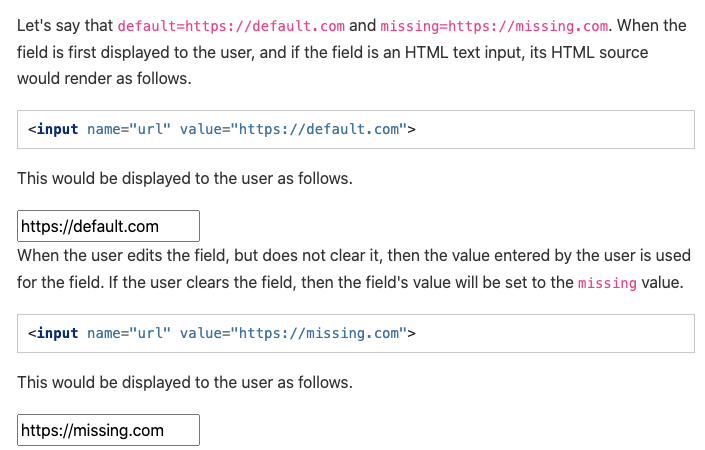
|
@stevepiercy You got it correct. That's the behavior. I'll update the docs with your suggestions. Many thanks! |


|
@tiberiuichim is this ready? |

|
|
||
| In effect, the following situation matrix will occur: | ||
|
|
||
| - `default` and `missing` are declared: the block form is initialized with |

There was a problem hiding this comment.
Nice. I just gave it a try on local vanilla volto. When both the values "default" and "missing" are used, it somehow re-initializes the form field with default value. Here's the schema snippet I created for demo field:
demo: {
        title: 'demo',
        widget: 'url',
        default: 'www.default.com',
        missing: 'www.missing.com',
      },
In addition to this, idk if its a glitch or the way it works, but the values let it be "missing" or "default" started to re-appear after clearing them and editing the form second time🤔
There was a problem hiding this comment.
@nileshgulia1 that's the effect of setting missing. If you don't want that effect, don't set the missing.
Btw, this is also the default with current Volto. Try it with this widget:
{
        title: 'demo',
        widget: 'url',
        default: 'www.default.com',
      },
There was a problem hiding this comment.
This is how the default behaviour works:
defaults.mp4
|
@tiberiuichim Do you think this is ready? @davisagli could you please give it a try and review it? Marked for review during next week sprint. |
4 participants


No description provided.