

This project will setup an api gateway endpoint, which you can have your github repository connect to. This will start and update a commit with the current build status. This will be triggered for any PR update, on any branch.
-
Setup an AWS CodeBuild project.
-
Create a GitHub API token here. Make sure to grant "repo" and "admin:repo_hook" permissions.
-
Create SecureString parameters in the AWS SSM Parameter Store for the GitHub username and access token. For example:
aws ssm put-parameter --name /path/to/github-username --value <GITHUB_USERNAME> --type SecureString
aws ssm put-parameter --name /path/to/github-access-token --value <GITHUB_ACCESS_TOKEN> --type SecureString
-
Get the KMS key ID used to encrypt the SSM parameters. For example:
aws kms describe-key --key-id alias/aws/ssm
To deploy this service with Serverless:
- Clone this repository
npm installdependencies- Export required environment variables
export CB_BUILD_PROJECT="your_codebuild_application_name"
export GITHUB_REPOSITORY="https://github.com/owner/repository"
export SSM_GITHUB_ACCESS_TOKEN="/path/to/github-access-token"  # Path in SSM
export KMS_SSM_KEYID="kms-key-id-used-by-ssm"- Export optional environment variables
export GITHUB_STATUS_CONTEXT="codebuild/pr"  # Tag associated with the status check in GitHub
export GITHUB_BUILD_EVENTS="pr_state"  # Comma-separated string of build events, supports "pr_state" and "pr_comment"
export GITHUB_BUILD_USERS=""  # Comma-separated string of GitHub users authorized to build from PR comments
export GITHUB_BUILD_COMMENT="go codebuild go"  # Case-insensitive string that will start a build from a PR comment
export CB_EXTERNAL_BUILDSPEC=false # Set to true if repo for the CodeBuild project is different from repo where webhook is created
export CB_GIT_REPO_ENV=REPO_TO_BUILD # Name of ENV variable CodeBuild project uses to know which repo to clone. Use with CB_EXTERNAL_BUILDSPEC.
export CB_GIT_REF_ENV=REF_TO_BUILD # Name of ENV variable CodeBuild project uses to know which git ref to checkout. Use with CB_EXTERNAL_BUILDSPEC.
export CB_ENV # key=value pairs of any extra Environment Variables to be included in the CodeBuild jobs. Example: CB_ENV="FOO=bar;ABC=123"- Run
serverless deploy
serverless deploy -v
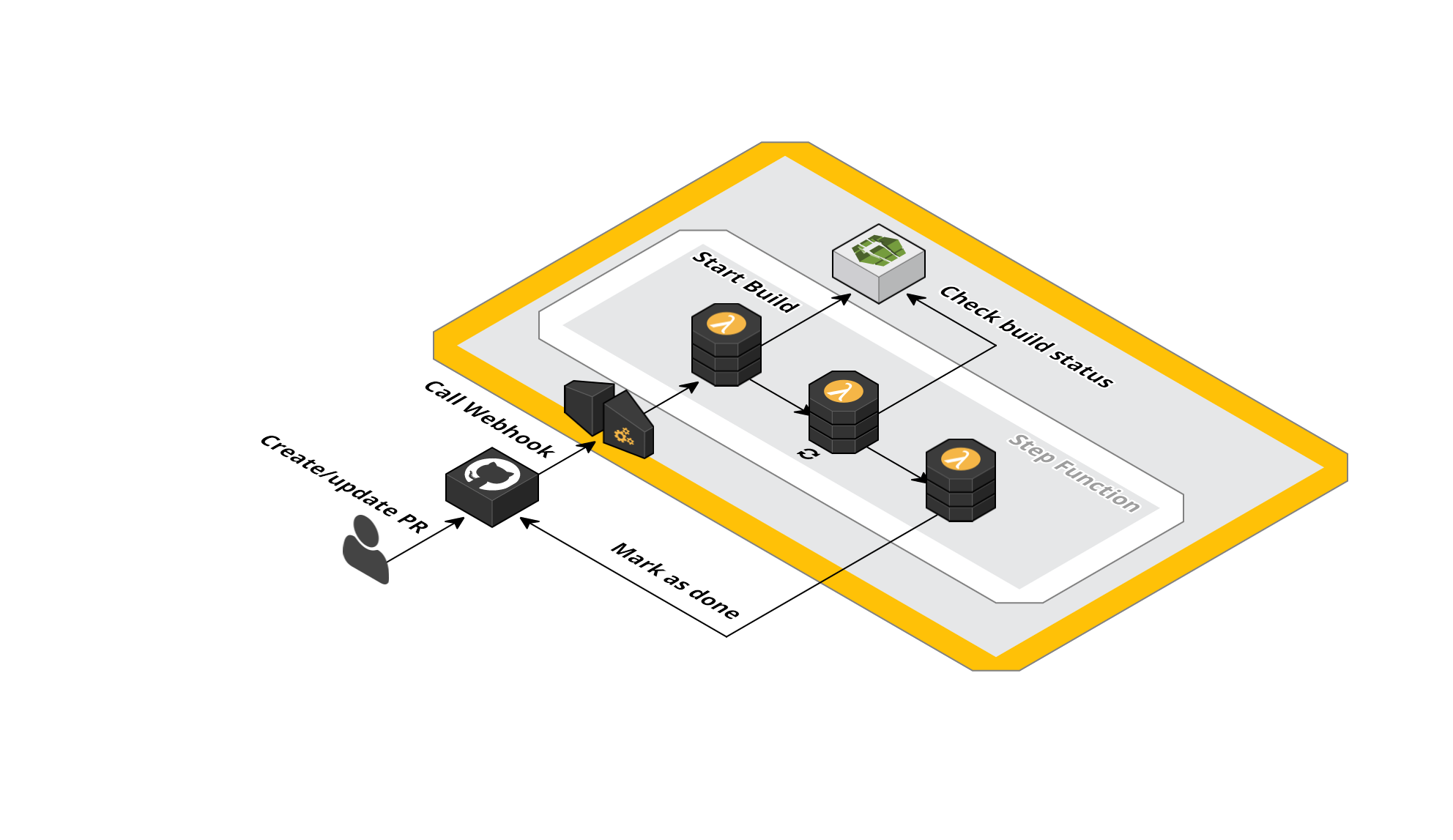
When you create a PR, a notification is sent to the API Gateway endpoint and
the lambda step function is triggered. This will trigger the start of a build
for your project, and set a status of pending on your specific commit. Then
it will start checking your build status every X seconds. When the status of
the build changes to done or failed, the github api is called and the PR
status will be updated accordingly.
In the Example below, a PR is create, and a build is run which fails. Then, a new commit is pushed, which fixes the build. When you click on the 'details' link of the PR status, it will take you to the CodeBuild build log.

In situations where a permissions boundary is required to create a resource, an extensions section can be added to serverless.yml to incorporate the permissions boundary.
Below is an example of how the permissions boundary can be provided to allow the creation of the required roles of this project:
extensions:
    ApigatewayToStepFunctionsRole:
      Properties:
          PermissionsBoundary: !Sub arn:aws:iam::#{AWS::AccountId}:policy/<permissions boundary name>
    BuildDashforDashcommitStepFunctionsStateMachineRole:
      Properties:
          PermissionsBoundary: !Sub arn:aws:iam::#{AWS::AccountId}:policy/<permissions boundary name>
    IamRoleLambdaExecution:
      Properties:
          PermissionsBoundary: !Sub arn:aws:iam::#{AWS::AccountId}:policy/<permissions boundary name>
- Add (optional) junit parsing, so it can comment on files with (possible) issues.
- Perhaps make build project dynamic through apigateway variable if possible.
- Doublecheck
editHookfunctionality. - Add
deleteHookfunctionality.