


Turn Codex account usage into a private-by-default profile and a stable GitHub README card.
Codex Usage Profile connects your GitHub identity to usage reported by the official Codex App Server account/usage/read API. The public MVP is available at codex-usage-profile-stage5.meleeisdeveloping.chatgpt.site, and the CLI uses that origin by default.
Important
The current production service supports private preview, publish/unpublish, the stable README card, and the metadata-enhanced /api/share/{handle} page.
Maintained with support from OpenAI’s Codex for Open Source program.
Support is provided to the maintainer and does not imply endorsement.
-
Open the Codex Usage Profile website and sign in with GitHub.
-
Submit your Codex usage from the machine where Codex is signed in:
npx codex-usage-profile@latest submit
-
On first use, approve the browser device flow. npm may also ask you to confirm the package name and version before installation.
-
Open your private profile preview and verify the submitted values.
-
Select Publish card when you are ready to make the card public.
-
Copy the stable image URL or README Markdown from Share and add it to your GitHub profile or project README.
Future usage submits and saved card appearance changes update the image served at the same URL. Your README Markdown does not need to change.
- Private by default: a new profile is visible only to its authenticated GitHub owner until it is published.
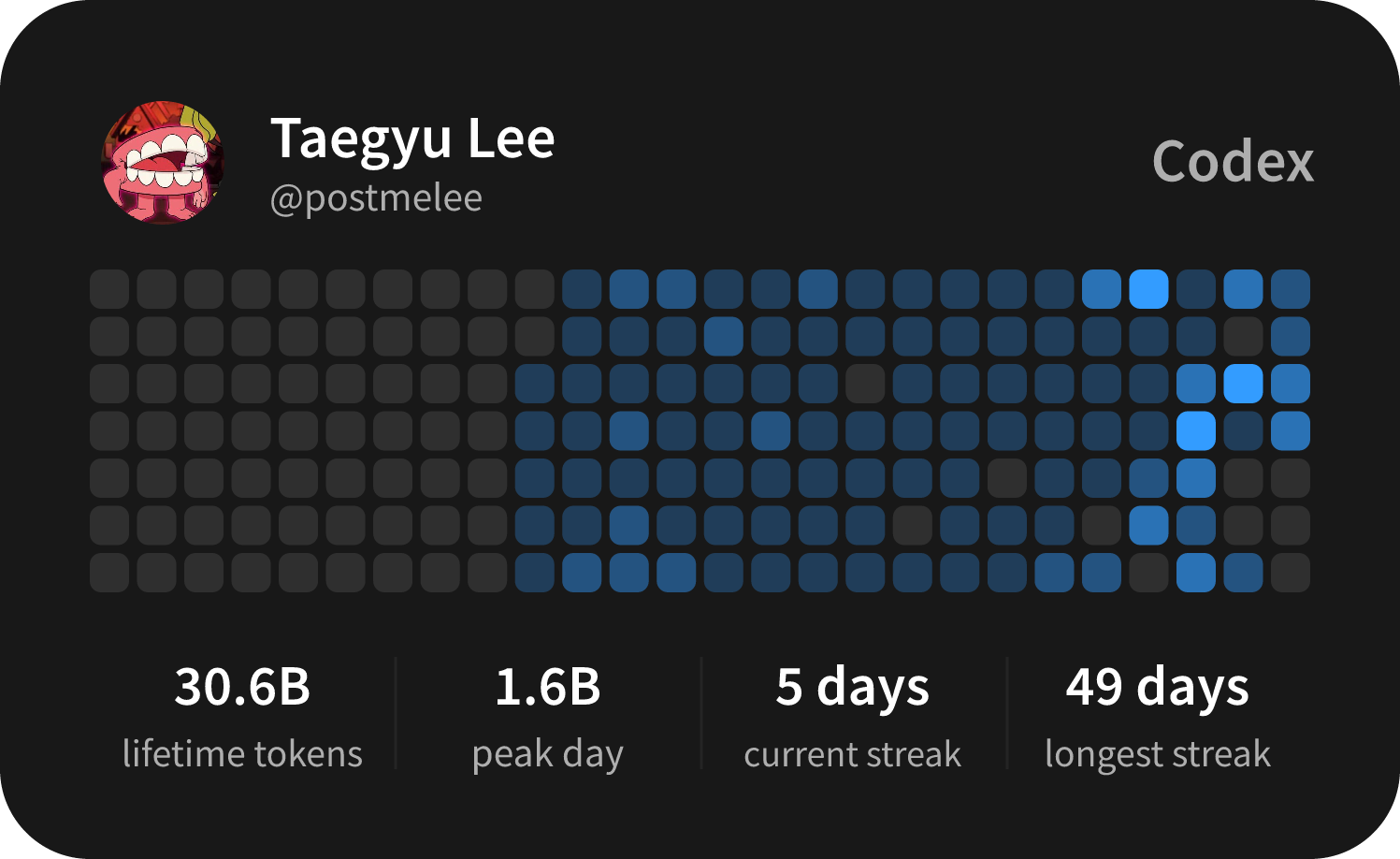
- Stable README card: a 1497x918 PNG designed for GitHub README embedding.
- Cache-aware updates: changed usage produces a new ETag at the same image URL.
- Social sharing: a dedicated profile page is backed by a 2400x1260 social preview image.
- No separate usage export: the CLI reads the identity-free account usage document through
codex-usage-analyzerand submits it directly.
| Surface | URL | Availability | Purpose |
|---|---|---|---|
| README card | /u/{handle}/card.png |
Available now | Stable PNG for GitHub profile and project READMEs |
| Public profile | /api/share/{handle} |
Available now | Human-readable share page with link-preview metadata |
| Social preview | /u/{handle}/social.png |
Available now | Link preview image for social platforms |
Use the README embed after replacing {handle} with your published profile handle:
<a href="https://codex-usage-profile-stage5.meleeisdeveloping.chatgpt.site/api/share/{handle}"><img width="50%" src="https://codex-usage-profile-stage5.meleeisdeveloping.chatgpt.site/u/{handle}/card.png" alt="Codex usage profile" /></a>Change only the width value when you want a different displayed size. Clicking
the card opens the public share page. The queryless image URL is canonical and
follows the card theme and
language saved in your profile, so changing either setting does not require new
Markdown. Explicit ?theme=dark|light and ?locale=en|ko selectors remain
available when you need a specific variant outside the README flow. When you
make the profile private, its public image endpoint returns 404.
GitHub's image proxy can delay a visible refresh even after the origin serves the new card. GitHub rewrites the image src to Camo but keeps the outer share-page link. See README card usage and cache behavior for the endpoint contract and troubleshooting steps.
- Node.js 20 or newer
- A ChatGPT-backed Codex sign-in on the submitting machine
- Codex available on
PATH, or a standard macOSChatGPT.apporCodex.appinstallation - A GitHub account for profile ownership and publishing
The service never asks for your Codex/OpenAI password, local Codex auth.json, API key, access token, refresh token, or keychain entry.
# Show authentication and submit status
npx codex-usage-profile@latest status

# Read and submit current account usage
npx codex-usage-profile@latest submit

# Remove the locally stored service credential
npx codex-usage-profile@latest logout
The CLI first looks for codex on PATH. On macOS it also checks the standard system and user Applications folders for ChatGPT.app and Codex.app.
For repeatable automation, pin the published version instead of using @latest. The current public version is 0.1.1:
CODEX_USAGE_PROFILE_URL=https://codex-usage-profile-stage5.meleeisdeveloping.chatgpt.site \
CODEX_USAGE_PROFILE_TOKEN='<service-submit-token>' \
npx --yes codex-usage-profile@0.1.1 submit --json
Only use a pre-issued service token on a trusted machine. See CLI login and usage submit for credential locations, transmitted fields, error mapping, and package validation.
- GitHub OAuth establishes the profile owner. The GitHub access token is used to fetch the authenticated user and is then discarded.
- The browser device flow issues the CLI a narrow submit token. The server stores only its digest.
codex-usage-analyzerreadsaccount/usage/readthrough the installed Codex process and emits Account Usage Contract v1 without identity or credentials.- The service binds the usage document to the authenticated GitHub owner. Request data cannot select a different owner.
- Publishing writes the public card, while private previews remain authenticated and are never persisted to public media.
If a submit stores usage but public media refresh fails, running the same submit again safely retries card convergence without creating a new usage revision.
The CLI transmits the account usage document to POST /api/account-usage/submit. It contains capture metadata, token totals, peak and streak statistics, and source-dated daily token buckets.
The web service separately owns your GitHub display name, login, avatar, stable provider user ID, sessions, visibility, profile handle, and rendered profile/card URLs. GitHub identity never comes from the submitted usage body.
Security boundaries include:
- CLI tokens are excluded from arguments, URLs, logs, analytics, success output, and error messages.
- File credentials are bound to the service origin and stored with owner-only permissions on macOS/Linux.
- Usage submit rejects identity, credential-like, wrapper, and unknown fields.
- Exact retries are idempotent; stale or conflicting revisions are rejected.
- Public PNG requests read only the stable media object; private previews stay authenticated.
- A revoked token can no longer submit updates; making a profile private stops public card access.
Revoke the CLI token from web Settings if it is exposed or the machine is no longer trusted.
npm install
npm run dev
npm run dev:runtime
npm test
npm run build
npm run dev starts the Vite frontend. npm run dev:runtime starts the same-origin local runtime for frontend and /api/* development.
Before publishing the npm package, run:
npm run scan:public-release
npm run verify:npm-release
npm run smoke:npm-package:local
See production hosting architecture, Sites operations and rollback, and npm release operations for deployment and release procedures.
- CLI login and usage submit
- README card endpoint and cache behavior
- Standalone analyzer integration
- Production hosting architecture
- Sites operations and rollback
- UsageSnapshot v2 legacy compatibility contract
The repository and published CLI package are licensed under the MIT License. Copyright (c) 2026 postmelee.
This is an unofficial community project and is not affiliated with, endorsed by, or sponsored by OpenAI. The generated card uses the Codex product name only as descriptive text and does not reproduce or reconstruct an OpenAI or Codex logo.