Text Alignment Issue in Hindi Language #2157

Description

Details about the bug:
- Web browser and version: 110.0.5481.178 (Official Build) (64-bit) (cohort: Stable)
- Operating System: Windows 10 Version 2004 (Build 19041.1415)
- Steps to reproduce this:
- Go to https://editor.p5js.org/
- Switch Language to हिंदी
- Then click on Settings Icon (Top-right corner)
- You will see that the text alignment appears broken (it means autosave in English)
- Image for Reference
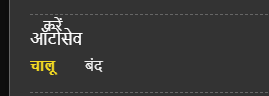
The reason is that the text above this, "decrease font size" which means (कम करें) in hindi, is overflowing to next row.