Repository navigation
Releases: psoldunov/skrepka
Release list
Skrepka 0.4.0

A Linux picker you can size, and a round of Linux polish. Settings → General → Appearance → Interface size draws the picker and Settings larger, a tray that said the background service was not running at login now recovers by itself, and a link copied on an iPhone pastes on Linux.
Added
- An interface size setting for the Linux picker and Settings. Settings → General → Appearance → Interface size draws both windows at 100, 110, 125, 150, 175 or 200 percent of their design size, on top of the desktop's own scaling. The picker was drawn at the Mac's sizes, which reads as small on a desktop whose own apps run larger. A change applies at once to both windows, including an open Settings window, which resizes to fit. The size is kept in
app.jsonbesideconfig.json, so it is not synced and the daemon never reads it.
Fixed
- The tray no longer says the background service is not running after a restart. At login the tray app and
skrepkadstart together, and the daemon dropped the app's first calls while it was still opening its store, so the app timed out and never asked again. The daemon now holds those calls and answers them once it is ready, the tray checks again after 2, 5 and 10 seconds and then every 30 until the daemon answers, and the picker re-reads the history when its last read failed. - A link copied on an iPhone pastes on Linux. A link that reached a Mac through Universal Clipboard as a bare URL synced to Linux with no bytes, and the picker refused it. A link is now captured with its URL as plain text too, and a row that already crossed without it pastes from its preview when the preview is the whole URL. Your link's identity does not change.
- The Linux picker's footer, Settings title bar and peer names look right on KDE. The arrow, return and shift keycaps are drawn centred in their caps instead of from a fallback font's glyphs, the Settings window buttons stay round instead of stretching into a pill, and the window icon is the rounded icon rather than a white square. A paired device that is off the network is named as the Sync pane names it, not by its fingerprint.
- A long screenshot no longer draws a preview half the picker wide. The Linux picker's image preview is held to its 84×48 tile and crops to fit, as the Mac's does.
- A Linux Settings drop-down no longer turns blue under the pointer with Breeze. A drop-down's button shows its choice in a list row, and Breeze fills a list row with its selection colour on hover, so the value sat in a solid blue block inside the button. The button now keeps its own background, as GTK's default theme already does.
- A copyable Settings label no longer selects its whole text when the window opens. A call lost when Settings was merged into
skrepka-guiis restored. - A debug build of the Linux picker no longer crashes when a transfer names a row that is not on screen. Release builds, which every shipped artifact uses, were not affected.
Documentation
- The docs are back in line with the code, and there is a per-distro install guide.
Skrepka 0.3.1
Sync through a firewall, and two more ways to install on Linux. skrepkad now listens on fixed ports, so a firewall can let paired devices in, and a Mac that cannot reach a Linux machine says which ports to open rather than "Could not connect." Fedora 43 and newer can install from COPR, Ubuntu 24.04+ and Debian 13+ through Pacstall. On KDE the shortcut works on every login, not only the first, and copies are recorded from the moment the session starts.
A Linux machine behind a firewall needs its ports opened once. TCP 27182 and 27183, and mDNS on UDP 5353; Sync has the NixOS, firewalld and ufw lines.
Added
- A COPR repository for Fedora 43 and newer.
sudo dnf copr enable psoldunov/skrepka && sudo dnf install skrepkainstalls the release build, anddnf upgradekeeps it current. It carries the same files as the release's.rpm, except the privatelibgtk4-layer-shell: it uses Fedora's own. It upgrades the GitHub.rpmin place. 0.3.0 is the first version published there. - A Pacstall package for Ubuntu 24.04+ and Debian 13+.
pacstall -I skrepka-debinstalls the release's own.deb, andpacstall -Upupgrades it. The pacscript lives inpackaging/pacstall/; each release pins it and opens the update in Pacstall's repository. - A picture copied in a file manager previews in the Linux picker. Copy a PNG, JPEG, GIF, BMP, TIFF or WebP file in Dolphin or Files and its row shows the picture, says Image rather than File, and gives its size — as the same copy always has on a Mac. A photo taken on its side is shown the right way up. The picture is decoded when the row is drawn: from the copy of the file Skrepka kept for sync when it was within the file-size limit, so it looks as it did when you copied it, and otherwise from the file itself. A picture over 16 MB is not previewed, and a copy of several pictures is still Files. WebP needs GdkPixbuf's WebP loader,
webp-pixbuf-loader, which SteamOS does not ship; without it the row says Image and shows the picture symbol. A picture copied before this update is relabelled the next time you copy it, and a GIF, BMP or WebP file from a paired device now previews too, where only a PNG, JPEG or TIFF did.
Changed
skrepkadlistens on fixed ports: TCP 27182 for sync and 27183 for pairing. It used to take whatever port the kernel handed out, a new one for every start and every pairing window, so no firewall rule could let other devices in. If another program holds one of them, the daemon takes a free port instead andskrepka doctorsays so.--port Nmoves the pair to N and N+1;--port 0asks for free ports as before. See Sync for the firewalld and ufw commands.- The NixOS module has
programs.skrepka.openFirewall. It opens those two ports and UDP 5353 for discovery, and works withoutenable, so a NixOS machine that installs Skrepka through Home Manager can import the NixOS module for the firewall alone.
Fixed
- A Mac can pair with a Linux machine behind a firewall, once its ports are open, and says what is wrong when they are not. Pairing started on a Mac with a NixOS machine waited ten seconds and said only "Could not connect.", while pairing the same two from the Linux side worked — NixOS drops incoming connections to every port nobody opened. The Mac now says the device did not answer and which ports to open on it; a refused, unreachable or unresolvable device gets its own sentence, on the Mac and on Linux, in the pairing sheet and in a paired device's row alike.
- Linux notices when a paired device cannot reach it. With the firewall closed, copies made on the Mac never reached the Linux clipboard, and nothing said so: the Linux side kept pulling the Mac's history every half minute, so the device showed as synced.
skrepka doctorand Settings → Diagnostics now name a paired device that has not connected for three minutes while this machine reaches it, and say how to open the firewall on this distribution.skrepka pairand Settings name the ports while a pairing window is open. skrepka listkeeps its columns lined up. ArichTextorimageFileentry pushed its date and preview out of line with every other row; the kind column now widens to the longest kind in the listing.- The shortcut works on every KDE login, not only the first. From Plasma 6.7.4, KDE's portal reports a saved shortcut as bound but only hands it to KWin when the app binds it again, and Skrepka stopped at the report — so from the second login on, Meta+Shift+V did nothing. It now binds on every start. No dialog appears for a shortcut KDE already knows, and a key you chose in System Settings is kept. The Steam Deck's Plasma 6.4 was never affected.
- Copies are recorded from the start of a Plasma session.
skrepkadoften starts before KWin has told systemd where the display is, and then recorded nothing until it was restarted by hand. It now asks the systemd user manager until the display appears and starts watching then — usually within a second or two of login. On X11 it also takes the session's authorization cookie from wherever the display manager keeps it, so the display lets it in. - The picker and Settings look right under a GTK theme set in
gtk.css. Home Manager'sgtk.gtk4.theme, and setups like it, import a whole theme such as Breeze-Dark from~/.config/gtk-4.0/gtk.css. That theme outranked Skrepka's own styling, leaving black sidebars, broken switches and a search field boxed apart from its icon. Skrepka's styling now wins over it, as it already did over a theme chosen the usual way. - Long values on the Linux Status page wrap instead of crushing their label. Where avahi's publishing is disabled, the Discovery line is long enough that its label broke into one syllable per line. The value now wraps between words, right-aligned, and the labels on the Status page stay on one line.
Skrepka 0.3.0
Linux is a supported platform, no longer a preview. KDE Plasma has run on a real Steam Deck. GNOME is implemented but has so far run only in a headless container, never on a real machine — as have sway and X11; the README's Where it runs table says exactly what was tested where.
Fixes from the first run on a real Steam Deck, and a Linux Settings window with the Mac's settings in it. On the Deck the picker could only be closed with Esc, the global shortcut did nothing, a Mac that opened pairing could not be paired with, and Macs never saw the Deck at all. All four are fixed. Copied files and pictures now reach the other machine as files and pictures, not as a path to something only the sender has.
Update the Mac app as well as the Linux build. File transfer needs both ends; a Mac on 0.2.1 keeps syncing text and pictures with an updated Linux box, but not files.
Added
-
.deband.rpmpackages for Ubuntu 24.04 and newer, Debian 13 and newer, and Fedora 39 and newer, attached to the release beside the tarball. They install the same build system-wide: the binaries in/usr/bin, the daemon's user unit and D-Bus activation file, the launcher, autostart entry, icons and GNOME extension. Nothing runs as root at install time. Settings' Launch at login switch now reads a system-wide autostart entry and turns it off for you alone.install.shstays the way onto SteamOS and other read-only systems. -
A Nix flake, for x86_64-linux, with a NixOS module and a Home Manager module —
programs.skrepka.enablein either. It repackages the release tarball, so it installs the same build as every other route. -
A disk image for the Mac,
skrepka-macos-universal.dmg, notarized like the app inside it: open it and drag Skrepka onto Applications. The zip beside it is nowskrepka-macos-universal.zip, named like the Linux assets, and both have a.sha256. The Homebrew cask installs the zip, as before. -
GNOME on Wayland records what you copy. GNOME does not let an ordinary program watch the clipboard, so the installer adds a small GNOME Shell extension,
skrepka@dev.soldunov, that hands each copy toskrepkadover the session bus. It has no settings, storage or network access of its own; the daemon still decides what is kept. A first install needs one log out and back in, andskrepka doctorsays whether the extension is running. GNOME Shell 46 to 50. -
Choosing a Linux history entry now pastes it automatically by default. Skrepka uses XTest on X11, a Wayland virtual keyboard on sway and Hyprland, and the Remote Desktop portal on KDE and GNOME. The portal may ask once for keyboard-control permission. If injection fails, the entry stays copied and Skrepka asks you once to press Ctrl+V; terminals may require Ctrl+Shift+V. The behaviour can be turned off in Settings or with
skrepka config set paste.automatic off. -
Copied files travel with the copy. When you copy files — in Finder, Dolphin, or a screenshot tool that puts the file on the clipboard — Skrepka reads them at once, up to the file-size limit (32 MB unless you lower it) and 1000 files per copy, and a paired device receives the files themselves. Pasting there gives real files in its own cache, and for a picture also the picture, so a file manager pastes a file and a chat app or editor pastes the image. A folder, or a copy over the limit, pastes as the file names, and its row says "contents not synced". Nothing ever pastes a path that exists only on the other machine.
-
Pictures over 256 KB arrive on the other clipboard within seconds. They used to reach its history on the next half-minute exchange and never its clipboard. Nothing is written if you copied something else in the meantime.
-
Choose how large a copy of files may be and still sync — on the Mac and on Linux. Settings → Sync → Sync files up to: Off, 1, 5, 10, 20 or 32 MB, 32 MB by default as before;
skrepka config set sync.file-limit <MB|off>on Linux. Each device applies its own limit both ways: a larger copy made there is not read or sent, and a larger one another device offers is not fetched. Either way the copy still arrives, as the files' names: a row the sender held back says "contents not synced", and one this device declined says "contents over the sync size limit" until its limit is raised. -
A row shows its progress while its bytes arrive. A file or picture larger than one 256 KB chunk, on its way from another device, draws a progress bar and a percentage in place of its bottom line of text, in the Mac's picker and the Linux one, until it has landed.
-
Linux Settings has the Mac's panes, and looks like the picker. A sidebar sized for the Deck's touch screen leads to five panes, drawn in the picker's colours and the desktop's accent, dark or light:
- General: the global shortcut and where to change it, Paste automatically, and Launch at login.
- History: how many entries, pinned entries and images there are; Keep at most and Discard after; and Clear…, keeping pinned entries or not.
- Privacy: what is never recorded — anything a password manager marks secret — and why there is no per-app list on Linux: Wayland's clipboard protocols never say which app copied.
- Sync: as before, plus a switch that stops sharing history altogether.
- Status: what
skrepka doctorreports, problems first, with Copy.
-
Retention is adjustable on Linux.
skrepkadstill keeps at most 500 unpinned entries for 30 days by default. Both limits can now be changed in Settings or withskrepka config set retention.items|retention.days <N|unlimited>. A lower limit applies at once, and old entries now age out hourly even when nothing new is copied. Pinned entries are never discarded. -
Sync can be switched off and on while the daemon runs, from Settings or with
skrepka config set sync.enabled on|off. Off withdraws the device from the network straight away. -
skrepka configprints the settings (--jsonfor scripts). They live in~/.config/skrepka/config.json; a damaged file is set aside asconfig.json.badand the defaults are used. -
skrepka-gui --statussays whether the tray icon was accepted, whether the global shortcut is bound and to which keys, and how the picker is shown. The app also writes this to the journal:journalctl --user -t skrepka-gui. -
The daemon's D-Bus interface is version 5, with
SettingsandSetSettings(the file-size limit and automatic paste among them), andTransferswith theTransfersChangedsignal for arriving entries.
Changed
- The picker closes when you click outside it or switch to another window, as on the Mac. On KDE and sway it now covers the screen with a transparent layer, so a click outside it closes it — that first click does not reach the window underneath.
- The picker opens where it does on the Mac: centred, with its top 18% of the way down the screen. The top stays put while a search shortens the list, so the search field no longer moves as you type. Its shadow fades out instead of ending in a hard-edged rectangle.
install.shstarts the app as a systemd user service named after the app, so its messages reach the journal instead of being discarded.- The tray icon is a fifth smaller, closer in weight to the icons beside it.
Fixed
- The global shortcut was never set up. The app told the desktop portal which app it is only after GTK had already talked to the portal on the same connection, so the portal refused, and the app gave up without saying so. It now registers on a connection of its own, and carries on if that fails. KDE asks you to confirm Meta+Shift+V the first time the app starts.
- KDE's confirmation of the shortcut was read as a refusal. The portal answers a successful binding with an empty reply; the app now asks what was bound instead.
- "Pair…" stayed greyed out for a Mac that was ready to pair. The Linux daemon read a device's record once, when it first appeared, and never saw the Mac open its pairing window afterwards. It now follows the record, and the button enables within about a second.
- Macs never saw a Steam Deck. SteamOS configures avahi to refuse publishing anything (
disable-publishing=yes). When avahi refuses,skrepkadnow answers for its own service on the local network itself, with no root and nothing changed under/etc.skrepka doctorsays which is publishing. - The tray's fallback picture was near-black, invisible on a dark panel, and its edges were darkened. It is drawn light and with straight alpha. Plasma uses it only when it cannot find the
skrepka-trayicon. - The Settings window's minimise, maximise and close buttons were invisible under KDE's Breeze theme, which draws them as background pictures that the window's own styling cleared. They now draw the same under every theme.
- The Settings window's stylesheet was never loaded. Every appearance change also added another copy of the picker's stylesheet; each window now keeps one.
Known limitations
- A
.debor an.rpmcannot enable the GNOME extension for you. After the first log out and back in, rungnome-extensions enable skrepka@dev.soldunov. There is no package repository yet, so a package updates only when you install the next one. - The Nix flake is x86_64-linux only and repackages the release binaries rather than building them.
- Copied files are kept in history, up to the file-size limit — 32 MB per copy unless you lower it — until retention removes the entry, so history takes more disk than it did when a file copy was only a path. Keep at most, Discard after and Sync files up to bound it; Off keeps none.
- A file copied before this update becomes a new entry the next time it is copied, because an entry for files now includes their contents.
- The built-in announcer speaks IPv4 only, and does not b...
Skrepka 0.2.1
Linux gets a desktop app: a tray icon, the clipboard picker on a global
shortcut, and Settings, in one program. It also fixes the daemon going deaf
after its first answer, which left 0.2.0's Settings window and every later
skrepka command timing out.
Added
-
skrepka-gui, one desktop app for Linux. It holds the tray icon, the
global shortcut, the picker and the Settings window in a single GTK4
application,dev.soldunov.Skrepka.App. It replacesskrepka-settingsand
its "Skrepka Settings" launcher entry. It takes one option at most:- no option opens the picker;
--pickeropens the picker, or closes it when it is open;--settingsopens Settings;--backgroundstarts in the tray and shows nothing, which is what the
autostart entry runs at login;--quitquits the app.skrepkadkeeps running and keeps recording.
A second launch hands its option to the copy that is already running and
exits, so the launcher, the tray and a shortcut never start two apps. -
A clipboard picker on Linux. It has the macOS layout: a search field,
rows with a kind tile or an image thumbnail, a subtitle (type, size, lines,
dimensions, how long ago), a pin glyph, Alt+1 to Alt+9 badges, the accent
colour on the selection, key hints in the footer, a gear that opens Settings,
and empty states with the paperclip mark. It follows the desktop's dark or
light setting and its accent colour, read from the appearance portal. Search
runs in the daemon over the whole text of every entry, not the first line.- Return copies the entry to the clipboard and closes the picker. You
paste with Ctrl+V; Skrepka does not synthesise the keystroke
(D-11). Alt+Return copies the
rich form and Alt+Shift+Return plain text. - Alt+1 to Alt+9 choose that row, Alt+P pins or unpins, and Alt+Backspace or
Alt+Delete deletes. Home, End, Page Up and Page Down move the selection,
and Esc closes. Right-clicking a row offers Pin or Unpin, Copy as Plain
Text and Delete. - The pointer selects a row only after it moves, so a picker that opens under
a resting pointer does not steal the selection. - On KWin and sway it opens as a wlr-layer-shell overlay, which leaves the app
underneath its caret. Where there is no layer-shell it falls back to an
undecorated window kept above the others, centred on the pointer's monitor,
with the keyboard grabbed. That fallback is for X11 sessions, which SteamOS
before 3.8.10 uses in Desktop Mode. It has only been seen to map under Xvfb.
- Return copies the entry to the clipboard and closes the picker. You
-
A global shortcut, Meta+Shift+V. The app asks for it through the
org.freedesktop.portal.GlobalShortcutsportal, mirroring ⌘⇧V on the Mac.
The desktop asks you to confirm or change it the first time. Where there is no
such portal, bindskrepka-gui --pickeras a custom shortcut in the desktop's
keyboard settings. -
A tray icon. A left click opens the picker, or closes it. The menu reads
Open Skrepka, Clear History…, Settings… and Quit Skrepka. Clear History asks
first and keeps pinned entries. When the daemon cannot be started, a row
saying so sits at the top. -
The daemon starts when something needs it. The installer adds a D-Bus
activation file, so any client call startsskrepkadthrough its systemd unit.
The app also starts the daemon itself when the call finds it missing, by asking
systemd forskrepkad.service, and shows the tray problem row when that fails. -
skrepka pin,unpin,delete,clearandcopy --plain. They cover
the same actions as the picker:pin <n|hash>,unpin <n|hash>,
delete <n|hash>,clearfor every unpinned entry andclear --allfor
every entry, andcopy --plain <n|hash>for the plain-text form. The daemon's
D-Bus interface is version 3, withSearch,CopyAs,SetPinned,Delete,
ClearandPreviewmembers and the row fields the picker draws. -
install.shinstalls the app. It addsskrepka-gui, a "Skrepka" launcher
entry with a Settings action, an autostart entry that runs--background, the
app icon at the hicolor sizes, a monochrome tray icon that follows the panel's
text colour, and the D-Bus activation file. It removes the old
skrepka-settingsfiles, quits a running app before upgrading, and starts the
app in the tray when it runs inside a graphical session.--uninstallremoves
all of it and still leaves your history and this device's sync identity.
Changed
- Settings opens from the tray, the picker's gear or the launcher's Settings
action. Its contents are the Sync pane 0.2.0 shipped, unchanged. It runs
inside the app instead of as its own process. skrepka doctorand the journal say why Avahi refused to publish. A
daemon that only reportedavahi refused EntryGroupNewgave no way forward.
The message now names the D-Bus error and, for the usual cause, says what to
change. See the note under Fixed.
Fixed
- Universal Clipboard relays are no longer recorded as new copies. A file or
screenshot copied on one Mac no longer appears again when Universal Clipboard
stages it on another Mac, and Sync no longer carries that relay back to the
sender. The first sync startup also removes relays earlier builds left in
history; peers discard and tombstone relays sent by older builds. - The picker returns to the top after it closes. Reopening it no longer starts
at the previous scroll position and then jumps while it resets the rows. skrepkadanswered one D-Bus call and then none. The D-Bus library's send
waits for a reply to every message it writes, including the method return the
daemon sends back. That wait sat inside the connection's read loop, so the loop
never read a second message. The first client got its answer; the Settings
window and a secondskrepkacommand then timed out. This affected 0.2.0.
Replies are now written without waiting for anything.
Known limitations
- The tray, the shortcut and the picker have not been run on real KDE Plasma.
They are tested under a headless sway and against fake portals and a fake
tray watcher on a private bus. The first Steam Deck session is still to come. could not publish the service: avahi refused EntryGroupNew…means
avahi-daemon is refusing services from user programs. Its source refuses
EntryGroupNewfor exactly three reasons:disable-user-service-publishing=yes,
too many clients, or too many objects for one client. On a daemon that has just
started it is the first. Other devices cannot see this one while it lasts, so a
Mac cannot dial it. The Linux device can still see and dial the Mac. To fix it,
setdisable-user-service-publishing=nounder[publish]in
/etc/avahi/avahi-daemon.conf, then runsudo systemctl restart avahi-daemon.
On a Steam Decksudoneeds a password set withpasswd. Whether an edit under
/etcsurvives a SteamOS update is unverified.Failed to set thread priority for worker thread: pqc=… errno=13in the
journal is harmless. Swift's libdispatch tries to lower a worker thread's nice
value to imitate a quality-of-service class, and an unprivileged user service
is not allowed to (EACCES). It happens once per process in any Swift program
that uses Dispatch on Linux and changes nothing. It is left showing because
LIBDISPATCH_LOG=NO, the switch that would hide it, hides libdispatch's
assertion messages too.- Thumbnails of copied image files are not drawn. An image copied as pixels
gets its thumbnail. A file copied from a file manager still shows a kind tile. - Retention and exclusion settings are macOS only. The Linux Settings window
has the Sync pane and nothing else.
Downloads
Skrepka.zip: macOS 26, universal (Apple silicon and Intel), Developer ID signed, notarized, and stapled.skrepka-linux-x86_64.tar.gzand.sha256: Linux x86_64 daemon, CLI, desktop app, installer, and private layer-shell library.skrepka-linux-x86_64-tools.tar.gzand.sha256: hardware bring-up probes and palette demo.
Source: v0.2.1.
Skrepka 0.2.0
Skrepka runs on Linux, as a preview, and a Linux box can share clipboard history with a Mac.
Linux, as a preview
skrepkad keeps clipboard history on Linux the way the Mac app does. It runs as a systemd user service and records what you copy on Wayland (wlroots and ext data-control) and on X11. It skips anything a password manager marks secret with x-kde-passwordManagerHint, which KeePassXC and wl-copy --sensitive set. It syncs with your paired Macs over the same protocol, the same TLS 1.3 pinning and the same on-screen code.
skrepka drives the daemon from a terminal: list, copy, pair, peers, sync, unpair and doctor.
Skrepka Settings (skrepka-settings) is a GTK4 window that mirrors the Mac's Sync pane:
- this device's name and code, and the "Allow new devices to pair" switch;
- every paired and sighted device, with Pair…, Unpair, Sync Now and a per-device live-clipboard switch;
- a pairing dialog that works in both directions.
It needs GTK 4.12 or newer.
There is no Linux picker yet. skrepka copy puts an entry back on the clipboard.
Install on Linux
In a terminal on the machine itself (Konsole, in a Steam Deck's Desktop Mode):
curl -fsSL https://raw.githubusercontent.com/psoldunov/skrepka/master/install.sh | bashIt downloads skrepka-linux-x86_64.tar.gz from this release and checks it against the .sha256 beside it. It installs everything under ~/.local and starts the daemon. No root is needed, and SteamOS's read-only system is left alone.
- Add
bash -s -- --version v0.2.0after the pipe to pin this release. - Add
bash -s -- --uninstallto remove it. Your history and this device's sync identity stay.
Know before you try it
- Linux has not run on real hardware yet. It is tested in containers against a headless Sway and Xvfb. The first Steam Deck session is still to come, so please report what breaks.
- The Linux daemon has sync on unless it is started with
--no-sync. It advertises itself on your local network from the first run. A new device still cannot pair until the pairing window is opened and the code is confirmed on both screens. - x86_64 only. On other architectures, clone the repository and run
scripts/setup-linux.shto build from source.
Fixed on the Mac
- An image that arrives from a paired device shows as a picture. A synced screenshot used to draw as a kind symbol on a text-height row. Skrepka now renders a thumbnail from the bytes that came with it.
- A live push no longer echoes back. With three devices, a push could come back to its sender as a fresh copy and overwrite a newer clipboard with older content. Three changes close that loop:
- A Mac writes a received push for this Mac only, so Universal Clipboard never relays it.
- A Linux daemon recognises its own write when the compositor reports it back.
- A hash a peer just sent is refused until something else is copied.
Downloads
Skrepka.zip: macOS 26, universal (Apple silicon and Intel), signed and notarized. Or runbrew upgrade --cask skrepka.skrepka-linux-x86_64.tar.gzand its.sha256: the Linux x86_64 preview, about 95 MB. Use the install line above, or untar it and run./install.shfrom inside.skrepka-linux-x86_64-tools.tar.gzand its.sha256: clipboard and sync probes and the picker demo, for testing on new hardware. You do not need these to use Skrepka.
The full list is in CHANGELOG.md.
Skrepka 0.1.4
Your clipboard follows you to your other Mac, over the local network and nowhere else.
Sync, if you want it
Skrepka can now share clipboard history with your other machines. There is no account to make, no server in the middle and no relay to fall back on — Skrepka finds the other Mac on your local network and talks to it directly, inside TLS 1.3.
It is off until you turn it on. Settings gains a Sync pane with one switch to share history, one to open a pairing window, and the list of devices this Mac trusts and can see. Paired devices exchange history every half minute; Sync Now is there for impatience; and each device has a live-clipboard switch of its own that pushes what you copy across the moment you copy it.
macOS will ask for Local Network access the first time you switch sharing on. Skrepka asks once, and answering finishes the job with nothing further to press. Decline it and everything else works exactly as it did — the Sync pane says what happened and offers a button straight to the right System Settings pane.
Pairing is a code that a person compares
Both machines show the same sixteen hex digits — A3F2-91BC-D4E7-0182, set in a face where 0 and O differ — and neither trusts the other until you confirm on both screens that the codes match.
That comparison is the whole man-in-the-middle defence, and it is deliberate that a human does it. TLS proves the two ends share a tunnel and says nothing at all about which machine is on the far end. So nothing in the sheet is pre-selected, and the button says what it confirms.
Afterwards a device is identified by a pinned self-signed certificate. One that cannot present the certificate you approved is refused rather than re-asked. Unpair, and Skrepka drops the certificate and the live-clipboard choice with it — no preference lingering to re-apply itself if that machine ever pairs again.
Accepting new devices is a second, separate listener that runs only while you have asked for it, and it closes itself: on the first pairing that succeeds, and on a five-minute expiry. The window that every attack on first contact needs is not left standing open because you got distracted.
What never crosses
A password your manager marked org.nspasteboard.ConcealedType never leaves the machine. The filter sits on both paths that could emit it — the index a peer browses and the payload it can fetch — so a peer is not offered the content and is not even told its hash.
Entries from apps on your exclusion list, and anything carrying a privacy marker, never reached storage in the first place, so there is nothing there to sync.
SECURITY.md has been rewritten around all of this: what sync is in scope for, and what it deliberately is not.
Settings and the welcome window stay where you put them
Skrepka has no Dock icon and never becomes the active app, so both windows used to open without keyboard focus and get buried by the first click elsewhere — with no Cmd-Tab entry to dig them back out and, for the welcome window, no way to reopen it at all. Both now take focus, float until you dismiss them, and stay visible in Mission Control. Alerts and the exclusion-list file picker were lifted with them, so a dialog opened from Settings can no longer draw behind the window that asked for it.
The first-run window also opens centred now, rather than 229pt off it.
Also in this release
- Launch at Login tells the truth. The switch read a stored preference that was reconciled only when you clicked it, so it went stale after a toggle in System Settings, after an approval granted there, and after the app was moved out of
/Applications. The preference is gone; launchd is the only authority. - The Settings tab bar no longer crowds the traffic lights, and switching to Status no longer redraws every card 17pt narrower.
- A copied file is asked about once rather than twice — microseconds on a local disk, and a halved stall on a path under a mount that has stopped responding.
- A schema migration and the stamp recording it now land together or not at all. A crash between the two used to leave a store that threw on every subsequent open.
Known limitations
- A live-pushed item over 256 KB reaches the other machine's history but not its clipboard. It is in the picker on the far side and pastes normally; it just does not land on the system pasteboard by itself. Below 256 KB — every text, link and small image — the clipboard follows.
- Sync needs both machines on the same local network, running Skrepka. Two devices that cannot see each other over Bonjour cannot pair or exchange anything.
Install
brew install --cask psoldunov/tap/skrepka # or: brew upgrade --cask skrepkaOr download Skrepka.zip below, unzip it, and drag Skrepka.app into /Applications. The build is universal and notarized, so it opens with no Gatekeeper detour.
Full detail in CHANGELOG.md.
Skrepka 0.1.3
A copy of several files is one row that knows it holds several files.
Copying several files at once actually works
Copy three files in Finder and Skrepka kept one of them. Only the first
pasteboard item was ever read, so the entry held a single file URL and took its
name from Finder's own text flavour — which lists the display names of the whole
selection. The row ran all three names together, reported "3 lines" it did not
have, showed the first file's dimensions, and pasted one file back.
Capture now reads every item's file URL — the shape NSPasteboard.h names as
the replacement for the deprecated NSFilenamesPboardType — and the entry keeps
the whole list beside its payload. A selection is named from the files it holds,
identified by the whole set so two copies sharing a first file stay two rows,
measured across every file, and pasted back as one item per file.
Naming a large selection is bounded; pasting it is not. Both file-system passes
share one time budget and the names stop at a hundred — a selection past that
ceiling is still counted and still pasted in full, only unnamed past the
hundredth. Reading the URLs themselves is uncapped: 20,000 of them measure
172 ms, inside the poller's cadence, and a row that pastes fewer files than it
claims is the defect this release exists to fix.
A selection looks like a selection
Previewed by its first file alone, a copy of three read as a copy of one. The
first three files are now layered front to back, each showing the file's own
picture where one can be decoded and its NSWorkspace icon otherwise — the
app's artwork, the folder, the PDF, rather than a repeated grey glyph. A count
badge sits beside the stack, so three layers say "several" whether the copy held
three files or thirty.
All three icons render or none do. Depth carries meaning — the front layer is
the file the entry leads with and the file its payload pastes — so dropping one
that failed to render would promote the second file to the front and picture the
wrong file as the leader. The fallback is the single preview and badge the row
had before stacks existed.
A copied picture is called an Image
A screenshot copied in Finder arrives as a public.file-url like any other
file, so the row read "File" beside the picture it was already showing. The kind
now comes from the file's content type, read in the same pass that already asks
the file system about it. A picture saved without an extension reports the
generic public.data and cannot be named that way, so it is corrected once a
thumbnail has been drawn out of it.
It stays a file-system entry throughout — same hash domain — so no stored row
loses its identity over the change.
Upgrading
Nothing to do. Your history, settings and permissions carry across from 0.1.2
untouched — the bundle identifier is unchanged.
brew upgrade --cask skrepkaOr download Skrepka.zip below, unzip, and drag Skrepka.app into
/Applications, replacing the old one.
Universal (arm64 + x86_64), signed with a Developer ID identity and a secure
timestamp, notarized by Apple and stapled — it opens on first launch with no
Gatekeeper detour.
The full list of changes is in the
changelog.
Requirements
macOS 26.0 or later.
Skrepka 0.1.2
Copied files now say what they are and how big they are.
A folder is no longer indistinguishable from a file
Finder writes one public.file-url whether you copied a document, a folder or
an application, so every one of those rows read "File" and wore a document
icon — a copied folder sat in the history looking identical to the documents
inside it. The file system is the only thing that can answer, so Skrepka asks
it: a plain directory is a Folder, and everything else, packages included,
stays a File. ChatGPT.app and an .rtfd remain one item with their
preview, the way Finder shows them.
Folders captured before this release correct themselves. Files and folders
share a hash domain, so an old entry collapses onto today's capture instead of
appearing twice, and copying it again fixes the stored kind — the same
repeat-copy path that already backfills a missing thumbnail.
Rows show the size of what was copied
A row said what it was and where it came from but never how big it was, so a
4 GB video and a 12 KB note read identically.
- A file gets the file system's answer. An application bundle gets
everything inside it, which is the number Finder reports for it too. - An image copied as pasteboard bytes gets its richest representation,
matching the ranking the preview is drawn from — summing a PNG and the TIFF
beside it would report one picture at twice its size. - A folder is measured by walking it, bounded at 250 ms. Past that the size
is left off entirely rather than shown short: "412 MB" under a folder holding
60 GB is worse than no number at all. Symbolic links are counted at neither
end, and children the file system will not describe are skipped rather than
failing the measurement. - Text, rich text and links get no size. The row already says how many lines
they are.
Sizes use decimal units, so a row and Get Info agree about the same file, and
they follow the machine's locale — a French Mac says 1,5 Mo where an American
one says 1.5 MB. A concealed entry shows no size, along with everything else
about it.
Also in this release
A changelog,
contributing guide, code of conduct, security policy, and issue and pull request
templates. Plus a phase-by-phase plan for a Linux port and LAN clipboard sync,
in docs/linux-sync/.
Upgrading
Nothing to do. Your history, settings and permissions carry across from 0.1.1
untouched — the bundle identifier is unchanged.
brew upgrade --cask skrepkaOr download Skrepka.zip below, unzip, and drag Skrepka.app into
/Applications, replacing the old one.
Universal (arm64 + x86_64), signed with a Developer ID identity and a secure
timestamp, notarized by Apple and stapled — it opens on first launch with no
Gatekeeper detour.
Requirements
macOS 26.0 or later.
Skrepka 0.1.1
Skrepka's bundle identifier moves from com.psoldunov.skrepka to
dev.soldunov.skrepka. Nothing else changes.
Upgrading from 0.1.0 — read this first
macOS keys per-app state to the bundle identifier, and this release ships no
migration, so 0.1.1 starts over rather than picking up where 0.1.0 left off:
- Clipboard history is not carried across. The old store stays on disk at
~/Library/Application Support/com.psoldunov.skrepka/; the new one starts
empty atdev.soldunov.skrepka/. Delete the old folder once you are sure you
do not want it — it is the whole history, in the clear. - Settings reset to defaults — hotkey, retention, per-app exclusions.
- Accessibility has to be granted again, the first time you paste. The old
"Skrepka" entry under System Settings → Privacy & Security → Accessibility is
now dead; remove it. - Launch at login is orphaned. If you had it on, switch it back on in
Settings, and remove the stale "Skrepka" entry under System Settings →
General → Login Items & Extensions.
Copying ~/Library/Application Support/com.psoldunov.skrepka/ over the new
folder before first launch carries the history across, if you want it.
Install
Download Skrepka.zip, unzip, drag Skrepka.app into /Applications.
Universal (arm64 + x86_64), signed with a Developer ID identity and a secure
timestamp, notarized by Apple and stapled — it opens on first launch with no
Gatekeeper detour.
Requirements
macOS 26.0 or later.
Skrepka 0.1.0
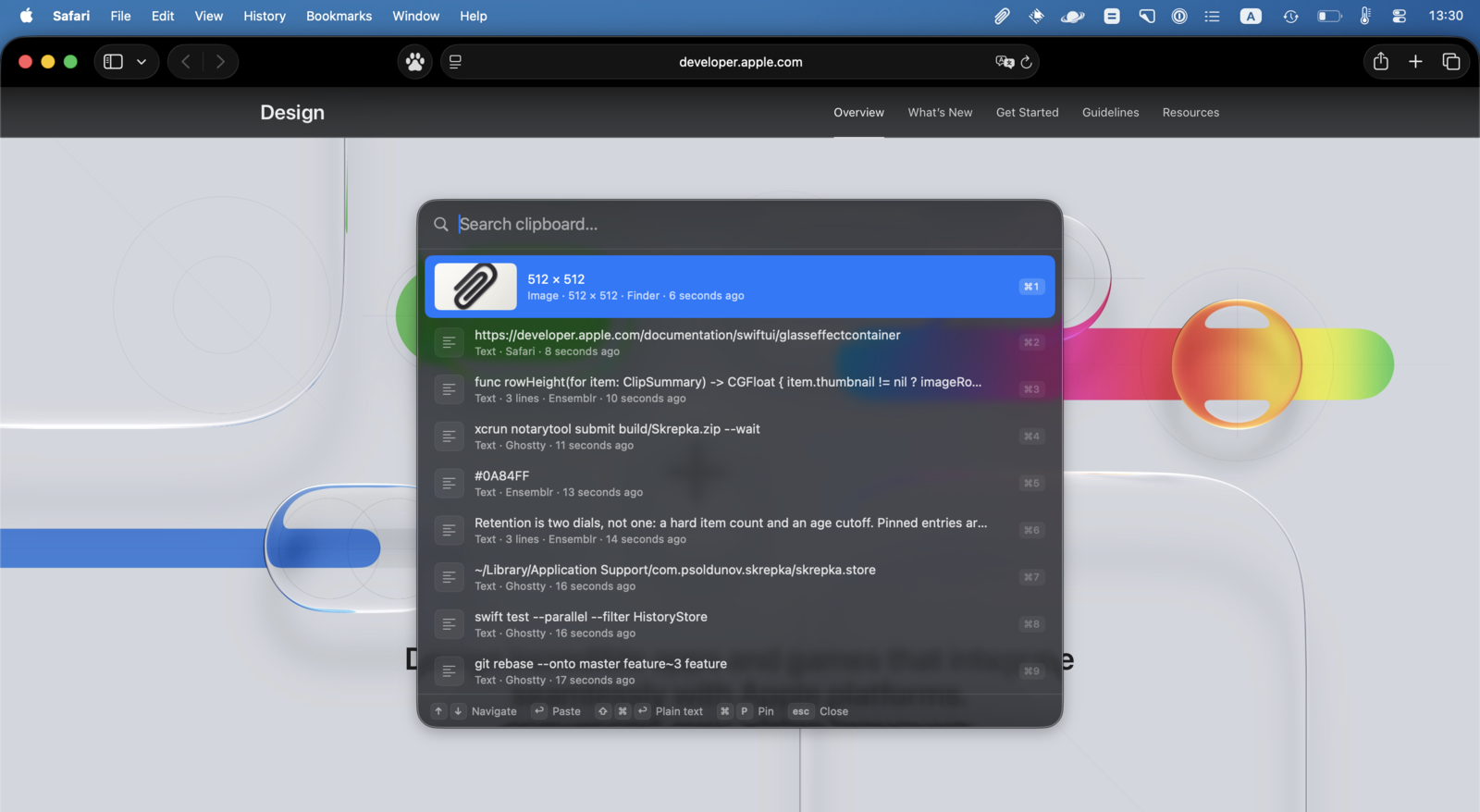
First release. A clipboard-history manager for macOS 26 that lives in the menu
bar with no Dock icon; ⌘⇧V opens a Liquid Glass picker over whatever app you are
in, without taking focus away from it.
Install
Download Skrepka.zip, unzip, drag Skrepka.app into /Applications.
The build is universal (arm64 + x86_64), signed with a Developer ID identity and
a secure timestamp, notarized by Apple and stapled — so it opens on first launch
with no Gatekeeper detour, on Apple silicon and on the four Intel Macs that still
run macOS 26.
What it does
- Text, rich text, URLs, files and images, with inline image previews
- Type to filter; ↑↓ to move; ↩ to paste into the app you were using
- ⌘1–⌘9 paste that row outright, ⇧⌘↩ pastes as plain text, ⌘P pins
- Pinned entries never age out
- Per-app exclusions, on top of automatically skipping anything a password
manager marks transient or concealed - Retention by item count and age, both configurable
Permissions
None to capture history, and none for the global shortcut — the hotkey goes
through Carbon's RegisterEventHotKey. Accessibility is asked for once, only so
Skrepka can synthesise ⌘V into the frontmost app. Decline it and pasting falls
back to copying, which you then paste yourself.
Requirements
macOS 26.0 or later.