Repository navigation
Releases: purpleeddy/logcat-on-releases
Release list
LogcatOn v1.4.0

What's new
-
A new Device Control panel: screenshots, keyboard input, and the device clipboard. No more switching to another tool for any of them. It sits below Devices in the sidebar, or press
⌘K(Ctrl+Kon Windows/Linux). -
Screenshots. Capture the device screen, preview it, then save it with a timestamped name or copy the image straight into Slack or an issue.
-
Type into the device. Send text to whatever field is focused on the device — including Korean, CJK, and emoji, which Android's own
input textcannot type at all. -
Device clipboard. Read what an app just copied, bring it over to your PC, or send text the other way.
Fixed
- Available-update notifications are no longer dismissed by outside clicks or Escape.
- Fixed two Windows shutdown crashes involving WebView teardown and Tao's destroyed event loop.
- Fixed bundled ADB detection on first launch after installation.
- Fixed Windows startup when an empty default ADB socket reports a timeout or permission error.
- Prefer an installed Android SDK ADB while safely preserving the shared server used by other tools.
- Added bounded retry handling for interrupted or temporarily unavailable ADB clients.
- Prevented leftover LogcatOn-owned ADB processes during shutdown and Windows updates.
- Portable Windows builds now use an isolated ADB runtime and open the release page for updates.
- Matching native debug files are now uploaded for crash symbolication.
Performance
- Reduced stutter in wrapped logs and the minimap during high-volume streams.
Downloads
Windows: installer or portable ZIP · macOS: universal DMG or portable archive · Linux: AppImage, DEB, or portable archive
LogcatOn v1.3.0
What’s new
-
Inspect any log line in detail. Double-click a line to open its full message, with readable formatting for JSON, stack traces, XML, URLs, and more.
-
Bring an AI coding assistant into your debugging session. Agent Port securely connects local MCP clients to your live logs, crashes, and metrics — then lets the assistant take you straight to the relevant log line.
-
Save and share complete investigations. Session Capsules package logs, bookmarks, filters, signals, device details, and an optional mapping file into one
.logcatonfile. -
Understand crashes faster. Crash Triage highlights the likely cause, the relevant stack frame, and practical next steps in the Issues tray.
-
Find the moment that matters. Press
⌘K(Ctrl+Kon Windows/Linux), choose Jump to time, then jump to a device timestamp or filter by time range. The performance timeline now also shows busy threads.
Also improved
- The app opens faster and remembers its window size and position.
- Command Palette is easier to search and reuse.
- More reliable session restore, ADB reconnects, and live-log resume behavior.
Downloads
Windows: installer or portable ZIP · macOS: universal DMG or portable archive · Linux: AppImage, DEB, or portable archive
LogcatOn v1.2.0
Added
-
Retrace — load your
mapping.txtand read R8/ProGuard-obfuscated stack traces in place, in live streams and opened files.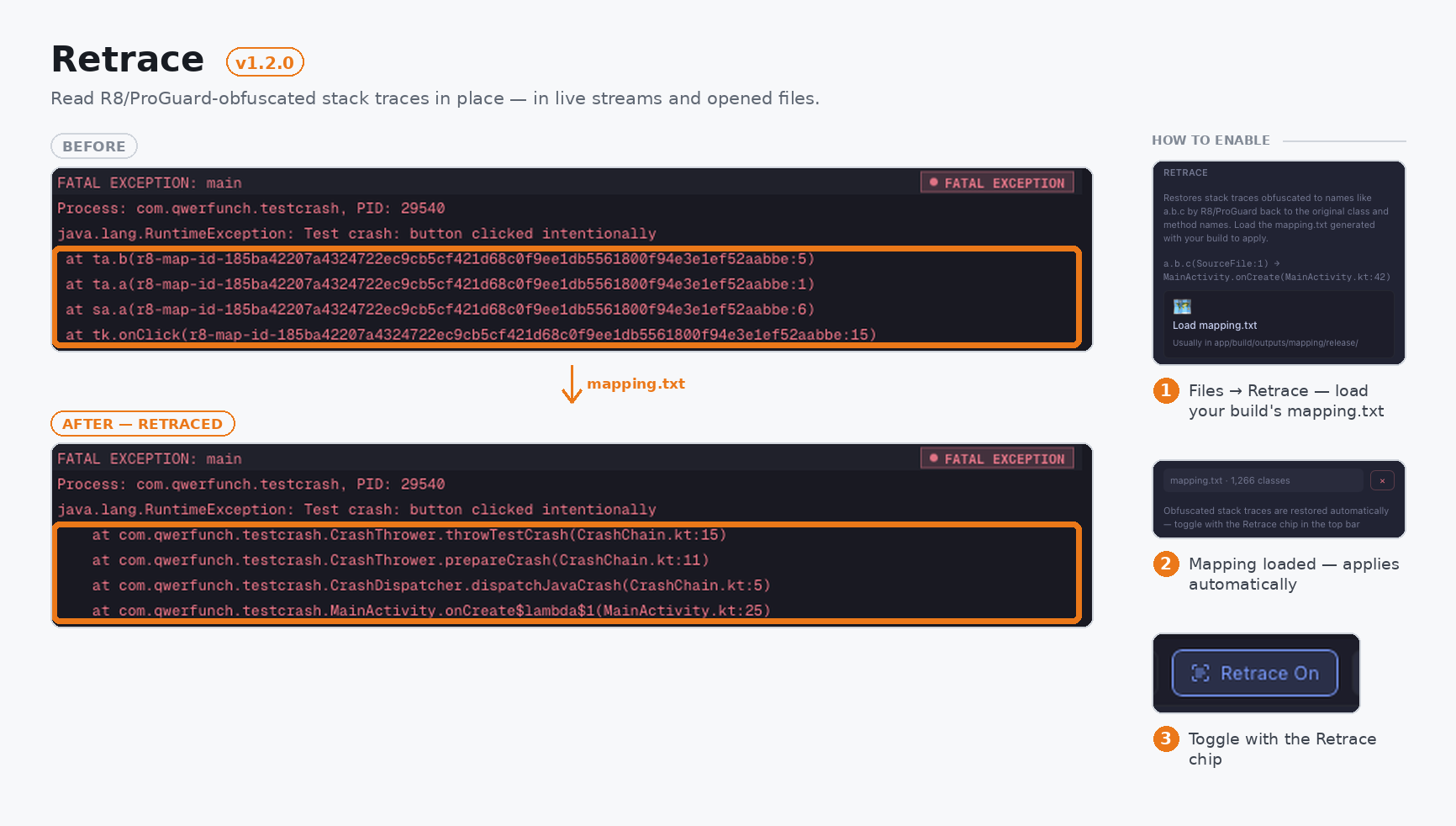
-
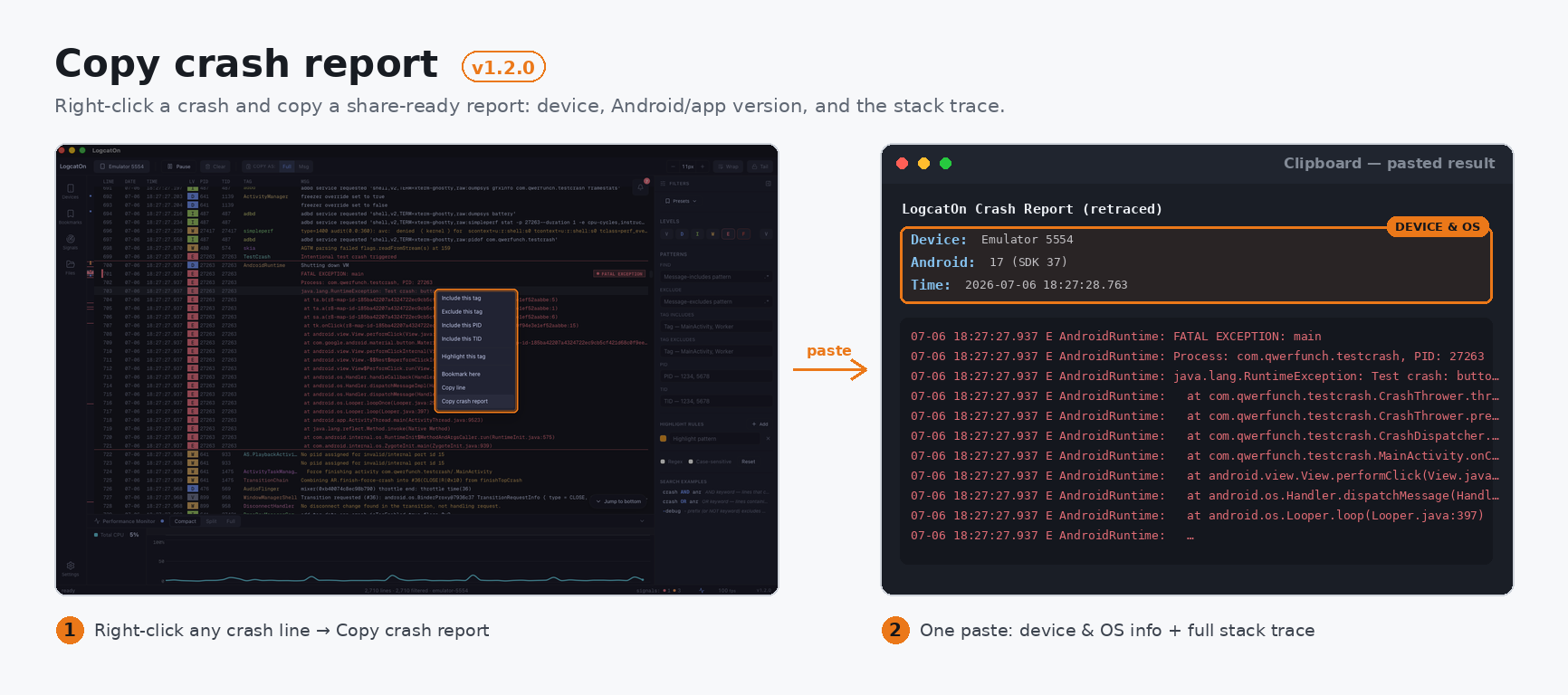
Copy crash report — right-click a crash and copy a share-ready report: device, Android/app version, and the stack trace.
-
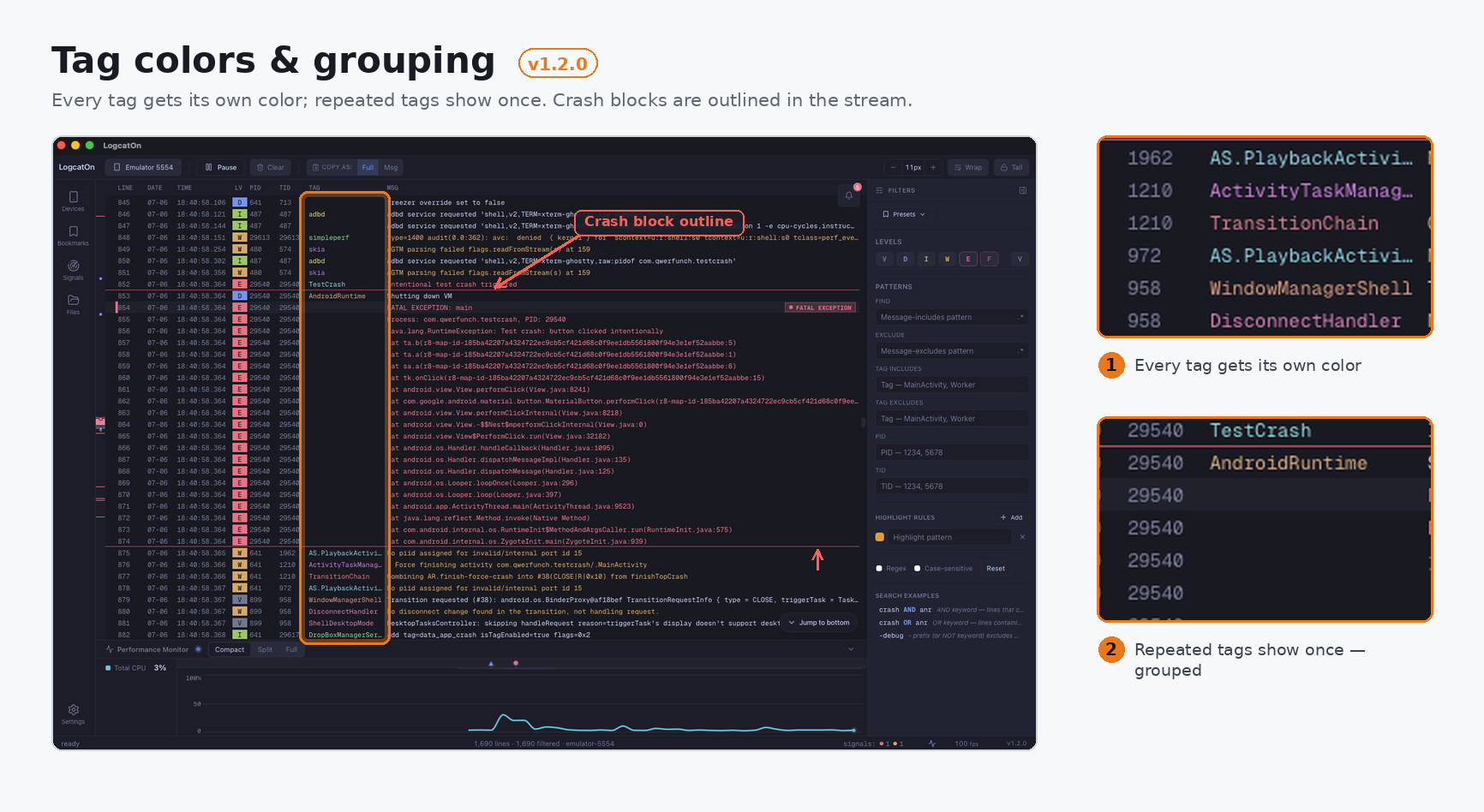
Tag colors & grouping — every tag gets its own color; repeated tags show once. Toggle in Settings.
-
Update prompt — new versions announce themselves on launch, with release notes. Close to skip that version.
Fixed
- Crash outline stays visible while its menu is open; ghost tag no longer overlaps the next one.
- Crash-report copy honors the Full/Msg toggle; highlighted tags stay visible when grouping is on.
LogcatOn v1.1.1
LogcatOn 1.1.1 is a stability release — no new features, just fixes that keep things accurate during long, high-volume sessions, when the log buffer fills up and the oldest lines start dropping.
What's fixed
- Scrolling stays where you put it. No more getting yanked back to a search match or jerked around as old lines drop — even mid-drag or with a filter on.
- Copy gets the right text. A drag selection during streaming no longer clips the first line's timestamp/tag prefix or pastes nothing.
- Find stays on the right line. Highlights and next/prev jumps stay correct as old lines drop, new matches at the bottom aren't skipped, and changing a filter cleanly re-runs the search.
- Bookmarks land on the right line, even after old lines have dropped.
- Also: opening a file starts fully clean; the Settings "Check for updates" result now scrolls into view; and word-wrapped high-volume streaming no longer stutters at buffer max.
On 1.1.0? You'll get 1.1.1 through in-app auto-update.
Requirements
- Device. An Android device or emulator with USB debugging enabled — no Android SDK required.
- Java. JRE 8+ only for
.aab/.apksinstalls;.apk/.xapkand log viewing need none.
Downloads
- Windows — .msi installer or portable .zip
- macOS — .dmg (universal arm64+x86_64, signed & notarized) or portable .tar.gz
- Linux — .AppImage / .deb or portable .tar.gz
LogcatOn v1.1.0
LogcatOn 1.1.0 makes the performance monitor a lot smarter — it profiles whatever app is on screen, compares cold-start time across rebuilds, and keeps the chart going when you switch what you're measuring. Plus a batch of stability fixes.
Highlights
- Profiles the app on screen — automatically. No need to pick a package first: LogcatOn profiles whatever app comes to the foreground on the device. The Devices panel marks the current foreground app with a live dot.
- Cold starts, compared every build. Each launch stacks its startup time as a bar, with the delta from the previous run shown in color (slower = red, faster = green) — so you can see at a glance whether your last change slowed the app down.
- Switch targets without a gap. Change what you're measuring and the chart keeps flowing — no session restart — with a tenure band showing who was measured, and when.
- A cleaner monitor. Reworked memory visualization and a unified visual language across the strip, split, and focus layouts.
Also: many stability fixes across bookmarks, the Issues tray, canvas selection/scroll, and the foreground badge — plus smoother line-wrapping for Japanese and other CJK text.
On 1.0.0? You'll get 1.1.0 through in-app auto-update.
Requirements
- Device. An Android device or emulator with USB debugging enabled — no Android SDK required.
- Java. JRE 8+ only for
.aab/.apksinstalls;.apk/.xapkand log viewing need none.
Downloads
- Windows — .msi installer or portable .zip
- macOS — .dmg (universal arm64+x86_64, signed & notarized) or portable .tar.gz
- Linux — .AppImage / .deb or portable .tar.gz
LogcatOn v1.0.0
LogcatOn is a desktop Android logcat viewer and debugging tool for macOS, Windows, and Linux. It keeps up with high-volume log streams and ties your logs to what the app is actually doing.
Highlights
- Built for volume. 1M+ lines at 60 fps, even through 5,000-line/sec bursts.
- Filter that follows your app. Pick a package once; PID/TID rebinds across restarts and crashes.
- Logs meet metrics. CPU, memory, jank, and battery on a timeline aligned with your logs.
- Signals surface themselves. 32 patterns flag crashes, ANRs, and native faults — the Issues tray jumps to each.
- Drive the app from the viewer. Drag-drop install, then launch, force-stop, or uninstall.
- Zero setup. Bundled adb/aapt2/bundletool; signed auto-updates.
Also: filtering (level/text/regex/tag/PID/TID/smart-query), bookmarks, find, command palette, dark/light themes, and a UI in English, 한국어, 简体中文, and 日本語 (auto-detects your OS language).
Requirements
- Device. An Android device or emulator with USB debugging enabled — no Android SDK required.
- Java. JRE 8+ only for
.aab/.apksinstalls;.apk/.xapkand log viewing need none.
Downloads
- Windows — .msi installer or portable .zip
- macOS — .dmg (universal arm64+x86_64, signed & notarized) or portable .tar.gz
- Linux — .AppImage / .deb or portable .tar.gz