Describe the bug
After adding a Custom Extension Directory, saving, and then reloading pyrevit, the extension does not show up. Additionally, when I return to the Settings, there are no directories included in the list. When I shift-clicked the Settings button to check out the config file, I received the error below. This was replicated in both 2021 and 2023.
To Reproduce
Steps to reproduce the behavior:
- Go to Settings
- Add a directory to the list of Custom Extension Directories
- Save and Reload pyrevit
- Go back into Settings and see that the added directories didn't stick :(
- Shift-click on Settings to try and access the config file
Expected behavior
When I add the Custom Extension Directory to the list and then reload pyrevit, I expect it to show up as a Revit tab as it has in previous versions. I also expect shift-clicking the Settings button to open the directory containing the config file.
Screenshots
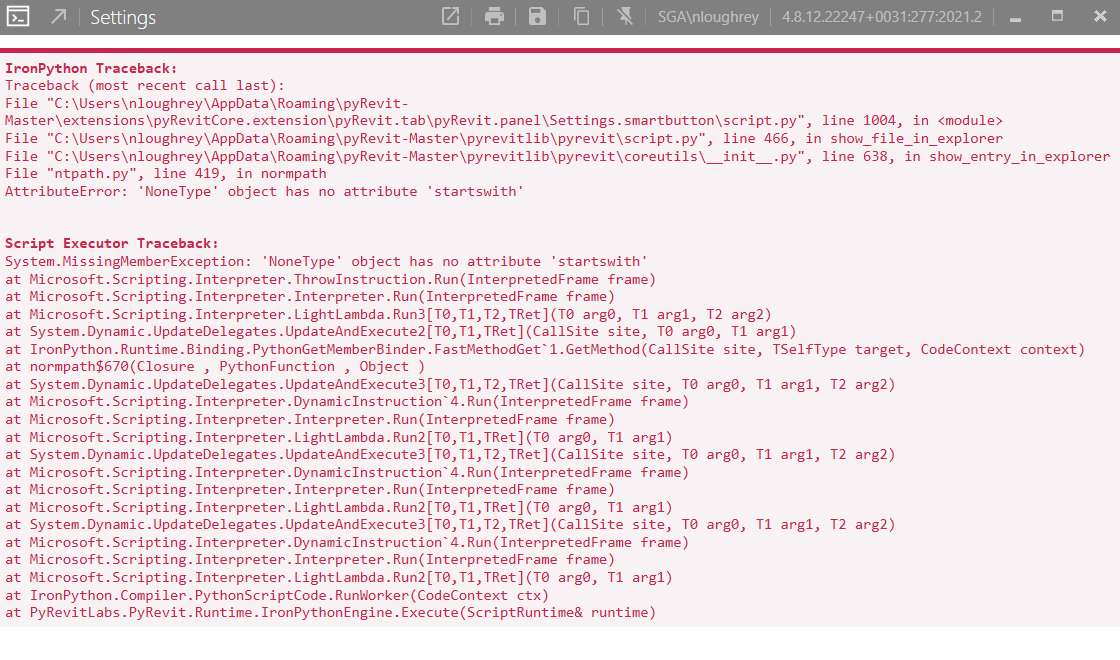
Desktop (please complete the following information):
- OS: Windows 10
- pyRevit Version: 4.8.12
- pyRevit Environment:
==> Registered Clones (full git repos)
==> Registered Clones (deployed from archive/image)
master | Deploy: "basepublic" | Branch: "master" | Version: "4.8.12.22247+0031" | Path: "C:\Users\nloughrey\AppData\Roaming\pyRevit-Master"
==> Attachments
master | Product: "2023.0.1" | Engine: IPY277 (277) | Path: "C:\Users\nloughrey\AppData\Roaming\pyRevit-Master" | AllUsers
master | Product: "2022 First Customer Ship" | Engine: IPY277 (277) | Path: "C:\Users\nloughrey\AppData\Roaming\pyRevit-Master" | AllUsers
master | Product: "2021.1.6" | Engine: IPY277 (277) | Path: "C:\Users\nloughrey\AppData\Roaming\pyRevit-Master" | AllUsers
master | Product: "2019.2.6" | Engine: IPY277 (277) | Path: "C:\Users\nloughrey\AppData\Roaming\pyRevit-Master" | AllUsers
master | Product: "2017.0.3" | Engine: IPY277 (277) | Path: "C:\Users\nloughrey\AppData\Roaming\pyRevit-Master" | AllUsers
==> Installed Extensions
==> Default Extension Search Path
C:\Users\nloughrey\AppData\Roaming\pyRevit\Extensions
==> Extension Search Paths
==> Extension Sources - Default
https://github.com/eirannejad/pyRevit/raw/master/extensions/extensions.json
==> Extension Sources - Additional
==> Installed Revits
2023.0.1 | Version: 23.0.10.18 | Build: 20220429_1500(x64) | Language: 1033 | Path: "C:\Program Files\Autodesk\Revit 2023\"
2022 First Customer Ship | Version: 22.0.2.392 | Build: 20210224_1515(x64) | Language: 1033 | Path: "C:\Program Files\Autodesk\Revit 2022\"
2021.1.6 | Version: 21.1.60.25 | Build: 20220123_1515(x64) | Language: 1033 | Path: "C:\Program Files\Autodesk\Revit 2021\"
2019.2.6 | Version: 19.2.60.3 | Build: 20220224_1700(x64) | Language: 1033 | Path: "C:\Program Files\Autodesk\Revit 2019\"
2017.0.3 | Version: 17.0.503.0 | Build: 20161205_1400(x64) | Language: 1033 | Path: "C:\Program Files\Autodesk\Revit 2017\"
==> Running Revit Instances
PID: 25680 | 2023.0.1 | Version: 23.0.10.18 | Build: 20220429_1500(x64) | Language: 0 | Path: "C:\Program Files\Autodesk\Revit 2023"
PID: 26792 | 2021.1.6 | Version: 21.1.60.25 | Build: 20220123_1515(x64) | Language: 0 | Path: "C:\Program Files\Autodesk\Revit 2021"
==> User Environment
Microsoft Windows 10 [Version 10.0.19043]
Executing User: SGA\nloughrey
Active User: SGA\nloughrey
Admin Access: Yes
%APPDATA%: "C:\Users\nloughrey\AppData\Roaming"
Latest Installed .Net Framework: 4.8
Installed .Net Target Packs: v3.5 v4.0 v4.5 v4.5.1 v4.5.2 v4.6 v4.6.1 v4.7.1 v4.7.2 v4.8 v4.X
Installed .Net-Core Target Packs: v6.0.100 v6.0.108
pyRevit CLI v4.8.12.22247+0031
Additional context
I haven't had this problem with previous versions
Describe the bug
After adding a Custom Extension Directory, saving, and then reloading pyrevit, the extension does not show up. Additionally, when I return to the Settings, there are no directories included in the list. When I shift-clicked the Settings button to check out the config file, I received the error below. This was replicated in both 2021 and 2023.
To Reproduce
Steps to reproduce the behavior:
Expected behavior
When I add the Custom Extension Directory to the list and then reload pyrevit, I expect it to show up as a Revit tab as it has in previous versions. I also expect shift-clicking the Settings button to open the directory containing the config file.
Screenshots

Desktop (please complete the following information):
Additional context
I haven't had this problem with previous versions