An intelligent Playwright HTML reporter with AI-powered failure analysis, flakiness detection, performance regression alerts, and a modern interactive dashboard. Free and open source (MIT) — every feature included.
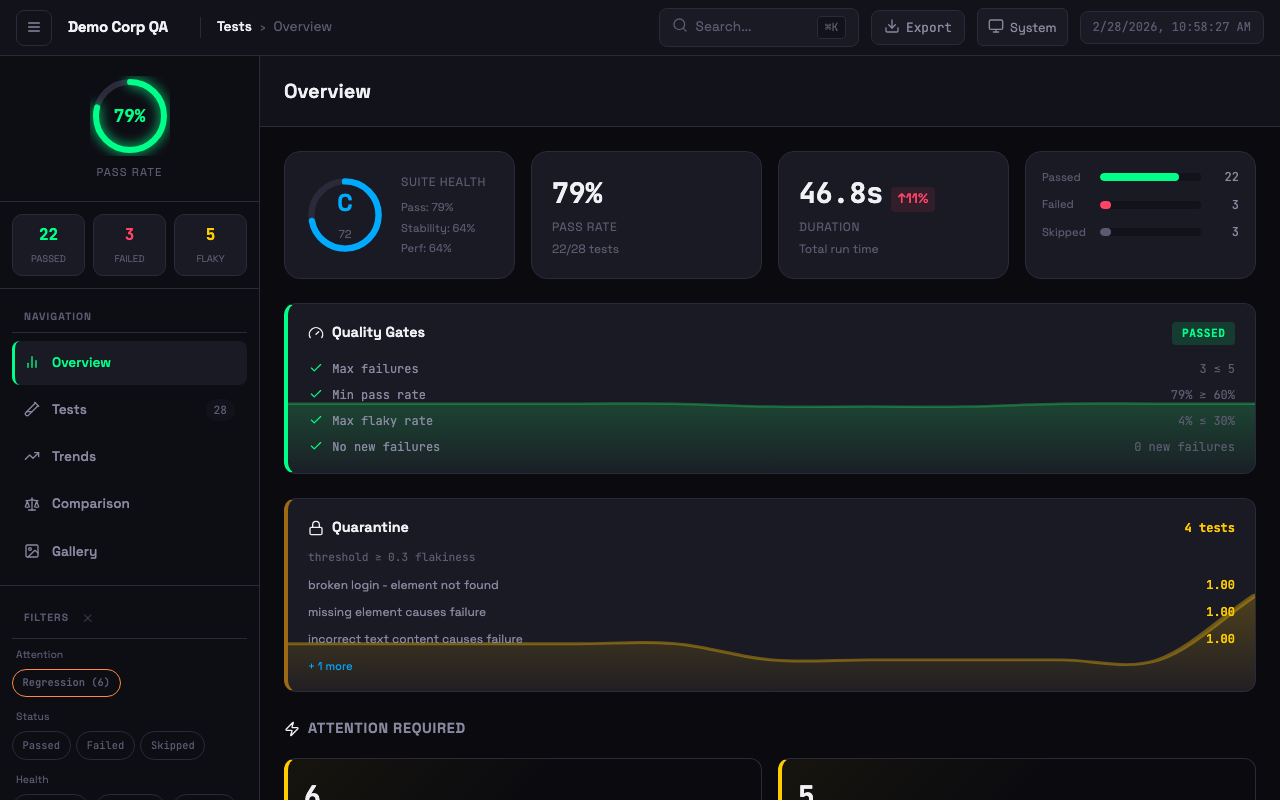 Dashboard with quality gates, quarantine, suite health grade, attention alerts, and failure clusters
npm install -D playwright-smart-reporterAdd to your playwright.config.ts:
import { defineConfig } from '@playwright/test';

export default defineConfig({
  reporter: [
    ['playwright-smart-reporter', {
      outputFile: 'smart-report.html',
      historyFile: 'test-history.json',
      maxHistoryRuns: 10,
    }],
  ],
});
Run your tests and open the generated smart-report.html.
- Stability grades (A–F) so you know which tests to trust
- Flakiness detection across retries and history
- Run-to-run comparison — catch regressions before they ship
- Screenshot, video, and trace gallery for every failure
- Network request logs to pinpoint API issues
- CI auto-detection & notifications
- Live progress dashboard — run, cancel, and filter tests as they execute
- AI-powered root cause analysis (bring your own Anthropic, OpenAI, or Gemini API key)
- 10 themes plus fully custom theme colours
- PDF, JSON, and JUnit XML exports
- Quality gates — block merges when quality drops
- Auto-quarantine unreliable tests to keep CI green
- Custom report branding (logo, title, footer)
- AI Failure Analysis — AI-powered fix suggestions using your own Anthropic, OpenAI, or Gemini API key
- Flakiness Detection — Historical tracking to identify unreliable tests (not single-run retries)
- Performance Regression Alerts — Warns when tests get significantly slower than average
- Stability Scoring — Composite health metrics (0-100 with grades A to F)
- Failure Clustering — Group similar failures by error type with error previews and AI analysis
- Test Retry Analysis — Track tests that frequently need retries
- Sidebar Navigation — Overview, Tests, Trends, Comparison, Gallery views
- Theme Support — 4 built-in themes (System, Light, Dark, High Contrast) with persistent preference
- Keyboard Shortcuts —
1-5switch views,j/knavigate tests,ffocus search,eexport summary - Virtual Scroll — Pagination for large test suites (500+ tests)
- Exportable Summary Card — One-click export of test run summary
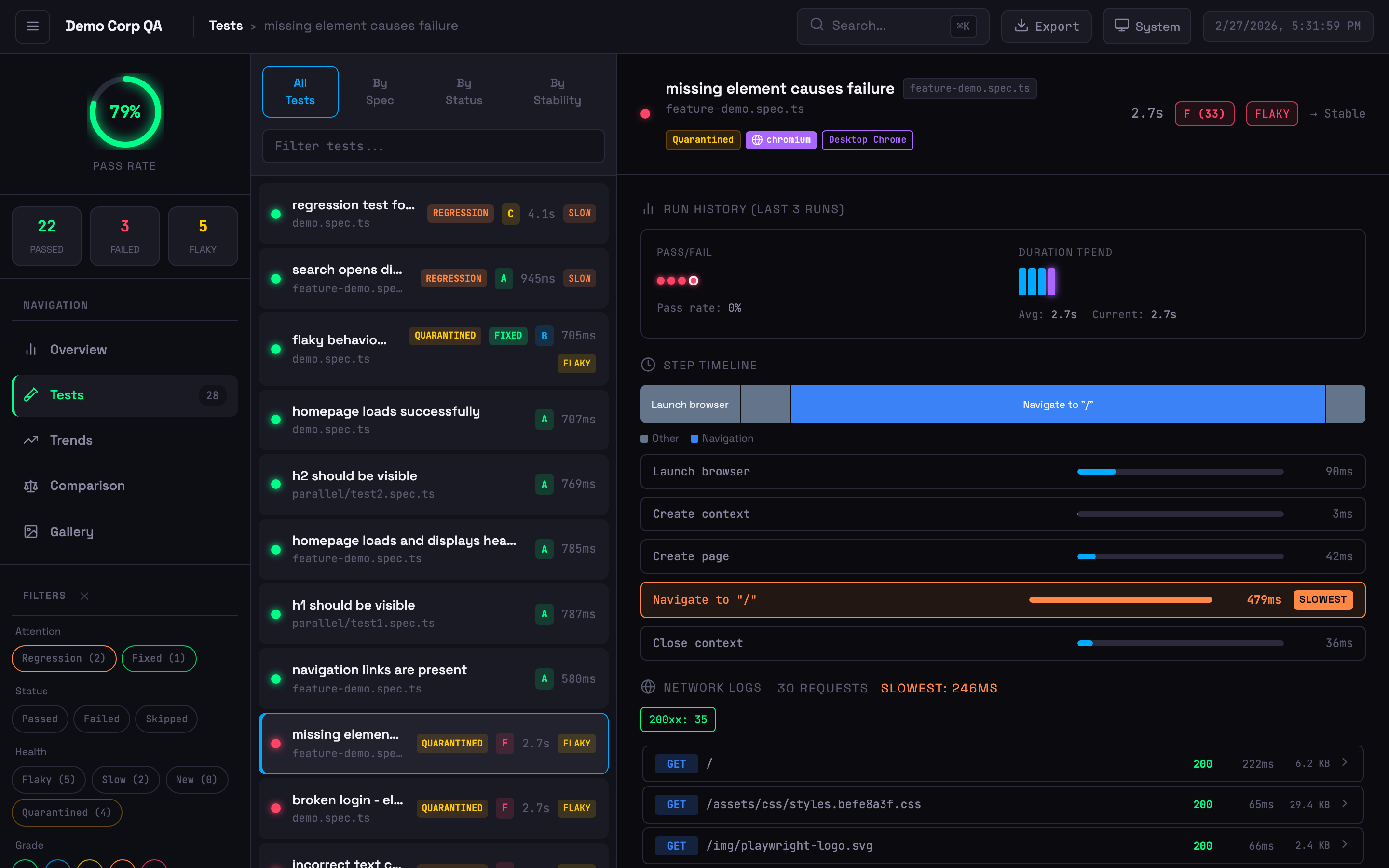 Expanded test card with step timeline, network logs, run history, and quarantine badge
- Step Timing Breakdown — Visual bars highlighting the slowest steps
- Flamechart Visualisation — Colour-coded timeline bars (navigation, assertion, action, API, wait)
- Network Logs — API calls with status codes, timing, and payload details (from trace files)
- Inline Trace Viewer — View traces directly in the dashboard
- Screenshot Embedding — Failure screenshots displayed inline
- Browser & Project Badges — Shows which browser/project each test ran against
- Annotation Support —
@slow,@fixme,@skip,@issue, custom annotations with styled badges
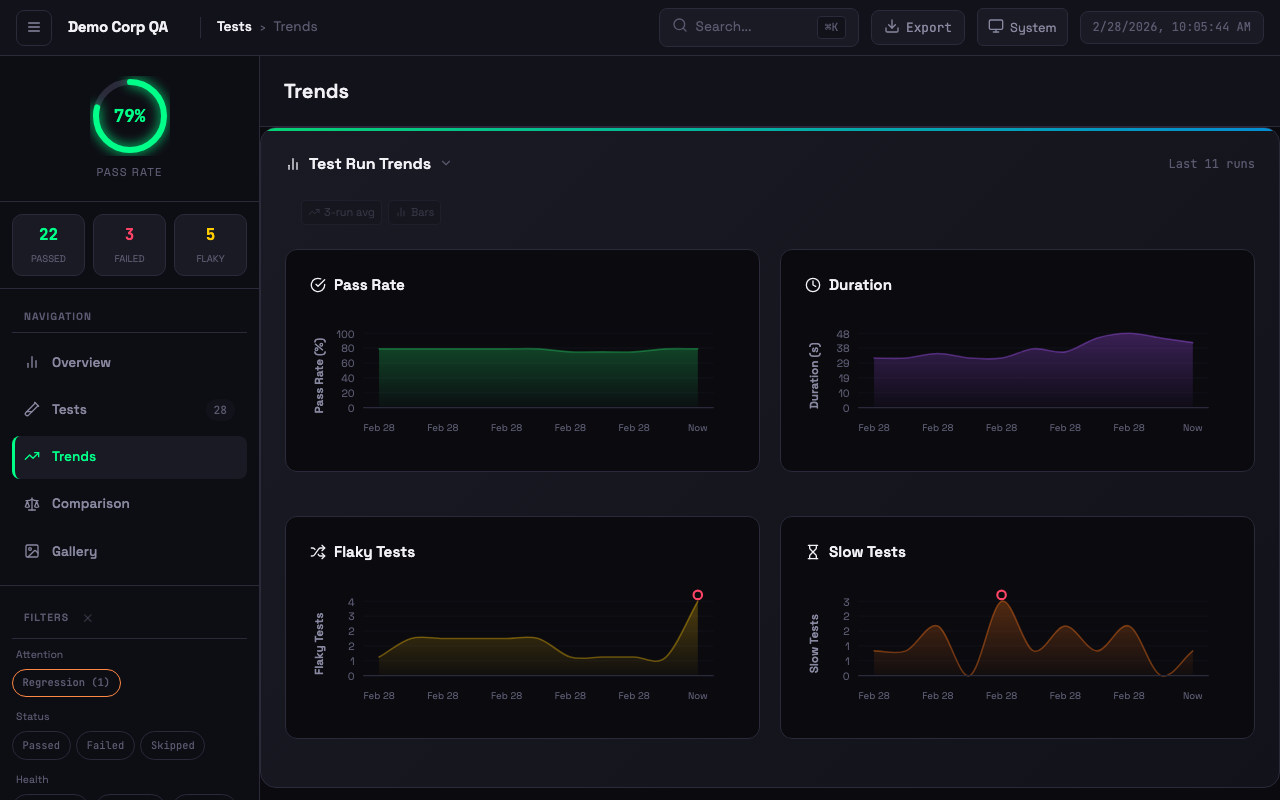 Interactive trend charts with pass rate, duration, flaky tests, and slow test tracking
- Moving Averages — Overlay on pass rate and duration trends
- Anomaly Detection — 2-sigma outlier detection with visual markers
- Clickable History — Click any chart bar to drill into that historical run
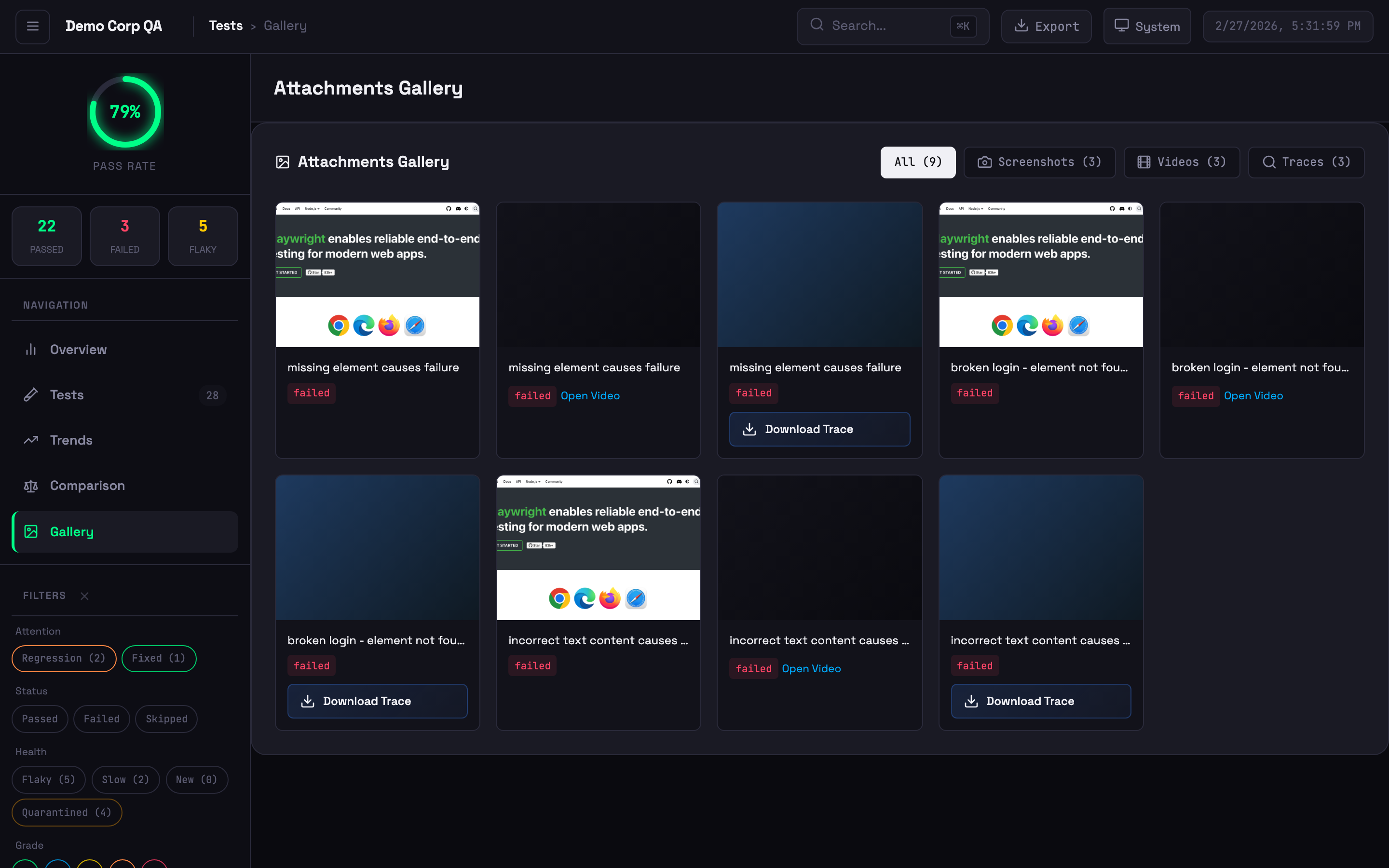 Visual grid of screenshots, videos, and trace files
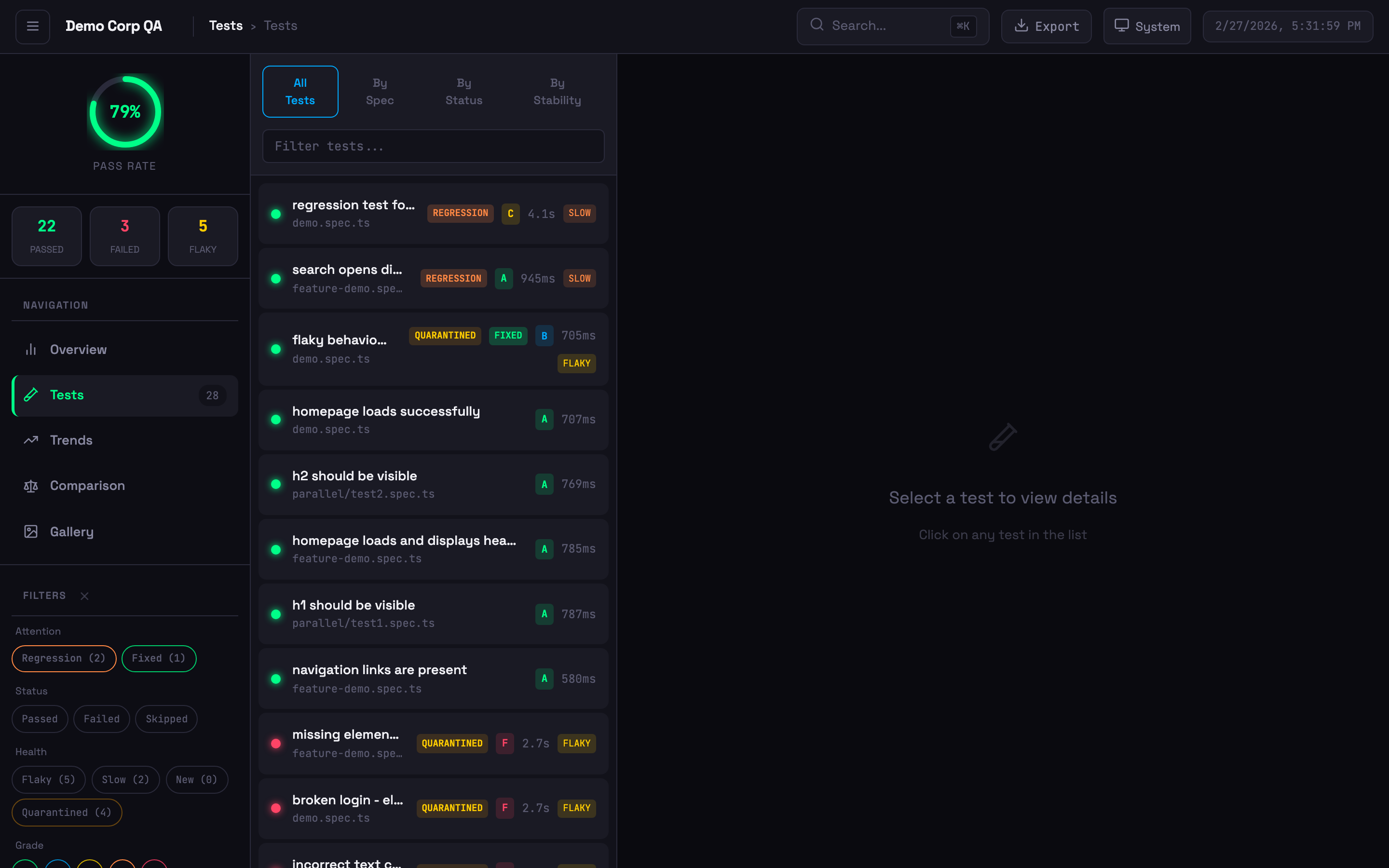 Test list with status badges, stability grades, quarantine indicators, and filtering
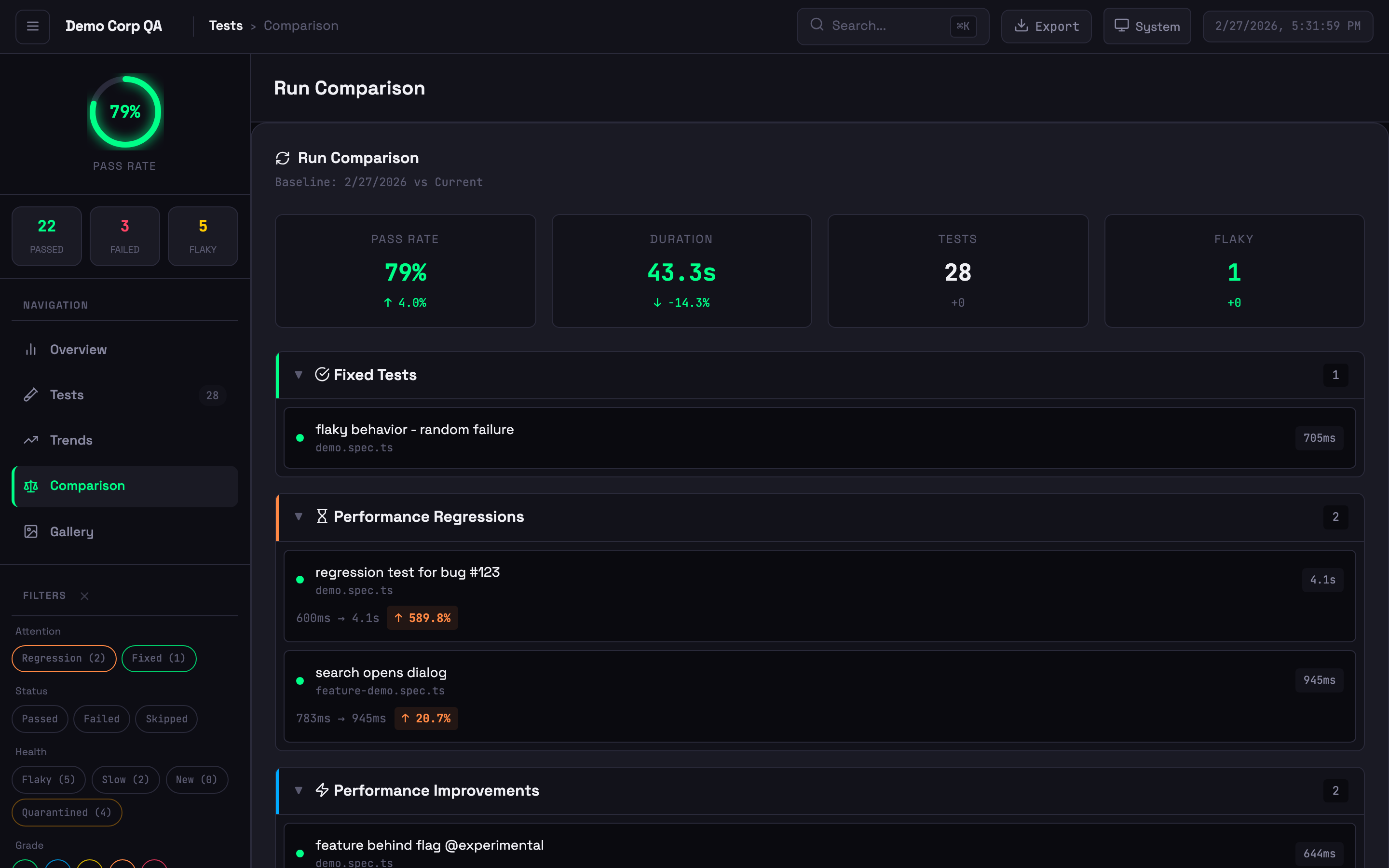 Run comparison showing new failures, performance changes, and baseline diffs
Smart Reporter tracks flakiness across runs, not within a single run:
| Playwright HTML Report | Smart Reporter | |
|---|---|---|
| Scope | Single test run | Historical across multiple runs |
| Criteria | Fails then passes on retry | Failed 30%+ of the time historically |
| Use Case | Immediate retry success | Chronically unreliable tests |
Indicators:
- Stable (<10% failure rate) — Unstable (10-30%) — Flaky (>30%) — New (no history)
6 additional themes beyond the 4 built-in themes (System, Light, Dark, High Contrast): Ocean, Sunset, Dracula, Cyberpunk, Forest, and Rose. Set via config:
reporter: [
  ['playwright-smart-reporter', {
    outputFile: 'smart-report.html',
    theme: { preset: 'dracula' },  // ocean, sunset, dracula, cyberpunk, forest, rose
  }],
]Generate professional PDF reports in 3 themed variants: Corporate, Minimal, and Dark. Includes a style picker modal in the HTML report.
reporter: [
  ['playwright-smart-reporter', {
    outputFile: 'smart-report.html',
    exportPdf: true,
  }],
]Fail CI builds when test results don't meet your thresholds:
reporter: [
  ['playwright-smart-reporter', {
    outputFile: 'smart-report.html',
    qualityGates: {
      minPassRate: 95,
      maxFlakyRate: 5,
      minStabilityGrade: 'B',
    },
  }],
]
Or run as a standalone CLI check:
npx playwright-smart-reporter gate --min-pass-rate 95 --max-flaky-rate 5Exit codes: 0 = all gates passed, 1 = gate failed (use in CI to block deploys).
Automatically detect and quarantine chronically flaky tests. Quarantined tests are tracked in a JSON file and can be excluded from gate failures:
reporter: [
  ['playwright-smart-reporter', {
    outputFile: 'smart-report.html',
    quarantine: {
      enabled: true,
      outputFile: '.smart-quarantine.json',
      threshold: 0.3,  // flakiness score 0-1
    },
  }],
]Customise the report title, footer, and theme colours:
reporter: [
  ['playwright-smart-reporter', {
    outputFile: 'smart-report.html',
    branding: {
      title: 'Acme Corp Test Report',
      footer: 'Generated by QA Team',
    },
    theme: {
      primary: '#6366f1',
      accent: '#8b5cf6',
      success: '#22c55e',
      error: '#ef4444',
      warning: '#f59e0b',
    },
  }],
]Export test results in structured formats for external tools:
reporter: [
  ['playwright-smart-reporter', {
    outputFile: 'smart-report.html',
    exportJson: true,
    exportJunit: true,
  }],
]An AI-generated executive summary appears at the top of the Overview tab, combining failure clusters, flakiness trends, performance regressions, and historical pass rate data into natural-language insights. Enabled by default when an AI API key is set (see AI Analysis).
To disable (e.g., to save one AI request per run):
reporter: [
  ['playwright-smart-reporter', {
    outputFile: 'smart-report.html',
    enableAISuiteHealth: false,  // Disable AI health summary
  }],
]reporter: [
['playwright-smart-reporter', {
// Core
outputFile: 'smart-report.html',
historyFile: 'test-history.json',
maxHistoryRuns: 10,
performanceThreshold: 0.2,
// Notifications
slackWebhook: process.env.SLACK_WEBHOOK_URL,
teamsWebhook: process.env.TEAMS_WEBHOOK_URL,
// Feature flags (all default to true unless noted)
enableRetryAnalysis: true,
enableFailureClustering: true,
enableStabilityScore: true,
enableGalleryView: true,
enableComparison: true,
enableAIRecommendations: true,
enableTrendsView: true,
enableTraceViewer: true,
enableHistoryDrilldown: false,
enableAISuiteHealth: true, // AI health summary in Overview tab (uses 1 AI request)
enableNetworkLogs: true,
// Step and path options
filterPwApiSteps: false,
relativeToCwd: false,
// Multi-project
projectName: 'ui-tests',
runId: process.env.GITHUB_RUN_ID,
// Network logging
networkLogFilter: 'api.example.com',
networkLogExcludeAssets: true,
networkLogMaxEntries: 50,
// Thresholds
stabilityThreshold: 70,
retryFailureThreshold: 3,
baselineRunId: 'main-branch-baseline',
thresholds: {
flakinessStable: 0.1,
flakinessUnstable: 0.3,
performanceRegression: 0.2,
stabilityWeightFlakiness: 0.4,
stabilityWeightPerformance: 0.3,
stabilityWeightReliability: 0.3,
gradeA: 90,
gradeB: 80,
gradeC: 70,
gradeD: 60,
},
// Report customisation & exports
theme: { preset: 'default' }, // default, light, dark, high-contrast, ocean, sunset, dracula, cyberpunk, forest, rose
exportPdf: false,
exportJson: false,
exportJunit: false,
qualityGates: {}, // { minPassRate, maxFlakyRate, minStabilityGrade }
quarantine: {}, // { enabled, outputFile, threshold }
branding: {}, // { logo, title, footer, hidePoweredBy }
// Advanced
cspSafe: false,
maxEmbeddedSize: 5 * 1024 * 1024,
}],
]AI failure analysis uses your own API key. Set one of the following environment variables:
export ANTHROPIC_API_KEY=your-key    # Claude (used first if multiple are set)
export OPENAI_API_KEY=your-key       # OpenAI
export GEMINI_API_KEY=your-key       # Google Gemini
When a test fails, the reporter sends the failure context to your chosen provider and includes fix suggestions in the report. Costs are billed by your provider — the reporter uses small, fast models (claude-haiku-4-5, gpt-4o-mini, gemini-2.5-flash) with short prompts, so per-run cost is minimal.
If no API key is set, AI analysis is skipped and everything else works as normal — every failed test still gets a Copy AI Prompt button in the report, which copies a ready-to-paste prompt (error, call log, code frame) for use with any AI assistant.
Composite score (0-100) from three factors:
| Factor | Weight | Description |
|---|---|---|
| Flakiness | 40% | Inverse of flakiness score |
| Performance | 30% | Execution time consistency |
| Reliability | 30% | Pass rate from history |
Grades: A (90-100), B (80-89), C (70-79), D (60-69), F (<60). All weights and thresholds are configurable.
reporter: [
  ['playwright-smart-reporter', {
    filterPwApiSteps: true,  // Only show custom test.step() entries
  }],
]
With filtering on, verbose page.click(), page.fill() steps are hidden — only your named test.step() entries appear.
Isolate history per test suite to prevent metric contamination:
reporter: [
  ['playwright-smart-reporter', {
    projectName: 'api',
    historyFile: 'reports/{project}/history.json',
  }],
]Click View on any test with traces to open the built-in viewer with film strip, actions panel, before/after screenshots, network waterfall, console messages, and errors.
npx playwright-smart-reporter-serve smart-report.htmlServes the report locally with full trace viewer support — no file:// CORS issues.
npx playwright-smart-reporter-view-trace ./traces/my-test-trace-0.zipAutomatically extracted from Playwright trace files — no code changes required. Shows method, URL, status code, duration, and payload sizes. Requires tracing enabled:
use: {
  trace: 'retain-on-failure',  // or 'on'
}| Annotation | Badge | Annotation | Badge |
|---|---|---|---|
@slow |
Amber | @fixme / @fix |
Pink |
@skip |
Indigo | @fail |
Red |
@issue / @bug |
Red | @flaky |
Orange |
@todo |
Blue | Custom | Grey |
test('payment flow', async ({ page }) => {
  test.slow();
  test.info().annotations.push({ type: 'issue', description: 'JIRA-123' });
});History must persist between runs for flakiness detection and trends to work.
- uses: actions/cache@v4
  with:
    path: test-history.json
    key: test-history-${{ github.ref }}
    restore-keys: test-history-

- run: npx playwright test

- uses: actions/cache/save@v4
  if: always()
  with:
    path: test-history.json
key: test-history-${{ github.ref }}-${{ github.run_id }}test:
cache:
key: test-history-$CI_COMMIT_REF_SLUG
paths: [test-history.json]
policy: pull-push
script: npx playwright test- restore_cache:
keys: [test-history-{{ .Branch }}, test-history-]
- run: npx playwright test
- save_cache:
key: test-history-{{ .Branch }}-{{ .Revision }}
paths: [test-history.json]steps:
- task: Cache@2
inputs:
key: 'test-history | "$(Build.SourceBranchName)"'
restoreKeys: 'test-history |'
path: test-history.json
- script: npx playwright test
continueOnError: true
- task: PublishPipelineArtifact@1
inputs:
targetPath: smart-report.html
artifact: playwright-smart-report
condition: always()The reporter automatically detects GitHub Actions, GitLab CI, CircleCI, Jenkins, Azure DevOps, and Buildkite. Branch, commit SHA, and build ID are displayed in the report header.
# GitHub Actions example
- run: npx playwright test
  continue-on-error: true

- run: npx playwright-smart-reporter gate --min-pass-rate 95 --max-flaky-rate 5
# Exits non-zero if gates fail — blocks the pipelineFor consistent history across parallel shards, set runId:
reporter: [
  ['playwright-smart-reporter', {
    runId: process.env.GITHUB_RUN_ID,
  }],
]npx playwright-smart-reporter-merge-history \
shard1/test-history.json \
shard2/test-history.json \
-o merged-history.json \
--max-runs 10For environments with strict Content Security Policy (e.g., Jenkins):
reporter: [
  ['playwright-smart-reporter', { cspSafe: true }],
]
When enabled, the reporter generates companion .css and .js files alongside the HTML report. The HTML references these via <link rel="stylesheet"> and <script src defer> instead of inline <style> and <script> tags. Report data is embedded in <script type="application/json"> tags (not executed by the browser). System fonts are used instead of Google Fonts.
Jenkins CSP configuration — Add to Jenkins script console or startup:
System.setProperty("hudson.model.DirectoryBrowserSupport.CSP",
  "script-src 'self' 'unsafe-inline'; style-src 'self'; img-src 'self';")
Note: Inline event handlers (
onclick, etc.) still require'unsafe-inline'inscript-src. Full event delegation is planned for a future release.
Works with Playwright + Cucumber frameworks:
import { defineBddConfig } from 'playwright-bdd';

const testDir = defineBddConfig({
  features: 'features/**/*.feature',
  steps: 'steps/**/*.ts',
});

export default defineConfig({
  testDir,
  reporter: [['playwright-smart-reporter']],
});Yes. Everything is MIT-licensed and included — no tiers, no license keys. AI analysis is the only feature with an external cost, and that's billed directly by your AI provider via your own API key.
Fixed in v1.0.6. Update: npm install playwright-smart-reporter@latest
They use different methodologies — see Flakiness Detection above.
Enable cspSafe: true to save attachments as files instead of embedding, or reduce maxHistoryRuns. Use maxEmbeddedSize to control the inline trace threshold.
| Problem | Cause | Fix |
|---|---|---|
| No history data | History file missing or wrong path | Check historyFile path, use CI caching |
| No network logs | Tracing not enabled | Add trace: 'retain-on-failure' to config |
| No AI suggestions | No AI API key set | Set ANTHROPIC_API_KEY, OPENAI_API_KEY, or GEMINI_API_KEY |
| Mixed project metrics | Shared history file | Use projectName to isolate |
| Quality gate not failing CI | Gate not run as separate step | Run npx playwright-smart-reporter gate as its own CI step |
npm install
npm run build
npm test
npm run test:demo- Gary Parker — Creator and maintainer
- Filip Gajic — v1.0.0 UI redesign
- Liam Childs — Parameterized project support
MIT