Install search plugins
⚠️ Security warning: Search plugins are Python scripts (third-party code). They are not guaranteed to be safe. Install only from sources you trust, and review the script before installing.
- Open the unofficial plugin list
- Under the
Downloadcolumn, click the plugin’sDownloadlink. - Save the
.pyfile to a temporary location on your computer.
- Under the
- In qBittorrent:
In the main window, click
View->Search Engineto show theSearchtab.
- Go to the
Searchtab. - Click the
Search plugins...button, located near the bottom-right side. - The
Search pluginswindow will open. It shows a list of installed search engine plugins.- Click the
Install a new onebutton.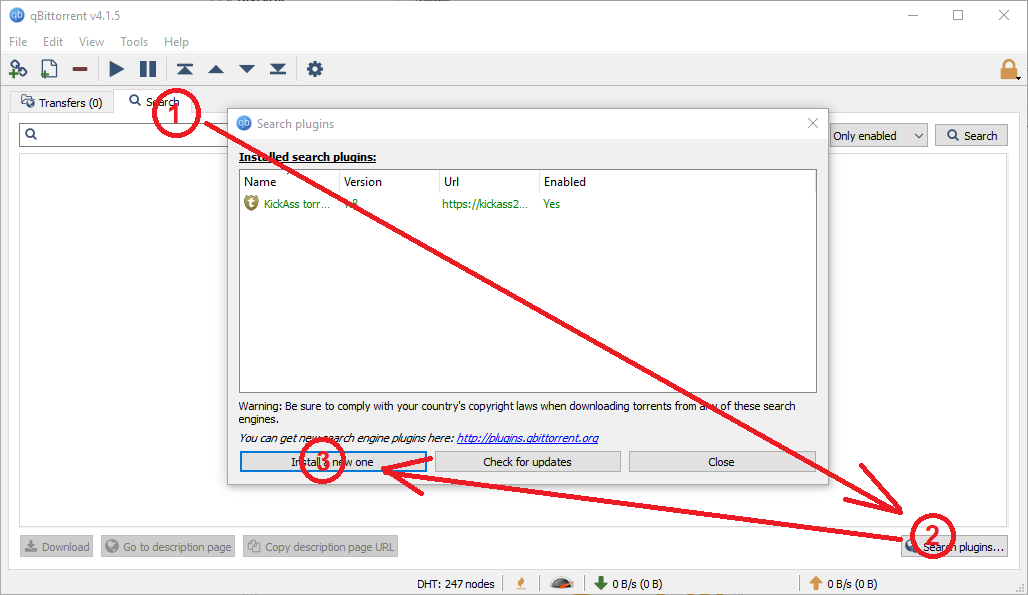
- The
Plugin sourcewindow will open.-
Click the
Local filebutton. -
Navigate to the
.pyfile you downloaded in the step above. Select the.pyfile. -
If successful, the following message will be displayed:
<PLUGIN.NAME> search engine plugin was successfully installed.
-
If not successful, the following message will be displayed:
<PLUGIN.NAME> search engine plugin could not be installed.
Using this page under the
Commentcolumn, check that your system meets the minimum requirements for each search plugin. Your system may not meet the plugin requirements.
-
- Click the
Closebutton.
- Click the
- Go to the
- You can delete the
.pyfile from your temporary location on local storage, as it is no longer needed. - Optionally, you can use the
Search pluginswindow to enable or disable search plugins, or check for updates. - Done. You have successfully installed a new search plugin for qBittorrent.