Repository navigation

中文 / Chinese
Auto SolidWorks 26.10.17
本次更新重点:建模后先复核,发现问题自行修正并继续迭代,不把首次生成的模型直接作为最终交付。
新增与强化
建模结果复核与修改迭代
在 Codex 与插件配合的建模流程中,生成模型后会继续对照源图检查关键尺寸、孔位、特征方向、连接关系及必要视图。发现有明确依据的问题后,AI 会修正草案、重新编译并再次建模,复核后再决定是否交付。
原生建模执行成功只是一个阶段结果。局部几何通过检查,但视图与源图存在矛盾时,仍会继续修改。关键尺寸或拓扑无法确定时,会提出具体澄清,不把不确定内容擅自当作图纸事实。
保存重开与证据保留
最终交付保留原生保存、重新打开、重建、实体有效性与已声明尺寸/几何检查,并实际查看必要视图。失败回执、中间状态、修正记录和检查点会保留,便于追溯迭代原因;有剩余未通过项或参数化限制时,会如实说明。
整合最新本地工作流能力
- AI 直接看图,识别文字、尺寸端点和跨视图关系,取消本地 OCR 依赖。
- 源尺寸统一引用与表达式派生,校验单位、缺失前提及依赖关系。
- 已复核特征可分阶段建模;后台原生任务串行执行,按 request_id 查询结果。
- 经验证的检查点可用于续建;阶段完成与最终整图交付分别记录。
- 支持在固定毫米坐标中比较已声明源轮廓与模型投影,辅助定位差异。
实际迭代示例
下图来自本次“三维练习51”的真实原生视图,包含未通过视觉复核的中间状态及本次交付几何版:
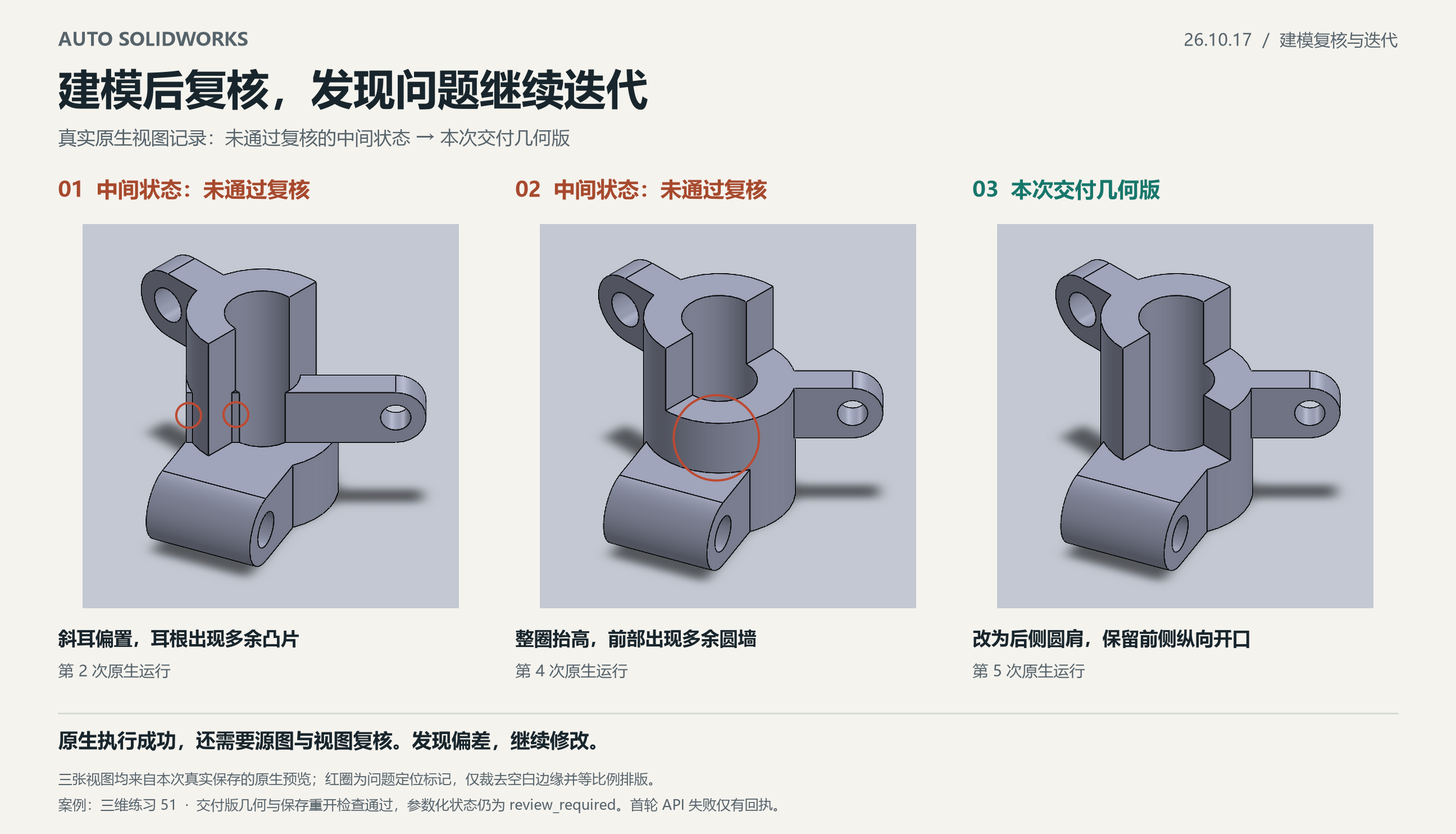
- 中间状态一:斜耳偏置,耳根出现多余凸片;原生执行成功后,在视图复核中发现问题,继续修改。
- 中间状态二:将连接区整圈抬高,产生源图没有的前部圆墙;再次依据等轴测反证修正。
- 本次交付几何版:改为斜耳根后侧四分之一圆肩,保留前侧纵向开口,并通过保存重开与声明检查。
本案例共进行5次原生运行:1次原生执行失败,3个原生成功的中间候选未通过后续视觉复核,第5次形成交付几何版。记录的建模相关墙钟为12分16秒,包含识图绑定、编译、重试和必要复核;首次打点前准备及结束后报告整理未计入。建模时及保存重开后的17项声明检查均通过,草图参数化状态仍为 review_required,未宣称整件草图完全约束。
适用范围
自动复核与修改迭代由 Codex 协同插件完成:AI 负责识图、判断和修改方案,插件负责原生执行、回执与验证。它不保证任意图纸都能自动收敛,也不等同于完整制造图、BREP 或 GD&T 等价认证。
配图运行时为发布整理前的本地 26.10.13-opt.1,展示的是本次实际迭代流程;该案例不替代 26.10.17 安装包的独立构建与验收。本次发布安装包的构建、离线和公开MCP验证范围见发布验证记录。
安装与下载
下载26.10.17 Windows x64 插件包,解压后运行 install.ps1。SolidWorks及其Interop由本机安装提供。
English
Auto SolidWorks 26.10.17
This update focuses on reviewing the model after creation, correcting evidence-backed problems, and iterating instead of treating the first generated model as the final deliverable.
Added and strengthened
Review, correction and iteration
In the Codex-assisted plugin workflow, model creation is followed by comparison with the source drawing: critical dimensions, hole locations, feature directions, connections and necessary views. When a discrepancy has clear source evidence, the AI revises the draft, recompiles and models again, then reviews the result before deciding whether to deliver it.
Successful native execution is an intermediate result. Passing local geometry checks does not end the task when a view contradicts the drawing. If critical dimensions or topology remain uncertain, the workflow asks a specific clarification instead of silently promoting an assumption to a drawing fact.
Save/reopen and retained evidence
Final delivery retains native save/reopen, rebuild, body validity and declared dimension/geometry checks, together with actual necessary-view review. Failed receipts, intermediate candidates, correction records and checkpoints remain available for tracing the iteration. Remaining failures and parametric limitations are disclosed.
Latest local workflow capabilities included
- AI reads the original drawing directly, including text, dimension endpoints and cross-view relationships; local OCR dependencies are removed.
- Unified source-dimension references and derived expressions check units, missing premises and dependencies.
- Reviewed features can be modeled in explicit stages. Native background tasks execute serially and are queried by request_id.
- Verified checkpoints support continuation. Stage completion and final whole-drawing delivery remain separate.
- Declared source contours can be compared with model projections in a fixed millimeter frame to help locate differences.
Actual iteration example
These are actual native views from the Exercise 51 run, showing intermediate candidates rejected during visual review and the delivered geometry:
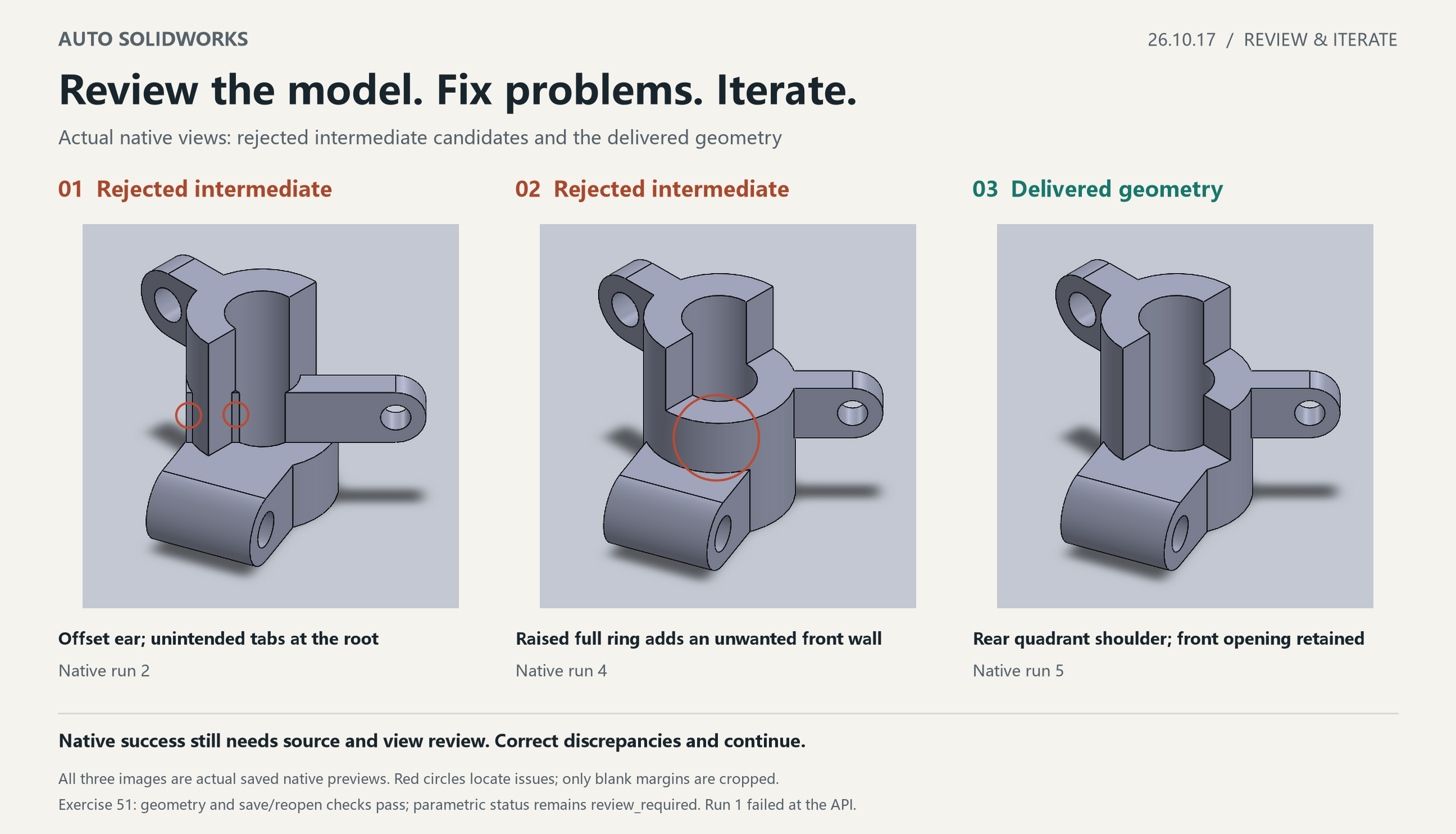
- Intermediate candidate 1: the diagonal ear was offset and extra tabs appeared at its root. Native execution succeeded; subsequent view review found the problems and modeling continued.
- Intermediate candidate 2: raising the full connecting ring introduced a front cylindrical wall absent from the source. Isometric counterevidence prompted another correction.
- Delivered geometry: a rear quadrant shoulder supports the ear while retaining the front longitudinal opening. Save/reopen and declared checks passed.
The example used five native runs: one native execution failure, three natively successful candidates rejected by subsequent visual review, and the delivered geometry on run 5. Recorded modeling-related wall time was 12 minutes 16 seconds, including interpretation/binding, compilation, retries and necessary review; preparation before the first timing mark and reporting after the final review were excluded. All 17 declared checks passed before and after save/reopen. Sketch parametric status remained review_required; full sketch definition was not claimed.
Scope
Automatic review and iteration are performed by Codex working with the plugin: the AI interprets the drawing, judges discrepancies and revises the plan; the plugin provides native execution, receipts and verification. This does not guarantee convergence for every drawing or certify complete manufacturing-drawing, BREP or GD&T equivalence.
The illustrated run used the pre-release local 26.10.13-opt.1 runtime. It demonstrates the actual iteration workflow and does not replace independent build and acceptance checks for the 26.10.17 package. See the release validation record for this package's build, offline and public-MCP validation scope.
Installation and download
Download the 26.10.17 Windows x64 plugin package, extract it and run install.ps1. SolidWorks and its Interop assemblies come from the local installation.