qFoldIT Agent Skills Plugin


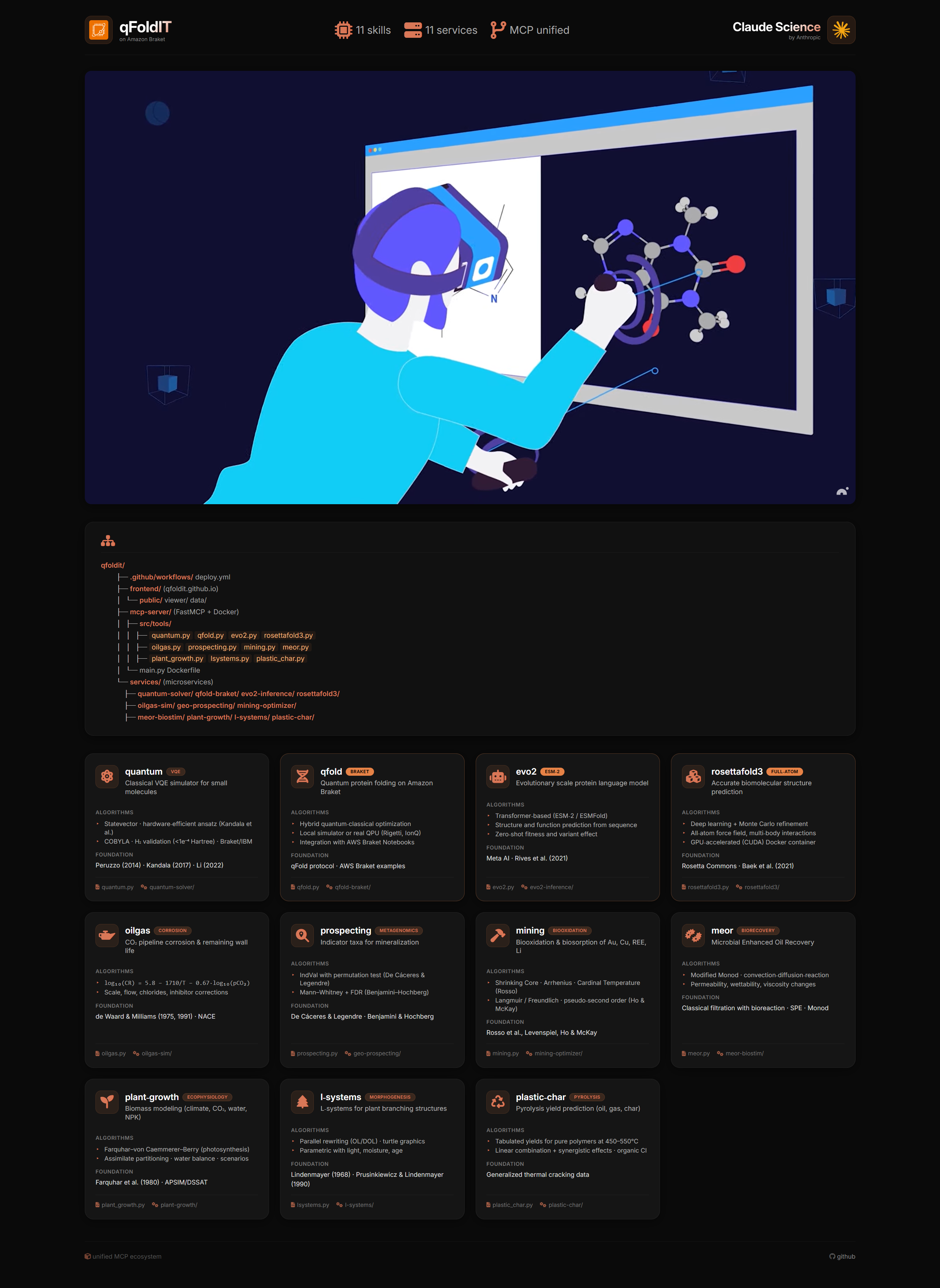
qFoldIT Skills are modular AI capabilities. Each Skill contains: domain knowledge, workflows, validation rules, examples, and MCP integration points where relevant. Folder names below match exactly what's in skills/ -- use them to install/reference a specific skill.
Repository: https://github.com/qfoldit/skills/
2D HP-lattice protein folding (Dill, 1985) with a QAOA-style circuit on Amazon Braket LocalSimulator, plus optional delegation to a full qFold MCP server when available.
Protein/complex structure prediction via AlphaFold2 (NVIDIA BioNeMo NIM) and AlphaFold3 (local Docker), plus DiffDock docking and MolMIM molecule generation. A compatible client, not an official NVIDIA or Google DeepMind integration.
Classical statevector VQE simulator (numpy-only), validated against exact diagonalization and a real published H2/STO-3G benchmark (arXiv:2209.09564, matches -1.1373 Hartree to 4 decimal places).
Bio-oxidation, biosorption (gold-cyanide/copper/REE/lithium), and cyanide biodegradation kinetics for metal recovery.
Indicator-taxa statistics on microbial abundance data for biogeochemical mineral exploration.
Bacterial growth, biosurfactant production, IFT reduction, and incremental oil recovery modeling.
Pipeline corrosion rate and remaining-wall-life estimation (de Waard-Milliams correlation).
Procedural plant/fractal generation (Koch, dragon, Sierpinski, branching plants) rendered as SVG.
Growth rate, morphology, and secondary-metabolite indices from NPK nutrition and light spectrum -- qualitative/illustrative, not species-calibrated. Can feed skills/l-systems to visualize the resulting shape.
Pyrolysis oil/gas/char yield ranges and chlorine-contamination risk for mixed plastic feedstock.
Bridges qFoldIT structures (from qfold/bionemo-agent-toolkit) into NanoVer, a real, independently published and maintained open-source framework (IRL2, Univ. of Santiago de Compostela; JOSS 2025, DOI 10.21105/joss.08118) for collaborative interactive molecular dynamics in VR. qFoldIT's role is a thin adapter only -- NanoVer is not a qFoldIT invention; citing the source publications is required whenever this skill's output is used. Requires a local conda install of nanover-server.
A playable, self-contained HTML5 puzzle game (falling element-labeled blocks, flood-fill match-4 clearing) for presentations, demos, and trade-show engagement -- the actual, working piece of qFoldIT's original "creative jump through gamification" thesis. Gamification only, explicitly not a chemistry simulation -- element matching is a game mechanic, not a model of real bonding rules; the skill itself says so before/when presenting the game. Ships with 12 passing headless logic tests (evals/logic_test.js: group-clear, flood-fill on L-shapes, gravity, chain reactions, wall collisions).
These share one engine-neutral format -- the Universal Assembly Graph (UAG), schema in skills/game-designer/references/uag_schema.md, paired with the Scientific World Schema (skills/digital-twin-builder/references/scientific_world_schema.md) for the underlying simulation state a UAG scene represents. game-designer produces a UAG; digital-twin-builder enriches it with Scientific World Schema-conformant physical/simulation semantics; each engine skill below exports the enriched UAG to one target platform. Every engine skill validates against skills/game-designer/scripts/uag_validate.py before exporting -- and every skill states plainly whether its target integration is official or community-maintained, since this changes fast enough to need re-checking rather than assuming.
| Skill folder | Target | Status |
|---|---|---|
skills/game-designer |
produces the UAG (engine-neutral) | qFoldIT-authored |
skills/digital-twin-builder |
enriches UAG per the Scientific World Schema | qFoldIT-authored |
skills/unreal-world-builder |
Unreal Engine | ✅ Official, native to the engine as of UE 5.8 (released June 17, 2026) -- built-in Experimental plugin, id ModelContextProtocol, requires the companion AllToolsets plugin. Which MCP clients Epic documents as targets is genuinely ambiguous as of 2026-07-12 (their own docs give a non-exhaustive "such as Claude Code, Cursor" list; independent reports describe connecting Claude Desktop successfully) -- don't assert a fixed client allowlist. |
skills/unity-experience-builder |
Unity | ✅ Official primary target: Unity MCP Server (Unity Technologies, Unity AI Assistant package com.unity.ai.assistant, Unity 6.0+, launched open beta May 4 2026; config key unity-mcp) -- confirms Claude Desktop as a supported client explicitly. unityMCP, camelCase) for Unity <6.0 or no AI Assistant package. Watch the unity-mcp vs unityMCP key casing if both are ever configured for fallback purposes -- similar enough to invite a silent copy-paste overwrite. Citation for the community bridge: Wu, S. & Barnett, J.P. (CoPlay), "MCP-Unity: Protocol-Driven Framework for Interactive 3D Authoring," SIGGRAPH Asia 2025 Technical Communications, DOI 10.1145/3757376.3771417. |
skills/unigine-simulation-engineer |
UNIGINE 2 / UNIGINE 2 Sim | ✅ Official, confirmed via UNIGINE's own SDK 2.21 release notes and independently corroborated by third-party engine-news coverage: Experimental MCPBridge Editor Plugin, ~27 MCP tools for live scene editing. Exact Add-On Store product URL not independently re-verified in this pass -- confirm the live link before publishing externally. Pairs with the pre-existing docs-grounded approach (unigine-engine/ai-docs) to avoid hallucinated API calls for anything MCPBridge doesn't cover directly. |
skills/openusd-architect |
OpenUSD / NVIDIA Omniverse | ✅ Official (NVIDIA-Omniverse/kit-usd-agents) -- a coding/API-assistance MCP (Kit extension search, USD class/method docs, code examples), not a live scene-editing bridge like the three rows above; no verified general-purpose live scene-editing MCP for Omniverse Kit as of this check. |
skills/apple-spatial-designer |
RealityKit / visionOS / USDZ | ✅ Official Xcode<->Claude Agent SDK integration; RealityKit specifics from public docs + community skills, not one single authoritative source |
skills/threejs-web-designer |
Three.js / React Three Fiber / WebXR | Community ecosystem; no single official skill exists for this stack |
skills/scene-export |
universal files: OBJ, glTF 2.0, standalone Three.js HTML, Godot 4.x GDScript | qFoldIT-authored -- fallback/interchange layer for when the live MCP adapters above aren't installed/available, or a portable file is needed instead of a live editor session |
skills/uefn-fortnite-builder |
Fortnite / Unreal Editor for Fortnite (UEFN) | undergroundrap/UEFN-TOOLBELT (358 tools, 55+ categories, own MCP bridge, by Ocean Bennett) -- alternative: quangdang46/uefn-verse-mcp. AGPL-3.0 with a required visible-attribution credit (see NOTICE); note the primary source's own README makes an unverified "first in the world" claim that qFoldIT does not repeat as fact. Windows-only, live-editor-only. Strongest native fit for UAG's multiplayer world_id/actor_id fields given Fortnite's existing account/session infrastructure -- but every island requires mandatory Epic human+automated content review before publication, and UEFN will merge into UE6 (2027-2029), so treat this as a bridge/pilot, not a replacement for unreal-world-builder's native UE 5.8/UE6-track path. |
Note on UEFN/Fortnite: read skills/uefn-fortnite-builder/SKILL.md's platform-constraints section before treating this as foundational -- it covers Epic's mandatory per-island content review, the "may not imply Epic endorsement" term, and why the native unreal-world-builder MCP is the more future-proof long-term investment even though this skill has the better out-of-the-box multiplayer fit today.
Note on Unity: the official and community paths use genuinely different tool names (Unity_ManageGameObject vs manage_gameobject, etc.) -- a workflow authored against one will not run unmodified against the other. Determine which server is actually configured before calling engine-specific tools.
Note on Unreal: enable both ModelContextProtocol and AllToolsets from Edit > Plugins on UE 5.8+ directly -- no separate GitHub install needed for the core functionality as of this engine version. There's an open, unresolved Epic forum bug report (filed roughly a month before this check) of the port-8000 server accepting then instantly dropping connections from several external tools -- if calls silently fail to connect, check current plugin status before assuming local misconfiguration.
Note on UNIGINE: MCPBridge is not configured via claude_desktop_config.json -- installing it (drag the .upackage into the Asset Browser) auto-generates a project-root .mcp.json, which is Claude Code's project-scoped convention, not Claude Desktop's. Use Claude Code from the UNIGINE project directory to pick it up automatically.
Built with curiosity by the qFoldIT community.