Releases: qgynisc/dsh-inline-pastes
Releases · qgynisc/dsh-inline-pastes
Release list
v0.6.0

Full Changelog: v0.5.2...v0.6.0
v0.5.2
v0.5.1

v0.5.0 — 文字中插图 / 悬浮预览 / 自动编号
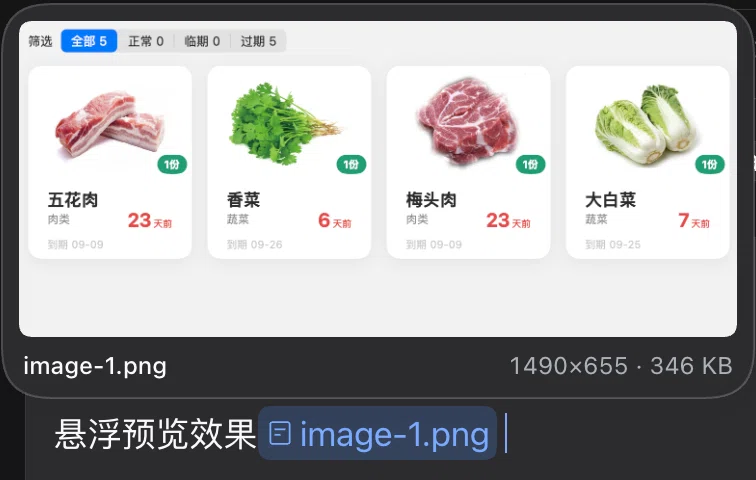
给 DeepSeek Harness Web GUI 的「文字中插图」插件 —— 粘贴图片即在光标处插入 image-1.png 内联胶囊,悬浮名字弹出缩略图预览,名字按消息自动编号。
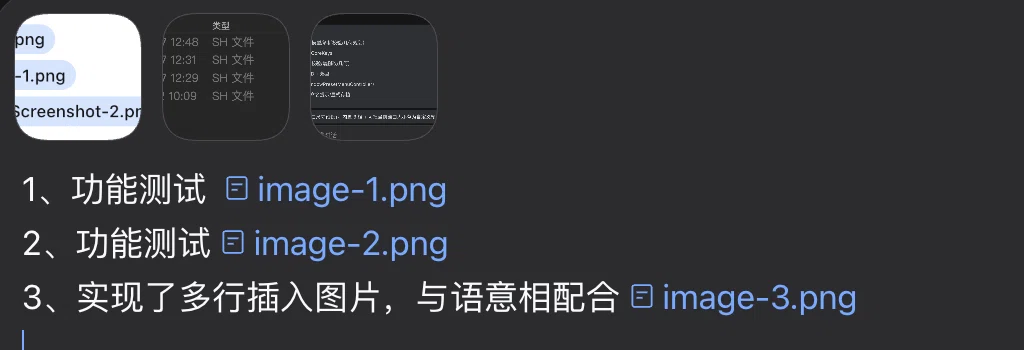
功能
- 文字中插图 —— 粘贴图片,在光标处插入官方引用胶囊
[图标] image-1.png;图片本身仍按官方管线作为附件随消息一起发出(模型照样收到图)。 - 悬浮预览 —— 鼠标停在名字上弹出预览卡(缩略图 + 名字 + 尺寸 · 体积);已发送气泡里的同名文字同样有效。
- 自动编号 ——
image-1.png、image-2.png…,每条消息从 1 重开;扩展名跟真实 MIME 走(image-*.webp/audio-*.mp3/pdf-*.pdf/doc-*.docx…),为其它媒体类型预留。 - 缩略图序号角标 —— dock 的附件轨与已发送气泡的图片行,左下角显示序号(
image-3.png→3),悬浮缩略图显示全名。 - 发送前自检 —— 文字里的名字与本条消息的图片对不上时,在输入框上方提示;第一次回车先拦下,再按一次仍可发送(保险,不是门禁)。
安装
# 方式一:克隆后用仓库里的脚本
git clone git@github.com:qgynisc/dsh-inline-pastes.git
cd dsh-inline-pastes && npm run install:desktop   # 别的 profile: node scripts/install.mjs --profile web

# 方式二:DSH 自带的插件安装命令(可钉版本)
dsh plugin --profile desktop add git@github.com:qgynisc/dsh-inline-pastes.git#v0.5.0装完重启 DeepSeek Harness;浏览器控制台 __dshInlinePastes.version 应显示 0.5.0。
关键实现约束(都对着 DSH 0.2.0-rc.2 源码核实过)
- 当前会话只能从
uiSession.current.getSnapshot()取 ——sessions.list快照里已经没有current字段了(踩过:读不到会话,还把官方图片粘贴一起堵死)。 - 胶囊必须在
inputTriggers注册带codec的 source,否则发送那一刻会报slash: no serializer for reference source "inline-paste"并把草稿弹回(踩过)。拿不到注册入口时插件退回纯文本插入。 - 官方把图片作为附件块排在文本之前,但每张图前会贴一行
Image "image-1.png" (sha256:…),名字就是锚点,所以多图不会错位。 conversation.input.attachments是singleslot(第二个注册直接抛错),角标改用 DOM 注入 +MutationObserver自愈;失效只影响角标,可一键关(CONFIG.badgeThumbnails)。
验证
- 单测 72 项(命名规则 / 粘贴接管 / 胶囊插入 / 自检 / 角标解析)
- 真 Chrome 端到端 41 项(真
ClipboardEvent/PointerEvent/KeyboardEvent/MutationObserver) - 加载器解析链自检 14 项(模拟
dsh-client-modules与loadProfileDirectory的每一步) - 另用克隆出来的副本重跑过一遍,证明入库快照自洽
npm test              # 构建 + 单测 + 真 Chrome 端到端
npm run verify:browser
node scripts/verify-install.mjs --profile desktop