ClickHouseAggregatingQueueProcessor
ClickHouseAggregatingQueueProcessor was created to simplify the package aggregating and inserting to ClickHouse.
ClickHouseAggregatingQueueProcessor consists of:
- Processing queue - contains packages for processing by a set of worker-threads.
- The preparation queue - to create the next packages for processing queue.
A package in a processing queue is a list of elements of an arbitrary type T (it is assumed that these will be entities for writing to ClickHouse).
Еlements are added to the preparation queue using the Add and AddCollection methods.
Еlements from preparation queue are aggregated to packages and pushed to the processing queue in the following cases:
- By timer once in
TimerPeriodMsms. - By
ForcePushAllPreparedPackagesmethod.
Using the PushPackage method, you can add a package to the processing queue directly, bypassing the preparation queue.
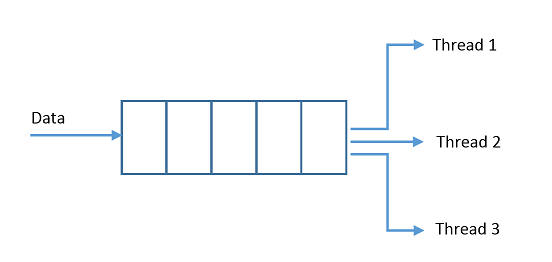
When creating a queue, you must specify Action <IClickHouseRepository, List <T>, ILogger>, which will be executed by handler threads for each packet from the queue. The image below shows the scheme of working with packages.
You can add ClickHouseAggregatingQueueProcessor into the DI mechanism can be done using the extension AddClickHouseAggregatingQueueProcessor<T>(IConfigurationSection configuration, Action <IClickHouseRepository, List <T>, ILogger> proc). Also you need to add to the DI ClickHouseRepository (see ClickHouseRepository wiki page).
ConfigureServices example code:
public void ConfigureServices(IServiceCollection services)
{
    services.AddClickHouseRepository(config.GetSection("ClickHouseConnectionPoolConfiguration"));

    services.AddClickHouseAggregatingQueueProcessor(Configuration.GetSection("ClickHouseAggregatingQueueProcessorConfiguration"), proc);

    //...
}

private readonly Action<IClickHouseRepository, List<TestEntity>, ILogger> proc = (repository, package, logger) =>
{
    repository.BulkInsert(TestEntity.TableName, TestEntity.ColumnNames, package);
    logger.LogInformation($"Package inserted by worker-thread, package.Count: {package.Count}");
    // or other processing code
};
In the extension method, you must pass Action for worker threads and the configuration section, which has the following form:
"ClickHouseAggregatingQueueProcessorConfiguration": {
"MaxPackageSize": 4,
"ProcessingThreadsCount": 2,
"QueueMaxSize": 10,
"TimerPeriodMs": 2000
},ClickHouseAggregatingQueueProcessor is added to the DI as Singleton. In addition to adding to the DI, you must also start it (by calling the Start method). You can do this yourself, or use the extension for IHost StartClickHouseAggregatingQueueProcessor in the Program class.
Example:
public class Program
{
    public static void Main(string[] args)
    {
        var host = CreateHostBuilder(args)
            .Build();
            .StartClickHouseAggregatingQueueProcessor<TestEntity>()
            .Run();
    }

    public static IHostBuilder CreateHostBuilder(string[] args) =>
        Host.CreateDefaultBuilder(args)
            .ConfigureWebHostDefaults(webBuilder =>
            {
                webBuilder.UseStartup<Startup>();
            });
}
Next, you can use ClickHouseAggregatingQueueProcessor:
public class TestClass
{
    private readonly IClickHouseAggregatingQueueProcessor<TestEntity> _queue;

    public TestClass(IClickHouseAggregatingQueueProcessor<TestEntity> queue)
    {
        _queue = queue;
    }

    public void AddSingle(TestEntity entity)
    {
        _queue.Add(entity);
    }
}