Repository navigation
Default Reporting Application
Attorneys may integrate with Fannie Mae's Default Reporting Application (DRA) system via:
- Web UI drag-and-drop of data files
- sFTP delivery of data files
- API submission of data files
- Web UI data entry of individual events
| Environment | Purpose | URI |
|---|---|---|
| UAT | User acceptance and systems integration testing. | uatfannie.quandis.io |
| PROD | Production environment | fannie.quandis.io |
| sFTP | Both UAT and PROD sFTP file delivery. | sftpfannie.quandis.io |
Fannie Mae will grant access to user administrator(s), who may then manage your firm's users. For those familiar with Fannie Mae's Technology Manager (from P360 or a similar application), the user provisioning process is the same. If a user already has a Technology Manager account, a user administrator may grant that same user access to DRA.
If your firm does not currently have user administrators with access to Technology Manager, please contact the DRA team at Fannie Mae to have an account provisioned.
- Firm Name
- Two main points of contact for DRA integration including first and last name, direct contact number and email address
- Planned DRA Submission Type(s):
- sFTP
- API
- Spreadsheet Upload (via the user interface)
- Direct Entry (via the user interface)
If your firm intends to submit data via automation (sFTP or API), please send the following information to dra_support@fanniemae.com:
- Firm Name
- Two main points of contact for DRA integration including first and last name, direct contact number and email address
- Planned DRA Submission Type(s):
- sFTP
- API
- Spreadsheet Upload (via the user interface)
- Direct Entry (via the user interface)
- A automation user name, such as
integrations@yourlawfirm.com - IF using sFTP:
- IP Address Ranges (CIDR) that you will be accessing the sFTP site from.
- Please check your CIDRS for validity at https://ipduh.com/ip/cidr
- Recommended: a 2048-bit SSH key pair to use in lieu of a password
- IP Address Ranges (CIDR) that you will be accessing the sFTP site from.
For UAT access, please contact fannie.support@quandis.com.
The DRA system is configured to support the legacy Fannie Mae default reporting data files. To upload such files via the web site:
- Login into the DRA site
- Navigate to Landing Pages > Default Reporting
- Click in the Import File tab
- Drag and drop an Events file onto the area that says 'Drag and Drop DR Legacy Events'
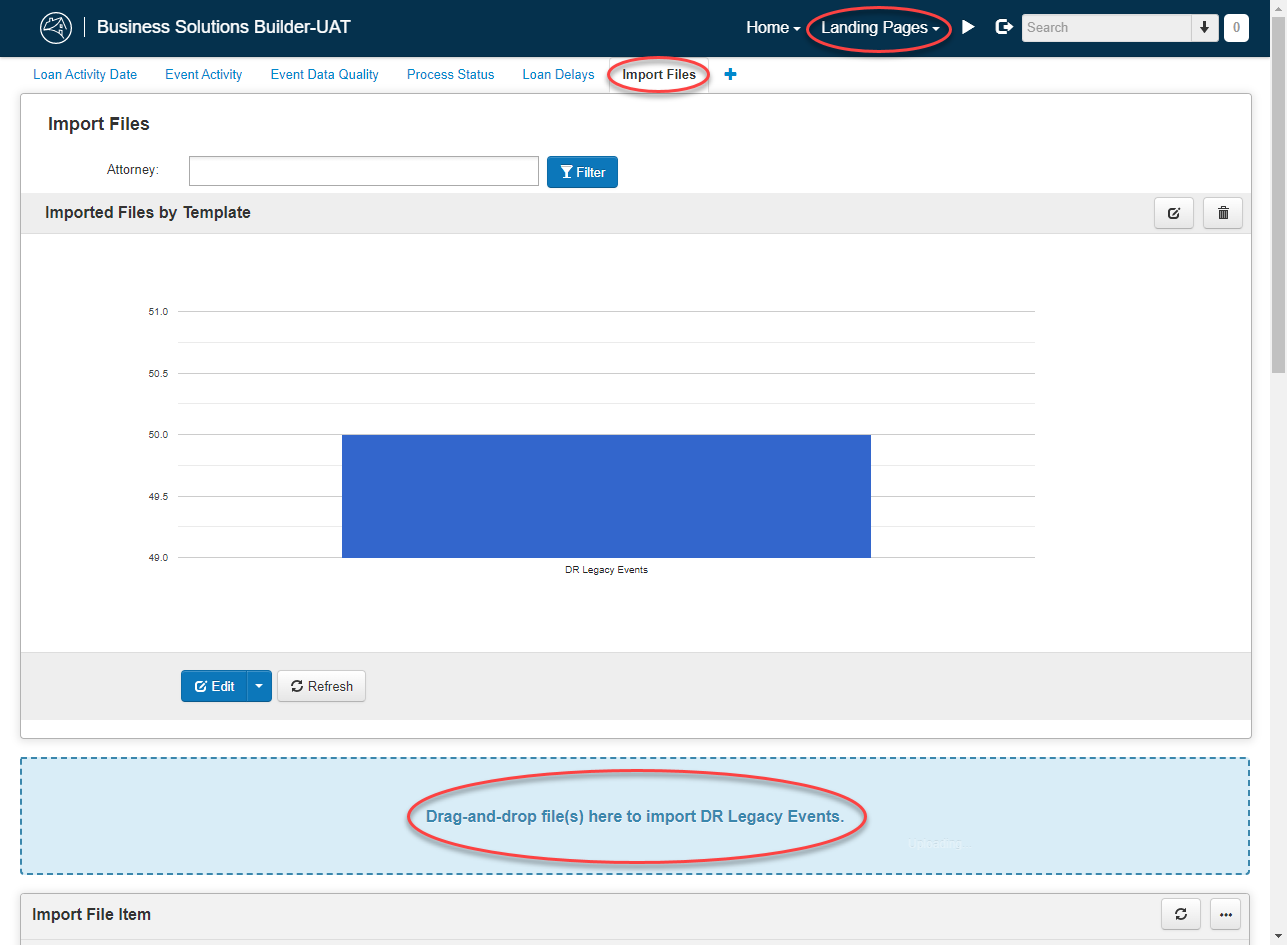
Once a file is dropped, it will be queued for import. Imports may take a few minutes to execute, but should generally complete within a few minutes. Once complete, you can see detailed results by clicking on the Import File hyperlink in the detail panel.
To deliver data to DRA via sFTP, you must:
- Get a user account, and
- Contact fannie.support@quandis.com to initiate the following steps:
- a UAT account similar to
uat.integrations@somelawfirm.comwill be created on the sFTP server - a PROD account similar to
integrations@somelawfirm.comwill be created on the sFTP server - for each account, either a password must be issued OR a 2048-bit SSH key pair must be generated
- your IT team should create the SSH key pair, and provide DRA with the SSH public key
- your IT team should use the SSH private key to authenticate
- if you prefer a password, Quandis will generate the password for you
- please provide the IP Addresses ranges (CIDRs) that you will need to access the sFTP site from. For eamples:
- 206.48.103.45/32, 209.102.42.0/32
- you can (and should!) verify your CIDRs here.
- a UAT account similar to
Quandis' security policies prohibit retaining private keys generated on your behalf.
The sFTP site server is an AWS Transfer server. It accepts connections via port 22, and requires an SSH key to connect.
Once you've established an sFTP account, you may upload the same DR Legacy Events files to the sFTP site. DR Legacy events files must:
- be an Excel
xlsxspreadsheet, or delimited text file (.csv or .txt) - include the name
Events(case sensitive)
Valid file names would include:
- Events.xlsx
- mylawfirm.Events.xlsx
- mylawfirm.Events.2022-04-01.csv
- LP02-Events_P02.03.1.txt
Invalid file names would include:
- mylawfirm.xlsx (no 'Events' in the file name)
- mylawfirm.events.xls ('Event' is case sensitive)
- mylawfirm.Events.xls (not an Excel
.xlsxformat)
The DRA system will monitor for such files, and automatically queue them for import, removing them from the sFTP site once they have been queued for import.
For delimited files, we will auto-detect the delimiter. As long as the file name ends with
.csvor.txt, we will process it expecting a delimited file.
Bulk operations are supported via API calls. To establish credentials for API calls:
- Contact Fannie Mae to have a user account provisioned (such as uat.integration@somelawfirm.com)
- See QBO's Authentication documentation
Once you have credentials, you can POST data to trigger QBO import routines.
To import data structured for Fannie Mae's legacy system, the endpoint is:
/api/import/legacyevents
To submit data to this endpoint, you will need to specify a filename ending with .csv or .xlsx, along with matching content.
Pattern:
POST https://uatfannie.quandis.io/api/import/legacyevents?PreTransform_FileName={FileName}
Content-type: text/plain; charset=UTF-8

EVENT,P001749,E0130,Foreclosure Referral Package received by Attorney,SS00005,P002886,Nationstar Mortgage LLC,660790361,2022-01-18T10:34:54,2022-01-18T10:34:54,2022-01-18T10:34:54,FA52853117,FIRMWARE,,,,,P000001,Fannie Mae,1665557617,,,,,,,,,,FL,,,,,,,,,,,,,,,,,,,,,,,P001749,22-003316,Judicial,Unknown,,,,,,,,,,,,Active,,,,,, ,, ,,,,,,,,,,,,,,,,,,,,,,,,,,,,,,,,"Acme and Sons, PLLC"
EVENT,P001749,E0290,Bankruptcy Referral Package received by Attorney,SS00005,P002886,Nationstar Mortgage LLC,660790361,2022-01-19T10:34:54,2022-01-18T10:34:54,2022-01-18T10:34:54,FA52853117,FIRMWARE,,,,,P000001,Fannie Mae,4005557721,,,,,,,,,,FL,,,,,,,,,,,,,,,,,,,,,,,P001749,22-003316,Judicial,Unknown,,,,,,,,,,,,Active,,,,,, ,, ,,,,,,,,,,,,,,,,,,,,,,,,,,,,,,,,"Acme and Sons, PLLC"
The full legacy file format is supported, but the
HEADERandFOOTERrows are now optional. This example skips those rows for brevity.
Pattern:
POST https://uatfannie.quandis.io/api/import/legacyevents?PreTransform_FileName={FileName}
Content-type: text/plain; charset=UTF-8

<Content>
    <Body>
        <RecordType>EVENT</RecordType>
        <ProviderCode>P000044</ProviderCode>
        <BusinessEventCode>E0290</BusinessEventCode>
        <BusinessEventName/>
        <SourceSystemCode>SS00005</SourceSystemCode>
        <ServicerCode>P002886</ServicerCode>
        <ServicerName>ServicerName</ServicerName>
        <ServicerLoanNumberID>0659442065</ServicerLoanNumberID>
        <EventActualDate>2022-03-07T00:00:00</EventActualDate>
        <EventCreatedDate>2022-03-07T00:00:00</EventCreatedDate>
        <EventRecordedDate>2022-03-07T00:00:00</EventRecordedDate>
        <EventProcessID/>
        <ProcessorID>99999</ProcessorID>
        <ProcessorName>ProcessorName</ProcessorName>
        <DelayTypeCode/>
        <SubservicerCode/>
        <SubservicerName>SubservicerName</SubservicerName>
        <InvestorCode>P000001</InvestorCode>
        <InvestorName>Fannie Mae</InvestorName>
        <InvestorLoanNumberID/>
        <InvestorServicerID/>
        <DelayActualStartDate/>
        <DelayProjectedEndDate/>
        <DelayEndReasonCode/>
        <DelayDetails/>
        <PrimaryBorrowerLastName/>
        <PrimaryBorrowerFirstName/>
        <SecondaryBorrowerLastName/>
        <SecondaryBorrowerFirstName/>
        <PropertyAddressANSIStateCode>LA</PropertyAddressANSIStateCode>
        <PropertyCountyANSICode/>
        <PropertyCountryISOCode/>
        <PropertyPrimaryResidenceIndicator/>
        <DwellingResidenceType/>
        <OriginalMortgageAmount/>
        <UnpaidPrincipalBalanceAmount/>
        <OldestUnpaidInstallmentDate/>
        <LoanOriginationClosingDate/>
        <LitigationIndicator/>
        <LienPriorityType/>
        <MortgageType/>
        <MortgageFinanceType/>
        <LoanMilitaryProtectionStatusIndicator/>
        <ServicingPortfolioPoolCertID/>
        <ServicingPortfolioPoolCertIssueDate/>
        <FICOScoreVL/>
        <GuarantorCode/>
        <GuarantorLoanNumberID/>
        <MIInsurerCode/>
        <MIPayerType/>
        <InsurerMICertID/>
        <InsurerMICertDate>1900-01-01</InsurerMICertDate>
        <AssignedFCAttorneyCode>P000044</AssignedFCAttorneyCode>
        <FCAttorneyFileID>19-1209</FCAttorneyFileID>
        <FCMethodType>Judicial</FCMethodType>
        <PropertyCurrentOccupancyType/>
        <FCSaleResultType/>
        <FCSaleScheduledDate/>
        <FCSaleRescissionReasonCode/>
        <LegalProcessServiceMethodType/>
        <FCJudgmentType/>
        <PursueDeficiencyIndicator/>
        <RestartIndicator/>
        <FCSaleChangedReasonCode/>
        <PreSaleBorrowerRightToCureEndDate/>
        <JudgmentAmount/>
        <InStateServiceIndicator>1</InStateServiceIndicator>
        <FCStatusType/>
        <FCFileClosedReasonType/>
        <FCSaleBidAmount/>
        <PropertyInspectionTypeCode/>
        <RedemptionPeriodProjectedEndDate/>
        <FinalLawDate/>
        <BKStatusIndicator>1</BKStatusIndicator>
        <AssignedBKAttorneyCode>P000044</AssignedBKAttorneyCode>
        <BKBorrowerIntentToSurrenderPropertyIndicator/>
        <BKCaseNumberID>16-10899</BKCaseNumberID>
        <BKChapterTypeCode>Chapter13</BKChapterTypeCode>
        <BKDistrictCode/>
        <BKDistrictName>BKDistrictName</BKDistrictName>
        <BKFilerType/>
        <BKFilingDate/>
        <BKFilingLastPaidInstallmentDate/>
        <BKFilingANSIStateCode>LA</BKFilingANSIStateCode>
        <BKPostPetitionPlanDate/>
        <BKReferralType>NotListed</BKReferralType>
        <BKPlanAmendedType/>
        <BKPOCBarDate/>
        <BKPostPetitionPaymentAmount/>
        <BKPostPetitionPaymentDueDate/>
        <PropertyValuationMethodType/>
        <PropertyValuationAmount/>
        <PropertyValuationDate/>
        <PaymentChangeNoticeReasonType/>
        <MFRRequestedReasonType/>
        <FilingDispositionType/>
        <TrusteePayAllIndicator/>
        <CramDownIndicator/>
        <CramDownAmount/>
        <PropertyValueAsAssetIndicator/>
        <PropertySalePriceAmount/>
        <LoanDelinquencyEventType/>
        <ServicingTransferorCode/>
        <ServicingTransferorName/>
        <ServicingTransfereeCode/>
        <ServicingTransfereeName/>
        <PropertyCountyANSIName/>
        <AssignedFCAttorneyName>Acme Law</AssignedFCAttorneyName>
        <AssignedBKAttorneyName>Acme Law</AssignedBKAttorneyName>
        <DocumentTypeCode/>
    </Body>
    <!-- Add additional Body nodes to the Content for each event you wish to send. -->
    <Body>...</Body>
    <Body>...</Body>
</Content>
Do not include legacy
HeaderorFooternodes. The<Content>and<Body>node names don't matter, but the element names inside the<Body>nodes must exactly match the legacy specification. Empty orNULLvalues should be included in the XML, as demonstrated in the above example.
The api/import/legacyevents endpoint will respond with an ImportFileID confirmation, along these lines:
<ImportFileItem xmlns:i="http://www.w3.org/2001/XMLSchema-instance">
	<ImportFile>{Your file name}</ImportFile>
	<ImportFileID>2510</ImportFileID>
</ImportFileItem>
You can retrieve logging information about an ImportFile as follows:
/api/importlog/search?Output=Xml&ImportFileID={your ImportFileID returned by the submission above}
/api/importlog/search?Output=Xml&ImportFileID={ImportFileID}&SqlFilters=Failed
The SqlFilters=Failed filters out the results to include only failed rows.
To test API integration via Postman, take a look at our sample.
You may submit data as often as you wish. If you wish to trigger delivery of 1 event per file, that's perfectly fine. The data is processed in near-real-time.
Unique file names are recommended, but not required. Use any naming scheme that makes sense to your organization, as long as it complies with the naming requirements described above. Including a date time stamp or other unique identifier that makes sense to your organization is recommended.
You will see your upload file from the DRA Landing Page, and may drill down to see a log of any issues associated with the file. If you would like API access to fetch such logging information automatically, contact fannie.support@quandis.com.
After your file is processed, it will disappear from the sFTP site. However, it's still available via the DRA application. From Landing Pages > Default Reporting > Import Files tab, you can see a list of all the files you've submitted (via sFTP, UI, or API). Drilling down into any of those records provides a link to the original file you provided.
The user account you use to deliver data (via sFTP, API, or GUI) is bound to an Organization (lawfirm). Since DRA knows the user that submitted the files, we know which firm submitted the data. Note that each sFTP account gets it's own 'home directory', so different firms cannot see each others' data, thus there's no risk of accidentally overwriting data from other users.
Generally speaking, the order that events appears within an import does not matter. If you report:
- File Closed as of 6/1/2022
- Delay End as of 5/31/2022
the "derived status" of the foreclosure would be closed, because 6/1/2022 is a later date than 5/31/2022.
The only exception to this is when the same event is being reported multiple times within 1 file. For example:
| InvestorLoanNumberIdenifier | BusinessEventCode | DelayTypeCode | DelayActualStartDate | DelayDetailsText | EventActualDateTime |
|---|---|---|---|---|---|
| 12345 | E2260 | D1000 | 5/1/2022 | Some description | |
| 12345 | E2270 | D1000 | 5/1/2022 | Some description | 5/15/2022 |
| 12345 | E2270 | D1000 | 5/1/2022 | Other description | 5/15/2022 |
would result in a Missing Document delay reported with 'Other description', since it occurs last in the import.
The Import File panel on Landing Pages > Default Reporting shows a list of data files processed, including the number of Events submitted. In some cases, the file submitted may have more rows than the number of Events reported on this panel. There are generally two reasons for this discrepancy:
- Reporting the same event for the same loan multiple times in a single file will cause only the last event to be processed.
For example, in this sample:
| InvestorLoanNumberIdenifier | BusinessEventCode | DelayTypeCode | DelayActualStartDate | DelayDetailsText | EventActualDateTime |
|---|---|---|---|---|---|
| 12345 | E2270 | D1000 | 5/1/2022 | Some description | 5/15/2022 |
| 12345 | E2270 | D1000 | 5/1/2022 | Other description | 5/15/2022 |
only one event would be reported: E2270 on loan 12345 would be reported with 'Other Description'.
- There may be invalid rows. You can view any such rows from the Import File > Logging panel, selecting Show Failed Items.
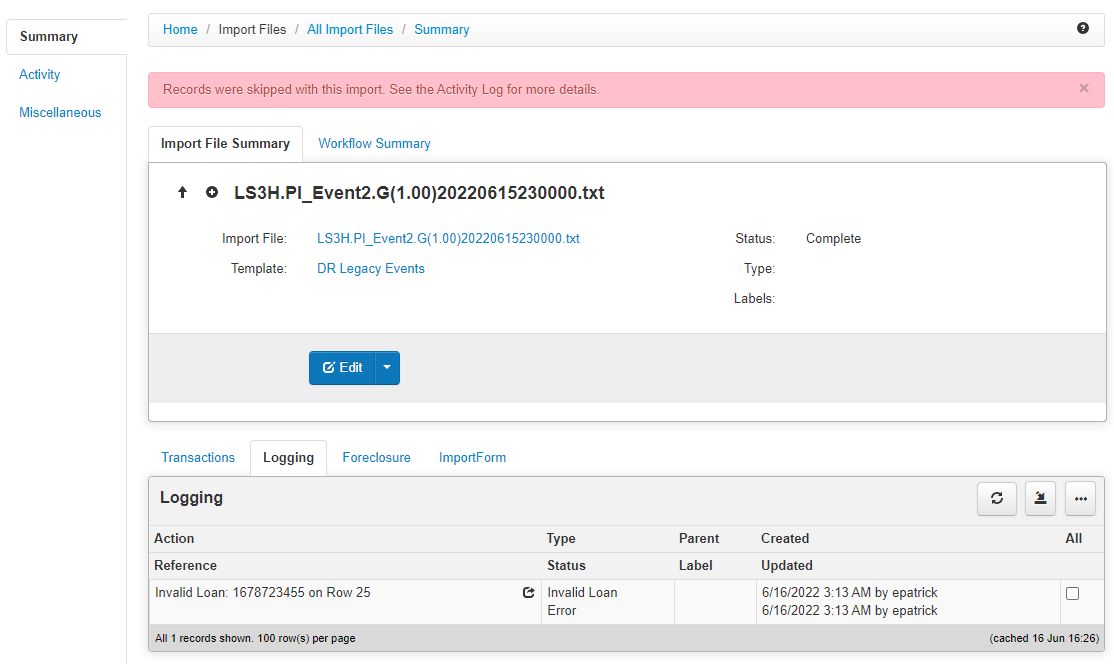
DRA will ignore servicer-related information submitted by an attorney, in favor of servicer information provided by a Fannie Mae data feed. Thus, if an attorney submits the following fields, they will be tracked inside an event, but ignored from the Loan Summary page:
- Servicer Code
- Servicer Name
- Servicer Loan Number Identifier
- Investor Servicer Identifier
- Property Address ANSI State Code
- Property Address ANSI County Code
- Property Country ISO Code
- Property Primary Residence Indicator
Note that Fannie Mae does not currently populate Property Address; addresses will appear as "No Address Specified for 4012573844"
If you submit "empty" files, they will not appear on the Import Files panel of the DRA Landing Page. Any empty file is any file with no Event rows.