Based on https://github.com/flyingmachine/emacs-for-clojure
I will write interesting stuff here as i learn it.
- http://sourcefoundry.org/hack/ (font)
- Bind caps lock to ctrl, as its more comfortable
Notation for emacs commands is C for Ctrl and M is for Alt
igeneral documentationawhich is apropos is like search for help. This looks for a command.dwill look for documentationblist the bindings for the current buffermdescribe modefdescribe functionkdescribe key?help on helpprefix-command C-hwill give help on that prefix, i.eC-x C-h
C-x C-s saves the file (with this config you can also just do command+s like normal)
C-z quits
C-g Stops a command if you mess up
Commands can have alternate states which is done by the 'universal modifier' C-u
So if you type C-u 8 a it will print a 8 times
C-u 2 M-d will delete two words
Related to modifiers the number keys can act as modifiers
M-d deletes previous word. Note that negativity reverses directions of commands, so apparently can be used to be the opposite of uppercasing a word
M-2-d deletes 2 previous words
C-3-f moves forward 3 characters
C-x b allows you to nav open buffers or create a new one if you specify an unknown name
C-x 4 b will open the buffer in the "other" window and set it as the current one
C-x k will "kill" (delete) the buffer
C-x C-f will open a file, use tab to make this less painful
C-x-left and C-x-right moves between previous/next buffers
Keyboard shortcuts like the ones above are just mapped to commands. You can invoke a command just by doing M+x and typing the name. Just like sublime's lovely thing.
Mode is a bunch of keybindings and functions to be more productive when editing different kinds of files. Modes are either major or minor. Major would be something language specific like clojure and are usually set when you open a file (but you can use M+x to set the mode manually).
Minor modes are useful for multiple file types.
M-x package-list-packages Mark packages to install with i and then install with x.
Open ~/.emacs.d/init.el to do more customizations for emacs
C-y pastes
C-k deletes to the end of the line
C-/ is undo
C-d delete char M-d delete word
C-S-backspace deletes line
M-% string RET newstring RET
C-v moves down a page
M-v moves up a page
C-M-v scrolls a page in a different window
C-l centers page on cursor
C-a move to beginning of line C-e move to end of line (just like bash)
m-m move to first non whitespace letter. REMEMBER ME
m-f move forward one word m b move back one word
C-n next line C-p previous line
C-s regex search. Hit again to move through the matches C-r does reverse search
M-< moves to beginning M-> moves to end
M-g g go to line
C-x C-SPC "pop-global-mark" (goes back)
C-space to mark and then move the point (using stuff above) to select more. You can then hit backspace to delete.
Or perhaps use M-x replace-string to replace text inside the region
Select all is C-x h
C-w Kill region (cut) M-w Copy region (copy)
C-y yank (paste) M-y Cycle through kill ring after yanking
M-d Kill word
C-k Kill line
C-j New line and indent
``M-/` Hippy expand (auto-complete)
- http://www.gnu.org/software/emacs/manual/html_node/emacs/index.html#Top The Emacs manual, dl PDF
- https://www.masteringemacs.org/reading-guide Apparently one of the best resources
- http://www.ic.unicamp.br/~helio/disciplinas/MC102/Emacs_Reference_Card.pdf Reference card
- http://sachachua.com/blog/wp-content/uploads/2013/05/How-to-Learn-Emacs8.png Pretty picture
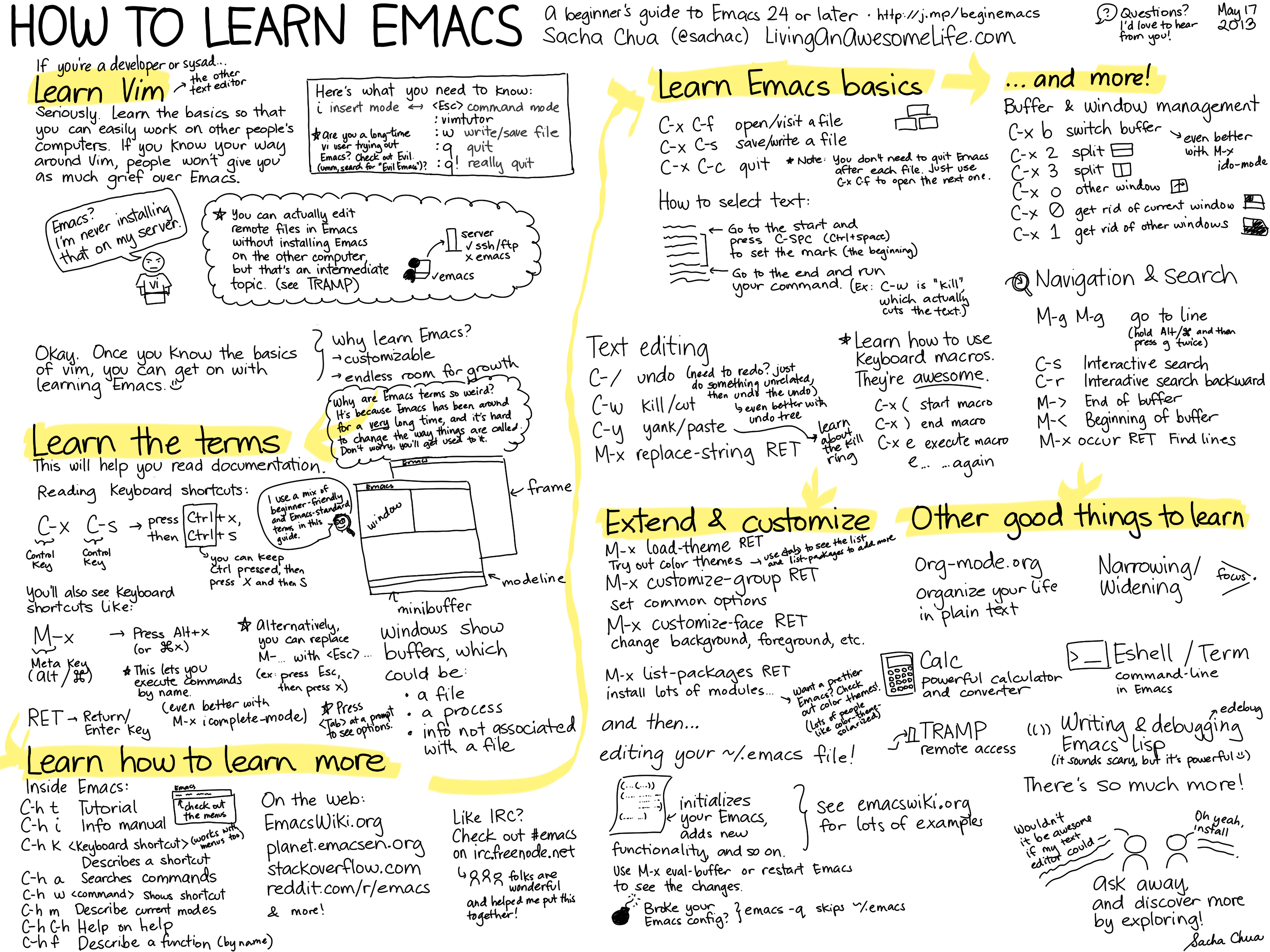
C-x o switch window
C-x 1 delete all over windows (doesn't delete buffers)
C-x 2 split window horizonatlly
C-x 3 split window vertical
C-x 0 delete current window`
M-x magit-status is synonumous with git status. Remember you can close all "windows" (different from buffers!) with q.
You can move the cursor thing to the modified files and hit tab to see what changes you've made. Within this you can press s to stage or i to add to .gitignore. k will discard uncommited changes to a file.
c opens the commit menu.
F opens the pull menu
C-x v L is history l is verbose history
Once you're in the commit menu do -a to enable "all" then type c again to do commit. Type your commit message and then C-c C-c to save it.
To just commit certain files, hit s on selected files. S will select all.
To ammend a commit use e instead of c
To push do P-P
C-x C-+ increase font size C-x C- - to decrease
All the configuration assumes the $GOPATH is set to ~/go. Can and should fix this.
https://github.com/dominikh/go-mode.el https://github.com/dougm/goflymake - Syntax checking https://github.com/nsf/gocode - Autocomplete
This has a number of plugins installed to make this nice. You will need the following go gets to be run
go get -u github.com/dougm/goflymake
go get -u github.com/nsf/gocode
go get github.com/rogpeppe/godef
go get golang.org/x/tools/cmd/oracle
This does gofmt on save and lots of other nice stuff like M-x go-play-buffer to copy buffer to the playground, C-c C-j to jump to definition C-c C-d to see a function's signature C-c C-a to add imports
To compile do C-c p c.
To see callers of a function do
M-x go-oracle-set-scope
e.g. github.com/quii/blog
And then on any symbol you can find callers with M-x go-oracle-callers
You can also safely rename symbols with M-x go-rename